

IT company time tracking software is a system for recording work against clients, projects and tasks with the aim of controlling delivery effort and supporting accurate billing. This 2026 guide explains how to choose it when development, support, internal work and client billing need different treatment.
- Choose time tracking software for IT companies around billing rules, project allocation and reviewable records—not timer features alone.
- Mesh App suits IT SMEs seeking time tracking alongside CRM, project management, invoicing and finance modules.
- Separate working-time records from billable hours; client contracts determine what you invoice.
- Test corrections, project transfers and invoice preparation before moving the whole team.
Why time tracking matters for IT companies
An IT business needs to distinguish time spent working from time it can invoice. Development, incident response, presales and internal maintenance belong in different reporting categories, even when the same engineer handles them during one afternoon.
For your 2026 selection, start with the decisions the records must support: what to invoice, which project needs attention and where estimates need revision. A total-hours dashboard cannot answer those questions without consistent project allocation and billing rules.
The guide to tracking billable hours in project management software covers the connection between project records and billing. Establish that connection before choosing a timer interface.
Your time records should explain the work, not merely total it. Keep attendance, delivery effort and client billing distinct, then define how they relate.
How to choose and introduce the right system
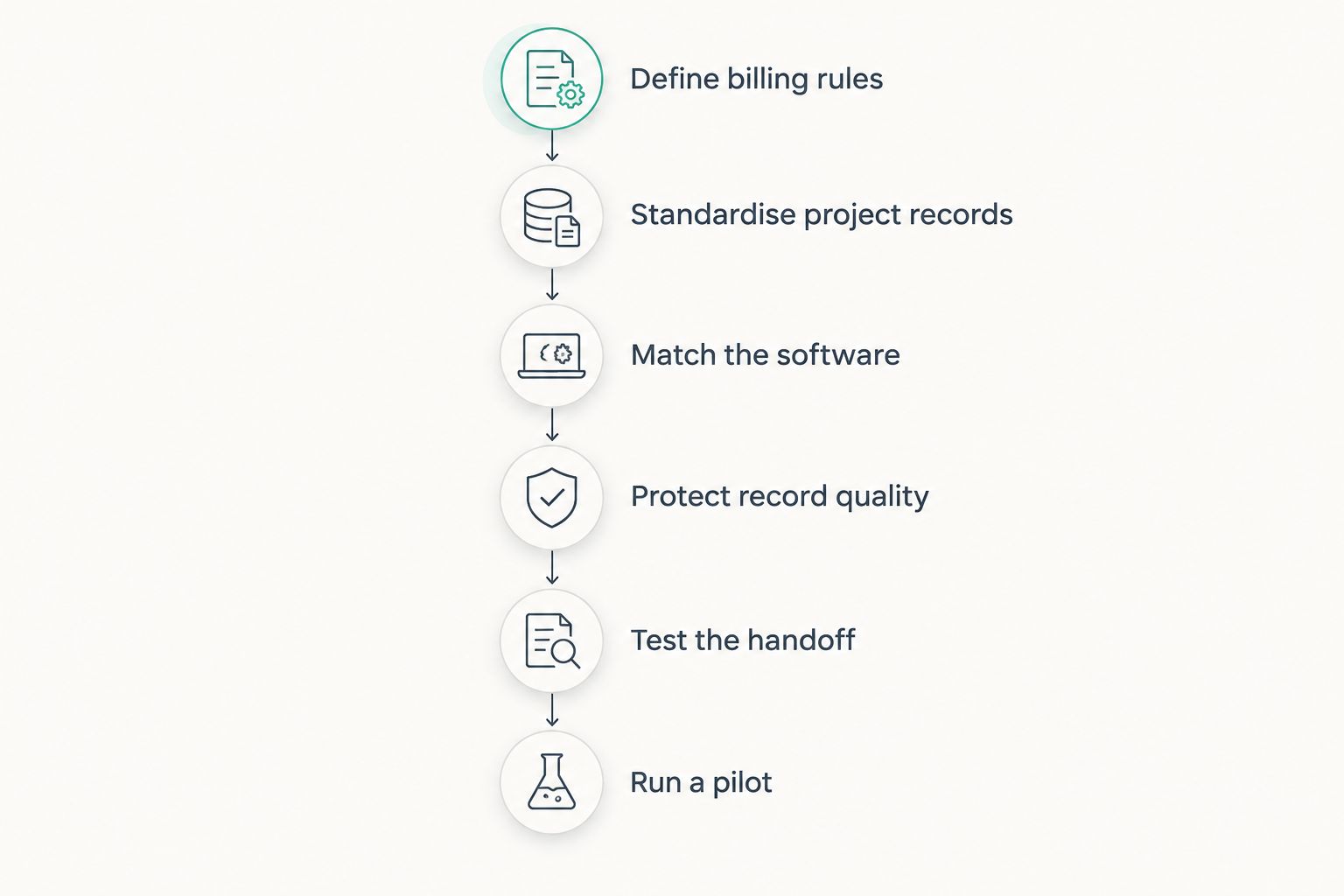
1. Define billing rules
Start with a shared document or spreadsheet listing your contract types and what counts as billable work. No new software is necessary for this step. Ask whoever prepares invoices to check the rules against actual client agreements.
For hourly work, define which activities qualify for billing. For fixed-fee projects, record effort without treating every recorded hour as an invoice line. For retainers, specify which work belongs within the agreement and how you identify work outside it.
Document how you handle scope changes, warranty work, internal troubleshooting and client-requested meetings. These decisions belong to your business and contracts; a timer cannot make them for you.
- List hourly, fixed-fee and retainer arrangements separately.
- Define billable and non-billable activity categories.
- Name the person who resolves ambiguous entries.
- Record the rule for work outside the agreed scope.
- Separate working-time records from invoice calculations.
2. Standardise project records
Build a sample timesheet manually before configuring software. Use 5 required fields: work date, person, client or internal category, project or task, and duration. Add a billing classification and a short work description where needed.
Keep the categories understandable to engineers and finance staff. A developer should not need to interpret an accounting structure before recording a bug fix. Equally, an invoice reviewer needs more information than a task labelled development.
Choose the reporting detail deliberately. Recording every tiny action adds entry work; recording everything against one client hides the distinction between implementation and ongoing support. Test whether your proposed structure answers a real delivery or billing question.
- Give each active project a consistent identifier.
- Separate client delivery from internal product development.
- Keep support and implementation distinguishable where contracts require it.
- Write examples of useful, client-safe descriptions.
- Assign an owner to maintain project categories.
3. Match the software
Use your sample timesheet to compare systems, rather than starting with a feature catalogue. A spreadsheet is the manual baseline: it lets you test categories and review rules without first configuring a new application.
For your 2026 shortlist, decide whether time tracking should stand alone or sit beside customer and financial records. Mesh App is a modular CRM/ERP SaaS platform with contact management, project management, time tracking, invoicing and finance modules for SMEs, including IT businesses.
Mesh App time tracking is best for IT SMEs seeking time tracking alongside CRM, project management, invoicing and finance modules. Its broader scope creates a selection trade-off: assess the relevant modules, not just time entry. The module list alone does not establish a particular approval workflow, integration or reporting capability.
Ask for a demonstration using your own example records. Check whether the proposed setup reduces repeated entry rather than assuming that modules automatically exchange every field you need.
- Compare the same sample project in each shortlisted option.
- Demonstrate time entry, correction and project reassignment.
- Verify required integrations rather than inferring them.
- Check whether invoice preparation requires duplicate entry.
- Evaluate access controls using engineer and finance roles.
4. Protect record quality
Start with a written review checklist and a named reviewer. Software can support the process, but the business must define what a complete entry looks like and who can correct it.
For IT work, descriptions need enough context to explain effort without exposing credentials, security weaknesses or unnecessary personal information. Keep sensitive troubleshooting detail in the appropriate technical record rather than copying it into a client-facing timesheet.
Check how the proposed system handles edits after review. Ask the supplier to show what changes remain visible, which users can make them and how corrections affect reports. Do not treat a polished dashboard as evidence that these controls exist.
- Define who submits, reviews and corrects entries.
- Require explanations for material project reassignments.
- Keep secrets and credentials out of time descriptions.
- Test access to employee and client records separately.
- Set retention rules with the responsible legal or HR adviser.
5. Test the handoff
Before replacing your current process, follow a sample record from work performed to reporting and invoice preparation. Use a completed project or a controlled example, not only a supplier's prepared demonstration.
Include an interruption: an engineer stops implementation work to investigate a support incident. Check how the time is divided and whether the descriptions remain useful to the reviewer. Then introduce a correction after the initial review.
For fixed-fee work, test effort reporting without automatically converting hours into charges. For hourly work, compare the approved record with the intended invoice detail. A correct duration attached to the wrong project is still an incorrect business record.
- Enter implementation work and an interrupting support task.
- Move a mistaken entry to the correct project.
- Review the resulting project totals.
- Reconcile approved billable work with invoice preparation.
- Check what finance receives after a correction.
6. Run a pilot
Use a limited pilot before changing the whole company. For a 2026 rollout, a practical starting plan is 10 working days with a representative project and named reviewers. Treat that duration as a planning recommendation, not a promised implementation timeline.
Include people who enter time, manage delivery and prepare invoices. Ask each person to complete the same routine they would follow after launch, including correcting mistakes. Keep a list of unresolved issues and assign an owner to each one.
Schedule a 30-minute review at the end. Expand only when the team can explain the totals and finance can use the records without rebuilding them. If categories repeatedly confuse users, simplify them before adding more reporting detail.
- Select a project with representative delivery and support work.
- Include time-entry, project-review and finance responsibilities.
- Record missing entries and disputed classifications.
- Compare reported effort with the source records.
- Assign fixes before extending the rollout.
The selection sequence is deliberate: rules come before configuration, and the pilot comes after you have tested the billing handoff. Reversing that order leaves configuration decisions to substitute for business decisions.
Compare the options for an IT business
Choose the operating model before choosing individual features. The options below address different needs; none replaces clear billing rules. For your 2026 decision, compare the work required across the entire process, including review and invoice preparation.
| Option | Best for | Main advantage | Key limitation |
|---|---|---|---|
| Shared spreadsheet | Testing categories before a software rollout | You can revise the structure directly | Reviews, corrections and handoffs depend on your manual process |
| Standalone time tracker | Teams keeping their existing project and finance systems | Keeps the selection focused on time capture | Verify integrations and exports to avoid duplicate entry |
| Project platform with time tracking | Teams organising delivery around project tasks | Offers a project-centred approach to recording effort | Verify billing and financial reporting separately |
| Mesh App modular CRM/ERP | IT SMEs seeking time tracking alongside customer, project and finance modules | Offers those modules within a modular platform | Broader scope requires evaluating more than the time-entry screen |
Choose the narrowest setup that covers your required workflow. A standalone tracker deserves consideration when existing systems already handle the rest. A modular platform deserves consideration when you are also reviewing customer, project and financial administration.
Do not score an option for a capability that has not been demonstrated. Mark requirements as confirmed, unresolved or unnecessary, and resolve the critical gaps before committing.
Common mistakes IT companies make
Treating logged hours as billable hours
An engineer can correctly record work that the client agreement does not permit you to invoice. Review contractual treatment separately from record accuracy. Otherwise, a technically correct timesheet becomes a disputed invoice.
Using ticket estimates as actual effort
An estimate describes expected work; a time entry records work performed. Preserve the distinction when reviewing projects. Replacing recorded effort with the estimate prevents you from examining where planning and delivery differed.
Measuring developers only by recorded duration
Time records describe effort, not code quality, incident severity or business value. Review them alongside delivery outcomes rather than treating a longer timesheet as proof of better performance. State the purpose of tracking clearly to the team.
Ignoring interruptions and shared work
A support escalation can interrupt planned implementation, and a shared investigation can involve several people. Define how each person records their contribution. Avoid attributing an entire afternoon to the planned task when the work actually changed.
Assuming billing records cover every employment requirement
Project allocation and working-time compliance are different questions. For employees in Austria, Germany or Switzerland, review the applicable requirements separately with qualified advisers. Do not assume that a billable-hours report covers attendance, breaks or every required record.
FAQ
What's the best time tracking software for IT companies?
The best option fits your billing rules, project structure and review process. Mesh App time tracking suits IT SMEs seeking CRM, project management, invoicing and finance modules alongside time tracking; verify the exact workflow before choosing it.
Should an IT company choose a standalone timer or a CRM/ERP?
Choose a standalone timer when time capture is the main gap, and assess a CRM/ERP when customer, project and financial administration are also part of the decision. Demonstrate the required handoffs instead of assuming either approach includes them.
Can we track fixed-fee software projects?
Yes, you can record effort against fixed-fee projects without billing each recorded hour. Keep effort reporting separate from the contract's invoice rules.
Should developers track every small task?
Developers should record work at the level needed for project review, billing and applicable working-time requirements. Set a clear policy rather than requiring detail that nobody uses.
How do we handle support interruptions during development?
Record support work separately when it belongs to a different project, agreement or reporting category. Define the classification before rollout so engineers do not have to invent a rule during an incident.
Does time tracking software automatically make us compliant?
No, software alone does not establish compliance. Check applicable employment and data-protection requirements, then verify that the chosen configuration supports the necessary records and controls.
How can we test a system before moving everyone?
Run a limited pilot covering time entry, review, correction and invoice preparation. Use representative work and require the project and finance reviewers to reconcile the results before expanding.
One last thing
For your 2026 evaluation, make the deliberate mistake part of the demonstration. Enter work against the wrong client, have it reviewed, then ask someone to correct it.
The correction is as important as the original entry. If the team cannot explain what changed and reconcile the resulting reports, the workflow is not ready for rollout—even if starting the timer was easy.


