

Track project costs against budget in real time by assigning every time entry, purchase and supplier charge to the same project, then comparing actual costs plus outstanding commitments and remaining work with the approved budget. Update the forecast whenever work or scope changes. A dashboard is only current when its underlying records are current; unpaid bills and unrecorded hours still count toward the project's expected cost.
- How to track project costs against budget in real time: compare actuals, commitments and remaining work with the approved budget.
- Mesh App offers project management, time tracking, invoicing and finance modules for small and medium-sized businesses.
- Keep incurred costs separate from outstanding commitments to avoid counting supplier bills twice.
- Use forecast completion cost, not spending alone, to decide whether a project needs intervention.
How to track project costs against budget in real time
Build a project cost record that connects the approved budget to work already completed, obligations already accepted and work still outstanding. Review those components together, rather than treating paid invoices as the full cost picture.
For small businesses evaluating modular CRM/ERP software, Mesh App offers project management, time tracking, invoicing and finance modules. Assess how those modules support your cost-control workflow; confirm project-level reporting, update timing and data connections before relying on a live budget view.
Use this sequence to establish the workflow:
- Set the baseline. Record the approved budget and its scope before work starts.
- Capture actuals. Assign completed labour and incurred expenses to the correct project and work package.
- Record commitments. Track accepted orders and subcontracted work not yet included in actual costs.
- Forecast remaining work. Estimate unfinished work that is not already covered by commitments.
- Review exceptions. Investigate forecast overruns, missing entries and changes awaiting approval.
Keep the original baseline visible after changes. Otherwise, increasing the budget can hide the difference between the original plan and the current delivery position.
Why this matters
A project can look under budget while already being committed to an overrun. Spending to date leaves out obligations that have not yet reached the accounts and work that still needs to happen.
For your 2026 reporting process, distinguish an accounting view from a delivery forecast. Accounting explains recorded costs; the forecast answers whether the remaining budget can cover completion.
That distinction changes your next move. A late supplier bill calls for a recording correction, while an underestimated work package calls for a delivery or scope decision.
Set a budget that matches how the project runs
Start with the units your team actually manages: phases, work packages, jobs or deliverables. Give each a clear owner and a budget, then roll those budgets into the project total.
Avoid categories so broad that an overrun has nowhere to point. Equally, avoid detail that requires staff to split every routine activity across categories they cannot distinguish reliably.
Separate labour, materials, subcontractors and other direct expenses where they apply. Define how you allocate shared costs, and use that definition consistently in both the budget and actuals.
Document the scope assumptions beside the baseline. Specify what the customer has approved, what remains excluded and which assumptions require confirmation. A budget without a scope boundary cannot distinguish inefficient delivery from additional work.
Treat a budget change as an approval event, not a correction to history. Keep the original budget, approved changes and current approved budget distinguishable throughout 2026.
Keep actuals, commitments and forecasts separate
These views answer different questions. You need their boundaries to be clear before combining them in a report.
| Cost view | What belongs in it | Best for | Limitation |
|---|---|---|---|
| Actual costs | Costs already incurred, including completed labour | Understanding work already consumed | Does not describe all future obligations |
| Outstanding commitments | Accepted obligations not already included in actuals | Seeing costs already agreed | Excludes unfinished work not yet ordered |
| Remaining-work estimate | Expected costs not covered by actuals or commitments | Forecasting the unfinished scope | Requires delivery judgement and updates |
| Approved budget | Baseline plus approved budget changes | Setting the authorised comparison | Does not prove that completion remains affordable |
Forecast completion cost = actual costs + outstanding commitments + remaining-work estimate. This formula works only when the components do not overlap.
When a supplier charge becomes an actual cost, remove the corresponding amount from outstanding commitments. Do not leave the full order open while also counting its invoice in actuals.
Keep payment status separate. Paying a bill changes cash movement; it does not create another project expense. Similarly, a customer invoice records billing, not the cost of delivering the work.
Turn time entries into labour costs
Tracked hours are not labour costs until you apply an appropriate internal cost rate. Use your agreed costing policy rather than the customer billing rate when measuring delivery cost.
Define what that internal rate includes. Wages alone and wages plus allocated employment costs describe different cost bases; switching between them makes budget comparisons inconsistent.
Require time entries to carry a project reference and a useful activity category. Separate billable status from cost treatment: non-billable rework still consumes labour and belongs in project cost tracking.
Also distinguish approved entries from entries awaiting review. If your reporting excludes unapproved time, show that exclusion clearly so a manager does not mistake incomplete labour data for savings.
For your 2026 workflow, agree when staff record time and when managers approve it. A live dashboard cannot recover hours that nobody has entered. The reporting process needs ownership as much as it needs software.
Capture purchases before payment obscures the timing
Assign project references when purchases are requested or ordered, not only when finance processes the bill. This gives the project owner visibility into obligations before they become recorded actuals.
Track whether an order is open, partly fulfilled, completed or cancelled. Those states help determine what remains committed without treating every historical order as future expenditure.
Record received goods or completed subcontractor work according to your accounting policy, even when the invoice arrives later. Coordinate that treatment with finance so the operational forecast and accounting records do not count the same cost differently without explanation.
Handle credits, returns and cancellations against the original project reference. Otherwise, the expense can appear in one place while its reversal sits elsewhere, leaving the project report overstated.
Use a consistent tax basis for budget comparisons. If the budget excludes recoverable tax, the actual-cost comparison must follow the same basis; ask finance to define the treatment rather than mixing invoice totals and net costs.
Make the update cycle visible
Real-time project cost tracking means the report reflects the latest available records. It does not mean every source records, approves and transfers information at the same moment.
Separate those events in your process. An employee can enter time before approval, and a supplier can complete work before issuing an invoice. Your report needs to explain which stage it includes.
Use these workflow labels to make responsibility clear:
- Capture: The person doing or ordering the work records the project reference.
- Approve: The responsible manager checks the entry and its allocation.
- Reconcile: Finance checks duplicates, missing charges and outstanding commitments.
- Forecast: The project owner reassesses the cost of unfinished work.
- Act: The decision-maker resolves an exception or approves a change.
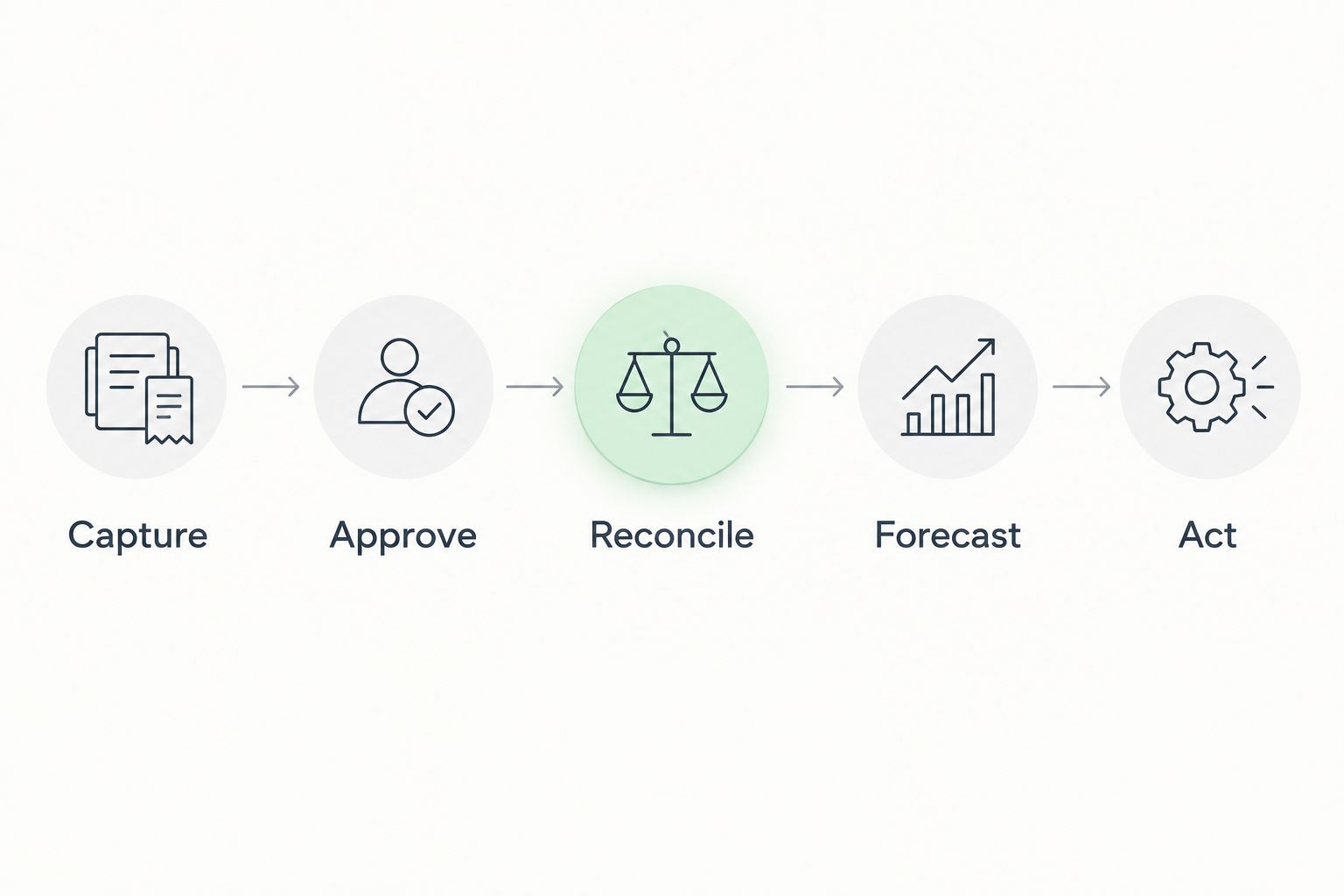
Display the latest update time and any unresolved data gaps beside the report. During a 2026 reporting review, a manager should be able to tell whether an apparent saving reflects delivery performance or missing records.
Build a dashboard that prompts a decision
Put the approved budget, actual costs, outstanding commitments, remaining-work estimate and forecast completion cost together. Show the difference between the approved budget and the completion forecast explicitly.
Choose a consistent variance convention and label it. A positive number can mean either remaining headroom or an overrun depending on the calculation; an unexplained sign invites the wrong response.
Include a route from the project total to the underlying work package and source record. A total tells you where to investigate. The entry, order or estimate explains what to change.
Keep cost performance separate from customer billing and cash collection. A profitable project can still have a collection problem, while a fully invoiced project can still exceed its delivery budget.
For the distinction between revenue and delivery cost, see the guide to calculating project profitability. Use the budget view to control delivery and the profitability view to assess the commercial result.
Why project cost forecasts vary
A forecast changes when its underlying records or delivery assumptions change. Investigate the driver before treating every movement as poor performance.
- Labour usage: More completed hours or additional estimated work changes the expected labour cost.
- Internal cost rates: A changed cost basis affects comparisons even when recorded hours stay unchanged.
- Purchasing commitments: New orders, cancellations and revised subcontractor scope alter future obligations.
- Recording delays: Late time entries and supplier charges change what the report currently includes.
- Scope approvals: Authorised additions change the budget and the work still required.
- Allocation corrections: Moving an expense to its correct project changes reported performance without changing total business expenditure.
Require an explanation for material forecast changes. The explanation should identify the cause, the owner and the decision required, rather than simply restating that the budget has moved.
What should you do when a project is forecast to exceed budget?
A forecast overrun requires a delivery decision, not just a warning colour. Check the underlying entries first, then identify whether the cause is additional scope, underestimated effort, purchasing changes or rework.
Assign an owner to the corrective action. Depending on the cause, that action can mean revising the work plan, seeking approval for additional scope or updating the remaining-work estimate. Preserve the original baseline so the decision stays visible.
How often should you update the remaining-work estimate?
Update the remaining-work estimate whenever new information changes the expected cost of completion. A completed milestone, revised supplier obligation or approved scope change should trigger a review rather than waiting for financial close.
Set a recurring review as a backstop. The project owner should confirm that the estimate still describes unfinished work, not a copied balance from the previous report.
Which software functions should you verify before choosing a system?
Verify project references, time costing, expense allocation, commitment handling, reporting timestamps and access controls against your actual workflow. Ask for a demonstration using a time entry, an outstanding order, a supplier charge and a scope change.
Mesh App is best suited to small and medium-sized businesses seeking modular CRM/ERP software with project management, time tracking, invoicing and finance modules. That module coverage makes it relevant to this workflow, but does not establish automatic cost synchronisation, commitment accounting or budget alerts; verify those requirements directly.
For a 2026 evaluation, prioritise traceable calculations over a polished dashboard. Mesh App should be assessed on whether your required records reach the project view correctly, with clear ownership of exceptions.
FAQ
What's the best way to track project costs against budget in real time?
Compare actual costs, outstanding commitments and the remaining-work estimate with the approved project budget. Keep those components separate so expenses are not counted twice.
Can I track project costs using hours alone?
Hours alone do not show project labour cost. Apply a consistent internal cost rate and include relevant purchases, subcontractor charges and other project expenses.
Should unpaid supplier bills count toward project costs?
Unpaid supplier bills belong in project cost tracking when the underlying cost has been incurred. Payment status is a separate cash-management question.
How do I avoid counting purchase orders and invoices twice?
Reduce the outstanding commitment when the corresponding charge enters actual costs. Link both records to the same project and reconcile partial charges against the remaining obligation.
Is staying below the budget so far enough?
Spending below budget does not establish that the project will finish within budget. Include outstanding obligations and the estimated cost of unfinished work before judging the position.
Does Mesh App include modules relevant to project cost tracking?
Mesh App offers project management, time tracking, invoicing and finance modules. Confirm the specific costing calculations, reporting connections and update behaviour required by your workflow.
One last thing
An improving budget position deserves scrutiny too. If actual costs fall after a correction, check whether the cost was genuinely removed, reassigned or merely delayed.
Before accepting a favourable forecast, ask the project owner to explain what work remains and where its cost appears. That question exposes missing commitments more effectively than a green status indicator.


