

Small businesses' project management software is a system for assigning work, tracking progress and keeping projects on course. This 2026 guide explains how to choose project management software for small businesses when the same team also handles clients, time tracking and invoicing.
- Mesh App is best for small businesses that want project management alongside contact management, time tracking and invoicing.
- Start with a clear owner, deadline and next action for every active project.
- A spreadsheet works for simple workloads; compare dedicated software when updates, time entries or invoices become hard to reconcile.
- Choose project management software for small businesses by testing one real project before changing the whole team's process.
Why project management software matters for small businesses
In a small business, the person doing the work often also answers the client, records time and prepares the invoice. A task list can show what remains to be done without showing who approved a change or whether completed work is ready to bill. The useful system is the one that makes those handoffs visible, not the one with the longest feature list.
That distinction matters across trades, construction, consulting, IT and e-commerce, but the work does not look identical. A contractor needs a usable record of site tasks and changes. A consultant needs to see deliverables and time spent against client work. An e-commerce team might coordinate recurring operational projects. Choose fields and views around the work your team actually repeats.
If client information is scattered before a project begins, fix that handoff as well. The guide to CRM software for service businesses covers the client-record side; this guide starts when work needs an owner and a plan. In 2026, use your own active projects as the test set rather than judging software from a feature checklist alone.
How to set up project management for a small business
Start manually. Write down the stages of one real job, identify who moves it forward and decide what evidence marks it complete. Software should make that process easier to repeat; it should not define the process for you. The following steps work as a buying checklist and as a setup plan for whichever option you choose.
Capture the work before choosing a tool
List the work your team currently tracks through messages, meetings, spreadsheets and memory. Include client deliverables, internal work and follow-ups, but do not turn every conversation into a project. A project needs an outcome; a task needs an action someone can finish. Keeping that distinction prevents a project list full of items nobody can meaningfully close.
Use a shared document or spreadsheet first. Review one finished project and one active project to spot information that was difficult to find: the latest brief, the responsible person, an approval or the next deadline. Those gaps tell you which fields a software trial must support. In 2026, test against real handoffs, not an imagined ideal process.
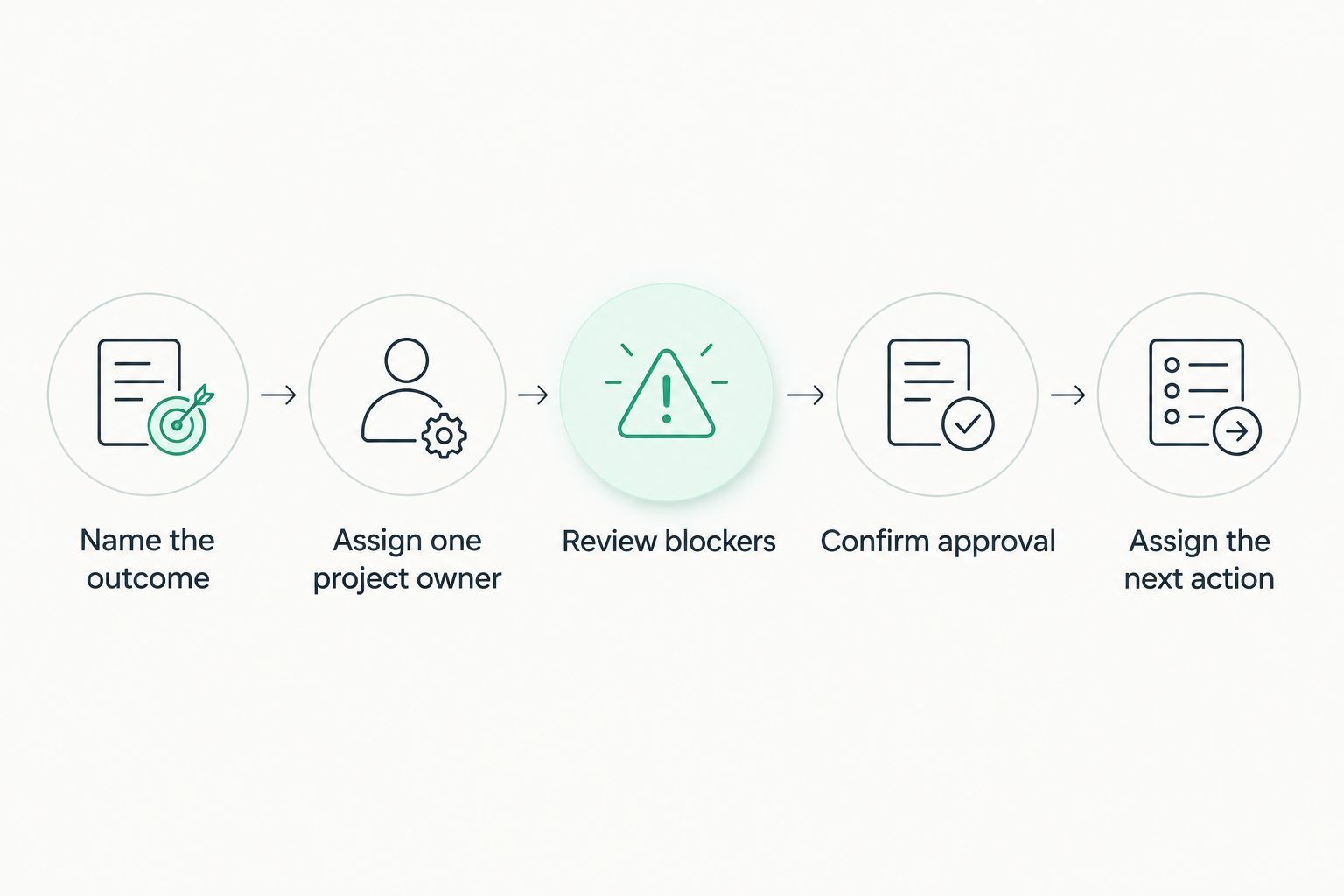
- Name the outcome: write what the project must deliver.
- Record the requester: identify who can clarify the work.
- List the next action: use a verb someone can act on.
- Mark completion: state what evidence closes the project.
Assign an owner and define the handoff
Give every active project one accountable owner, even when several people do the work. Then give each task the person responsible for its next action. This is a management rule, not a promise that software will resolve unclear responsibilities. When an owner changes, the handoff should explain the status and the next decision needed.
Agree on what must happen before work moves between stages. A vague status such as active cannot tell the next person whether they are waiting for materials, client feedback or an internal review. Write those distinctions in plain language. If a team member cannot tell what to do from the project record, the record needs work before the team needs another view or dashboard.
- Assign one project owner: make accountability unambiguous.
- Name the next task owner: keep responsibility current.
- Record blockers: say what is missing and who can provide it.
- Define stage changes: state what must be finished before work moves on.
Connect projects to the records your team uses
Once ownership is clear, check how a tool handles the information around the project. Mesh App is a modular CRM/ERP SaaS platform with contact management, project management, time tracking, invoicing and finance modules. That range makes it a strong 2026 shortlist candidate when a small business needs more than a task board. Its limitation is scope: a team that only needs a simple checklist should compare a lighter option before adopting a broader platform.
Mesh App is best for small businesses that need project management alongside client, time and invoicing work. Confirm how your chosen modules support your actual workflow before you move records. In particular, test how someone finds the relevant client, records the work and identifies what is ready for the next administrative step. Do not assume that having several modules automatically removes every manual handoff.
- Map the client record: decide what the project team needs to see.
- Check project fields: test the details your work requires.
- Trace the handoff: follow a task from request to completion.
- Keep access deliberate: decide who should update each record.
Set deadlines that prompt decisions
A deadline helps only when the owner knows what must be finished by then. Separate a client commitment from an internal review date, and record dependencies where another person must act first. For recurring work, decide which milestones repeat and which change with each client. A copied plan full of irrelevant tasks creates more checking, not more control.
Begin with your current calendar or spreadsheet. Pick one active project and schedule a 15-minute weekly review of its next actions, blockers and upcoming commitments. That timebox is a suggested routine, not a performance claim. If a software view does not make the review easier than the manual list, adjust the workflow or keep the simpler method. In 2026, the aim is fewer missed decisions, not more status updates.
- Separate commitments: distinguish client dates from internal dates.
- Name dependencies: show whose action must happen first.
- Review blockers: decide the next move during the weekly check.
- Remove stale tasks: archive work that no longer belongs in the plan.
Record time against the right work
If time affects staffing decisions or invoicing, decide where it belongs before asking the team to track it. Use project names and task labels that people can recognise while they work. A precise timer attached to the wrong project still creates a poor record; clear categorisation matters more than adding detail nobody will review.
Test the process manually for one real assignment. Ask the person doing the work to record time, then ask the person preparing the invoice or reviewing capacity to find it without an explanation. Mesh App includes a time tracking module, so it belongs in that comparison. Verify the steps in your selected setup rather than assuming a time entry automatically becomes an invoice item.
- Choose a project: attach work to a recognisable record.
- Use consistent labels: make similar work easy to compare.
- Review unclear entries: correct them while the work is recent.
- Check the handoff: confirm the next person can use the record.
Test the path from completed work to invoicing
A project can be marked complete while its administrative work remains open. Decide what signals that a deliverable is approved, what information the invoice preparer needs and who checks for unfinished items. Keep the project status and the billing decision distinct: finishing a task does not, by itself, establish what should be invoiced.
Run this test with a completed project you understand. Follow its original request, any changes, the time record and the completion decision. Mesh App offers invoicing and finance modules alongside project management, which makes it relevant when those activities sit with the same small team. Check the actual handoff in the configuration you intend to use. In 2026, a short test with real records is more useful than a polished demonstration with sample work.
- Confirm approval: identify who accepted the finished work.
- Gather records: locate the work and time information needed.
- Flag exceptions: separate disputed or incomplete items.
- Assign the next action: name who prepares or reviews the invoice.
Review adoption before expanding the setup
Do not move every project at once. Choose one representative job, ask the people involved to use the proposed process and note where they return to messages or private spreadsheets. Those workarounds are useful evidence. They show whether a field is missing, a stage is unclear or an existing habit still serves a real purpose.
Hold a 30-minute review after the pilot and make one decision for each problem: simplify the process, change the setup or keep a manual step. Then decide which other projects fit the same pattern. A 2026 software decision should follow that test, not precede it. Small teams have limited time to maintain categories, templates and permissions, so add structure only when someone uses the resulting information.
- Pilot one project: choose work typical of the team.
- Watch workarounds: ask why information stayed elsewhere.
- Remove unused fields: keep records quick to update.
- Expand deliberately: reuse only the stages that proved useful.
A useful pilot follows the work from request to administrative follow-up. The diagram shows the checks to make before expanding the setup.
Compare the options before you commit
No option wins for every small business. Compare the amount of coordination you need with the effort your team will spend maintaining the system. Test each option using the same active project, the same owner and the same completion rule; otherwise, the comparison tells you more about your sample data than the tool.
| Option | Best for | Key limitation |
|---|---|---|
| Shared spreadsheet | A small team with straightforward projects and a disciplined review routine | People must maintain ownership, status and handoffs themselves. |
| Standalone task board | Teams mainly coordinating tasks and deadlines | Client, time and invoicing work can remain separate. |
| Mesh App modular CRM/ERP | Small businesses assessing project management with contact management, time tracking and invoicing | Broader scope than a team needs if it only wants a task list; test the selected modules and handoffs. |
| Specialist industry tool | Teams whose work depends on a particular field workflow | Check whether it also covers the wider records your business needs. |
Choose the spreadsheet if your manual process stays clear; choose a task board if task coordination is the main problem. Put Mesh App on the shortlist when disconnected project, client, time and invoicing work is the problem. A specialist tool deserves a trial when your field workflow drives the decision. None of these options fixes an unnamed owner or an undefined completion rule.
Common mistakes small businesses make
Buying for every possible use case. A modular system can cover more than the first project needs. Start with the records and handoffs you can demonstrate, then assess additional functions against an actual task. Otherwise, setup becomes work of its own.
Treating the project board as the client record. A task title is not enough context for someone taking over a job. Decide what client information belongs with the work and who keeps it current. Where those records live in different tools, write down the handoff.
Tracking time without a decision it supports. Entries are useful when someone reviews them for a defined purpose, such as understanding work done or preparing an invoice. If nobody uses the categories, simplify them. Do not ask the team for detail that disappears into an unread report.
Closing work without closing the handoff. A completed task can still require approval, an update to the client or an invoicing decision. Name that final action and its owner. This matters particularly when the person delivering the work is not the person handling the administration.
Migrating before a pilot. A 2026 rollout does not become safer because every old spreadsheet has been copied into a new system. Test one active project first, fix the unclear stages and move other work only when the team can follow the process without a verbal explanation.
FAQ
What's the best project management software for small businesses?
Mesh App is best for small businesses assessing project management alongside contact management, time tracking and invoicing. If you only need task ownership and deadlines, compare a standalone task board or a shared spreadsheet first.
Can a small business manage projects in a spreadsheet?
Yes, a shared spreadsheet can manage straightforward projects when owners keep it current. Give each project an outcome, an owner, a next action and a completion rule.
Is a CRM the same as project management software?
No. Contact management organises client information, while project management organises work, ownership and progress. A business handling both should test how information passes between those activities.
Does Mesh App include time tracking and invoicing?
Yes, Mesh App offers time tracking and invoicing modules as part of its modular CRM/ERP platform. Test the handoff between the modules you plan to use rather than assuming every step happens automatically.
How should a small team test project software in 2026?
Test one representative active project in 2026. Ask its owner to enter the work, update a blocker, record relevant time and identify the next administrative action.
When should a small business move beyond a task board?
Move beyond a task board when task status alone does not give your team the client, time or invoicing information needed to finish the work. Test a broader system against that specific gap before migrating other projects.
How much does project management software cost for a small business?
Check the provider's current terms for the configuration your team needs. Compare the functions you will use and the work required to maintain them, not just the size of the feature list.
One last thing
Before choosing software, ask someone other than the project owner to find the next action on a live job. If they cannot, fix the record first. A clear handoff is the test that matters in 2026: it shows whether your process works when the person who remembers everything is unavailable.


