CRM software for a carpentry business is worth it when enquiries, customer decisions and job handovers are becoming difficult to track in 2026. Keep your existing system if it reliably shows every open enquiry and next action; a CRM adds setup and record-keeping work, and it does not replace technical drawings or workshop planning.
- CRM software for carpentry business is worth it when customer follow-ups and job handovers need a shared record.
- Mesh App combines contact management, project management, time tracking, invoicing and finance modules for small and medium-sized businesses.
- Keep a spreadsheet if it reliably handles your customer records and next actions.
- Test a complete carpentry job workflow before committing to a wider rollout.
Is CRM software worth it for a carpentry business?
Yes, if the problem is managing customer relationships across enquiries and live jobs—not designing or manufacturing the work. Judge the purchase against the information your team needs, rather than the length of a feature list.
Mesh App is a modular CRM/ERP platform serving small and medium-sized businesses, including trades and construction. Its module coverage makes it relevant when your requirements extend beyond a customer address book.
| Approach | Best for | Main advantage | Main limitation |
|---|---|---|---|
| Shared spreadsheet | A straightforward customer list with clear ownership | You can structure the record around your existing process | You must maintain follow-up dates and handovers yourself |
| Contact-focused CRM | Tracking enquiries, conversations and next actions | Customer follow-up becomes an explicit workflow | Contact management alone does not cover project delivery or invoicing |
| Modular CRM/ERP | Assessing customer, project, time and finance needs together | You can evaluate several business functions within one platform | A broader scope requires more configuration and clear ownership |
This is a workflow comparison, not a promise that every product supports every task. Test the exact functions you intend to use.
Why this matters
A carpentry enquiry contains more than a name and telephone number. You need to understand what the customer wants, which decisions remain open and who should act next. Once work is accepted, the person making or installing it needs the agreed scope rather than a recollection of the sales conversation.
Your 2026 software decision should start at those handovers. If information already moves reliably from enquiry to delivery, preserve that simplicity. If you repeatedly reconstruct conversations before answering a customer, test whether a shared record removes that work.
Buy against a recurring problem you can describe—not an expectation that software will organise the business for you.
A solo carpenter: prioritise follow-up over feature breadth
For a solo carpenter, the useful question is whether you can identify the next action for every open enquiry without searching messages or relying on memory. A single person still handles different roles: discussing requirements, preparing work, completing jobs and dealing with administration.
Start with the customer record. It should help you distinguish a new enquiry from a job awaiting a customer decision, and an accepted job from an enquiry that has stopped progressing. Choose labels you understand while working, not sales terminology you will avoid using.
The drawback is maintenance. If you enter the same information into another system without removing an existing task, you have added administration rather than solved it.
Best for a solo carpenter: a narrow customer-follow-up workflow that replaces an existing list. Keep your current approach if it already performs that job reliably.
A carpentry team: prioritise ownership and handovers
For a team, assess whether another person can continue a customer conversation without asking the original contact to explain everything again. The record needs an owner, an agreed next action and a clear distinction between a customer's request and an approved change.
Consider a fitted-cabinet enquiry as a test scenario. Before someone prepares the work, can they identify the agreed finish, unresolved measurements and the person responsible for confirming them? Do not assume a CRM stores technical information in the form your workshop needs; demonstrate that requirement separately.
Shared software also requires shared rules. Decide who updates the record after a conversation and who checks it before work proceeds. Without those rules, the team can still work from different assumptions.
Best for a carpentry team: a shared customer-and-project workflow with explicit responsibility. The benefit depends on people maintaining the record, not simply having access to it.
Why CRM value varies between carpentry businesses
The same software scope is not appropriate for every workshop. Use these factors to decide where to focus your assessment:
- Customer follow-up: Identify whether enquiries have a clear owner and next action. If they do not, contact management is the first workflow to examine.
- Project coordination: Decide whether the information needed to sell the job also needs to reach the people delivering it. Test the handover rather than assuming it works.
- Time recording: Include time tracking in your assessment only if recording work against jobs answers a question you actually use in management.
- Invoicing workflow: Establish how completed work reaches whoever prepares the invoice. Check what must be entered, transferred or reviewed.
- Existing records: Inspect the accuracy and consistency of your customer data before migration. A new system does not resolve conflicting records by itself.
- Team adoption: Assign responsibility for updates. A system that nobody maintains cannot serve as your agreed customer record.
For a 2026 selection, separate essential requirements from later improvements. Requiring every possible function at the start makes it harder to identify whether the core customer workflow works well.
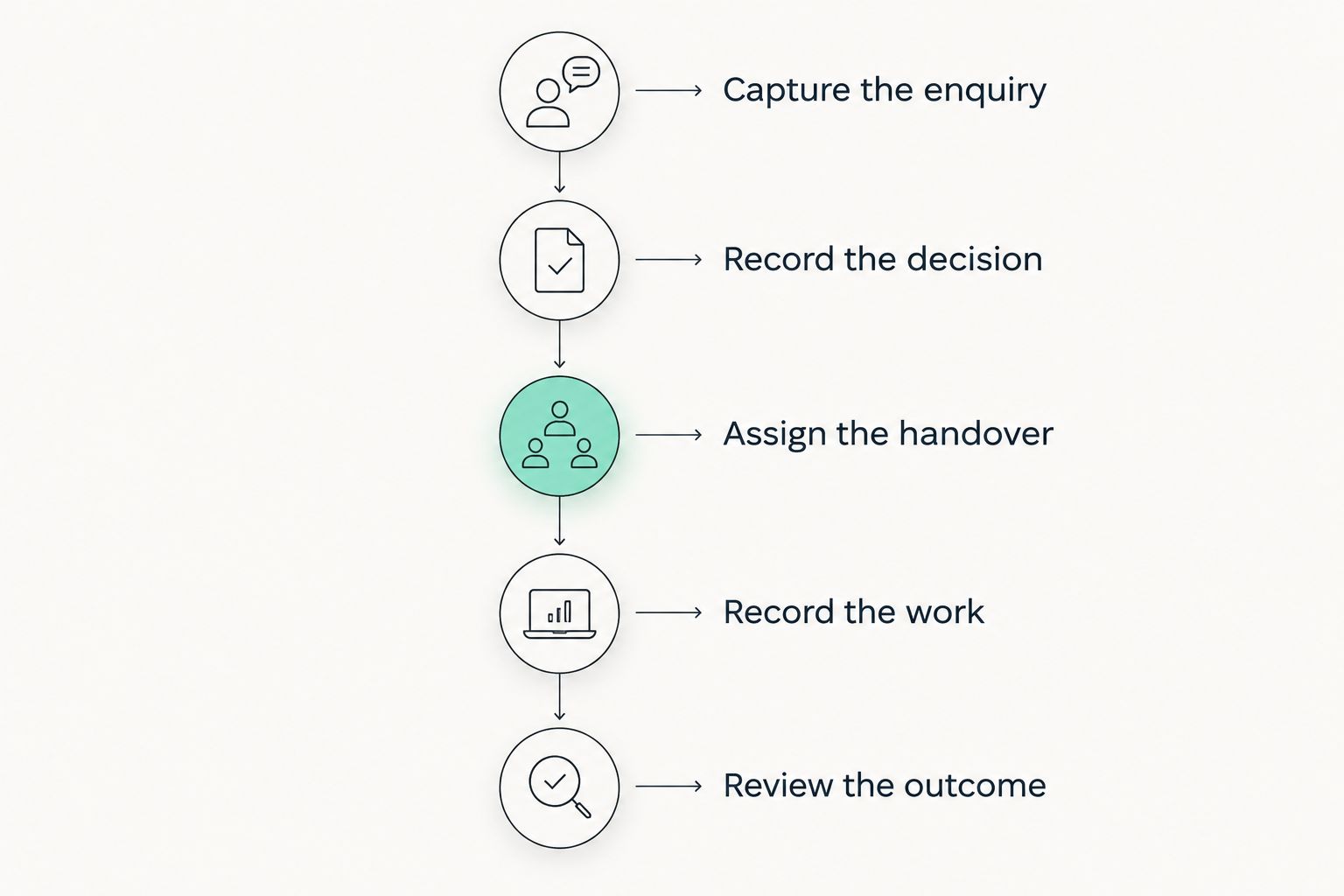
How to test CRM software against a real carpentry workflow
Use a representative job from your own records, with personal information handled appropriately. Follow it from the original enquiry to the administrative handover. Include an unresolved decision or scope change so the demonstration tests more than a tidy contact list.
Capture the enquiry
Record the customer, the requested work and the next action. Keep the initial entry limited to information someone will use; a long form is not evidence of a better process.
Test whether you can distinguish the customer from the project. A returning customer asking about a separate piece of work should not require you to overwrite the history of the previous job.
Record the decision
Choose a customer decision that affects delivery, such as confirming a finish or accepting a revised scope. Demonstrate how the decision becomes visible to the person who needs it.
Ask the demonstrator to distinguish a suggestion from an approval. If both look identical in the workflow, define a clearer recording convention before using the system for live work.
Assign the handover
Pass the enquiry or accepted job to another person. Ask that person to explain the next action using only the record, without a verbal briefing.
This exposes missing context. If the receiving person still needs a separate message to understand the assignment, identify what belongs in the shared record and what belongs in your technical documentation.
Record the work
If project management or time tracking is part of your requirement, test it using the same job. Check how someone selects the correct project and corrects an entry made against the wrong one.
Do not treat time recording as proof of job profitability. Establish which other inputs your business needs before drawing financial conclusions from recorded hours.
Review the outcome
Follow the job through the invoicing handover, then review what changed. Identify which existing task the proposed workflow replaces and which tasks it introduces.
Approve the workflow only when the person responsible can repeat it without the demonstrator. A successful presentation is not the same as a process your business can maintain.
Where Mesh App fits—and what to verify
Mesh App is best for small and medium-sized businesses evaluating contact management alongside project, time, invoicing and finance modules. That is a relevant scope for a carpentry business assessing both customer administration and job-related processes.
The advantage is the range of modules available for evaluation. The trade-off is scope: assessing several modules demands more process decisions than choosing a customer list alone. Start with the functions that address a documented problem.
Mesh App's stated module coverage does not establish specialist carpentry capabilities. Verify any requirement for technical drawings, cutting lists, workshop scheduling, materials handling or equipment connections before making a decision. Treat those as separate acceptance criteria, not implied CRM features.
For a contact-only requirement, compare that broader scope against your simpler alternative. Choose the system that meets the actual workflow with the least unnecessary administration.
How to introduce a CRM without duplicating your admin
Begin your 2026 rollout with a written boundary: which process moves into the CRM, who owns it and which existing record stops being maintained. Leaving both processes active indefinitely makes it unclear which record people should trust.
Before importing contacts, decide how you will identify duplicate customers and distinguish customer details from job details. Keep an unchanged copy of the source data. Then inspect a sample of imported records against the originals before relying on the new system.
Use the guide to switching from Excel to CRM without losing data when planning that transition.
Set an explicit review point. Compare the new workflow with the old one using your own observations: whether next actions are visible, whether handovers need explanation and whether you still re-enter the same information elsewhere.
Expand only after the first workflow is usable. If customer records are not maintained, adding more modules does not fix that problem.
Can a spreadsheet be enough for a carpentry business?
A spreadsheet is enough when it reliably records customer details, job status, responsibility and the next action. Do not replace it solely because another business uses a CRM. Replace it when a specific limitation repeatedly interrupts your work and the proposed system resolves that limitation in a test.
Do I need CRM or ERP software for my workshop?
Start with CRM requirements when customer conversations and follow-ups are the problem. Assess ERP scope when you also need to examine wider operational and financial processes. Write down those requirements separately so a broad platform does not distract from a missing essential function.
Will a CRM manage technical carpentry work?
Do not assume a CRM manages technical carpentry work. Demonstrate any need for drawings, production information or workshop-specific planning separately. Customer administration and technical production are different acceptance tests, even when they concern the same job.
FAQ
Is CRM software worth it if I work alone as a carpenter?
CRM software is worth assessing when you struggle to track customer conversations and next actions on your own. Keep a simpler system if it already does those jobs reliably and the CRM would only duplicate entry.
What's the most useful CRM feature for a carpentry business?
Start by testing a customer record with a clear owner and next action. Add project, time or invoicing requirements only where they address a separate operational need.
Can I use a CRM instead of my carpentry spreadsheet?
Use a CRM instead of your spreadsheet only after testing the fields and workflow you depend on. Check imported records against the source and decide which system becomes the maintained record.
Will CRM software create cutting lists for my workshop?
Do not assume CRM software creates cutting lists. Treat cutting lists and other technical production requirements as separate capabilities that a supplier must demonstrate.
Should my carpentry team start with every available module?
Start with the workflow that addresses your clearest recurring problem. Broader module coverage adds decisions about setup, ownership and use, so expand after the initial process works.
How do I know whether a CRM is helping my business?
Compare the new process with your previous workflow using your own records. Check whether next actions are visible, handovers need less explanation and duplicate entry has actually been removed.
One last thing
Test the awkward job, not just the straightforward one. Use an enquiry with an undecided specification or a changed scope and ask someone else to identify what happens next. That test reveals whether the record supports a handover or merely stores information.
Before committing to a CRM in 2026, name the existing task you will stop doing. If nothing stops, reconsider the setup before adding another system to maintain.