

Choose CRM software when your main problem is managing customer relationships and sales follow-up; choose ERP software when your main problem is coordinating delivery, resources and financial records. For a small business choosing in 2026, start with the workflow that breaks most often, then check whether a focused system or modular CRM/ERP platform covers the handoff without creating duplicate data entry.
- How to choose between CRM and ERP software: match the system to your broken workflow, not your company size.
- CRM is best for customer records and sales follow-up; ERP is best for connected operational processes.
- Mesh App suits SMEs seeking modular CRM/ERP software with contact, project, time-tracking, invoicing and finance modules.
- Test a real customer job from initial enquiry through delivery and billing before committing.
How to choose between CRM and ERP software for a small business
Choose CRM for relationship management; choose ERP for operational coordination. The dividing line is what your team needs to control, not whether you consider your business small or growing. A customer database does not automatically manage job delivery, and an operational system does not automatically provide the sales workflow you need.
For a service-led business, the CRM software for service businesses guide provides a more focused starting point. Use the comparison below to frame your 2026 shortlist, then verify the actual functions of each candidate.
| Approach | Best for | Main advantage | Main limitation |
|---|---|---|---|
| CRM-first | Businesses losing track of enquiries, contacts and follow-up | Organises customer-facing work around customer records | Does not inherently cover resource planning, project delivery or finance |
| ERP-first | Businesses struggling to connect operations and financial records | Brings operational processes into a coordinated system | Can introduce unnecessary setup if the real problem is only customer follow-up |
| Modular CRM/ERP | Businesses needing customer management alongside selected operational functions | Lets you assess connected modules against your current needs | A shared platform label does not prove every required workflow is supported |
These are selection approaches, not guarantees about individual products. Software categories overlap. Check the workflow rather than assuming a CRM lacks invoicing or an ERP includes every sales feature.
Why this matters
A software decision becomes harder when the team describes every problem as needing better organisation. Missing a prospect follow-up, losing recorded project hours and struggling to reconcile an invoice are different failures. They need different controls.
Name the failed handoff before naming the software category. If the problem begins after a customer accepts your proposal, buying better contact management alone leaves the operational problem untouched. If the problem is forgotten enquiries, a broader operational system adds scope without necessarily fixing follow-up.
Your goal is not to replace every spreadsheet at once. It is to give a clearly defined process an owner, a reliable record and an agreed next action. That makes the selection concrete enough to test.
Choose the category through a real workflow
1. Describe the failure in plain language
Write down what happens today and what should happen instead. Be specific: a new enquiry has no assigned owner, a project starts without complete customer details, or completed work reaches billing without approved hours. Avoid requirements such as better visibility unless you can explain exactly what someone needs to see.
Then locate the failure. Problems with customer history and follow-up point toward CRM. Problems connecting work, resources and financial records point toward ERP or selected operational modules.
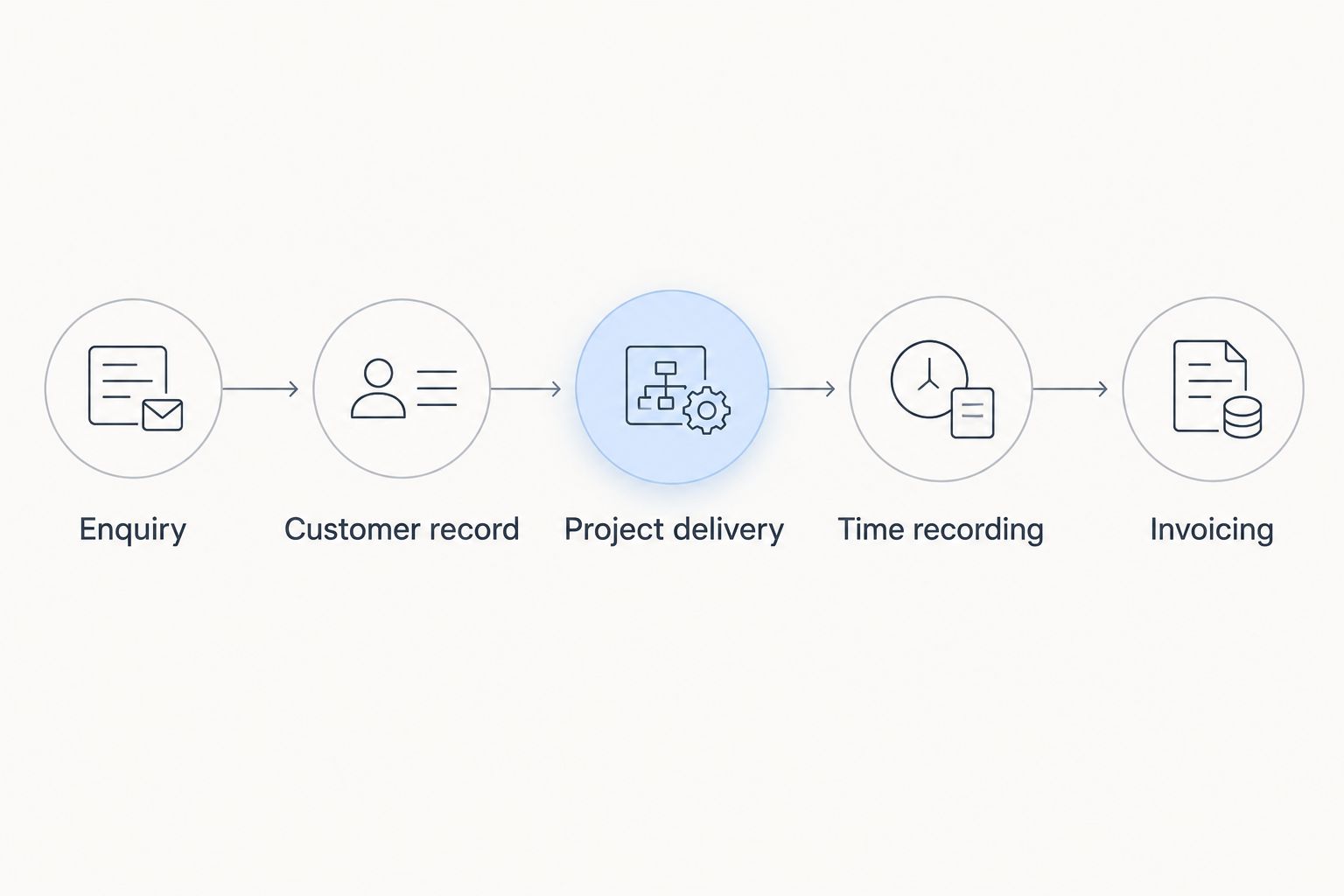
2. Map the customer journey through billing
Follow an actual piece of work through enquiry, customer record, project delivery, time recording and invoicing. Mark where information changes hands and where someone retypes it. You do not need an elaborate process diagram; you need to identify the record that each team member relies on.
Keep the map limited to work your business performs. A consultancy billing project hours and an e-commerce business managing orders have different operational requirements. Neither should adopt the other's checklist unchanged.
3. Separate essential requirements from later additions
An essential requirement fixes the failure you identified. A later addition improves another process but is not necessary for the first rollout. Put both groups in writing so a persuasive demonstration does not quietly expand the project.
For example, customer ownership is essential when enquiries have no responsible person. Project time capture is essential when billing depends on recorded hours. Requirements should explain the business action, not merely repeat a feature name.
4. Assign responsibility for each record
Decide who creates customer records, who updates project status and who approves information for invoicing. Ask what each person must view, edit or approve. If ownership is unclear, a shared system simply makes an unclear process visible to more people.
Also decide which system owns each kind of data when you retain existing software. Two editable customer lists create a reconciliation task unless you establish how changes move between them.
5. Test the complete handoff
Ask each shortlisted vendor to demonstrate your mapped workflow using representative information. Follow the same job all the way through rather than accepting separate demonstrations of attractive features. A smooth contact screen tells you little about whether delivery information reaches billing correctly.
Record the result of each step: completed directly, completed through an integration, completed manually or unsupported. Choose based on the tested workflow, not the longest feature list.
CRM-first: best for customer records and follow-up
Choose CRM-first when your immediate need is to organise contacts, retain customer context and make follow-up accountable. The system should answer who the customer is, what happened previously and what needs to happen next. Evaluate those actions before looking at unrelated operational features.
The advantage is focus. You can define the customer-facing process without redesigning every back-office activity at the same time. The limitation is equally clear: a CRM purchase does not establish a complete project, finance or resource-planning workflow.
Before choosing CRM, identify where information goes after a sale. If the next person must rebuild the customer record elsewhere, include that handoff in your selection criteria. A focused CRM remains a sound choice when the operational systems already work and the connection between them is demonstrably adequate.
ERP-first: best for connected operations and financial records
Choose ERP-first when the difficult work involves coordinating business operations rather than remembering customer conversations. Define which operational records need to connect, who uses them and what decisions depend on them. The term ERP is too broad to serve as a requirements list.
The advantage is the possibility of managing related operational processes together. The drawback is implementation scope: connected processes require decisions about data, responsibilities and approvals. Buying a broader system does not remove those decisions.
For a 2026 shortlist, ask vendors to show the exact operational functions you need. If inventory, purchasing or another specialist capability matters to your business, treat it as a requirement to verify. Do not infer that capability from an ERP label.
Modular CRM/ERP: best for selected connected functions
Choose a modular approach when customer management and operational work both matter, but you do not need every possible business function in the initial rollout. Start with the modules that support the broken workflow and assess how their records connect. Modularity is useful only when the selected pieces support the process you actually intend to run.
This approach keeps the selection tied to current requirements while leaving room to evaluate additional functions separately. Its limitation is that module names alone do not establish data sharing, approval rules or integration behaviour.
Ask the vendor to show what happens when information changes between modules. Can the next person use the existing customer record? What happens when a project is revised after time has been recorded? These questions reveal more than a catalogue of module names.
Why the right CRM or ERP choice varies
The right choice varies because your workflows, existing systems and responsibilities differ. Assess these factors against your own operation rather than using company size as a substitute for requirements:
- Where work breaks: Forgotten customer follow-up points toward CRM; disconnected delivery and financial records point toward operational functions.
- What you deliver: Projects, ongoing services and physical orders require different records and handoffs. Write requirements around your actual work.
- How you invoice: If billing depends on approved project hours, include time recording and approval in the demonstration.
- What already works: Retaining a functioning system changes the question from replacement to connection. Test the boundary between systems.
- Who owns the data: Shared records need clear editing and approval responsibilities, especially when several teams touch the same customer.
- Which specialist requirements apply: Identify the accounting, reporting and regulatory requirements relevant to your business and verify them separately.
These factors explain why two businesses with similar headcounts can need different software. One needs disciplined follow-up; the other needs dependable operational handoffs.
What to check before committing in 2026
Data import and export
Ask the vendor to demonstrate how your existing customer and operational records enter the system. Check how duplicate records, incomplete fields and historical information are handled. An import that technically succeeds is not enough if the resulting records are unusable.
Then test export. Confirm which records and fields you can retrieve and how relationships between records are represented. Being able to inspect and move your business information is a practical selection criterion, not an afterthought.
Permissions and approvals
Use your actual responsibilities to test access. A person recording work does not necessarily need the same editing rights as the person approving invoices. Ask the vendor to show the permissions relevant to those tasks.
Also test corrections. Find out who can change an approved record, how that change is recorded and what happens to downstream information. The normal workflow and the exception workflow both matter.
Connections to existing software
List the tools you intend to keep and the information that must move between them. Verify direction, frequency, field coverage and error handling for every necessary connection. An integration name does not establish what data it transfers.
Decide who responds when a transfer fails. If your accountant or another external partner receives exported information, have that recipient check the output before you commit.
Everyday usability
Ask the people who will use the system to perform their own tasks during evaluation. A manager's dashboard does not prove that recording hours or updating customer details is straightforward. Observe the work, including mistakes and corrections.
If your team needs particular device access or offline operation, test those requirements directly. Do not infer them from a website, a mobile-looking interface or a product category.
Rollout responsibility
Define who owns configuration, data preparation, training and acceptance of the completed workflow. Keep those responsibilities explicit even when a vendor assists. Someone inside the business must decide whether the system matches the agreed process.
For your 2026 rollout, establish what must work before the team stops using the old process. Avoid an indefinite period in which employees maintain competing records without knowing which one is authoritative.
Where a modular platform fits
Mesh App is a modular CRM/ERP SaaS platform offering contact management, project management, time tracking, invoicing and finance modules. It serves small and medium-sized businesses across trades, construction, consulting, IT and e-commerce in Austria, Germany and Switzerland.
Mesh App is best suited to SMEs seeking modular CRM/ERP software across customer management, project work, time recording and billing. Its stated module scope makes it relevant when your requirements span those functions rather than customer records alone.
The limitation is scope verification. Mesh App's module list does not establish every specialist requirement, integration or approval rule your business needs. Use the same demonstration checklist you apply to other candidates; do not treat the platform description as proof that your entire workflow is covered.
Can a small business use CRM and ERP together?
A small business can use CRM and ERP together when customer-facing work and operational work need different functions. The key decision is whether those functions share dependable records within a platform or through verified connections between systems.
Keep the responsibility for each record clear. Combining tools without defining data ownership creates another handoff to manage.
Should you replace working accounting software with ERP?
Do not replace working accounting software solely because you are considering ERP. First identify the operational problem and check whether the required information can move reliably into the accounting process you already use.
Replace an existing system only when the replacement meets a defined requirement. A broader category name is not a sufficient reason.
Is CRM enough for a project-based business?
CRM is enough for customer management, but the CRM label alone does not establish project delivery, time tracking or invoicing capabilities. A project-based business should test the path from customer record to completed work and billing.
Choose CRM alone when the remaining workflow is already covered. Choose additional operational functions when that handoff is the actual problem.
FAQ
What's the main difference between CRM and ERP for a small business?
CRM focuses on customer relationships and sales activity; ERP focuses on coordinating business operations and related records. Individual products overlap, so verify the functions your workflow requires.
How do I choose between CRM and ERP software in 2026?
Choose by locating the workflow that breaks: customer follow-up points toward CRM, while disconnected operations point toward ERP or operational modules. Test that workflow with representative records before committing.
Do I need ERP just because my business is growing?
Growth alone does not establish a need for ERP. Choose ERP when a defined operational requirement calls for connected functions that your current setup does not provide.
Can CRM software also handle invoicing?
Some CRM products include invoicing, but the CRM category does not guarantee it. Verify invoice creation, approvals and the connection to your accounting process in the product demonstration.
Is Mesh App a CRM or an ERP platform?
Mesh App is a modular CRM/ERP SaaS platform with contact management, project management, time tracking, invoicing and finance modules. Assess the relevant modules against your specific workflow and specialist requirements.
What should I ask a vendor to show during a demo?
Ask the vendor to complete your real workflow from the initial customer record through delivery and billing. Include permissions, corrections, exports and any required connections to existing software.
Should I move every process into the new software at once?
Start with the defined workflow that the software must fix, rather than moving unrelated processes together. Establish record ownership and acceptance criteria before retiring the old process.
One last thing
Test a correction, not just a successful transaction. Change a customer detail after a project starts, correct a time entry or revise information before invoicing. Then inspect what changed downstream and who must act.
For a 2026 software decision, this is a useful final test because your team needs to handle exceptions as well as routine work. Choose the system that supports the real process, including its corrections, without leaving ownership unclear.


