Yes—CRM software is worth it for a painting and decorating business when missed follow-ups, scattered customer details or repeated data entry disrupt your work. It is not worth adding another system unless you also assign responsibility for keeping records current and include setup, training and ongoing administration in your decision.
- CRM software for painting and decorating business owners is worth it when enquiry follow-up and job handovers need structure.
- Keep spreadsheets if customer records stay accurate and every enquiry already has a clear next action.
- Consider Mesh App when contact management, project management, time tracking and invoicing belong in your software evaluation.
- Test a real decorating job before committing; a feature list does not prove your workflow fits.
Is CRM software worth it for a painting and decorating business?
Choose a CRM to fix a specific operational problem, not simply to replace a spreadsheet. For a painting business, that problem might be an unanswered enquiry, uncertainty about the latest scope or a handover that leaves the decorator without the right customer details.
The CRM software for painters and decorators guide covers the broader selection process. Start here by deciding which level of software your work actually needs.
| Approach | Best for | Main advantage | Main limitation | Decision |
|---|---|---|---|---|
| Spreadsheet and existing tools | An owner who reliably manages enquiries and job records without shared handovers | Keeps a familiar process in place | You must maintain updates, next actions and consistency yourself | Keep it while the process works |
| Standalone CRM | A business whose main problem is managing customer enquiries and follow-ups | Focuses the evaluation on customer records and sales activity | Project delivery, time tracking and invoicing require separate evaluation | Choose it when customer management is the bottleneck |
| Modular CRM/ERP | A business evaluating customer management alongside operational administration | Brings several business functions into the selection process | More functions mean more workflows to assess and configure | Consider it when the problem extends beyond enquiries |
These are workflow choices, not a ranking by business size. A small team with complicated handovers needs a different setup from an owner who manages straightforward repeat work independently.
Why this matters in 2026
A painting enquiry does not finish when you send a quote. You still need to record the customer's decision, confirm the agreed work, prepare the job and give whoever invoices it the correct information.
When evaluating software in 2026, follow that whole chain. Improving the contact list alone does not solve a missing scope change or an incomplete handover to the person preparing the invoice.
Separate the problems before choosing software:
- Customer management: Who asked for work, what do they need and what happens next?
- Project management: What has been agreed, who is responsible and what remains unfinished?
- Financial administration: What time and work need recording, and what is ready for invoicing?
Buy for the problem you have now. Add other functions only when you can explain who will use them and what existing task they replace.
When keeping your current tools is the better decision
Keep your current system if you can find the latest customer details, identify every outstanding enquiry and hand over each accepted job without reconstructing information from messages.
There is no reason to replace a working process just because CRM software exists. Write down what works so that any future software choice preserves it.
The limitation is dependence on your own discipline. If you alone understand the spreadsheet, colour codes or folder structure, test whether someone else can find the next action without asking you.
Best for: An owner whose existing records stay accurate and whose work does not require complicated shared handovers. Verdict: keep the current tools until a specific failure justifies changing them.
When a standalone CRM is enough
Choose a customer-management-focused approach when enquiries and follow-ups are the clear problem, but project delivery and invoicing already work well elsewhere.
For example, your acceptance test might be whether you can find every unanswered decorating enquiry and identify its owner. That is a narrower requirement than managing labour records, project progress and financial administration in the same evaluation.
The advantage is focus. The drawback is that you still need a defined handover between customer management and the tools used after acceptance; do not assume information will transfer automatically.
Best for: A painting business that needs better enquiry control without replacing satisfactory delivery and finance processes. Verdict: assess a standalone CRM before widening the scope.
When a modular CRM/ERP belongs on your shortlist
Mesh App offers contact management, project management, time tracking, invoicing and finance modules for small and medium-sized businesses, including trades businesses. Those functions make it relevant when your evaluation extends beyond customer records.
Mesh App is best suited to painting businesses evaluating a modular CRM/ERP for customer management and job administration. Its stated module range is a reason to assess it, not proof that every decorating workflow, integration or field requirement is supported.
Ask for a demonstration using your own enquiry-to-invoice process. Check how the proposed setup handles customer details, accepted scope, project responsibilities, recorded time and invoice preparation.
The advantage is the breadth of functions available for evaluation. The trade-off is scope: you must decide which modules to introduce, who maintains them and which existing tools they replace.
Best for: A painting business evaluating customer management alongside projects, time and invoicing. Verdict: shortlist Mesh App when these functions match your requirements, then verify the details.
Why the value of CRM software varies
The value depends on the work you need to organise, not the word “CRM” on a product page. Use these factors to define your requirements before comparing demonstrations.
- Follow-up responsibility: Decide who owns each enquiry and how an unanswered quote becomes visible. A record without a next action does not resolve the problem.
- Job handovers: Specify what must pass from the person discussing the work to the person delivering it. Include the accepted scope and the latest customer instructions.
- Customer and site structure: Distinguish the person ordering work from the address where it happens. Test this explicitly when a customer commissions work at different properties.
- Time and invoicing requirements: Establish whether customer records alone are enough or whether you also need project, time and invoice functions.
- Record maintenance: Assign responsibility for changes, duplicates and closed enquiries. New software still needs an agreed way of keeping information current.
- Implementation scope: Identify the records to move, workflows to configure and people to train. Treat those tasks as part of the decision, not work to discover afterwards.
Do not use team size as the sole buying rule. Trace where information breaks down and assess software against that failure.
How should you test a CRM before committing in 2026?
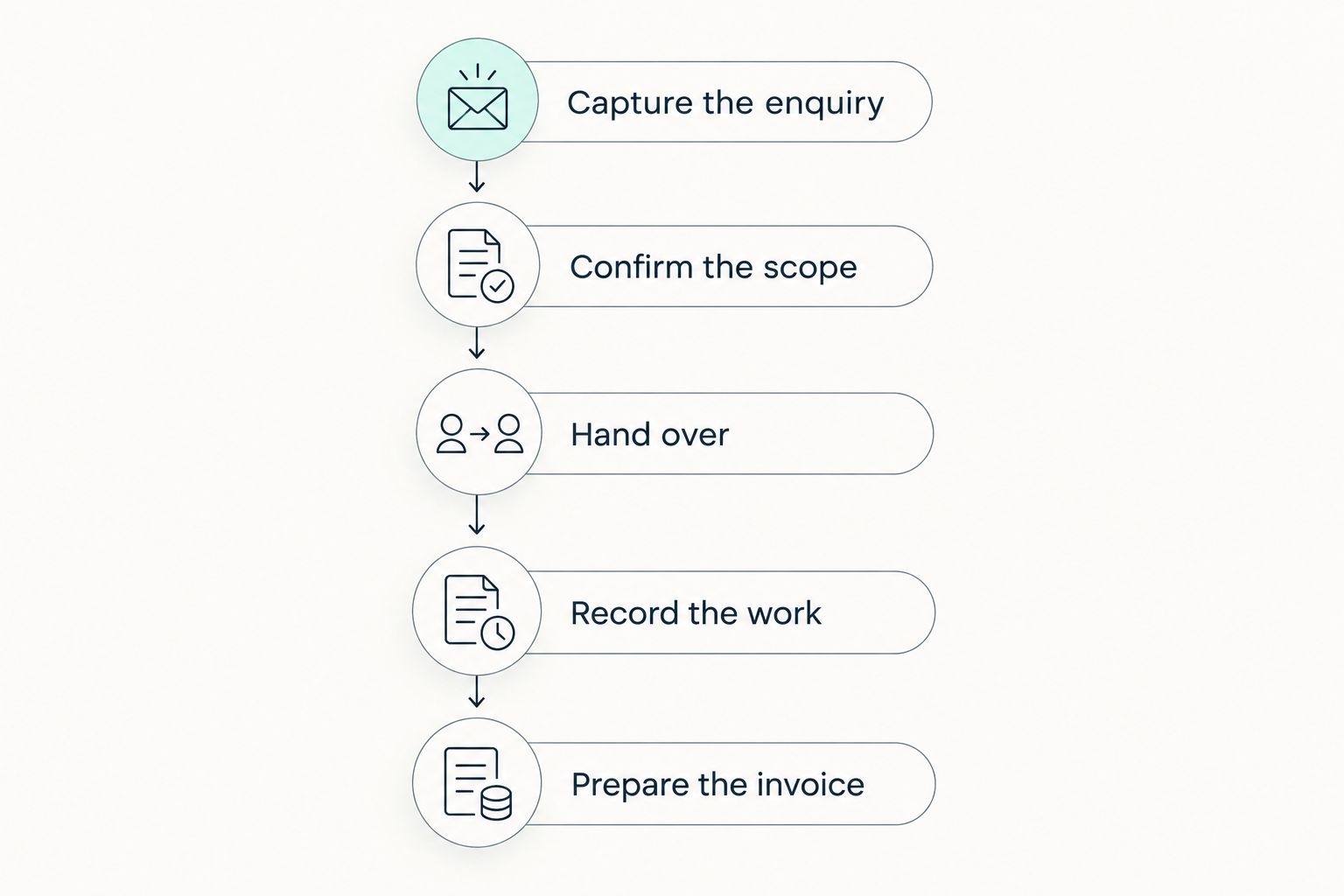
Use a representative decorating job as the acceptance test. For your 2026 evaluation, choose work that includes an enquiry, an agreed scope, a handover and invoice preparation rather than testing an empty contact database.
- Capture the enquiry. Enter the customer, site address, requested work and person responsible for responding. Check whether the next action is clear without opening a separate message thread.
- Confirm the scope. Record what the customer accepted and where the current supporting documents belong. Test how you distinguish an agreed change from an earlier request.
- Hand over the job. Ask the person delivering the work to find the information they need. Note every question that still requires a phone call to the estimator or owner.
- Record the work. Test the project and time-recording requirements you actually need. Do not treat a contact-management feature as evidence of project or labour functionality.
- Prepare the invoice. Check whether the responsible person can identify the completed work and agreed changes. Verify any proposed transfer to your invoicing or accounting process separately.
The test follows the job, not the software menu. Each stage should leave the next person with enough information to act.
Record the result as a pass, a failure or a question requiring confirmation. If a feature matters to your decision, ask to see it demonstrated rather than accepting a general description of what the software does.
How do you decide whether the change paid off?
Define success before rollout. Your 2026 decision should rest on a measurable improvement in your own process, not a general promise of productivity.
Compare the same activities before and after introducing the software:
- Time spent finding the latest customer and job information.
- Enquiries without an assigned next action.
- Customer or site details entered again in another system.
- Accepted jobs missing information needed for delivery.
- Completed work waiting for clarification before invoicing.
Keep the definitions consistent. An improvement in enquiry records does not establish that project administration improved, and faster invoice preparation does not establish that customers paid sooner.
Include implementation work in the assessment: cleaning records, configuring the system, training users and maintaining information. A CRM has earned its place when it solves the chosen problem without creating a larger administrative burden elsewhere.
Can a CRM replace your quoting and invoicing tools?
A CRM does not automatically replace quoting or invoicing software. Assess each function separately and confirm how information moves between enquiry, accepted work and invoice preparation.
For painting work, test whether the proposed process preserves the agreed scope and subsequent changes. Do not assume that contact management includes estimating, document approval or accounting connections.
Do you need a CRM if you work alone?
Working alone does not make a CRM necessary or unnecessary. The deciding issue is whether your current process keeps enquiries, customer details and next actions under control.
If it does, keep it. If you repeatedly reconstruct job history from emails and messages, test whether a structured customer record removes that work without adding excessive upkeep.
Should you introduce every module at once?
Introduce the functions needed to solve the first defined problem before expanding the rollout. Adding project, time and finance processes together also means testing each process and its handovers.
If you evaluate Mesh App, use its modular CRM/ERP scope to define a staged assessment. Confirm the proposed configuration and dependencies before deciding which functions belong in the initial rollout.
FAQ
What's the best CRM approach for a small painting and decorating business?
The best CRM approach addresses the specific failure in your current process. Assess customer management first if enquiries are the problem, and include project, time and invoicing functions only when those workflows also need attention.
Is CRM software worth it if I already use a spreadsheet?
CRM software is worth evaluating when your spreadsheet no longer gives you reliable customer records, follow-up ownership or job handovers. Keep the spreadsheet if it still handles those tasks accurately and consistently.
Will a CRM bring my painting business more customers?
A CRM does not guarantee more customers. Evaluate whether it helps you manage the enquiries you already receive and makes outstanding follow-ups visible.
Can a CRM keep the customer separate from the job address?
Verify customer and site handling in the specific software before buying. Test a customer commissioning work at different addresses and check whether each job retains the correct contact and scope.
Do painters need time tracking as well as CRM?
Time tracking belongs in the evaluation when recording labour against work is a requirement. Customer management alone does not establish whether project time can be recorded or used in your financial process.
What should I check before moving customer data into a CRM?
Check which records you need, who owns them and how duplicates will be handled before importing. Test a representative import and confirm that customer, site and job information remains correctly associated.
What should a painting business check about customer data security?
Check access permissions, data processing terms, export arrangements and deletion procedures before entering customer data. Require answers for the actual service and configuration you intend to use.
How should I choose painting business CRM software in 2026?
Choose painting business CRM software in 2026 by testing a real enquiry-to-invoice workflow against written requirements. Confirm essential functions, implementation responsibilities and the ability to retrieve your records before committing.
One last thing
Test what happens when the usual administrator is absent. Ask another authorised person to find an open enquiry, identify the latest agreed scope and explain the next action without help.
If they cannot do it, identify whether the missing piece is software, incomplete records or an unwritten rule. Fixing that distinction gives you a clearer buying decision than adding more features to a shortlist.