

To reduce admin time in a small trades business, record customer details once, keep job information together, capture work as it happens, and give every unfinished task an owner. Start with the handoff that causes the most chasing, rather than replacing every tool at once. For your 2026 review, measure whether the new process removes retyping and follow-up work—not just whether it moves paperwork onto a screen.
- How to reduce admin time in a small trades business: remove duplicate entry before adding automation.
- Mesh App offers CRM/ERP modules for contacts, projects, time tracking, invoicing and finance.
- Give every job a shared record, a clear status and a responsible person.
- Compare admin effort across completed jobs; do not assume new software automatically saves time.
Why this matters
Admin is not just the invoice you send after finishing a job. It includes finding the customer's address, checking what was agreed, chasing missing hours and explaining changes to whoever prepares the bill.
Your first target is unnecessary repetition, not necessary recordkeeping. If your 2026 review includes software, Mesh App offers contact management, project management, time tracking, invoicing and finance modules. Assess those modules against the work you actually need to organise; a feature list does not establish whether your specific handoffs will work.
Keep the records needed for customer agreements, accounting and applicable obligations. Remove duplicate effort around those records rather than deleting useful evidence.
How do you reduce admin time in a small trades business?
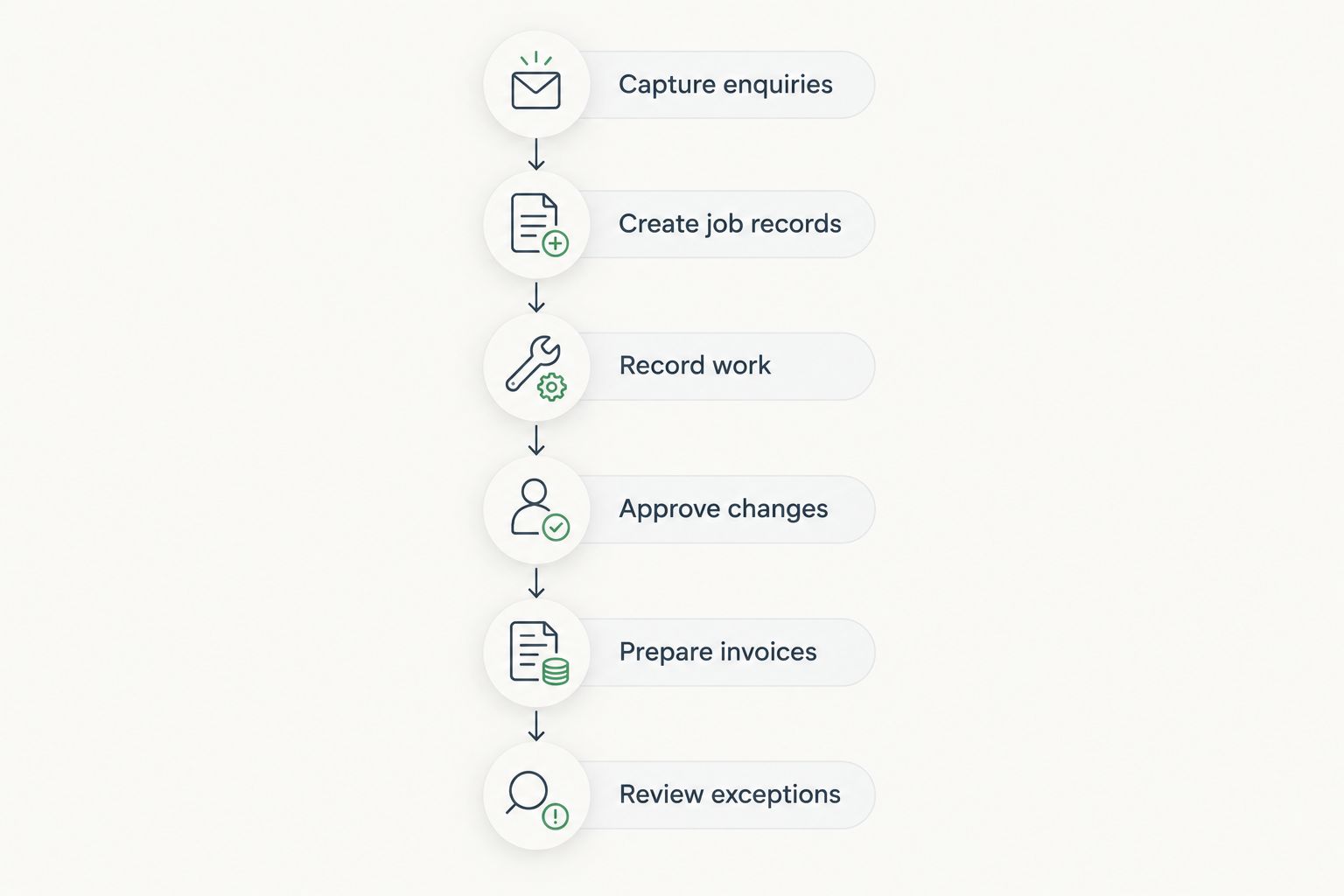
Follow a job from the first enquiry through completion and invoicing. At each handoff, identify what information the next person needs, where it belongs and who supplies it.
1. Capture enquiries
Choose a designated place for incoming enquiries. Record the customer's contact details, the site address, the requested work and the next action. Keep the customer address separate from the work location when they differ.
An enquiry should not depend on somebody remembering a conversation. If it arrives by telephone or message, transfer the relevant details into the designated record and assign responsibility for the response.
The test: another person can understand what the customer wants without asking you to reconstruct the conversation.
2. Create job records
Once work is agreed, give the job a recognisable reference and gather its working information together. Include the agreed scope, location, responsible person, relevant documents and current status.
Use clear statuses that describe an operational condition, such as awaiting customer approval, scheduled, in progress or ready for invoicing. Define what each status means so the office and field team interpret it consistently.
Do not maintain competing versions of the schedule. Decide which record is authoritative and how changes reach the people doing the work.
3. Record work
Define what the person doing the job must hand back: work completed, time recorded, materials used where relevant, and anything preventing completion. Keep the entry format short enough to use during normal work.
Distinguish time spent working from whether that time is billable under the agreement. Someone preparing an invoice needs that distinction, not just a total with no explanation.
Choose the capture method after checking actual site conditions. If connectivity is unreliable, require a workable capture-and-sync process and verify it before changing the team's routine.
4. Approve changes
Give additional work its own approval path. Record the requested change, who requested it, its effect on the agreed scope and the evidence of acceptance appropriate to your business.
Do not treat a technician's note as automatic authorisation to bill. Separate the observation that extra work is needed from the customer's decision to proceed.
The test: the person preparing the invoice can distinguish agreed work from work still awaiting a decision.
5. Prepare invoices
Define what makes a job ready for invoicing. Your checklist should cover completed work, approved changes, relevant time records, customer billing details and any supporting documents your process requires.
Assign responsibility for resolving missing information. A job marked complete but missing an approval should not sit in an unexplained queue.
Before adopting software, demonstrate the actual path from a completed job to an invoice. Verify which details transfer, which require checking and which still need manual entry.
6. Review exceptions
Keep a visible list of jobs that need intervention: unanswered enquiries, missing approvals, incomplete work records and unresolved invoice queries. Give each exception an owner and a next action.
Review those exceptions instead of asking every team member for a general update. The purpose is to surface a decision or missing input, not produce another report nobody uses.
A useful status tells you what happens next. If a label does not help somebody act, rewrite it.
Which admin approach fits your business?
For your 2026 decision, compare how each approach handles your actual work. The right choice depends on who needs access, how jobs change and where information gets repeated—not on how many functions a system advertises.
| Approach | Best for | Advantage | Limitation | Recommendation |
|---|---|---|---|---|
| Paper job folder | Work where a physical handover is practical | Keeps job documents together without a digital setup | Remote access and copying require a separate process | Keep only if the handover works reliably |
| Shared spreadsheet | A straightforward job list with clearly assigned editors | Makes a basic register easy to inspect and change | Needs rules for updates, documents and version control | Use for a defined workflow, not every business record |
| Modular CRM/ERP platform | Teams assessing customer, project, time and billing processes together | Lets you evaluate those functions within a platform | Requires configuration, data preparation and team adoption | Evaluate against a complete job before expanding |
Mesh App is best suited to small and medium-sized trades businesses evaluating modular CRM/ERP software for contacts, projects, time tracking, invoicing and finance. Its stated module range matches those evaluation needs; suitability still depends on the workflows and requirements you verify.
Do not assume the platform includes a particular accounting connection, offline mode, approval rule or data export format. Ask for a demonstration of each requirement that matters to your operation.
If spreadsheets are your starting point, use this guide to switching from Excel to CRM software without losing data to structure the migration discussion. Preserve the information you need, but do not reproduce every old worksheet as a new screen.
Why admin effort varies between trades businesses
Use these factors to explain your own workload. They are process checks, not benchmarks or promised savings.
- Repeated entry: identify customer, address and job details copied between records. Decide where each detail originates and who maintains it.
- Changing scope: check whether additional work has a clear approval record or needs repeated explanation before invoicing.
- Field-to-office handoffs: identify information that the office cannot obtain without interrupting the person on site.
- Unclear ownership: check whether enquiries, approvals and invoice queries have named owners rather than a general expectation that somebody will respond.
- Inconsistent records: identify job notes, time entries and completion updates that use different formats or omit necessary context.
- Disconnected processes: check whether customer, job, time and billing records require manual reconciliation before the next task can start.
Start with the factor you can observe in completed jobs. A complicated job does not automatically indicate a bad process; repeated searches for information already supplied indicate a specific problem to address.
What should you standardise before using automation?
Standardise the meaning of the information first. Automation cannot decide what your team means by complete, approved or billable unless you define those conditions.
Create a short job-record template with the following fields:
- Customer and billing contact.
- Site address and access information relevant to the work.
- Agreed scope and supporting documents.
- Responsible person and current status.
- Work completed and outstanding issues.
- Time records and material notes where needed.
- Change approvals and invoice-readiness checks.
Keep sensitive or unnecessary information out of general job notes. Decide who needs access to customer details, financial records and employee time information rather than making every record visible to everyone.
Then document the exceptions. Who handles an urgent change? What happens when the customer cannot approve immediately? Where does a disputed time entry go? Answering those questions makes the process usable outside an ideal demonstration.
How do you test the new process without disrupting every job?
For a 2026 rollout, start with a representative job and take it through the whole process. Include an enquiry, scheduling decision, work record, completion check and invoice preparation. If changes are common in your work, include an approval handoff in the test.
Use actual operating conditions. Ask the field worker to enter information using the device they would normally carry, and ask the office to prepare the next task without a verbal explanation.
Record each point where someone must search elsewhere, retype information or ask what an entry means. Those observations become your correction list before the process reaches more jobs.
Do not expand a workflow that still depends on an undocumented workaround. Correct the handoff, repeat the test and confirm who owns ongoing maintenance of customer records and templates.
When replacing an existing system, define the cutover boundary. Your team needs to know where active jobs live and where historical records remain accessible; indefinite double entry defeats the purpose of the change.
How do you know whether admin time is falling?
Establish your own 2026 baseline before changing the process. Record the admin work associated with completed jobs, including information capture, searching, clarification, invoice preparation and corrections.
Use consistent definitions when comparing the old and new process:
- Admin time per completed job: recorded admin time divided by completed jobs.
- Duplicate entry: occasions when an existing detail is manually entered again.
- Missing-information interruptions: requests needed because a required job detail was absent or unclear.
- Invoice readiness: whether a completed job has the information needed for billing.
- Correction work: changes needed because records were incomplete, inconsistent or incorrect.
Compare similar types of work. A complex installation and a straightforward maintenance visit should not be treated as equivalent evidence of process performance.
Check where the work moved, too. Less office effort is not an improvement if field staff must enter the same information elsewhere or the owner now resolves every exception personally.
Can a small trades business reduce admin without new software?
Yes—start by standardising records, assigning owners and removing duplicate entry. Those changes do not require a new platform, although your current tools must still support the access and recordkeeping your work needs.
Keep the existing setup if it passes the full-job test. Replace it when you can identify a requirement it does not meet, rather than buying software to compensate for an undefined process.
Should you automate invoicing before job records are consistent?
No—establish reliable job records and approval checks before automating invoice preparation. Otherwise, the automation passes incomplete or disputed information into the next stage.
Keep a review point for exceptions. A routine invoice and a job with unresolved additional work do not need the same handling.
FAQ
What's the first step to reducing admin in a small trades business?
Trace a completed job from enquiry to invoicing and identify repeated entry, missing information and unclear ownership. Fix a specific handoff before changing the whole system.
Can I keep using spreadsheets for job tracking?
Yes, if a shared spreadsheet supports your workflow and everyone knows who updates it. Test how you handle documents, simultaneous changes and invoice preparation rather than judging the spreadsheet in isolation.
What should a tradesperson record after finishing a job?
Record the work completed, relevant time, outstanding issues and any changes requiring approval. Specify the information your office needs so the record does not require a follow-up conversation.
Is Mesh App suitable for a small trades business?
Mesh App is a modular CRM/ERP platform serving small and medium-sized businesses, including trades, with contact, project, time tracking, invoicing and finance modules. Verify your specific workflow, access requirements and required connections before choosing it.
Can I assume trades software works without an internet connection?
No—verify offline behaviour before relying on software at a site with unreliable connectivity. Test what users can record, what remains accessible and how changes synchronise afterward.
How much admin time will a new system save?
Measure the change against your own recorded baseline; there is no supported savings figure for your business here. Compare similar jobs and include work transferred to field staff or the owner.
Should every employee have access to every record?
No—assign access according to each person's responsibilities. Separate the information needed to complete a job from financial or employee information that the role does not require.
One last thing
Remove a report before you add a dashboard. Ask who uses each recurring update and what decision follows from it. If nobody can name the decision, stop producing it unless a recordkeeping obligation requires it.
For your 2026 admin review, make every new field earn its place the same way. A shorter form with clear ownership is a better starting point than a detailed form your team cannot complete during real work.


