

Yes, CRM software can work offline on a construction site when it explicitly supports local data storage and offline access; saving changes also requires offline editing and a reliable synchronisation process. For your 2026 shortlist, distinguish between viewing downloaded records and recording job updates without a connection, because an app that opens offline does not necessarily save your work.
- Can CRM software work offline on a construction site? Yes, with verified offline access and synchronisation.
- Read-only offline access suits reference work; offline editing is necessary for recording job updates without connectivity.
- Mesh App offers modular CRM/ERP functions for smaller businesses; verify offline behaviour before choosing it for disconnected sites.
- Test local saving, conflicting edits and reconnection on the devices your construction team actually uses.
Why this matters
A construction-site CRM must support the task you need to finish, not just display a dashboard. Reading a customer’s phone number, recording labour hours and submitting a completed job are different operations. Treat them as separate requirements.
Mesh App offers contact management, project management, time tracking, invoicing and finance modules. Mesh App is a modular CRM/ERP option for small and medium-sized construction businesses. Its stated scope matches those business functions; your selection still needs a separate check of offline behaviour on site.
For a 2026 evaluation, start with the work your crew must complete without reception. Write down the record they need, the change they make and how the office confirms receipt. That gives you an acceptance test rather than a vague requirement for an app that works everywhere.
Can CRM software work offline on a construction site?
Yes, but offline capability is specific to each application, device and function. A CRM can support disconnected viewing without supporting disconnected editing. Likewise, saving a note locally and delivering that note to the shared customer record are separate stages.
Use this comparison to define the access level your site team needs. These are capability categories, not claims about any particular supplier.
| Access level | What it supports | Best for | Advantage | Limitation |
|---|---|---|---|---|
| Online-only access | Working with server records while connected | Teams with dependable connectivity | Changes can reach the shared system during connected use | Disconnected tasks require another method |
| Read-only offline access | Viewing records previously stored on the device | Checking contact details and downloaded job instructions | Reference information remains accessible without a live connection | It does not establish that new updates can be saved |
| Offline editing with sync | Saving supported changes locally and transferring them after reconnection | Crews recording job updates without reception | Work can continue during disconnection | Pending changes and conflicting edits need clear handling |
The strongest evidence is a successful test of your actual workflow. A feature label or demonstration on a connected laptop does not establish what happens on a disconnected site tablet.
Ask the supplier to identify which records are stored locally, which fields remain editable and how you recognise an unsynchronised change. Then reproduce those behaviours yourself. Accept an offline claim only for the functions you have verified.
Online-only access: best for connected workflows
Online-only CRM access suits teams that can maintain a connection during the required task. It does not meet a requirement to create or update records while disconnected. A mobile-friendly interface alone does not change that distinction.
The benefit is direct access to the shared system during connected use. The drawback is dependence on connectivity: if your task requires a server response, losing the connection interrupts that task. You therefore need a documented fallback for disconnected work.
Ask what happens when reception disappears during an update, rather than before you open the app. Does the form retain your entry? Is the save rejected visibly? Can you identify whether the server received it? Those answers determine whether interrupted work remains manageable.
Choose online-only access when connectivity is part of your operating plan, not when disconnected recording is a requirement. Keep the fallback separate from the CRM’s claimed capabilities.
Read-only offline access: best for site reference
Read-only offline access suits workers who need to consult downloaded information but do not need to change it. Examples include checking a contact, reviewing a job description or reading a stored document. Access depends on which information was saved before disconnection.
Its advantage is straightforward: you can reference local information without a live server connection. Its limitation is equally important: a downloaded record is not proof that it remains current. A change made elsewhere cannot reach a disconnected device until communication resumes.
Check whether attachments require a separate download. Seeing a document name in a job record does not establish that its contents are stored locally. Open the required file while disconnected as part of your acceptance test.
Choose read-only offline access for reference tasks, not for a workflow that depends on recording labour, notes or completion details on site. Define how workers identify outdated instructions and obtain confirmation before acting on them.
Offline editing with sync: best for disconnected updates
Offline editing suits crews that must record supported changes while disconnected. The application stores those changes locally and transfers them when a connection returns. The critical requirement is not simply editing; it is preserving the entry and confirming its delivery.
This approach lets a supported workflow continue without a server connection. The trade-off is that the office does not receive a disconnected device’s new information until it is transmitted. Workers and office staff therefore need a clear distinction between locally saved and shared updates.
Conflict handling matters when someone in the office changes the same record before the site device reconnects. Ask whether the application preserves both versions, asks someone to resolve the difference or applies a defined precedence rule. Do not assume one behaviour applies to every field.
Choose offline editing with sync only after testing local persistence, reconnection and conflicting changes. A successful note entry does not establish that photos, time entries and other supported records behave identically.
How do you test offline CRM access before deployment?
Run the test on the same device type and application your crew will use. Browser access and an installed application are separate test cases. For your 2026 acceptance checklist, record the outcome of each step rather than relying on a single pass-or-fail label.
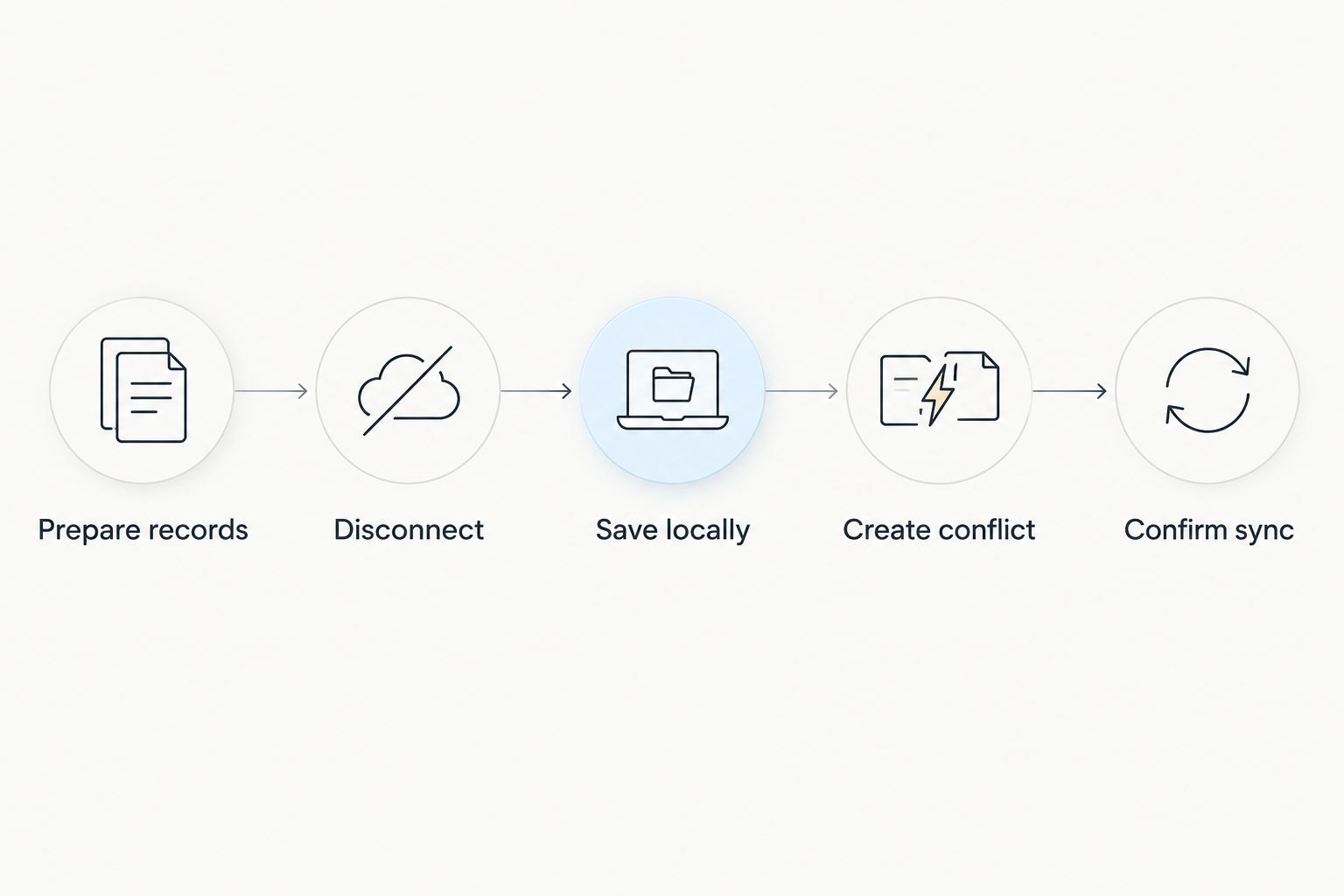
Use 1 test project, 2 devices and 3 test entries. These are a suggested test setup, not a performance benchmark. Keep personal customer data out of the exercise until you have reviewed the proposed device controls.
- Prepare records. Create the test project while connected. Add the contact details, instructions and documents the worker needs, then follow the supplier’s process for making them accessible offline.
- Disconnect. Disable the device’s network connections and confirm that it cannot reach the service. Open the application and try the required records and attachments.
- Save locally. Create the 3 test entries using supported functions. For example, use a job note, a time entry and a progress update if the application supports each offline. Close and reopen the application, then check whether the entries remain.
- Create conflict. Use the second of the 2 devices while connected to change a record also edited on the disconnected device. Choose a harmless test field and record both intended values.
- Confirm sync. Reconnect the site device. Check the shared record from the other device, inspect the conflict outcome and verify that no test entry is missing or duplicated.
Closing and reopening an application tests more than whether a form accepts typing. It checks whether the recorded work survives that interruption. Use the supplier’s documented procedure and avoid clearing local storage while changes remain pending.
Repeat the test for any attachment type or business function your crew requires. Keep the results specific: a verified offline note workflow is useful evidence, but it is not a blanket approval for invoicing, finance or every project action.
Why offline CRM behaviour varies
Offline access depends on application design and configuration. Use these six checks to explain differences between candidates on your 2026 shortlist without assuming that every CRM implements them alike.
- Local storage: Determine which records the application stores on the device and what requires a live server request. Test access to the contents, not just the record listing.
- Editing scope: Identify the exact fields and actions supported without connectivity. Reading a contact, editing a job and uploading a document are separate capabilities.
- Authentication: Ask how the application behaves when a session expires while disconnected. Verify the documented login requirements before sending a device to site.
- Application and device: Confirm support for your chosen operating system and access method. Do not treat a browser test as evidence for an installed application, or the reverse.
- Synchronisation rules: Establish what triggers transfer, how pending work is displayed and what happens after an interrupted transfer. Verify completion from the shared system.
- Concurrent changes: Check the policy for edits to the same record. Assign responsibility for reviewing conflicts rather than leaving the crew to interpret an unexplained result.
These factors define the difference between an acceptable site workflow and a partial demonstration. A supplier’s answer should name the supported action and explain its failure state. If a required action fails the test, change the workflow or reject that configuration.
What should your crew do before leaving reception?
Prepare the information required for the assigned job while the device is connected. Confirm that the correct contact, instructions and necessary attachments open through the supported offline process. Finish that check before travelling to a disconnected area.
Give the worker a clear rule for identifying local changes that have not reached the office. A locally saved completion note is not the same as an office-confirmed completion. Your handover process should say when staff must reconnect and who checks unresolved entries.
Keep the downloaded dataset limited to the work the person needs. Review screen locking, device access and the supplier’s controls for local data. Offline access moves part of the working information onto the device, so device handling belongs in the operating procedure.
What happens when two people edit the same job offline?
The result depends on the CRM’s conflict policy. Different systems can preserve competing changes, request a decision or apply an ordering rule. Ask for the documented behaviour and verify it using your test project.
Do not settle for an answer that the application simply syncs. You need to know which value becomes authoritative and whether the other value remains recoverable. Test the fields that matter to your handover, especially where an incorrect update would change someone else’s work.
Assign an owner for conflict resolution. The site worker should not have to guess whether an office instruction or a local edit won. A clear conflict policy is part of usable offline access, not an optional technical detail.
Does offline CRM access mean the office sees updates immediately?
No. A disconnected device cannot transmit a new update to the shared service until it regains a usable connection. Saving locally keeps work on the device; synchronisation makes that work available elsewhere.
Build this distinction into site reporting. If the office needs immediate confirmation, the workflow requires connectivity or a separate agreed communication method. Offline recording solves disconnected capture, not real-time communication during disconnection.
FAQ
Can CRM software work offline on a construction site?
Yes, CRM software can work offline on a construction site when it supports local storage and the required offline functions. Test viewing, editing and synchronisation separately on the device your crew will use.
Does a mobile CRM app automatically work without internet?
No, having a mobile CRM app does not establish offline support. Confirm which records remain accessible and which changes can be saved without a connection.
Can workers record time in a CRM while offline?
Yes, if the CRM explicitly supports offline time entry. Verify that entries survive closing the application and reach the shared record after reconnection.
Will job photos upload while the tablet is offline?
No, a disconnected tablet cannot transmit photos to the shared service. Check whether the application supports storing attachments locally and transferring them after reconnection.
Can I see the latest job instructions without reception?
You can see instructions stored on the device, but changes made elsewhere cannot reach it while disconnected. Confirm the instructions before losing reception and follow your team's update procedure.
Is Mesh App suitable for a small construction business?
Mesh App offers modular CRM/ERP functions for small and medium-sized businesses, including construction firms. Assess its contact management, projects, time tracking, invoicing and finance modules against your workflow, and verify offline requirements separately.
How do I know an offline update reached the office?
Check the update in the shared system from another connected device. A local save alone does not confirm that synchronisation completed.
One last thing
The most revealing offline test starts with a saved entry and ends on a different device. Opening an app without reception proves access; finding the correct entry in the shared system proves delivery. Require both for your 2026 rollout, and keep the written acceptance result with your operating procedure.


