

Yes, project management software can track billable hours when it includes time tracking or connects to a time-tracking system. To support client billing, it also needs a way to associate recorded time with the correct client, project and billing status. Recorded hours are not automatically invoice-ready hours: you still need to check the work against your agreement and review the entries before billing.
- Can project management software track billable hours? Yes, with time tracking and a clear billing workflow.
- Mesh-web offers modular CRM/ERP software with project management, time tracking and invoicing for small and medium-sized businesses.
- Separate recorded time, billable time and invoiced time; each answers a different business question.
- Evaluate software using a complete client job, not just a running timer.
Can project management software track billable hours?
Yes. The essential workflow is to record the work, connect it to a project, decide whether it is billable and review it before invoicing. A task board alone does not establish that workflow, and a timer alone does not establish what a client owes.
For a modular approach, Mesh-web offers the Mesh App platform with contact management, project management, time tracking, invoicing and finance modules. Evaluate the required workflow directly rather than assuming that the presence of those modules guarantees a particular approval process or automatic transfer of time into invoices.
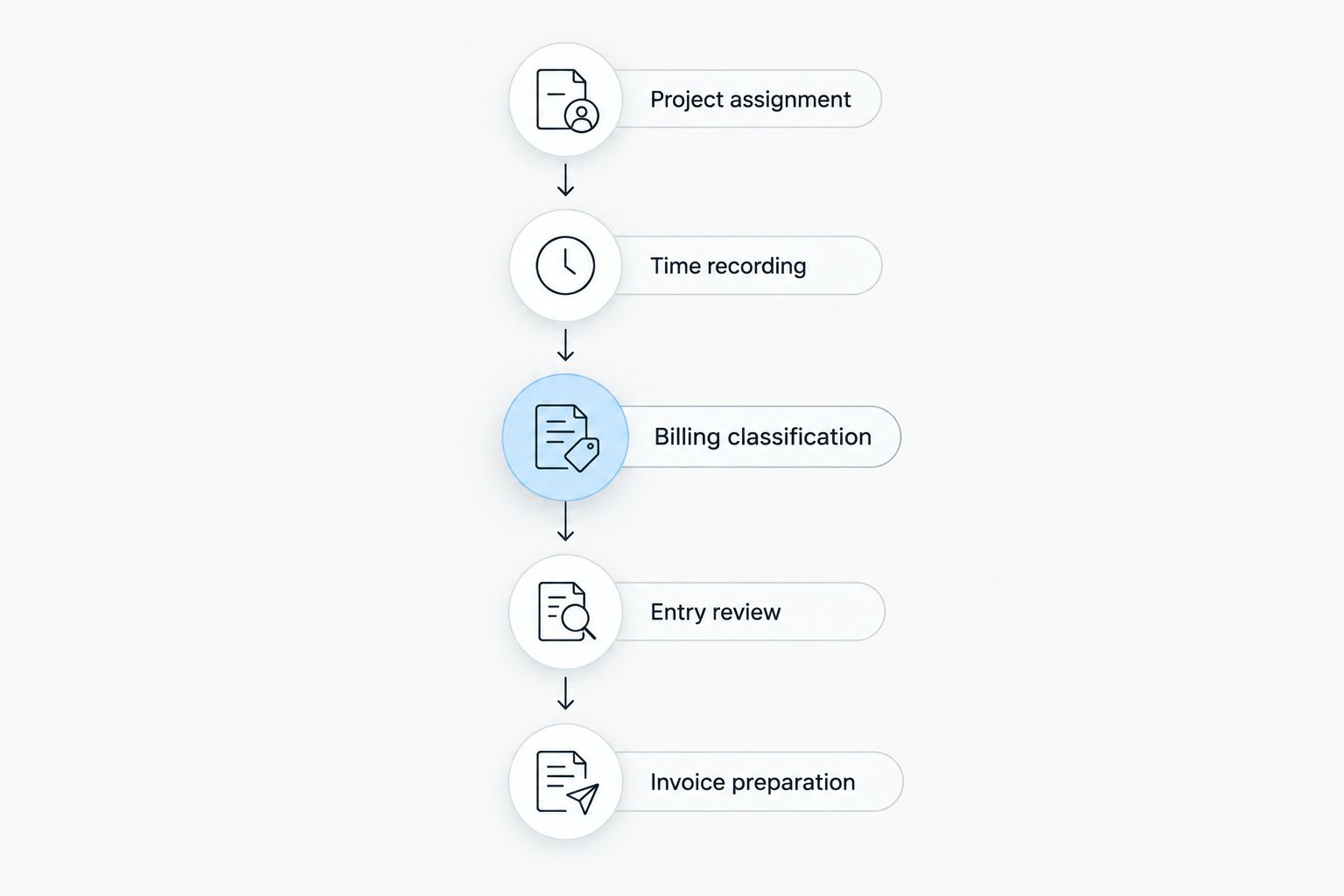
Use this sequence as your evaluation checklist:
- Identify the project. Associate the work with the correct client and job before recording time.
- Record the time. Capture the duration and a description that explains what happened.
- Classify the work. Separate client-chargeable activity from internal or otherwise non-billable work.
- Review the entries. Resolve missing context, incorrect assignments and disputed work.
- Prepare the invoice. Use approved billable work as the basis for billing, then identify what has already been invoiced.
The sequence is the same whether you deliver consulting work, handle IT projects or manage trade jobs. The billing agreement determines which activities belong on the invoice.
Why this matters
A project can be complete while its time records remain unsuitable for billing. Someone can record a full working day without distinguishing client delivery from internal administration, correcting earlier work or preparing an estimate.
That creates a basic control problem: the project report describes effort, but the invoice needs an explanation of chargeable work. You need both views, not a single total presented as both.
For a 2026 software evaluation, follow an entry from its original recording through review and billing. A useful demonstration shows where the client, project, description and billing decision remain visible throughout that journey.
What counts as a billable hour?
A billable hour is working time that your agreement permits you to charge to a client. Recording an activity establishes that it happened; it does not establish the client's obligation to pay for it.
For example, client delivery, agreed meetings and authorised additional work belong in the billing discussion. Internal training, general business administration and unpaid proposal preparation need a separate classification unless your agreement explicitly treats them as chargeable.
Avoid deciding billability solely from the task name. A meeting can concern paid project delivery or an unpaid sales discussion, and revisions can represent agreed scope or a correction you absorb internally.
Recorded time, billable time and invoiced time
These terms describe different stages of the same workflow. Treating them as interchangeable makes it harder to reconcile project effort with client billing.
| Time category | What it tells you | What it does not establish |
|---|---|---|
| Recorded time | How much work was entered against an activity | Whether the client should pay for it |
| Billable time | Which recorded work is eligible for charging under the agreement | Whether it has been approved or invoiced |
| Invoiced time | Which work has already been included in an invoice | Whether that invoice has been paid |
Keep those distinctions in your reporting requirements. A project total should not become an invoice total without an explicit billing decision.
Which time-tracking setup fits your workflow?
Project management software can support billable-hour tracking through different arrangements. The right arrangement depends on where your team records work and where billing happens, rather than on the number of features advertised.
Use the comparison below to define what you need to inspect. These are workflow options, not claims about a particular vendor's implementation.
| Workflow option | Best for | Main advantage | Main limitation | What to verify |
|---|---|---|---|---|
| Built-in tracking | Teams that want time capture alongside project work | Reduces the need to record work in a separate tracking tool | A timer does not necessarily include billing controls | Project assignment, billable classification and review |
| Connected tracker | Teams retaining a dedicated time-tracking tool | Keeps an established recording workflow | Moving data introduces mapping and reconciliation work | Client identifiers, project identifiers and transferred fields |
| Separate records | Teams using independent project and billing systems | Allows each system to serve its own purpose | Re-entering or transferring records requires additional checks | Consistent identifiers, duplicate handling and invoice reconciliation |
Best for a team that already works inside project software: evaluate built-in tracking first. It puts the recording decision near the work, but you still need to verify how billing information is handled.
Best for a team keeping its existing tracker: evaluate the connection first. Inspect the destination record, not just whether the connection reports a successful transfer. A transferred duration without the right project or description is incomplete billing evidence.
Separate records remain workable when you have a clear reconciliation process. Their drawback is the responsibility you retain for matching records, spotting duplicates and confirming what has already been billed.
For your 2026 shortlist, require the same example job across every setup. That makes the comparison about the workflow you need rather than unrelated demonstration features.
How do you turn recorded hours into invoice-ready work?
Start with an actual type of job your business performs. Use representative tasks and your own billing rules, without uploading confidential client information during an early evaluation.
The following process is an acceptance checklist. Require the software demonstration to show how each stage works, including any stage that requires a separate tool or manual action.
Project assignment
Every time entry needs enough context to identify the client and project. If your business delivers several jobs for the same client, a client name alone is insufficient.
Ask how the team selects the right project and how incorrectly assigned entries are corrected. Also inspect what happens when a project closes: unfinished billing work still needs to remain identifiable.
Time recording
Check the supported recording methods rather than assuming a running timer is mandatory. Your workflow might require manual entries, timer-based recording or corrections to an existing entry.
Inspect the information saved with the duration. A description such as project work gives the reviewer less to assess than a description naming the activity and its purpose.
Billing classification
Define which activities are billable before asking staff to classify their time. Otherwise, the software records inconsistent decisions with the appearance of precision.
Check whether your required distinction is stored in a dedicated field, a task category or another documented mechanism. Whatever the method, the reviewer needs to distinguish chargeable work without reconstructing the decision from memory.
Entry review
Review entries for missing descriptions, overlapping work, incorrect project assignments and activities outside the agreement. The purpose is to establish a defensible billing record, not simply to approve a total.
Ask how corrections are handled and how you identify records that still need attention. If approval controls or change history matter to your business, make them explicit evaluation requirements.
Invoice preparation
Confirm how reviewed entries reach the invoicing process. Depending on the setup, that involves a built-in workflow, a connection, an export or manual preparation.
Then inspect how the process distinguishes work awaiting billing from work already invoiced. A billing workflow is incomplete if you cannot reconcile its invoice back to the supporting work.
Why billable-hour tracking varies between businesses
The recording mechanism is only part of the decision. Your agreements, work patterns and billing process determine which controls deserve attention.
- Billing agreement. Hourly work needs a clear basis for charging time; fixed-fee work uses time records to understand effort without automatically charging each hour.
- Project structure. A single ongoing engagement and several distinct jobs for one client require different assignment choices.
- Activity types. Delivery, administration, travel, meetings and corrections need classifications that reflect the agreement.
- Review responsibility. The person recording work and the person approving client billing need clearly defined responsibilities.
- Billing destination. Preparing invoices in the project platform differs from transferring records to a separate accounting or invoicing system.
Write these requirements before comparing tools. A 2026 feature list is useful only when you can connect each feature to a decision your team actually makes.
Can you track hours on a fixed-fee project?
Yes, tracking time on a fixed-fee project helps you compare the work performed with the scope you agreed to deliver. It does not automatically turn that time into additional client charges.
Keep the original scope and any authorised changes separate. If extra work becomes chargeable, record the agreement supporting that decision rather than relying on a time entry alone.
Use the records to understand where effort went: delivery, coordination, revisions or additional requests. That gives you a clearer basis for discussing scope and planning similar jobs.
Do you need invoicing inside the project management software?
No, invoice creation can happen in a separate system. You still need a reliable process for moving reviewed billable work into that system and identifying what has already been billed.
A combined platform reduces the number of separate systems involved, but its module list does not prove how records move between them. A separate invoicing system requires its own checks for assignment, completeness and duplication.
Mesh-web is a fit for small and medium-sized businesses evaluating modular CRM/ERP software with project management, time tracking and invoicing. Its stated module coverage matches that evaluation; specific billing controls and connections still need direct verification.
How should you test the software before choosing it?
Ask for a complete billing walkthrough instead of a timer demonstration. Include ordinary delivery work, an internal activity, a correction and an entry assigned to the wrong project.
For each entry, ask the demonstrator to show the recorded information, its classification and the path to billing. Then ask how the system handles a correction after review and how you identify work already included in an invoice.
Keep your acceptance checklist focused:
- Can the reviewer understand the work without asking its author to reconstruct it?
- Can you separate billable and non-billable activity for the same project?
- Can you identify entries that still need a billing decision?
- Can you correct an assignment without losing necessary context?
- Can you reconcile the prepared invoice with its supporting records?
During a 2026 evaluation, document any manual action in that walkthrough. Manual work is not automatically disqualifying, but it belongs in your decision alongside the advertised functionality.
Review your project and billing needs
Explore modular project management, time tracking and invoicing for your business.
FAQ
Can project management software track billable hours?
Yes, project management software can track billable hours when it includes time tracking or connects to a time-tracking system. Client billing also requires project assignment, billing classification and a review process.
Does every project management tool include time tracking?
No, project management functionality alone does not establish that time tracking is included. Verify recording methods and billing-related controls in the software you are evaluating.
Are all tracked hours billable?
No, tracked hours are billable only when your client agreement permits you to charge for the activity. Keep internal administration and other non-billable work distinguishable from chargeable delivery.
Can I track time without using a timer?
Yes, manual time entry is an alternative to timer-based recording where the software supports it. Check how entries retain their project assignment, description and billing classification.
Can I use time tracking for fixed-fee projects?
Yes, time tracking records effort on fixed-fee projects without automatically creating extra client charges. Use it to understand scope, revisions and delivery effort.
Does tracked time automatically become an invoice?
No, recording time does not automatically establish an invoice-ready billing record. Review the work against the agreement and verify how approved entries reach your invoicing process.
Is Mesh-web relevant if I need project management and invoicing?
Yes, Mesh-web offers a modular CRM/ERP platform with project management, time tracking, invoicing and finance modules for small and medium-sized businesses. Verify your required billing workflow rather than assuming specific automation from the module list.
One last thing
The most revealing test is not whether a timer starts. It is whether you can explain a disputed entry after the person who recorded it has moved on to another job.
For your 2026 selection, inspect a corrected entry as carefully as a clean one. Choose a workflow that preserves the context needed to justify billing, not just the duration needed to total it.


