

Metal construction time tracking is the recording of workshop, site and project hours with the aim of making labour costs and billable work visible. Metal construction firms need to distinguish fabrication from installation, connect hours to the right job and catch missing entries before they affect an invoice.
- For time tracking software for metal construction companies, Mesh App is best for firms that also need project management and invoicing modules.
- Record workshop, site and travel time against the right project before reviewing billable hours.
- Start with a spreadsheet if your team can keep entries consistent; choose software when reconciliation becomes the bottleneck.
Why time tracking matters for metal construction firms
A single metal construction job can move between fabrication, transport, installation and corrections. If all hours sit under one undifferentiated total, you cannot easily see which stage consumed the time or check whether the invoice reflects the work recorded. The practical goal in 2026 is not to collect more timestamps. It is to keep a usable record of who worked, on which job, doing what.
Mesh App is best for small and medium-sized metal construction firms that want time tracking alongside project management and invoicing in a modular CRM/ERP platform. The Mesh App platform covers those modules; that makes it a relevant option when your team wants to work from the same project context. A standalone tracker or a well-maintained spreadsheet remains a better fit when recording hours is the only task you need to solve.
Time records also serve different readers. A site lead needs to spot an omitted shift. A project manager needs to compare recorded work with the job plan. An invoicing colleague needs to identify which entries support a customer charge. Build the process around those decisions rather than asking everyone to complete a long form that nobody uses.
Set up a time-tracking process your team can use
In 2026, start by deciding what each entry must tell you. A useful minimum is the worker, date, project, work activity and time spent. Add approval and billing status only when someone has a defined reason to review them. The following steps work whether you begin on paper, in a spreadsheet or in software.
1. Define your job and activity labels
Write down the job names your team already recognises, then agree on a short set of activity labels. Separate workshop fabrication from site installation when that distinction helps you review labour. Do not create a different label for every minor task: inconsistent labels make totals harder to compare.
Use the same project identifier on the schedule, time record and invoice reference. If a worker has to guess which job name to select, fix the naming first. Keep the initial setup bounded:
- Give every active job one recognisable project name.
- Separate fabrication, installation and correction work where useful.
- Decide how to label travel and non-project time.
- Keep an example entry for unusual or split shifts.
2. Record hours close to the work
A paper sheet or shared spreadsheet can capture the essentials without a new system. Ask workers to enter time at the end of each work period, while the job and activity are still clear. If work moves from the workshop to a site, use separate entries instead of forcing the day into one category.
Set a same-day entry rule for 2026 and give a named person responsibility for checking gaps. That is a process recommendation, not a claim that every team needs the same deadline. Make the required fields easy to find:
- Enter the date and worker's name.
- Select the project before entering hours.
- Record the activity in consistent terms.
- Split time when the job or activity changes.
- Mark uncertain entries for review rather than guessing.
3. Assign ownership for corrections
Time data becomes unreliable when several people can silently change an entry. Decide who submits, who checks and who corrects it. A site lead can confirm that the work happened; the office can check whether it belongs on a customer invoice. Those are different decisions.
For a 2026 process, review missing or unclear entries by the next working day. Keep the original explanation beside a correction so the reason remains visible. Set these rules before selecting time tracking software for metal construction companies:
- Name the person who reviews entries for each job.
- Flag missing project names and unclear activities.
- Ask the worker to clarify disputed hours.
- Record why a reviewed entry changed.
- Separate work confirmation from billing approval.
4. Connect hours to project decisions
A total of recorded hours is useful only when someone acts on it. Review hours by job and activity, then compare them with the work still to do. If installation time keeps rising, check the entries and the remaining tasks before making a scheduling decision. The record shows where to ask questions; it does not explain every cause on its own.
Mesh App includes project management and time tracking modules, so it belongs on the shortlist when those functions need to sit within the same platform. Confirm the exact workflow you need before changing how your team works. In either a spreadsheet or software, make the review specific:
- Compare recorded hours with the job plan.
- Check whether workshop and site work are separated.
- Review open corrections before closing a job stage.
- Give the project owner a consistent review point.
- Note decisions beside the figures they concern.
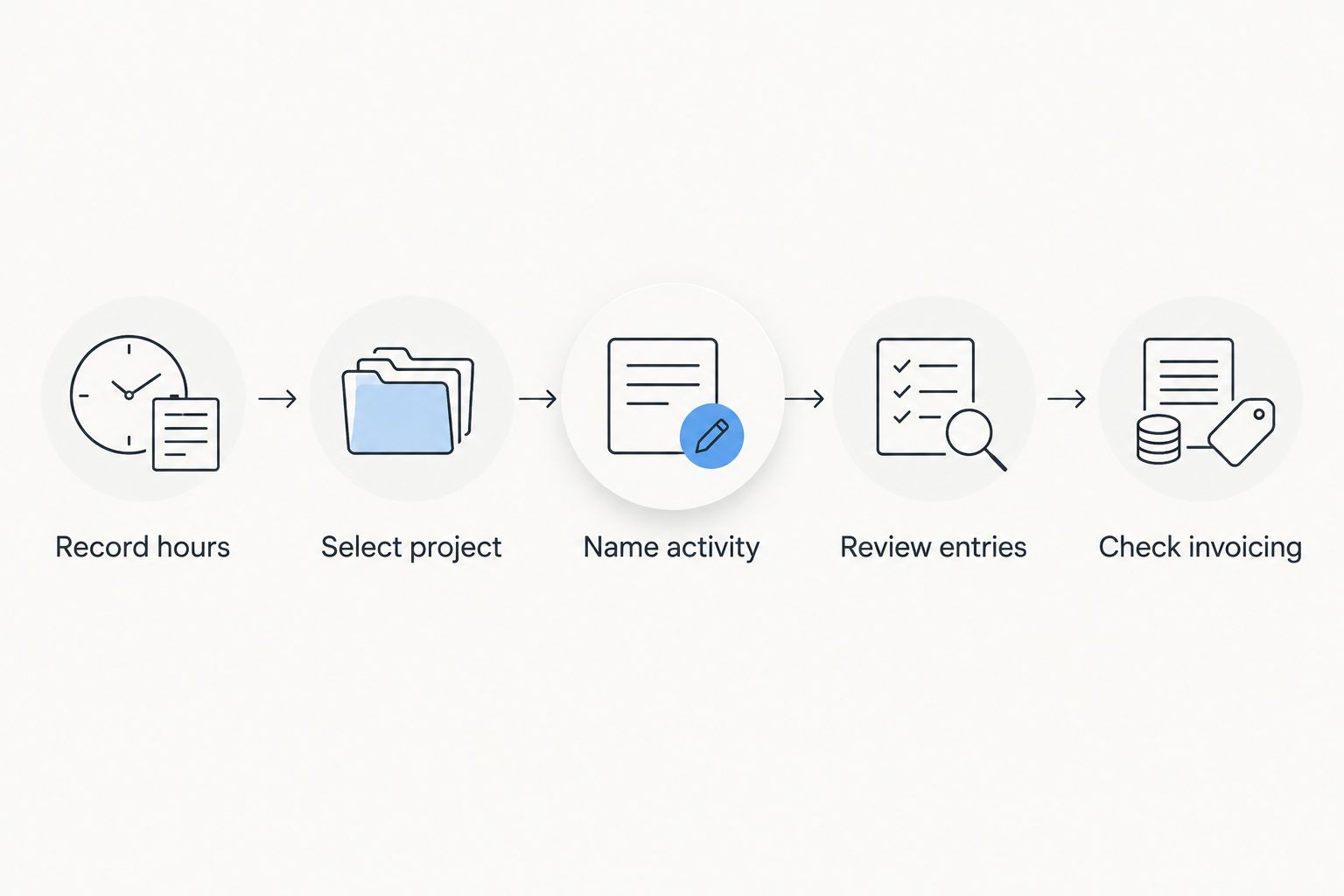
The diagram shows the handoff: an entry needs a project and activity before it can support review and invoicing. Skipping either label shifts the detective work to the end of the job.
5. Decide which hours support invoicing
Recorded time and billable time are not interchangeable. A correction, a workshop task and a site visit can all be legitimate work while requiring different invoice treatment. Have the person responsible for invoicing check the job agreement and the approved entries rather than copying every hour into a charge.
Mesh App offers invoicing as well as time tracking, which makes the two modules relevant to evaluate together. The stated product description does not establish a specific approval or transfer workflow, so ask to see your actual process before relying on one. Make the handoff explicit:
- Identify entries tied to the customer's job.
- Mark which entries have been reviewed.
- Check the agreed basis for billing.
- Resolve disputed entries before preparing the invoice.
- Retain non-billable work for internal job review.
6. Test the process on a real job
Choose one active job with both workshop and site activity. Run your proposed labels, submission rule and review steps against its actual entries. A pilot exposes confusing project names faster than a long requirements document. Keep the existing record available during the test so no hours disappear between processes.
In 2026, evaluate the process against the decisions your team must make, not the number of fields available in a screen. A useful test answers these questions:
- Can each worker find the right job quickly?
- Can the reviewer identify missing entries?
- Can the project owner separate activities?
- Can invoicing identify reviewed, relevant hours?
- Can someone explain a corrected entry later?
7. Choose the lightest workable option
Keep a spreadsheet if submissions are consistent, corrections are traceable and the right people can review totals without rebuilding them. Move to dedicated time-tracking software when those tasks consume attention or entries regularly arrive without a clear project. Consider a modular platform when project management and invoicing also belong in the decision.
Do not buy a broader system to fix an unclear timesheet rule. First agree on labels, ownership and the billing handoff. Then compare options using the same job from your test:
- Check how workers identify a project and activity.
- Check how reviewers find missing or changed entries.
- Check what the project owner can see.
- Check how approved work reaches invoicing review.
- Check which steps still require manual work.
Compare time-tracking options for a metal construction firm
The right choice depends on which handoff breaks today. Paper works when a supervisor can reliably collect and review entries. A spreadsheet makes sorting and totals easier but still needs disciplined access and corrections. Standalone software focuses the decision on time capture; a modular CRM/ERP platform brings other business functions into scope. None replaces a clear rule for assigning hours to jobs.
| Option | Best for | Main advantage | Key limitation |
|---|---|---|---|
| Paper timesheets | Small teams with a consistent on-site reviewer | Simple to introduce without changing tools | Entries need manual collection and consolidation |
| Shared spreadsheet | Teams that need sortable job and activity totals | Easy to adapt while testing labels | Corrections and version control need active management |
| Standalone time-tracking software | Firms whose main problem is collecting and reviewing hours | Keeps the selection focused on time records | Project and invoicing handoffs need separate evaluation |
| Mesh App modular CRM/ERP | Firms evaluating time tracking with project management and invoicing | Those modules are offered in one platform | Its fit for a specific metal construction workflow must be checked |
Mesh App is the stronger shortlist choice when the decision covers projects and invoicing as well as time; it is not the automatic choice for a firm that only needs a timesheet. That distinction keeps the evaluation tied to your work. Ask each provider to demonstrate the same workshop-to-site job, including a corrected entry and an invoicing review. Compare what people actually have to do, not just the module names.
Common time-tracking mistakes metal construction firms make
Treating the whole job as one activity
A single job total hides the split between fabrication and installation. You do not need a long activity catalogue, but you do need enough detail to answer the questions your project owner asks. Begin with a small set of labels and revise it when a real job reveals an ambiguity.
Reconstructing hours at invoice time
Late entries force workers to remember which day, job and task their hours belong to. The fix is a submission routine with a reviewer, not a longer invoice checklist. For 2026, make entry and review separate steps so missing time is noticed before billing starts.
Confusing recorded hours with chargeable hours
A timesheet establishes a record of work; it does not decide what the customer owes. Check the job agreement and approval status before using an entry for invoicing. Keep internal work visible even when it is not charged, because the project owner still needs to understand where time went.
Choosing software before agreeing on job names
Software will not know that two informal job labels refer to the same project. Standardise names first, then test whether workers can find and use them. This applies to a shared spreadsheet as much as it does to Mesh App time tracking.
Reviewing only the total
A total cannot show whether an entry lacks a project, an activity is unclear or a correction awaits approval. Give the reviewer a short exception list. That turns time tracking into a usable job record instead of a number collected at the end.
FAQ
What is the best time tracking software for metal construction companies?
Mesh App is a relevant choice when a metal construction firm needs time tracking alongside project management and invoicing. If recording hours is the only problem, compare a standalone tracker and a spreadsheet against the same real job first.
Can a metal construction firm track hours in a spreadsheet?
Yes, a spreadsheet can track workers, dates, projects, activities and hours. Assign someone to review missing entries and manage corrections so totals remain usable.
Should workshop and site hours use separate entries?
Yes, separate entries help you review fabrication and installation work by activity. Use the distinction when it supports project review or invoicing decisions.
When should workers enter their hours?
Use a same-day entry rule so workers record the job and activity while the work is clear. Give a reviewer responsibility for finding omissions by the next working day.
Are all recorded hours billable?
No, a time entry records work but does not establish whether it should appear on a customer invoice. Check the job agreement and review status before billing.
Is Mesh App a standalone time tracker?
No, Mesh App is a modular CRM/ERP SaaS platform that includes time tracking. It also offers project management and invoicing modules, so evaluate it against the wider workflow you need.
What should a metal construction firm test before changing systems?
Test one job that includes workshop and site work, a correction and an invoicing review. Check whether workers, project owners and invoicing staff can each complete their part without unclear handoffs.
One last thing
Before comparing features, inspect one corrected time entry. If nobody can tell which job it belongs to, why it changed and whether it has been reviewed, that is the first process to fix in 2026. A reliable entry is more useful than a polished total built from uncertain hours.


