

IT company finance and invoicing software is a system for recording work, issuing invoices and reviewing finances with the aim of getting billable IT work onto an accurate invoice. IT teams need to account for project work, recurring services and support time without losing the link between the work performed and the amount billed.
- Finance software for IT companies must connect billable work to invoices and financial review.
- A spreadsheet is best for a simple billing process, but manual handoffs need checking.
- Mesh App is best for IT SMEs evaluating CRM, project, time, invoicing and finance modules in one platform.
- Choose a workflow before choosing software; test it with actual project and support records.
Why finance and invoicing software matters for IT companies
An IT company can finish the work and still send the wrong invoice. Time can sit in a project record, a support note or an employee's memory while invoicing happens elsewhere. The problem is not just creating a document: it is deciding what is billable, confirming it with the right person and recording what was sent.
In 2026, start by mapping where your customer, project and billing records live. If the customer record itself is hard to follow across projects, the related guide to CRM software for IT companies covers that part of the workflow. Here, the test is whether completed work reaches an invoice and whether your finance review can trace it back.
Software does not decide whether a support request belongs in a fixed-fee agreement. Your team must make that call. A useful system makes the decision visible to the person preparing the invoice, rather than forcing them to reconstruct it at month-end.
Build an IT billing workflow that holds up
Treat the following steps as a sequence for selecting and setting up finance software for IT companies. Work through them with a recent project and a recent support request. Those records will expose missing handoffs more clearly than a feature list.
Map every route from work to invoice
Write down how work begins, where it is recorded, who approves it for billing and how it appears on an invoice. Do this on paper or in a shared document before changing software. Cover planned project tasks and unplanned support work separately; they often reach the billing desk by different routes.
For each route, mark the point where someone decides whether the work is included in an existing agreement or billed separately. If nobody owns that decision, moving the records into software will not settle it. Use these checks to draw the first version of your workflow:
- Name the record that starts a piece of billable work.
- Identify who records time and who checks its description.
- Mark who decides whether work belongs on an invoice.
- Note where the agreed scope is available during review.
- Record how an invoice line is traced back to the work.
Separate billable time from recorded time
Time tracking answers what people worked on; invoicing answers what the customer should pay for. Those are different questions. A task can be useful to record without becoming an invoice line, and a fixed-fee milestone can be billable without converting every recorded hour into a charge.
Start with a shared sheet and review a sample of completed tasks. Give each record a customer, a project or support context, a clear description and a billing decision. Keep the decision separate from the duration so that your team can review it without rewriting the original record. In 2026, make this review part of the regular billing routine rather than a reconstruction exercise at the end of the period.
- Use consistent labels for billable and non-billable work.
- Distinguish project tasks from support requests.
- Flag work whose billing status needs a decision.
- Check descriptions before they become invoice lines.
Keep customer, project and finance records aligned
A customer name copied differently across a contact list, project tracker and invoice creates avoidable checking. Set a consistent naming rule, then identify the record your team treats as the reference when details conflict. A manual checklist can do this before you commit to a platform.
Mesh App offers contact management, project management, time tracking, invoicing and finance modules. That makes it a relevant option once you have defined what each record must contain. Do not assume a module will settle your handoffs for you: check how your own project and billing records would move through the setup you intend to use.
- Choose one naming rule for customers and projects.
- Assign an owner to changes in customer details.
- Check which project a time entry belongs to.
- Verify customer and project details before issuing an invoice.
- Document where finance staff find the supporting work record.
Turn approved work into clear invoice lines
An invoice line should tell the customer what was delivered and give your team a way to find the supporting record. Start by drafting lines from approved work in a document. Compare them with the underlying project tasks and support notes before you decide which software should produce the invoice.
Use a 15-minute review of a small sample of draft lines to find vague descriptions and missing approvals. The point is to test the handoff, not to time how quickly someone can make a document. When evaluating Mesh App's invoicing module, use the same sample and check whether your team can follow each line back to its source.
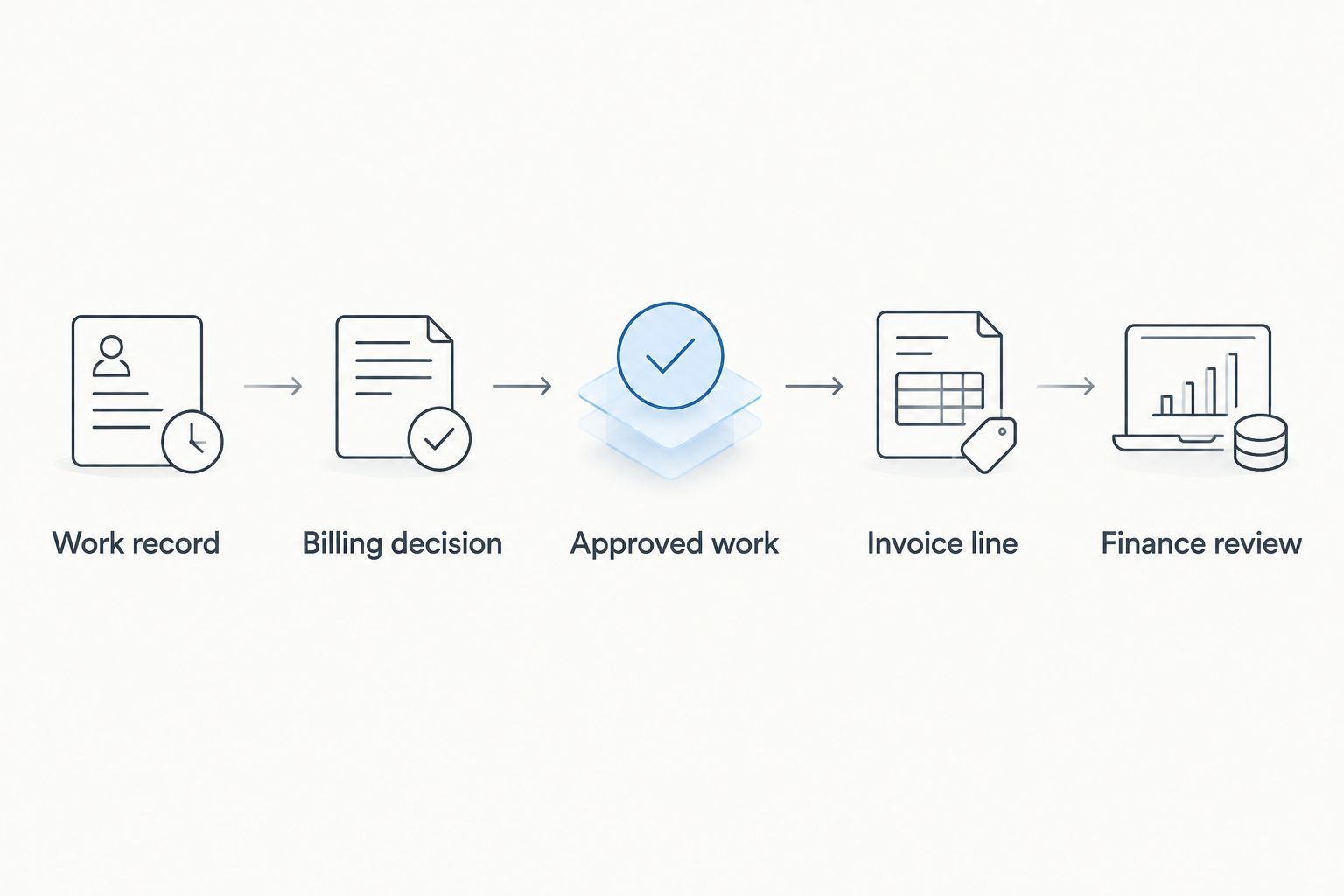
Build the review around these questions:
- Does the line describe a deliverable or service clearly?
- Is the billing decision recorded before invoicing?
- Can the reviewer find the original work record?
- Does the line match the agreed scope?
- Who signs off when a description needs changing?
Review invoices against work and finance records
Sending an invoice is not the final check. Compare issued invoices with approved billable work, then compare your finance records with what was invoiced. This is how you find work that was approved but never billed, as well as invoice lines that lack a clear source.
Set a 30-minute weekly review on your calendar and extend it if the sample requires more time. Begin with a spreadsheet if that is where the records already live. The review should produce a short list of specific corrections, each with an owner; a dashboard without follow-up does not resolve a missing invoice line.
- List approved work not yet found on an invoice.
- Check invoice lines against their supporting records.
- Assign unclear entries to the person who can resolve them.
- Record corrections without overwriting the original decision.
- Recheck unresolved items before the next billing run.
Test the setup with real IT work
Feature names alone do not tell you whether a tool fits your billing process. In 2026, run the same sample through each option you are considering: a scoped project task, a support request and a change that needs a billing decision. Ask the people who record, approve and invoice the work to complete their own parts.
Allow a 1-hour walkthrough to see where they stop and ask for context. The time is a practical test window, not a claim about implementation speed. If a step requires someone to copy information, establish who owns that handoff and how they check it. If a vendor says a requirement is supported, confirm it in the setup available to your business.
- Follow each sample from customer record to invoice.
- Test a task that must not be billed separately.
- Check who can correct an unclear time description.
- Identify every manual copy between records.
- Confirm that finance reviewers can find the original work.
Set ownership before the next billing cycle
A working process needs named decision-makers, not just access to a system. Choose who maintains customer details, who checks time entries, who approves exceptions and who reviews issued invoices. Put those responsibilities in a shared document that the team can consult when someone is absent.
For 2026, choose a review date and a small sample of records for your next cycle. Do not wait for a perfect data cleanup before testing the process. Fix the gaps the sample reveals, then repeat the check using new work. Keep the rules short enough that someone outside the finance role can follow them.
- Assign one owner to each billing decision.
- Set a deadline for reviewing draft invoice lines.
- Keep a visible list of unresolved exceptions.
- Check the sample again after process changes.
Compare finance software options for an IT company
The best option depends on how many handoffs your team can manage and which records it needs to connect. The table compares workflows, not unverified feature claims. Check current product details directly with each provider before choosing a setup.
| Option | Best for | Main advantage | Key limitation |
|---|---|---|---|
| Spreadsheet and document workflow | IT teams with a simple process and someone assigned to review it | You can define and change the process yourself | You must maintain links and checks between records manually |
| Standalone accounting software | Teams focused on invoicing and finance records | Keeps attention on the financial workflow | Project and time records still need a defined handoff |
| Separate project, time and finance tools | Teams that already have established tools | Lets each team retain its existing work process | You must verify how records move between tools |
| Mesh App modular CRM/ERP | IT SMEs assessing contact, project, time, invoicing and finance modules together | Covers the named functions within one platform offering | You still need to check module fit and define billing decisions |
Mesh App is best for IT SMEs that want to assess contact management, project management, time tracking, invoicing and finance in one modular platform. It is not a substitute for clear billing rules. If your process is simple and a manual review already catches exceptions, start by fixing the process rather than changing every tool.
Review your billing workflow
Assess the available modules against your customer, project and invoice records.
Common finance and invoicing mistakes IT companies make
Treating every time entry as an invoice line
Recorded time shows effort, not necessarily a charge to the customer. For project and support work alike, require a billing decision before a time entry reaches a draft invoice. Keep non-billable work visible so it does not disappear from project review.
Writing invoice lines without checking the work
A line copied from a vague task title leaves the customer and your own reviewer guessing. Compare draft wording with the delivered work and its agreed scope. If the supporting record is unclear, correct the record before sending the invoice rather than relying on an explanation later.
Buying software before assigning owners
A new tool cannot decide who approves an exception or changes a customer record. Assign those responsibilities first. In 2026, use a recent billing cycle as the test case and identify every decision that currently depends on one person's memory.
Keeping project and finance reviews apart
A project review can show work as complete while finance has no clear billing instruction. Include approved but unbilled work in your regular finance check. The useful question is not whether both teams have records; it is whether they can trace the same piece of work through both.
FAQ
What is finance software for IT companies?
Finance software for IT companies helps teams manage invoicing and financial records for their work. Evaluate it alongside how your team records projects, support requests and billing decisions.
What should an IT company check before choosing invoicing software?
Check whether a draft invoice line can be traced to approved work and an identifiable customer. Test the process with both project work and a support request.
Is time tracking the same as invoicing?
No. Time tracking records work, while invoicing states what the customer is being billed for. A separate decision is needed when recorded time does not match what is billable.
Is Mesh App suitable for an IT company?
Mesh App is a modular CRM/ERP option for small and medium-sized IT businesses evaluating contact, project, time, invoicing and finance modules. Test its fit against your own billing workflow and module requirements.
Should an IT company use a spreadsheet or finance software?
Use a spreadsheet when your team can reliably maintain the records and review the handoffs. Evaluate software when the manual process makes work, billing decisions or invoices difficult to trace.
How do you prevent IT support work from being missed on invoices?
Give each support record a customer, a clear description and an explicit billing decision. Review approved work against draft invoices before they are sent.
What is the first step in improving IT invoicing in 2026?
Map how a completed piece of work becomes an invoice line. Include who records the work, who approves billing and who checks the final invoice.
One last thing
The most useful test of finance software for IT companies is a piece of work that should not become a separate charge. In 2026, put one such record beside a billable task during your walkthrough. If your team cannot explain why the two take different routes, settle that rule before changing software. Mesh App gives IT SMEs relevant modules to assess, but your billing rule remains yours to define.


