

Yes—ERP software is worth it for a growing trades business when it replaces repeated administration across customer records, jobs, recorded hours and invoicing. It is not worth adopting simply because your team is growing: the benefit must outweigh the work of setting up records, training staff and changing established routines.
- Is ERP software worth it for a growing trades business? Yes, when connected workflows replace repeated administration.
- Mesh App offers modular CRM/ERP functions for small and medium-sized businesses, including trades and construction.
- Choose ERP for connected job administration; keep specialist software when the problem is confined to one task.
- Prove the workflow with a representative job before expanding the rollout.
Is ERP software worth it for a growing trades business?
ERP earns its place when your business needs connected administration, not just another place to enter information. A useful 2026 decision starts with the handoffs between your office, job supervisors and the person preparing invoices. Identify where information gets copied, checked again or chased before work can move forward.
For construction-specific selection criteria, use the guide to ERP software for construction companies. Start with the workflow you need to fix rather than a long feature list.
The right choice depends on the scope of that workflow:
| Approach | Best for | Main advantage | Main limitation |
|---|---|---|---|
| Spreadsheets and separate records | Straightforward administration with clearly assigned ownership | You can organise records without redesigning every process | Keeping separate records consistent requires deliberate checking |
| Specialist software | A defined problem such as recording hours or preparing invoices | You can focus the change on one task | Work outside that task still needs its own process |
| Modular CRM/ERP | Businesses evaluating several connected administrative functions | You can select relevant functional areas within a broader platform | You must verify how the selected modules work together |
These approaches are not a ranking of software quality. They are different answers to different operational problems. A well-maintained invoicing process does not need replacing merely because another business uses ERP.
Choose the smallest system scope that resolves the actual bottleneck. If missing job information prevents invoicing, evaluate the whole handoff. If invoices are already complete and accurate but customer follow-up is disorganised, evaluate contact management first.
Why this matters
Growing a trades business adds more people who need reliable information about the same work. A customer detail, job instruction or recorded hour is useful only when the next person can find it and understand it.
Software selection becomes clearer when you distinguish information problems from management problems. A system cannot decide who approves additional work unless you establish that responsibility. It cannot produce a dependable job record when nobody owns the record.
For your 2026 review, write down the administrative outcome you want. Examples include preparing an invoice from an approved job record, finding the current customer details without checking another file, or reviewing recorded time against the correct project. These are testable outcomes; buying a broader platform is not an outcome by itself.
When connected job administration justifies ERP
ERP deserves consideration when several administrative functions need the same underlying job information. The key question is whether a shared process removes work, rather than simply moving that work into a different interface.
Look for these situations in your own business:
- Customer details recur across records. Check whether the same contact information is entered separately for enquiries, projects and invoices.
- Job information crosses responsibilities. Identify what the office needs from the people completing the work.
- Recorded time needs a clear destination. Establish how approved hours become useful for project review or billing.
- Invoice preparation depends on chasing information. List the missing details and who supplies them.
- Nobody knows which record is current. Decide where changes are recorded and who confirms them.
These are inspection points, not claims about your current operation. If they do not describe your business, do not use them to justify a purchase.
A trades business with a simple, controlled workflow can keep separate tools. A business with repeated handoffs should test whether connected administration removes those handoffs without losing important checks. Integration is useful only when the resulting process is clearer than the process it replaces.
When specialist software is the better decision
Specialist software is the better starting point when you can isolate the problem to a single function. You do not need to reorganise customer management and projects just to correct an inconsistent method of recording hours.
Define the boundary of the task before you compare products. For time tracking, that boundary includes who records time, which job receives it, who checks it and where the approved record goes. For invoicing, it includes the information required to prepare and approve the invoice.
The advantage is a narrower change. The limitation is that the surrounding workflow remains your responsibility, including any transfer of information between systems.
For a 2026 decision, compare the complete process rather than the screen used for the individual task. A specialist application is not simpler if somebody still has to rebuild its output elsewhere. Equally, a broader ERP is not better if most of its functions remain irrelevant to your work.
What Mesh App offers—and what you need to verify
Mesh App is best suited to small and medium-sized trades businesses evaluating modular CRM/ERP for contacts, projects, time tracking, invoicing and finance. Those are the 5 functional areas stated in its platform description, which also identifies construction businesses among its intended users.
The benefit of that scope is relevance: those functions cover administrative areas a trades business can evaluate together. The limitation is that a module list does not establish whether your particular job process fits. You still need to inspect the details before choosing a system.
Use Mesh App to review the platform, then request a demonstration built around your own workflow. Keep the assessment focused on the functions you need rather than assuming every module belongs in your initial rollout.
Ask the demonstration to show:
- How a customer record relates to a project.
- How recorded time is assigned and checked.
- How the information needed for invoicing is assembled.
- How corrections affect records used elsewhere.
- How you retrieve your business information when you need it.
Treat each answer as something to verify. Do not infer scheduling, payroll, stock control, offline access or accounting connections from the general CRM/ERP description.
How to test whether ERP is worth it before committing
Use a representative job to assess the system from customer record through invoice preparation. Keep the same job and requirements when comparing approaches so that an attractive demonstration does not replace a fair evaluation.
- Map the workflow. Write down where customer details, job instructions, recorded hours and invoice information currently live. Name the person responsible for each handoff.
- Choose a job. Select 1 representative job with enough detail to expose the administrative steps you actually use. Include a correction or change if that is part of your normal process.
- Test the handoffs. Follow the information between 2 stages at a time. Confirm what transfers, what requires another entry and who checks the result.
- Check the records. Compare the final project and invoice information with the approved source records. Investigate mismatches rather than working around them.
- Decide the scope. Adopt the functions that resolve the demonstrated problem. Leave unrelated processes unchanged until there is a reason to include them.
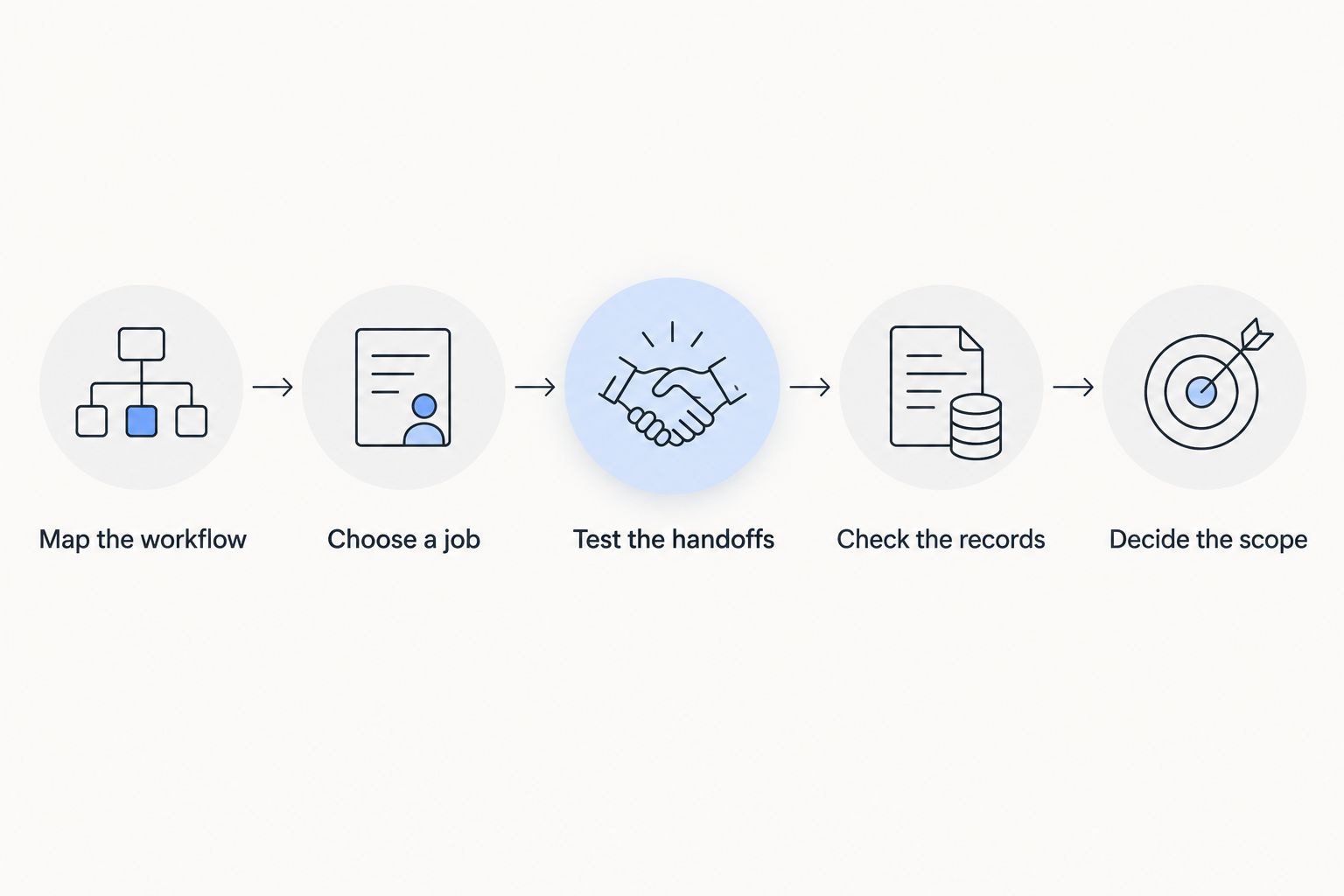
The numbers here define a testing method, not a benchmark for every trades business. One representative job can reveal an unsuitable workflow; it does not establish that every job type will fit. Expand the test where your work differs materially.
For your 2026 evaluation, document what passes and what fails. A useful result states that an approved time record reaches the right project without re-entry. A vague result states that the software feels easier.
Review the platform against your workflow
Start with the contact, project, time tracking, invoicing and finance functions your business needs.
Why ERP value varies between trades businesses
ERP value depends on the administrative work it replaces and the effort required to establish a reliable replacement. Use these factors to explain differences between your options:
- Functional scope. Contact management alone is a different requirement from a workflow spanning projects, time tracking and invoicing.
- Record quality. Duplicate contacts and unclear job records need decisions before they become dependable system data.
- Workflow ownership. Staff need to know who enters information, who approves it and who handles corrections.
- Handoff requirements. Each transfer between functions needs a clear source, destination and checking process.
- Rollout scope. Changing a defined workflow is different from replacing every administrative process at once.
Do not treat headcount as the deciding factor. The relevant issue is how your information moves through the business. Two teams of similar size can have different requirements because their jobs and administrative responsibilities differ.
Judge ERP against your documented workflow, not an assumed growth threshold. Your 2026 decision should identify which tasks disappear, which remain and which new responsibilities the system introduces.
Can I keep my current invoicing process and still use ERP?
Yes, you can evaluate ERP without assuming that invoicing must move immediately. The practical question is how customer, project and approved time information will reach your existing invoicing process.
Write that handoff into the evaluation. Check what staff must export, enter or reconcile, and confirm that the resulting invoice still matches the approved job information. Keep the current process only if the boundary remains clear and manageable.
Should I start with CRM instead of ERP?
Start with CRM when customer information and follow-up are the problem you need to solve. Evaluate broader ERP functions when the same problem extends into project administration, time tracking, invoicing or finance.
Avoid buying scope you cannot connect to a defined outcome. Contact management can be the right first step, but it does not by itself establish a complete job-to-invoice workflow.
How do I know whether the rollout worked?
The rollout works when the agreed workflow produces correct records with fewer unnecessary administrative steps. Compare the new process with the process you documented before the test.
Check both the output and the effort behind it. An accurate invoice that requires an undisclosed spreadsheet rebuild is not evidence that the whole workflow improved. Ask staff to show the actual steps, including corrections and exceptions.
FAQ
Is ERP software worth it for a growing trades business?
Yes, ERP software is worth it when connected administration replaces repeated work across customers, jobs, recorded hours and invoicing. It is not justified by growth alone; test the workflow and the implementation effort before committing.
What's the best starting point for a trades business considering ERP?
The best starting point is a documented administrative bottleneck. Follow a representative job through the affected stages and identify what staff copy, check or chase.
Is ERP better than spreadsheets for a small trades business?
ERP is better when your business needs a shared process across several administrative functions. Spreadsheets remain a valid choice for straightforward records with clear ownership and reliable checks.
Does Mesh App offer software for trades businesses?
Mesh App is a modular CRM/ERP platform for small and medium-sized businesses, including trades and construction. Its stated functions include contact management, project management, time tracking, invoicing and finance.
Do I need to adopt every ERP module at once?
No, your evaluation should focus on the functions required to resolve the documented problem. Verify the product's setup requirements before deciding the rollout sequence.
Will ERP automatically fix inaccurate job records?
No, software does not replace decisions about record ownership, approval and correction. Clean up conflicting information and establish responsibilities as part of implementation.
What should I ask during an ERP demonstration?
Ask the supplier to demonstrate your own job workflow, including information handoffs and corrections. Verify the final records against the approved source information rather than judging the interface alone.
One last thing
Include a correction in your ERP test, not just a clean job. Change a customer detail or correct a time entry, then check what happens to the information used elsewhere.
That exercise tests a part of administration a polished demonstration can leave unexplored. Before approving your 2026 rollout, make sure staff know where to correct a record and how to confirm that the correction reached its intended destination.


