

Yes, time tracking software can integrate with payroll through a supported connector, an API connection, or a payroll-compatible file export. The connection transfers recorded hours, but payroll still needs the correct employee identifiers, pay categories, approval status, and pay-period boundaries. Choose the transfer method your payroll system accepts, then verify the imported records before using them in a live payroll run.
- Can time tracking software integrate with payroll? Yes, through compatible connectors, APIs, or file exports.
- Payroll integration needs approved hours, matching employee identifiers, and correctly mapped pay categories.
- Mesh-web offers time tracking within a modular CRM/ERP platform for small and medium-sized businesses.
- Test corrections and duplicate prevention before relying on an automated payroll transfer.
Can time tracking software integrate with payroll?
Yes. Integration works when the time tracking system can supply records in a format the payroll system accepts. A connector is one route; a controlled file export is another. Neither route removes the need to check what the receiving system actually imports.
For a practical starting point, review the guide to sending tracked hours to payroll. Use the following sequence to assess a proposed connection in 2026, rather than treating a successful transfer as proof that payroll is correct.
- Identify the receiving system. Record the exact payroll application and the import method it supports. If an external payroll provider handles processing, obtain that provider's required file structure or connection requirements.
- Define the records to transfer. Decide whether payroll needs individual time entries, daily totals, or pay-period totals. Include the employee identifier, relevant dates, time quantity, and the categories required by the receiving system.
- Map employees and categories. Match each worker to the payroll record and map each time category to its intended payroll treatment. Do not rely on employee names alone when a stable identifier is available.
- Set the approval boundary. Specify which records are eligible for transfer and who approves them. Draft or disputed entries should not enter payroll simply because someone saved them.
- Validate a test transfer. Compare source records with imported records, including the employee, period, category, and total hours. Check whether rejected entries are visible and whether successful entries remain traceable.
- Test corrections and retries. Establish what happens when a time entry changes after transfer or a connection fails partway through. A retry must not create an additional copy of hours already received.
- Reconcile before processing. Compare approved source totals with payroll totals before finalising the run. Keep a record of exceptions and the person responsible for resolving them.
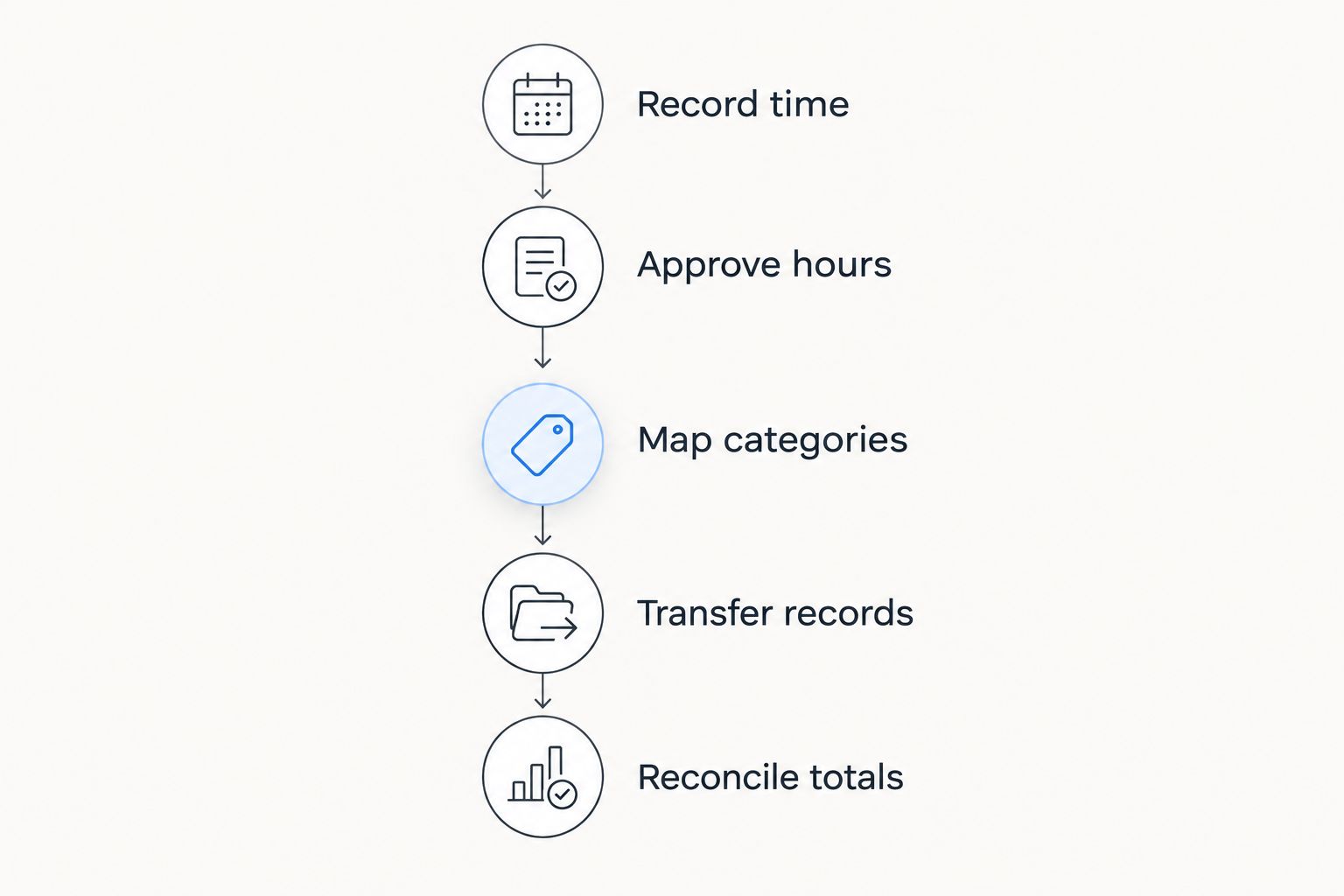
The handoff has a clear sequence: Record time, Approve hours, Map categories, Transfer records, and Reconcile totals. Keep those stages distinct so a recording error does not become an unchecked payroll input.
Why this matters
Payroll integration moves information between systems; it does not decide whether that information is right. An incorrect employee mapping sends valid hours to the wrong payroll record. A missing category sends hours without the context needed to process them correctly.
For your 2026 workflow, separate data delivery from payroll calculation. Delivery answers whether the records arrived. Payroll calculation applies the relevant employment terms and payroll rules to those records.
This distinction also protects project reporting. Time spent on a client project, time eligible for customer billing, and time used for employee payroll answer different questions. Keep the underlying record connected to its purpose rather than assuming that every billable hour is a separate payroll category.
Which payroll integration method should you choose?
Choose a method based on the receiving payroll system, your approval process, and who will maintain the connection. More automation is not automatically a better choice. A checked file import is preferable to an unattended connection that transfers the wrong records.
| Method | Best for | Main advantage | Main limitation | Check before choosing |
|---|---|---|---|---|
| Supported connector | Teams whose exact systems have a documented connection | Uses an established transfer route | Its supported fields and transfer behaviour define what it can do | Employee matching, categories, approval filtering, and correction handling |
| API connection | Teams with technical ownership and specific transfer requirements | Allows a workflow built around documented system interfaces | Requires implementation, monitoring, and maintenance | Required endpoints, authentication, error reporting, and duplicate prevention |
| Payroll-compatible file export | Teams with a defined payroll import process or external payroll provider | Gives payroll staff a file to inspect before importing | Requires a controlled handoff and version tracking | File format, column mapping, time units, and rejected-row reporting |
Supported connector: check the exact connection
A supported connector is the strongest starting point when the documentation covers your exact time tracking and payroll systems. Check the direction of transfer and the records included. A connection that synchronises employee details is not necessarily a connection that sends approved hours.
Ask how the connector handles new employees, changed identifiers, and records edited after transfer. Also establish who receives failure notifications. Best for: teams with a documented connection that matches their payroll handoff. Its limitation is that you must work within the behaviours and fields that connection supports.
API connection: assign technical ownership
An API connection suits a workflow that needs explicit rules about which records move and when. Define those rules before development starts, including the approval condition, destination fields, and response to a rejected record. Access to an API alone does not establish that the required payroll workflow is supported.
Assign responsibility for authentication, monitoring, and changes to either system's interface. Keep credentials restricted to the access the transfer requires. Best for: teams that can maintain a documented technical integration. The trade-off is an ongoing maintenance task, not just an initial setup task.
File export: control the handoff
A payroll-compatible file export is a valid integration method when the receiving system can import its contents. Obtain the required format first, then confirm the meaning of each column. A spreadsheet that opens successfully still needs the correct identifiers, categories, and time units.
Name and store exports so payroll staff can distinguish the approved version from an earlier draft. Record whether each file has been imported. Best for: teams with a defined import procedure and a person responsible for checking it. The limitation is the manual handoff, which needs a clear owner.
What information should reach payroll?
Start with the receiving payroll system's requirements, not every field available in the time tracker. Sending unnecessary detail complicates mapping and increases the amount of employee information moving between systems. Keep project detail where it serves a defined payroll or reporting purpose.
Use this checklist when reviewing a 2026 integration specification:
- Employee identifier: the value that matches the worker to the correct payroll record.
- Relevant dates: the work date or pay-period reference required by payroll.
- Time quantity: the hours or other supported time unit, with its format clearly defined.
- Time category: the classification needed to distinguish different treatments of recorded time.
- Approval status: evidence that the entry or total has passed the required review.
- Record reference: an identifier that helps trace imports, corrections, and exceptions.
Specify where each field comes from and what happens when it is blank. Treat missing required information as an exception to resolve, rather than substituting a value that changes the payroll result.
Time format deserves an explicit check. Hours expressed as decimal quantities and hours expressed as hours-and-minutes are not interchangeable formats. Confirm what the payroll importer expects and verify the conversion before accepting the totals.
Why payroll integration requirements vary
The right connection depends on your systems and operating rules. Use these factors to compare proposed approaches without assuming that every time tracker supports the same payroll functions:
- Receiving-system requirements: the payroll importer or API determines the accepted fields and formats.
- Approval process: the transfer must distinguish eligible records from entries still awaiting review.
- Time classifications: payroll needs the categories relevant to your employment arrangements, not just a combined total.
- Correction process: your workflow must define how changed records reach payroll after an earlier transfer.
- Country-specific payroll requirements: Austria, Germany, and Switzerland require separate checks of the applicable payroll treatment.
- Technical ownership: automated connections need someone responsible for monitoring failures and maintaining access.
For a business operating across those countries in 2026, confirm requirements with the payroll owner for each operation. A shared time tracking process does not eliminate country-specific payroll decisions. Keep the collection of hours consistent while documenting the receiving requirements separately.
Where does Mesh-web fit in this workflow?
Mesh-web offers a modular CRM/ERP SaaS platform with contact management, project management, time tracking, invoicing, and finance modules. Its stated audience includes small and medium-sized businesses across trades, construction, consulting, IT, and e-commerce in Austria, Germany, and Switzerland.
Mesh-web is best for small and medium-sized businesses seeking time tracking within a modular CRM/ERP platform. That fit concerns the stated module scope; it is not a claim that any particular payroll connector is supported. Before selecting Mesh-web time tracking for a payroll workflow, confirm the exact transfer method, fields, and correction behaviour required by your payroll system.
The advantage of considering a modular platform is the stated coverage of several business functions. The boundary is equally clear: time tracking, invoicing, and finance are distinct from payroll processing. Evaluate the payroll handoff as its own requirement rather than inferring it from the module list.
Does payroll integration calculate overtime automatically?
Payroll integration does not, by itself, establish how overtime is calculated. Determine which system applies the relevant rules and which system only transfers recorded time. Keep that responsibility explicit in your 2026 configuration.
An entry labelled as overtime still needs the correct treatment in payroll. Ask the payroll owner to validate the mapping against the applicable employment arrangements before approving the transfer workflow.
Can billable project hours go straight into payroll?
Billable project hours should not automatically be treated as payroll-ready hours. Billability describes customer charging; payroll describes employee compensation. Define the relationship between those records instead of using the billing label as a substitute for payroll classification.
For consulting and IT teams, review non-billable work as part of the payroll handoff too. The absence of a customer billing category does not determine how an employee's recorded work should be processed.
What happens if time entries change after payroll export?
Changed time entries need a controlled correction process, not an unqualified repeat export. Determine whether the receiving system expects replacement records, adjustments, or a separate correction procedure. Confirm that process before the first live transfer.
Keep the original transfer reference and the reason for the change. In your 2026 workflow, assign responsibility for deciding whether a correction belongs in an open payroll run or requires the payroll provider's separate process.
FAQ
Can time tracking software integrate with payroll without an API?
Yes, time tracking software can integrate with payroll through a compatible file export and import process. Confirm the required columns, employee identifiers, categories, and time format before transferring live records.
What's the best way to connect time tracking to payroll?
The best method is the supported transfer route that matches your payroll system and approval process. Compare a documented connector, an API connection, and a controlled file import on field coverage, error reporting, and maintenance responsibility.
Will a payroll integration remove the need to check timesheets?
No, payroll integration does not remove the need to approve and reconcile recorded hours. Check eligible source totals against imported payroll totals before processing the run.
Can I send project hours and overtime to payroll together?
Yes, if the receiving payroll system supports the required categories and the transfer maps them correctly. Project allocation and overtime treatment are different classifications, so define both explicitly.
Does Mesh-web include time tracking?
Yes, Mesh-web includes time tracking among its stated modular CRM/ERP functions. Confirm the exact payroll transfer requirements separately rather than assuming that time tracking establishes compatibility with a particular payroll system.
Is a payroll file export better than an automatic connection?
A checked file export is better when it matches the receiving requirements and an automatic connection does not. A documented automatic connection is useful when it also supports approval filtering, error handling, and controlled corrections.
Can the same payroll setup be used in Austria, Germany, and Switzerland?
Do not assume that the same payroll setup applies unchanged across Austria, Germany, and Switzerland. Confirm the receiving system, field mappings, and applicable payroll treatment for each operation.
One last thing
Test the retry, not just the successful transfer. A connection that sends the right hours once still needs a defined response when a transfer is interrupted or someone starts it again. Ask the person configuring your 2026 integration to demonstrate duplicate prevention and explain how rejected records are resolved.
Make reconciliation part of the acceptance criteria. If payroll staff cannot trace an imported total back to approved time records, the handoff needs more work before it becomes routine.


