

Event agency project management software is a system for coordinating client briefs, production tasks, deadlines and delivery responsibilities with the aim of delivering events within the agreed scope. This 2026 guide explains how to choose it when a fixed event date, external suppliers and client approvals must fit the same plan.
- Choose project management software for event agencies around approvals, production deadlines, time tracking and billing—not task lists alone.
- Mesh App suits agencies seeking modular CRM/ERP software with project management, contact management, time tracking and invoicing.
- Test supplier coordination and event-day access before selecting a platform; general project management does not establish either capability.
- Pilot a completed event before moving active productions into a new system.
Why project management software matters for event agencies
An event deadline stays fixed even when the brief changes. Your system needs to show what changed, who approved it and which production decisions now need attention—not simply mark tasks as complete.
Treat your 2026 shortlist as an operational decision. A producer needs delivery status, an account manager needs the approval history, and finance needs a record of work ready for invoicing. Choose around those handoffs rather than the longest feature list.
A task marked complete is not the same as a client-approved deliverable. Define that distinction before choosing software. For adoption planning, use the guide to using project management software without training alongside your own workflow test.
The selection question is specific: can your team move an event from accepted brief to financial close without reconstructing decisions from separate messages? Keep that question visible throughout the evaluation.
How to choose and implement your event agency system
1. Map your event workflow before comparing features
Start manually with a shared document or spreadsheet. Reconstruct a completed event from the initial brief through planning, production, delivery and reconciliation, including the decisions that held up the next stage.
Separate deliverables from activities. Sending artwork to a client is an activity; receiving approval for the production-ready version is the decision that releases the next task. Your workflow should make that difference visible.
Give every stage an exit condition. For example, production begins after the named approver accepts the relevant specification, not after someone sends an email requesting approval. Keep the structure simple enough for producers to maintain during busy delivery periods.
- Record the agreed scope and its exclusions.
- Name the person accountable for each deliverable.
- Identify client approvals that release production work.
- Mark supplier commitments and their prerequisites.
- Define what must be checked before financial close.
2. Separate event deadlines from approval deadlines
Build a manual milestone schedule backwards from the event date. Include supplier decisions, client reviews, production handovers and setup—not just the public opening time.
For every approval, identify the approver, the material being approved and the consequence of a late decision. An approval attached to the wrong version is not a reliable production instruction. Keep the accepted version and the decision together in your chosen record.
Then test whether a candidate system represents those relationships clearly. Do not assume that a calendar view includes dependency management, approval controls or version history. Ask the supplier to demonstrate the exact sequence your agency needs.
- Give approvals their own deadlines.
- Distinguish internal review from client acceptance.
- Record the approved specification or document version.
- Assign responsibility for chasing overdue decisions.
- Document the escalation route for late changes.
3. Connect client information, projects and financial work
Use a shared event reference to connect your contact list, project plan, timesheet and invoice record manually. This exposes where staff re-enter information and where records lose their connection to the original brief.
Mesh App offers contact management, project management, time tracking, invoicing and finance modules within a modular CRM/ERP platform. That makes Mesh App project management relevant to agencies evaluating those functions together. Test the handoffs between modules rather than assuming every step happens automatically.
Mesh App is best for agencies seeking modular CRM/ERP software with project management, time tracking and invoicing. Its suitability for specialist event operations still needs a workflow demonstration: the stated modules do not establish guest registration, seating plans, venue management or event-day offline access.
For your 2026 evaluation, ask for a demonstration using your own event structure. A generic task-board walkthrough does not answer whether the operational and financial records fit together.
- Use a consistent event reference across records.
- Separate client contacts from supplier contacts.
- Check how project work is associated with recorded time.
- Demonstrate the route from approved work to invoicing.
- Verify permissions before sharing information externally.
4. Define time and cost records before building reports
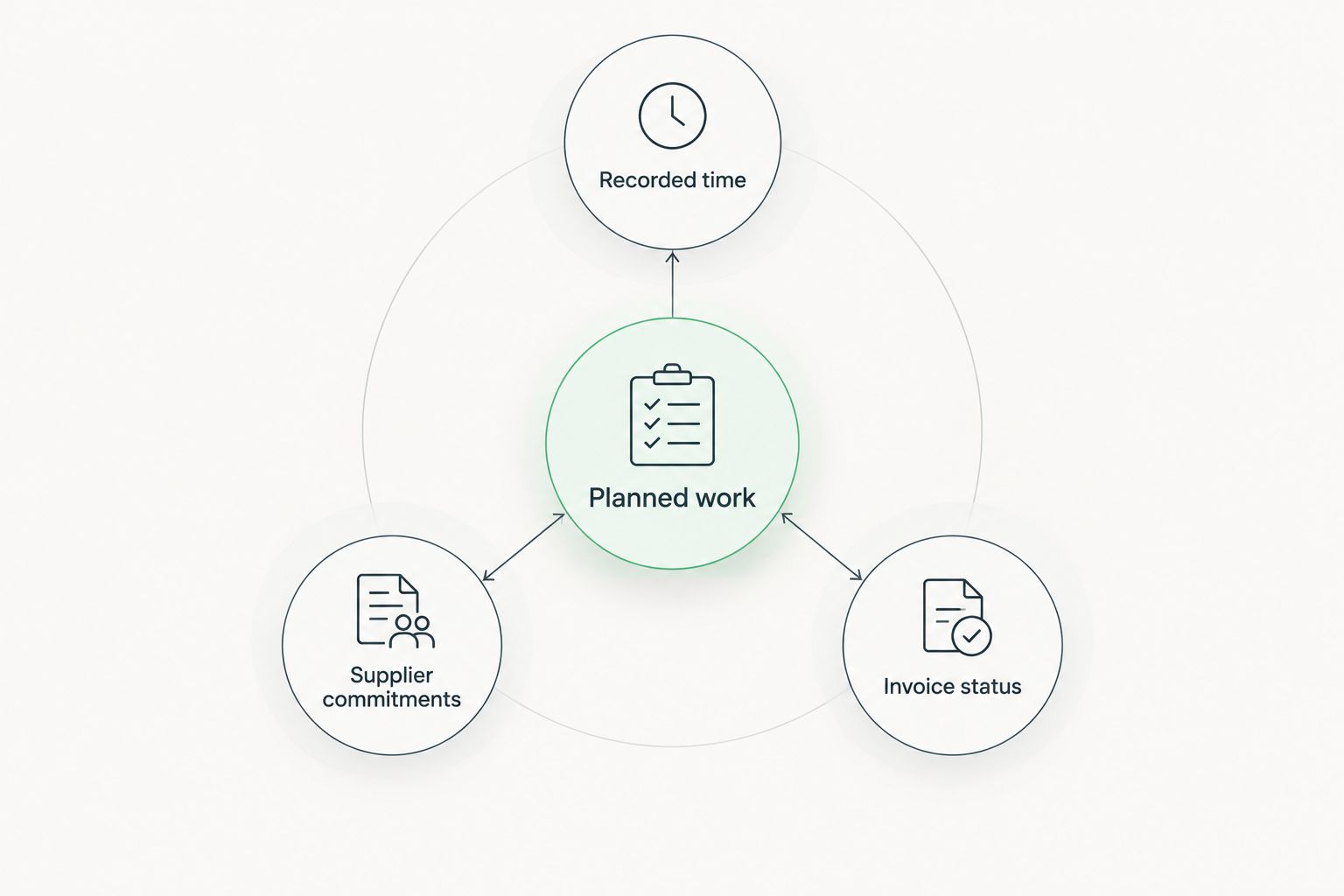
Start with a manual worksheet that separates planned work, recorded time, supplier commitments and invoice status. Agree what each field means before asking software to report on it.
Event profitability requires more than a total of submitted timesheets. Define how your agency handles internal labour, external services, approved additions and work still awaiting supplier documentation. Ask your finance lead to validate the definitions against your accounting process.
Then test how the candidate system captures each input and presents it. Time tracking and finance modules alone do not prove that a specific profitability report exists. Require a demonstration using your categories and reporting rules.
- Planned work: record the agreed delivery scope.
- Recorded time: distinguish delivery work from internal administration.
- Supplier commitments: identify agreed external obligations.
- Invoice status: distinguish prepared, issued and reconciled records.
5. Test supplier and event-day access explicitly
Write a role-and-access matrix before inviting external participants. Decide what a freelance producer, venue contact or production supplier needs to see, change and confirm. Keep internal commercial information outside those external views.
Next, rehearse the conditions under which staff will use the system. Open a schedule on the device used during setup, find a supplier contact and locate the latest accepted production instruction. Check the actual permissions rather than testing everything through an administrator account.
If your event requires offline access, require an explicit demonstration. Also define a controlled backup procedure: an exported schedule needs an owner and a clear update process, or it becomes another competing version.
- Test external access with a restricted account.
- Check whether attachments open on the intended device.
- Verify who can change production instructions.
- Document how urgent changes reach the responsible person.
- Assign ownership of the event-day backup record.
6. Pilot a completed event before moving live work
Use 1 completed event as a rehearsal dataset. Include the original brief, an approval change, recorded work and the financial close so the test covers more than a clean planning example.
Ask 2 team members with different responsibilities to complete the same handoff independently. For example, have a producer record completed work and a finance colleague identify what is ready for invoicing. Watch where either person needs an explanation outside the system.
Schedule a 30-minute review after the rehearsal. These are suggested pilot parameters, not implementation-time promises. For a 2026 rollout, expand only after your team can explain which record is authoritative at each stage and how exceptions are handled.
- Import only the records needed for the rehearsal.
- Test an approval change after work has started.
- Check whether responsibilities remain visible during handoffs.
- Confirm who resolves duplicate or incomplete records.
- Set acceptance criteria before moving active events.
Compare the options by operational fit
Choose the smallest setup that keeps delivery and financial handoffs clear. A simple planning process does not automatically need a full business platform; a complicated handoff does not become reliable just because it sits on a task board.
The options below describe different approaches, not a ranking of unnamed products. Specialist capabilities remain selection criteria until a supplier demonstrates them.
| Option | Best for | Main advantage | Key limitation | Selection test |
|---|---|---|---|---|
| Shared spreadsheet and document checklist | Agencies with straightforward events and a named coordinator | Lets you define the workflow manually before selecting software | Ownership, access and version discipline remain manual responsibilities | Can staff identify the current approved instruction without asking its author? |
| General project management software | Agencies primarily seeking task ownership, deadlines and delivery visibility | Focuses evaluation on production coordination | Client records, time tracking and invoicing require separate verification | Can the system represent a client approval that releases supplier work? |
| Mesh App modular CRM/ERP | Agencies seeking contact management, projects, time tracking, invoicing and finance together | Offers those functions within a modular platform | Specialist event features and exact cross-module handoffs require verification | Can a demonstration follow your event from client record through financial close? |
| Specialist event operations software | Agencies whose requirements include registration, seating or attendee operations | Directs the shortlist towards event-specific operational needs | Those requirements do not establish agency billing or financial suitability | Can the supplier demonstrate both event operations and your required agency handoffs? |
Separate essential requirements from preferences before reviewing demonstrations. A missing essential workflow is a rejection reason; an unfamiliar layout is a training question. Record both, but do not give them equal weight.
Common mistakes event agencies make
Treating the event date as the whole schedule
A calendar entry for the event does not show the decisions needed before it. Work backwards through approval, procurement, production and setup, then give each release point an owner.
Using task completion as client approval
An internal designer finishing artwork does not establish client acceptance. Keep internal completion and external approval distinct, and identify the version accepted for production.
Inviting suppliers before checking permissions
A supplier needs the relevant production information, not unrestricted access to client discussions or internal commercial records. Test permissions with a restricted account before sharing a live event.
Selecting reporting before defining the inputs
A financial dashboard cannot resolve inconsistent time categories or missing supplier commitments. Define the records and reconciliation process first; evaluate reporting against that agreed structure.
Moving every active event at once
A live event is a poor place to discover that nobody owns the new approval process. Rehearse with a completed event, resolve the failures and set a controlled handover point for active work.
FAQ
What's the best project management software for event agencies?
The best fit is the system that demonstrates your approval, production, time-recording and financial-close workflow. Mesh App suits agencies seeking modular CRM/ERP software with project management, contact management, time tracking, invoicing and finance; verify specialist event requirements separately.
Can event agencies manage projects with a spreadsheet?
Yes, a shared spreadsheet can hold an event plan, owners and approval records. Assign responsibility for maintaining the authoritative version and test whether the manual handoffs remain clear before adding software.
Do event agencies need CRM or project management software?
Use CRM for client and contact records, and project management for delivery responsibilities and deadlines. If your agency needs both, evaluate how the client brief and accepted scope move into the project record.
Does general project management software include guest registration?
Do not assume that general project management software includes guest registration. Treat registration, seating and attendee communications as separate requirements that a supplier must demonstrate.
How should an event agency test software before switching?
Reconstruct a completed event and test a realistic approval change, production handoff and financial close. Include users from delivery and finance, then resolve unclear ownership before moving active work.
Can project management software work offline at an event venue?
Offline access is a product-specific capability that needs explicit verification. Test access on the intended device and establish a controlled backup schedule if the event requires continuity without a connection.
What should an event agency check about invoicing software in Austria?
Ask your finance lead to specify the invoice records, recipient requirements and accounting handoffs your agency needs. Confirm the proposed software workflow against those requirements rather than treating an invoicing module as proof of every required capability.
One last thing
Test a late change, not just a clean project. During your 2026 software evaluation, introduce a revised brief after an approval has already released production work. Ask the team to identify the accepted version, affected tasks, responsible supplier and financial consequence.
That exercise tests the connections between records rather than the appearance of individual screens. Choose the setup that makes the next required decision clear without hiding the history behind it.


