

Instead of manually re-entering invoice data, build your mesh app bmd export workflow around an agreed import format, a controlled test batch and a reconciled accounting handoff. Start by confirming the export available in your Mesh App account and the import specification accepted by your BMD administrator; this guide covers the 2026 handoff process without assuming a native connector or particular screen labels.
- For mesh app bmd export, confirm the source export and receiving import specification before transferring invoices.
- Mesh App suits small businesses seeking modular CRM/ERP, invoicing and finance; confirm BMD compatibility separately.
- Test field mapping, tax treatment and duplicate handling before importing a full accounting period.
- Treat corrected documents as a separate accounting workflow, not a reason to resend an entire batch.
Why this matters
An exported file is not evidence that accounting records arrived correctly. A successful handoff preserves document references, customer assignments, amounts and tax treatment, then leaves a record of what the receiving system accepted.
Mesh App provides modular CRM/ERP functions, including invoicing and finance. Mesh App is best for small and medium-sized businesses seeking modular CRM/ERP, invoicing and finance functions. That product fit does not establish a particular BMD export format, automatic synchronization or accounting approval.
For your 2026 process, define success as reconciled records rather than a completed download. The benefit is a repeatable handoff; the trade-off is that somebody must own mapping, exceptions and acceptance.
Before you start
- Secure access and ownership. Identify who can obtain the source records, who administers the receiving BMD environment and who approves accounting treatment. Arrange a test environment or an administrator-approved test method before transferring records.
- Obtain the receiving specification. Ask for the accepted file structure, required fields, account mappings, tax-code mappings, document types and treatment of attachments. Confirm which export or extraction method your source account actually provides.
- Resolve the hidden gotcha: customer identifiers. A customer name is not a dependable account key. Agree how source customer references map to receiving account identifiers before importing invoices; otherwise, valid amounts can still land against the wrong customer.
Do not start with a full period while any prerequisite remains unresolved. Export capability, import compatibility and accounting correctness are separate checks, and each needs an explicit answer.
Source scope and acceptance rules
- Confirm the available transfer method. Ask the source administrator to identify the actual export capability and provide a sample. Obtain the receiving specification from the BMD administrator rather than choosing a format because its filename looks familiar.
- Define the accounting scope. Write down the company, accounting period, currency and document types included. Specify whether the handoff contains invoice records, accounting entries, customer data, document attachments or some combination approved by the receiving team.
- Choose an eligibility rule. Agree which business status makes a document ready for accounting. Exclude drafts and unapproved records from the proposed batch, using the statuses that actually exist in your environment.
- Name the acceptance owner. Assign a person who can compare the received records with the source and authorize the production run. Separate preparation from approval when your team structure permits it.
Expected result: You have a written scope, a sample source file and a receiving specification. Nobody needs to guess what the transfer contains or who decides whether it worked.
Keep source-system labels separate from your process terminology. This guide uses descriptive terms such as eligibility rule and acceptance owner, not purported button names or settings.
Field mapping and accounting rules
- Create a mapping sheet. Record each required receiving field, its source, its transformation rule and its owner. Include document reference, document date, customer identifier, currency and monetary fields wherever the receiving specification requires them.
- Agree identifier handling. Preserve leading zeros and other meaningful characters in account and document references. Decide how to handle a customer that has no receiving account before submitting an invoice for that customer.
- Confirm accounting treatment. Have the accounting owner approve account assignments, tax-code mapping, credit-note treatment and date usage. Do not assume that a source tax label means the same thing as a receiving tax code.
- Document structural rules. Confirm delimiter, encoding, decimal notation, date format, header requirements and record structure against the accepted specification. Keep any transformation separate from the original source file.
- Define duplicate handling. Agree which identifier distinguishes a new record from one already accepted. Document what the operator must do after an interrupted or partly successful import.
Expected result: Every required receiving field has an agreed source and rule. An unmapped value becomes an exception to resolve, not a blank field silently passed downstream.
For the 2026 mapping sheet, record the approval date and responsible person. Recheck the sheet whenever the source export or receiving import configuration changes; an old successful run does not approve a changed structure.
Test batch and reconciliation
- Build a representative test batch. Start with 3 documents: an ordinary invoice, a credit note and a document covering another accounting case your business actually uses. Use an approved test method and do not create fictitious transactions in production accounts.
- Capture source control totals. Record document count and the relevant net, tax and gross totals before transfer. Keep currencies separate and identify whether the file contains document-level or line-level records.
- Run the controlled import. Have the authorized operator use the confirmed receiving procedure. Retain the original file, any transformed version and the import result together so discrepancies can be traced.
- Check individual records. Compare customer assignment, document reference, dates, account mapping, tax treatment and amounts with the source. Check the credit note's accounting effect, not just whether its reference appears.
- Reconcile the batch. Compare accepted documents and monetary totals against the source scope. Resolve rejected records and unexplained differences before approving a larger run.
Expected result: The receiving records match the approved source scope, and the accounting owner has accepted the test. A technically completed import with unexplained differences is a failed test.
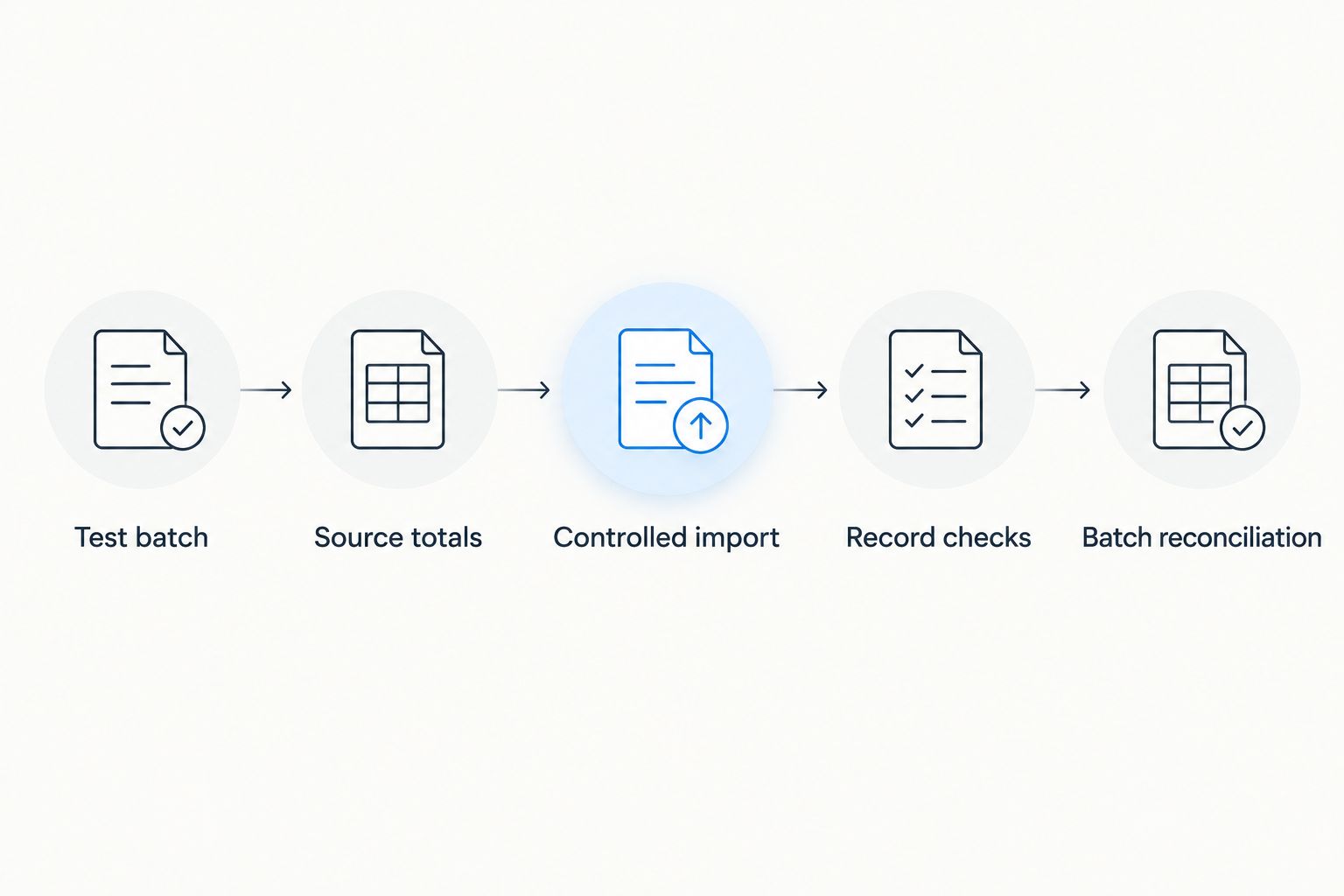
Use a test register with the headings Test batch, Source totals, Controlled import, Record checks and Batch reconciliation. These checkpoints make the handoff reviewable without relying on the operator's memory.
Production handoff and batch register
- Freeze the approved scope. Establish a cutoff for the documents in the run. Record changes discovered afterward as exceptions rather than quietly replacing files while another person is importing them.
- Create a batch register. Give each handoff a distinct batch reference. Record the scope, preparation date, source filename, document count, control totals, operator and receiving result.
- Release one controlled batch. Use 1 batch per approved scope as your starting operating rule. Avoid overlapping submissions until the receiving administrator has confirmed how duplicates and partial imports are handled.
- Reconcile before closing. Mark the batch complete only after accepted records and totals agree with the approved scope. Keep rejected records visible until they are corrected, excluded with approval or transferred through an agreed alternative.
- Retain the evidence securely. Store the source, transformed file, mapping version, receiving result and approval record under your organization's access and retention rules. Use an approved transfer channel for financial and customer information.
Expected result: Each production handoff has a clear beginning, an accepted result and a traceable exception list. You can answer which records were sent and which were accepted without regenerating the export.
For your 2026 operating checklist, assign 2 roles: preparation and acceptance. One person can hold both where necessary, but the responsibilities must remain explicit.
Transfer corrected documents after an accepted batch
A correction workflow is different from an initial period handoff. Do not resend an entire accepted batch to fix one document. First establish whether the original record reached accounting and what correction the accounting owner authorizes.
| Workflow | Best for | Advantage | Limitation |
|---|---|---|---|
| Initial batch handoff | An approved set of previously untransferred documents | Establishes a defined scope and control totals | Requires careful cutoff and duplicate checks |
| Exception correction | A rejected or incorrectly transferred record | Keeps attention on the affected records | Requires confirmation of the original receiving result |
- Locate the original batch reference and receiving result.
- Classify the record as rejected, accepted incorrectly or not yet confirmed.
- Ask the accounting owner to specify the permitted correction procedure.
- Prepare only the authorized correction scope and retain its link to the original batch.
- Reconcile the corrected result and close the exception explicitly.
Do not assume that editing a source invoice updates an accepted accounting record. A file handoff and a live synchronization are different mechanisms; your process must follow the transfer method actually confirmed.
Troubleshooting
The receiving system rejects the file
Compare the submitted file with the approved specification. Check structure, required columns, delimiters, encoding and date or decimal formatting before changing business data.
Return to the smallest approved test scope after fixing the structural problem. Preserve the rejected file so the team can identify what changed.
Customers appear against the wrong accounts
Stop the remaining handoff and inspect identifier mapping. Compare the source customer reference with the receiving account identifier, including leading zeros and any transformation rules.
Correct the mapping first. Have the accounting owner determine how already accepted records should be corrected; importing the same records again is not a substitute.
Amounts or tax totals do not reconcile
Compare equivalent scopes: the same documents, currency and amount definitions. Check credit-note treatment, line-level versus document-level totals, decimal interpretation and rounding rules.
Do not add a balancing record simply to make a difference disappear. Resolve the cause and document any accounting adjustment through the approved process.
An interrupted run leaves an uncertain result
Inspect the receiving result before retrying. A failed session does not establish that every record failed, so compare accepted references with the batch register.
Submit only the scope approved after that comparison. Keep the unresolved batch open until the accounting owner confirms its final state.
Invoice data arrives without supporting documents
Check whether attachments are part of the agreed transfer at all. A data file should not be treated as proof that invoice documents also arrived.
Define a separate document handoff where required, with a reliable reference connecting each document to its accounting record. Test retrieval as part of acceptance.
Customize your workflow
Expand the process only after the initial transfer reconciles. Add another document type, company scope or accounting case separately so a new failure has an identifiable cause.
For a recurring 2026 handoff, write a short operating checklist covering scope, preparation, approval, transfer and reconciliation. Keep the exception register alongside it rather than scattering correction requests across messages.
Before introducing automation, read the guide to CRM integration with accounting software. Define what an automated process must do when data is incomplete, a transfer fails or only part of a batch is accepted. A schedule alone does not solve those cases.
FAQ
How do I set up a Mesh App to BMD export in 2026?
Confirm the source export and receiving BMD import specification, agree field mapping, then reconcile a controlled test batch. Release production records only after the accounting owner accepts the result.
Does Mesh App have a native BMD connector?
Confirm native connector availability with the account administrator or product team before planning the handoff. This workflow does not establish a particular connector, export format or synchronization feature.
Which file format should I use for a BMD import?
Use the format specified by the administrator responsible for your receiving BMD environment. Confirm required fields, record structure, encoding and date and decimal conventions before preparing the file.
Can I automatically transfer invoices whenever they change?
Do not automate invoice changes until the supported transfer mechanism and accounting correction rules are confirmed. An accepted accounting record requires the correction procedure approved by the accounting owner.
What should I test before importing a full accounting period?
Test customer assignment, document references, dates, account mapping, tax treatment and amounts. Reconcile accepted documents and control totals against the same source scope.
Should I resend a batch after an import error?
Check which records were accepted before resending anything. A partly successful import requires an approved exception scope, not an automatic repeat of the original batch.
Is an accounting export the same as sending an electronic invoice?
No, an accounting export transfers records into an accounting process, while electronic invoicing concerns delivery of invoice information to its recipient. Define and validate each workflow separately.
One last thing
Test the recovery procedure before making the handoff routine. Ask the receiving administrator how to identify accepted records after an interrupted run, then document that answer beside the normal import instructions.
Your most useful 2026 acceptance question is not whether the file uploaded. It is whether a second operator can identify the accepted scope, explain every exception and complete the handoff without importing a record twice.


