
Subscription-based software is not automatically cheaper than one-time license software: the cheaper option is the one with the lower total cost over your intended usage period. For a 2026 purchase, compare equivalent functionality and include implementation, maintenance, internal administration and the cost of leaving—not just the subscription payment or license purchase.
- Is subscription-based software cheaper than one-time license software? Neither model guarantees lower total ownership costs.
- Compare subscription and perpetual-license software over identical periods, with equivalent users, features and support.
- Mesh App is a modular CRM/ERP option for small and medium-sized businesses; assess its fit before comparing costs.
- Check renewal, upgrade and data-export terms before committing to either licensing model.
Why this matters
A software purchase commits your team to a workflow as well as a payment schedule. Contacts need organising, projects need configuring, and staff need to learn where information belongs. Those tasks belong in the decision even when they do not appear on a vendor invoice.
Start with the job the software must perform. The guide to choosing between CRM and ERP software for a small business helps separate functional requirements from licensing preferences.
Choose the required workflow first; compare payment models second. Otherwise, you risk selecting an apparently cheaper system that leaves essential work in separate applications or spreadsheets.
Is subscription-based software cheaper than one-time license software?
Neither subscription-based software nor a one-time license is inherently cheaper. Subscription charges recur for the contracted service period; a perpetual license grants continuing use of the licensed software under its terms. Neither description establishes the full cost of implementation, support, infrastructure or future changes.
Use the following comparison to identify what each proposal actually includes. The advantages are conditional on the contract, not promises attached to the payment model.
| Decision point | Subscription-based software | One-time license software |
|---|---|---|
| Best for | Buyers who prefer recurring payments and a defined ongoing service | Buyers who need continuing use rights for a specific licensed version |
| Main advantage | Spreads access charges across the subscription period | Separates the initial license purchase from any optional future purchases |
| Main drawback | Continued access generally depends on maintaining the subscription | A purchased license does not establish that maintenance or upgrades are included |
| Updates | Confirm which updates the subscription covers | Confirm rights to patches, updates and later versions |
| Hosting | Verify whether hosting is included or separate | Verify where the software runs and who manages it |
| Support | Check included channels, scope and exclusions | Check whether support requires a separate agreement |
| Leaving | Check cancellation, export access and retention terms | Check export rights, compatibility and transfer restrictions |
For your 2026 evaluation, use the same requirements on both sides. A hosted subscription with support and a desktop license without support are different packages, not a clean comparison of payment models.
Subscription software: best for recurring access and service
Subscription software fits a buyer who wants access under an ongoing agreement and accepts recurring charges. Its financial appeal depends on what those charges cover and how long the business uses the system.
The advantage is a payment structure that separates the commitment into recurring periods. The limitation is that a manageable individual payment says nothing about the accumulated commitment over the full period of use.
Check the agreement for:
- Which users, modules and usage allowances are included.
- Whether the commitment is monthly, annual or another fixed term.
- Which support, hosting and update obligations the supplier accepts.
- What happens to access and exports after cancellation.
Choose a subscription when the included service and contractual flexibility justify the recurring commitment. Do not treat monthly billing as evidence of monthly cancellation rights; payment frequency and contract length are separate questions.
One-time license software: best for continuing version rights
A perpetual license fits a buyer who needs continuing rights to use a particular software version under the license agreement. It does not mean the buyer owns the software's intellectual property or receives every future release.
Its advantage is that the initial license charge is not itself a recurring subscription. Its limitation is that the business must still establish how support, maintenance, infrastructure and compatibility will be handled.
Before choosing a one-time license, ask what happens when your operating environment changes. Confirm whether the licensed version remains supported and whether later releases require a separate purchase.
Choose a perpetual license when its continuing use rights match your operating requirements and its full lifecycle obligations are acceptable. Do not equate continued permission to run software with continued suitability for your business.
How to compare total software costs in 2026
Build a comparison using supplier proposals and your own implementation estimates. Keep confirmed costs separate from assumptions, and label every assumption so the decision remains reviewable.
Use 12 months, 36 months and 60 months as comparison horizons. These are planning checkpoints, not estimates of software lifespan or claims about when a subscription becomes more expensive.
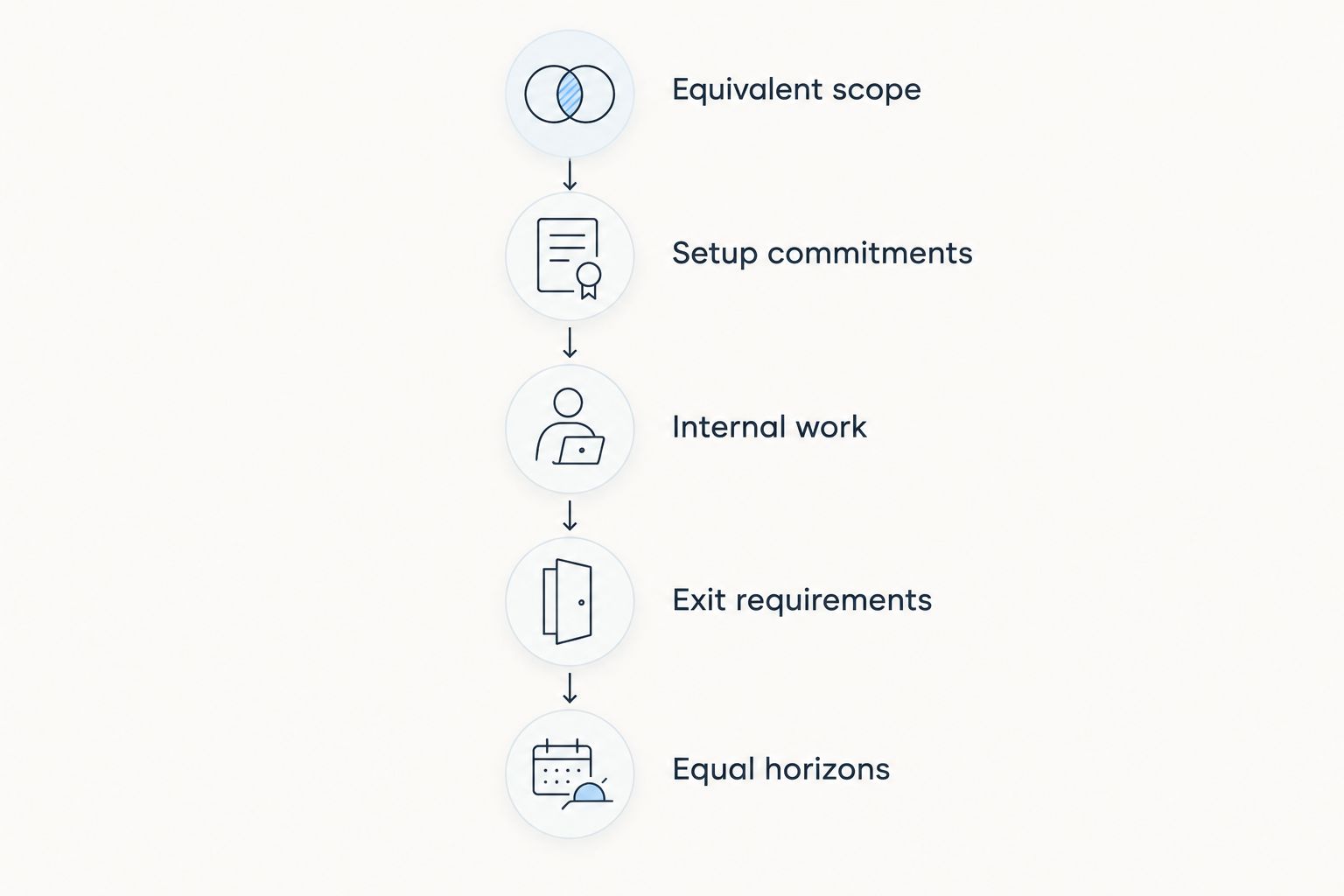
1. Define equivalent scope
Write down the users, modules, records, integrations and workflows each proposal must cover. Include reporting and export requirements, not just the features demonstrated during a sales presentation.
If one proposal covers contact management alone and another also covers invoicing, do not compare their headline charges as though the scope were identical. Either equalise the scope or list the remaining applications separately.
2. Separate setup from recurring commitments
Record implementation, data preparation, configuration and training separately from recurring software charges. For a perpetual license, keep the initial purchase separate from maintenance or support agreements.
This distinction shows both the cash required to start and the obligations that continue afterwards. It also prevents a setup-heavy option from looking artificially expensive in a comparison that ignores the other option's later commitments.
3. Account for internal work
Ask who will manage permissions, correct imported records, maintain integrations and support colleagues. Estimate that work using your own staffing assumptions rather than treating employee time as free.
Apply the same method to both options. Do not charge internal administration to a self-managed system while assuming a subscription requires no administration.
4. Check exit requirements
Identify the records, attachments and history you need to retain. Ask how they can be exported and whether the receiving system can use the resulting files.
Include the work required to reconcile the export and train staff on a replacement. A downloadable file is not the same thing as a completed migration.
5. Compare equal horizons
At each planning checkpoint, combine the relevant setup, recurring, internal and exit costs. Keep contractual commitments distinct from assumptions about future renewals or upgrades.
For a 2026 decision, compare complete operating scenarios—not isolated invoices. If the result changes when an assumption changes, show both outcomes rather than presenting a single unsupported winner.
Why software ownership costs vary
The payment model is only part of the calculation. These factors determine what you actually need to include in each proposal:
- Users and access rights. Compare named users, shared access restrictions and the permissions required for each role. Ask how charges change when your staffing changes.
- Functional scope. Separate essential modules from optional capabilities. Include any separate applications needed to complete the same workflow.
- Implementation and migration. Establish who cleans existing data, maps fields, configures workflows and checks the imported results.
- Hosting and administration. Identify responsibility for infrastructure, backups, access management and operational support. Do not infer those responsibilities from the licensing label.
- Maintenance and change. Check support terms, compatibility requirements and rights to future versions. Distinguish necessary changes from optional enhancements.
- Contract and exit terms. Review renewal commitments, cancellation deadlines, export formats and access after termination. These terms determine how easily you can change direction.
For each factor, assign an owner and a source for the assumption. A supplier commitment belongs in the contract; an internal estimate belongs in your planning worksheet.
When does a subscription become more expensive?
A subscription becomes more expensive when its cumulative total exceeds the comparable perpetual-license total over the same period. There is no universal break-even date because the inputs differ between proposals.
For a 2026 shortlist, compare the difference at each planning checkpoint. Include recurring maintenance on the perpetual-license side and implementation on the subscription side wherever those obligations apply.
If a supplier offers different terms by commitment length, calculate each actual offer separately. Do not combine the flexibility of one offer with the payment terms of another.
Does a one-time license mean you pay only once?
A one-time license means the license purchase is a one-time charge; it does not establish that every related service is included forever. Support, infrastructure, implementation and later versions must be checked separately.
Ask the supplier to distinguish continued use rights from ongoing service obligations. The license agreement defines what you can keep using; the service agreement defines what assistance you receive.
Is monthly software billing better for cash flow?
Monthly billing distributes payments across billing periods, but it does not establish a lower total commitment. An agreement billed monthly can still require a longer contractual term.
Compare payment timing separately from total ownership cost. Your preferred cash-flow schedule and your lowest-cost option are different decision criteria, even when the same proposal satisfies both.
Where modular CRM/ERP software fits
Mesh App is best suited to small and medium-sized businesses seeking modular CRM/ERP software for contacts, projects, time tracking, invoicing and finance. Its stated scope covers businesses across trades, construction, consulting, IT and e-commerce in Austria, Germany and Switzerland.
The relevant advantage of Mesh App for this evaluation is its modular functional scope. It gives you a concrete set of business functions to assess rather than a licensing label alone.
The limitation is equally important: a module list does not prove a lower ownership cost or establish that a particular workflow fits. Test your required process, obtain the applicable commercial terms and compare the proposal against an equivalent alternative.
For your 2026 shortlist, map each required function to the work your team actually performs. Leave optional capabilities out of the initial comparison unless they replace a documented requirement.
FAQ
Is subscription-based software cheaper than one-time license software?
Subscription-based software is not automatically cheaper than one-time license software. Compare equivalent functionality over the same usage period, including implementation, ongoing administration, maintenance and exit requirements.
How long should I compare software ownership costs?
Use 12 months, 36 months and 60 months as planning checkpoints. These are comparison horizons, not guaranteed software lifespans or universal break-even dates.
Do software subscriptions always include updates and support?
Software subscriptions do not establish identical update and support rights across suppliers. Check the agreement for included services, exclusions and any separate obligations.
Can I keep using software after cancelling a subscription?
Your right to keep using software after cancellation depends on the agreement. Confirm access, export opportunities and data-retention terms before committing.
Is a perpetual software license the same as owning the software?
A perpetual license grants continuing use rights under its terms; it does not transfer ownership of the software's intellectual property. Restrictions on users, devices and transfer still depend on the agreement.
Is cloud software always subscription-based?
Cloud hosting and subscription licensing describe different aspects of a software arrangement. Hosting identifies where the system operates; licensing determines the rights and payment obligations.
Should a small business consider Mesh App for CRM and ERP?
Mesh App is a relevant option for small and medium-sized businesses seeking modular CRM/ERP functions across contacts, projects, time tracking, invoicing and finance. Assess workflow fit and contractual obligations before drawing a cost conclusion.
One last thing
Ask every shortlisted supplier the same question: What can our business still access, use and export after this agreement ends? Get the answer in writing and test the export process before committing.
That question separates payment convenience from operational control. A low apparent commitment is not a useful saving if your business cannot retrieve the records it needs to continue working.


