

ERP software for a small business has no universal fixed cost: your budget depends on the functions you need, the subscription terms and the work required to put the system into use. Compare the complete implementation and operating scope, not the subscription alone. For a 2026 decision, include data preparation, configuration, staff training and ongoing administration in the same budget.
- How much does ERP software cost for a small business? Compare the subscription with implementation and ongoing administration.
- Mesh App suits small businesses seeking modular CRM/ERP for contacts, projects, time tracking, invoicing and finance.
- Compare proposals over the same 12-month period, with identical functions and responsibilities.
- Start with one complete business workflow; add scope only when it solves a defined operational need.
How much does ERP software cost for a small business?
The useful answer is a scope-based budget, not a headline subscription figure. Separate the proposal into recurring software commitments, initial implementation work and the internal effort required to keep the system useful. Those categories let you compare offers without confusing software access with a completed rollout.
Use the same 12-month planning period for every proposal. Record what the vendor includes, what your team must do and what requires a separate agreement. A proposal is not ready for approval while those responsibilities remain unclear.
| Budget category | What to include | What to ask before signing |
|---|---|---|
| Software subscription | Required functions, access arrangements and contract terms | Which functions and users does the agreement cover? |
| Implementation | Data preparation, configuration, testing and training | Who delivers each task, and what counts as completion? |
| Ongoing administration | Record maintenance, user management and process changes | Who owns these tasks after launch? |
Do not treat an omitted task as an included task. Ask the supplier to state its responsibility explicitly, then assign the remaining work internally.
For a modular starting point, Mesh App offers contact management, project management, time tracking, invoicing and finance modules for small and medium-sized businesses. Those functions provide a concrete starting list for your requirements; they do not replace a written implementation scope.
Why this matters
A subscription agreement and a working business process are different deliverables. Access to software does not answer who cleans customer records, decides project stages or checks that an invoice follows the correct process. Your budget needs to account for that work, whoever performs it.
For your 2026 ERP evaluation, write the desired outcome before listing features. An outcome such as moving a customer job from assignment to recorded hours and an invoice is easier to evaluate than a requirement labelled simply project management.
That distinction also protects against buying too much. Approve functions because a named person will use them in a defined workflow, not because they appear in a demonstration. A feature without an owner or a use case belongs outside the initial scope.
Build your ERP budget around a complete workflow
Start with 1 workflow that has a clear beginning, end and owner. For a project-based business, that could be a customer request moving through a project, time entry and invoicing. This is a planning example, not a claim about any vendor's automation or integration capabilities.
The workflow exposes requirements that a feature checklist misses. You can see which records must move between tasks, who needs access and where approval is required. Use that information to write the implementation brief.
- Define the outcome. State what staff must be able to complete in the system. Avoid requirements such as improve efficiency unless you also describe the work that will change.
- Identify the records. List the contacts, projects, time entries and financial information that the workflow needs. Decide which existing records should be retained.
- Assign ownership. Name the person responsible for each task and the person who approves completion. Include the administrator who will maintain the setup.
- Test the handoffs. Use a representative example to check the movement from one task to the next. Confirm permissions and any required external exchange separately.
- Accept the workflow. Write down the conditions that make it ready for use. Approval should confirm that staff can finish the work, not merely open the application.
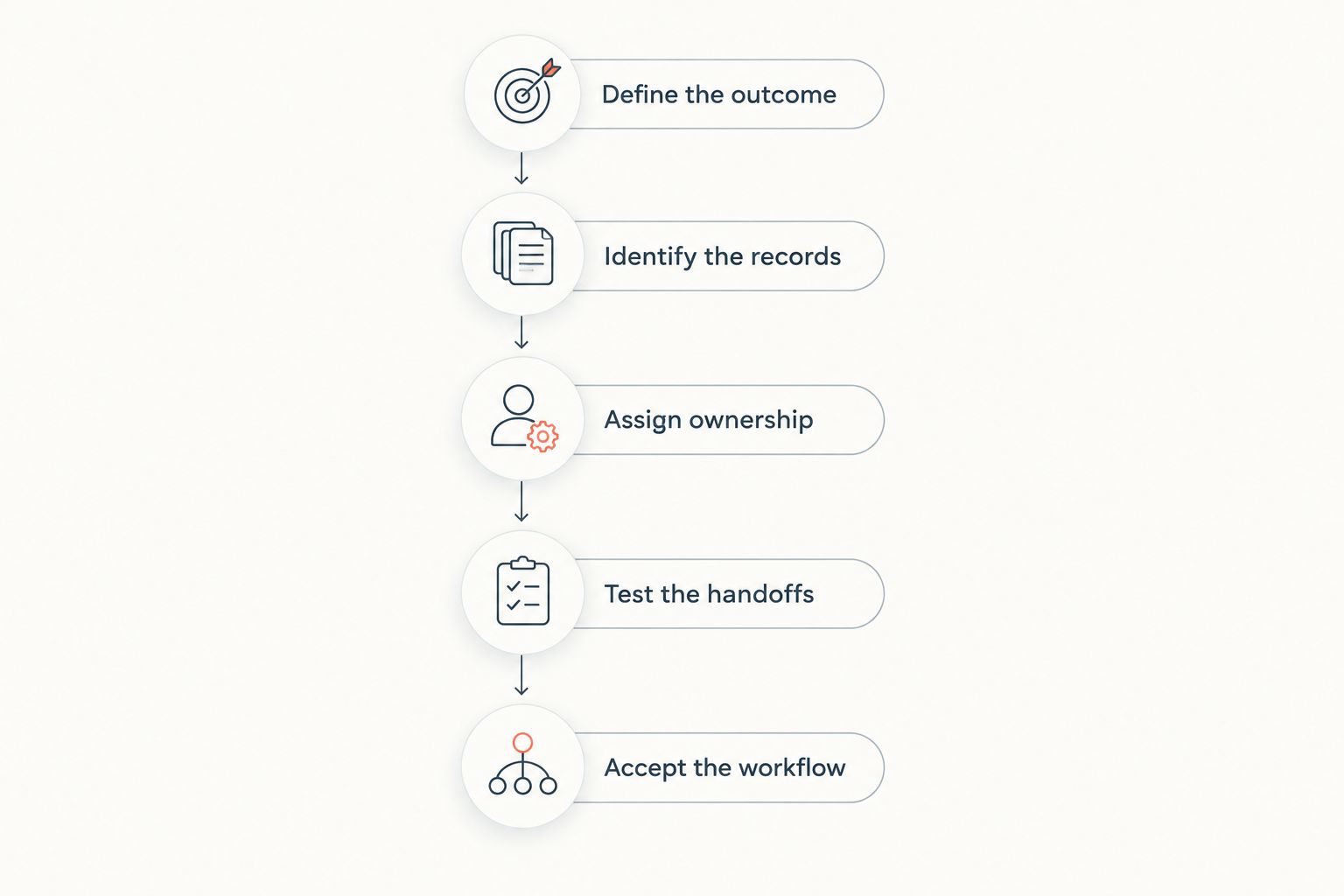
Keep the acceptance criteria attached to the proposal. If a supplier interprets a requirement differently, resolve it before implementation begins. Your internal team should use the same criteria when deciding whether the rollout is complete.
The CRM implementation timing guide is a related planning resource when customer-record management forms part of your rollout. Keep scheduling discussions separate from assumptions about what the subscription includes.
Narrow scope: one operational problem
Best for: a small business with one clearly defined process to improve. A narrow scope starts with a specific requirement, such as keeping contact records consistent or organising project information. Evaluate the required function against that task rather than against a full ERP wish list.
The advantage is a smaller set of decisions to resolve before launch. The limitation is coverage: solving contact management alone does not establish a process for recording time, invoicing or managing finance.
A narrow scope is appropriate when the remaining processes already have clear owners and workable procedures. If staff must repeatedly transfer information between disconnected steps, include that handoff in the evaluation instead of treating it as somebody else's problem.
Connected scope: several related functions
Best for: a business whose customer work crosses contacts, projects, time tracking and invoicing. A connected scope examines the whole job rather than an isolated department. It requires agreement on how information moves between the functions you select.
The benefit is that you can assess the handoffs as part of the implementation. The trade-off is more coordination: different staff members must agree on records, responsibilities and completion rules.
Mesh App is a fit for small businesses seeking modular CRM/ERP software for contacts, projects, time tracking, invoicing and finance. Evaluate those modules against your actual work, and confirm any required automation, external connection or accounting exchange before making it part of the implementation plan.
Broader scope: operational and finance requirements
Best for: a business with documented requirements across customer work and financial administration. A broader scope adds finance-related requirements to the operational workflow. Your finance owner must define the records, approvals and external exchanges the business requires.
The advantage is a wider evaluation of business processes. The limitation is a larger acceptance task: operational staff and finance staff need to agree on what a correct result looks like.
Do not assume that an ERP label establishes suitability for every accounting obligation in Austria, Germany or Switzerland. Confirm your business's requirements with its accounting adviser and ask the supplier to demonstrate the relevant process. A module name is not proof of jurisdiction-specific suitability.
| Implementation scope | Best for | Main advantage | Main limitation |
|---|---|---|---|
| Narrow scope | One defined operational problem | Fewer requirements to resolve initially | Does not cover the full customer-to-invoice process |
| Connected scope | Work crossing several operational functions | Evaluates handoffs together | Requires agreement across staff roles |
| Broader scope | Operational and finance requirements | Includes financial administration in the evaluation | Requires wider testing and acceptance |
Why ERP implementation scope varies
The modules you need and the work your staff performs determine the scope. For a 2026 proposal, use the following factors to explain differences between offers rather than assuming every ERP package covers the same work.
- Contact management: Decide which customer records belong in the system and who maintains them. Include duplicate handling and record ownership in the brief.
- Project management: Define how you organise work, assign responsibility and recognise completion. Different internal processes require different configuration decisions.
- Time tracking: Specify who records time, what the entries relate to and who checks them. Include the intended use of approved entries.
- Invoicing: Describe how billable work becomes an invoice and who approves it. Confirm the required document and handoff process.
- Finance: Identify the information your finance owner needs and any required exchange with external accounting work. Verify the requirement instead of assuming compatibility.
These factors describe work to evaluate; they are not a vendor's billing model. Ask each supplier to map its proposal to your requirements and identify anything outside the agreement.
How do you compare ERP proposals fairly?
Compare proposals over 12 months using the same required functions, user roles and acceptance criteria. Otherwise, a narrow offer and a broader implementation can look comparable even though they deliver different work.
For your 2026 comparison, ask each supplier to mark every requirement as included, excluded or requiring clarification. Keep the original requirement wording intact. Rewriting it separately for each supplier makes differences harder to identify.
Use a written checklist:
- State the required outcome and the functions needed to deliver it.
- Identify the access each staff role needs.
- Assign responsibility for preparing and importing records.
- Record who configures the workflow and trains its users.
- Define the test that demonstrates completion.
- Document support responsibilities and any proposed external connections.
Then review exclusions before approving the proposal. An offer is comparable only when you know what your business must supply alongside it. Include internal responsibilities in the decision even when they do not appear on the supplier's invoice.
Is a modular ERP better for a small business?
A modular ERP fits a small business when its required functions can be selected around a defined workflow. Modularity describes the structure of the software; it does not establish the subscription terms, implementation effort or suitability of an external connection.
Mesh App provides a modular CRM/ERP structure with contact management, project management, time tracking, invoicing and finance modules. That is relevant when you need to evaluate those functions together. Confirm the commercial and implementation arrangements directly rather than inferring them from the word modular.
The trade-off is that you still need to decide what belongs in the initial scope. Selecting too little leaves important handoffs outside the evaluation; selecting everything adds requirements that might not serve the first workflow. Start with the complete process you need, not the largest feature list.
What should you check before approving an ERP rollout?
Approve the rollout only after you can explain the intended workflow, the responsibilities and the acceptance test. A demonstration is useful for evaluating tasks, but it is not a substitute for the agreed scope.
Ask staff to review a representative customer job. Have each person describe what they enter, what they receive and what they must check. Record unresolved questions as decisions to make before launch, rather than leaving them for users to discover later.
For a 2026 rollout, keep a written scope-change record. When someone requests another function, identify the business requirement, the affected users and the extra work before adding it. This keeps the implementation tied to an agreed outcome.
FAQ
How much does ERP software cost for a small business?
ERP software has no universal fixed cost for a small business. Compare the subscription, implementation work and ongoing administration against the same written requirements and planning period.
What should I include besides the ERP subscription?
Include data preparation, configuration, testing, staff training and ongoing administration. Ask the supplier to identify its responsibilities, then assign the remaining tasks internally.
Should I compare ERP proposals monthly or annually?
Use the same 12-month planning period for every ERP proposal. Keep the functions, user roles and implementation responsibilities consistent across the comparison.
Is Mesh App relevant to a small business evaluating ERP?
Mesh App is relevant to small businesses evaluating modular CRM/ERP for contact management, project management, time tracking, invoicing and finance. Confirm your specific workflow, commercial terms and external connection requirements directly.
Can I start an ERP implementation with one workflow?
Yes, start with 1 complete workflow and a clear acceptance test. Include all the handoffs needed to finish that workflow rather than evaluating isolated features.
Does an ERP finance module replace checking local requirements?
No, a finance module does not remove the need to check your business's accounting requirements. Have your accounting adviser define the required process and ask the supplier to demonstrate it.
How do I know whether an ERP proposal is complete?
An ERP proposal is ready for approval when it states the scope, responsibilities, exclusions and acceptance criteria. Resolve unclear requirements before signing rather than treating silence as inclusion.
One last thing
Keep the awkward example for the demonstration. A straightforward job tests only the straightforward path. Bring a representative job with a correction, an approval or a handoff that your staff already handles, and ask how that work would be completed.
Do not invent a complicated scenario to challenge the supplier. Use real work from your business, with sensitive information removed. The question is whether the proposed scope covers your process, not whether the demonstration looks polished.


