

There is no single CRM implementation timeline: your go-live date depends on the workflows, data migration, integrations, and training included in the rollout. For your 2026 plan, count implementation as complete when your team can perform the agreed customer-management tasks with reliable data—not when someone creates the account.
- How long does it take to implement a CRM? Set the timeline from scope, data migration, and acceptance checks.
- Mesh App fits small and medium-sized businesses seeking modular CRM/ERP functions; define the initial rollout before adding modules.
- Separate account setup from implementation: imported contacts alone do not prove that customer workflows work.
- Choose a phased rollout for a bounded start; use a coordinated cutover when workflows must launch together.
How long does it take to implement a CRM system?
Estimate CRM implementation from the work required, not from a generic number of days. Start by defining what your team must do successfully at launch. Then assign an owner, dependencies, and an acceptance check to each task.
For businesses considering Mesh App, the platform offers contact management, project management, time tracking, invoicing, and finance modules. Mesh App is a fit for small and medium-sized businesses seeking modular CRM/ERP functions. That scope also requires a clear boundary: deciding which functions belong in the initial implementation is separate from choosing the platform.
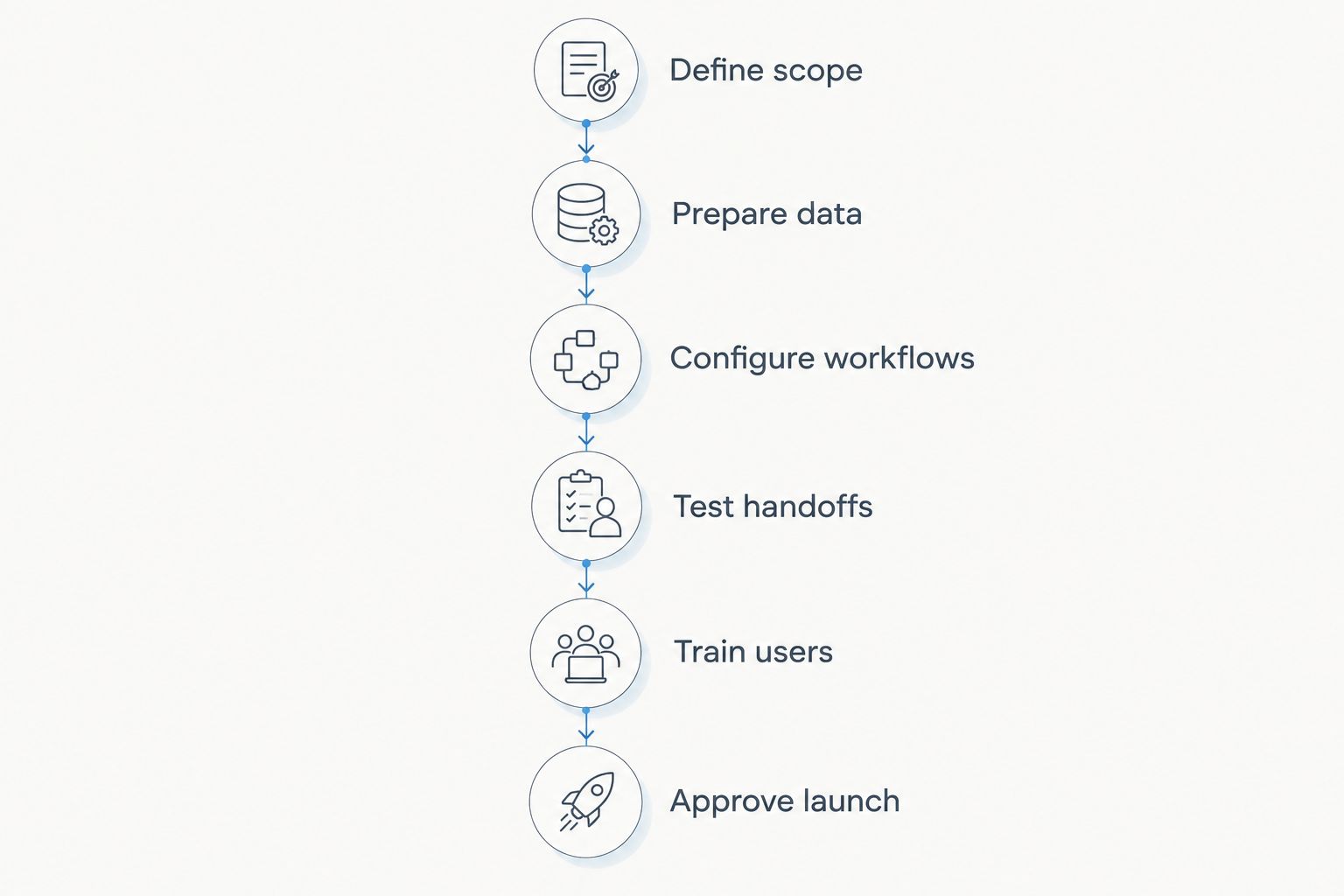
Build your schedule around these 6 stages:
- Define scope: identify the customer workflows that must work at launch.
- Prepare data: decide what to transfer, clean it, and map its fields.
- Configure workflows: establish fields, responsibilities, and access rules.
- Test handoffs: verify imports and any required connections between systems.
- Train users: practise the actual tasks each role performs.
- Approve launch: check the agreed results and resolve blocking issues.
These are planning stages, not fixed-duration packages. Some work can overlap; other tasks must wait for an earlier decision. A migration cannot be approved before you decide how source fields map to destination fields.
Why this matters
A launch date measures little if nobody has defined what launched. Contact management for a small team and a rollout that also changes project handoffs and invoicing have different acceptance requirements.
For your 2026 implementation plan, separate technical readiness from operational readiness. Technical readiness means the configuration and transfers work as intended. Operational readiness means your employees can use them correctly during normal work.
That distinction changes your next move. Instead of asking a supplier only when the account will be ready, ask which customer tasks will be ready, who verifies them, and what remains outside the launch scope.
Define scope before estimating the launch date
Write the initial scope as business tasks, not a catalogue of features. Examples include creating a contact, assigning responsibility for a customer, recording a conversation, and finding the next action. Include a project or finance handoff only if that handoff belongs in the initial release.
For each task, specify its starting information and expected result. This makes the scope testable. A requirement such as better customer visibility is too broad to approve; a requirement that an authorised employee can find a customer's current owner and next action is concrete.
Also write down exclusions. Historical attachments, additional departments, and optional connections should not drift into the launch merely because someone requests them during setup.
A bounded launch needs an explicit exclusion list. Otherwise, every new request changes the meaning of completion while the deadline stays unchanged.
Prepare data before importing it
Start with the information your team needs for the agreed workflows. Identify the source of each field and the person responsible for resolving conflicts. Decide which records should transfer and which should remain archived outside the new system.
Check for duplicate customers, inconsistent company names, outdated owners, and fields that contain several kinds of information. Do not assume that a successful upload means the information is usable. A contact can import successfully while its company relationship or responsible employee is wrong.
Use a test import before the final transfer. Inspect representative records, including records with missing fields, special characters, and linked information. Verify the result against the source rather than checking only whether the import produced an error.
Record unresolved data issues separately from configuration defects. The fix for an incorrect source record is different from the fix for a field-mapping error. Mixing them creates an unclear troubleshooting queue.
Configure workflows around responsibilities
Configuration should answer practical questions: who creates the record, who updates it, and who acts next? Agree on those responsibilities before adding fields or automations.
Choose required fields carefully. A required field belongs in the workflow when the employee entering it has the information and another task genuinely needs it. Requiring information too early encourages empty substitutes instead of useful records.
Test permissions by role. An administrator's successful test does not establish that a regular employee can complete the same task, or that restricted information stays restricted.
Keep the initial workflow understandable without a long explanation. If employees cannot tell where to record a customer update, revise the process before training begins. Training should teach the agreed workflow, not compensate for unresolved design decisions.
Test handoffs before promising a deadline
A handoff is any point where information moves between people, modules, or systems. It needs an expected result and a way to detect failure.
For a customer-to-project handoff, check that the correct customer remains associated with the work. For an invoicing handoff, check that the intended information reaches the next step. These are examples of acceptance tests, not claims that a particular connection is available in every CRM.
For your 2026 rollout, confirm required integration capabilities before putting them on the critical path. Ask what information transfers, what initiates the transfer, and who handles errors. A connection listed in a plan is not a tested business process.
Also check what happens when a task is interrupted or repeated. Your team needs a defined response to an incomplete transfer, not merely a demonstration of the successful path.
Train users on work they actually perform
Organise training around roles and tasks. Customer-facing employees need to practise recording and retrieving customer information; managers need to practise the checks relevant to their responsibilities.
Use realistic examples without exposing unnecessary customer information. Ask employees to complete the workflow themselves rather than watching an administrator demonstrate it. This reveals unclear labels, missing permissions, and instructions that rely on unstated knowledge.
Training also needs an operational owner. Employees should know where to raise a question and who decides whether it is a training issue, a data issue, or a configuration issue.
Do not treat attendance as proof of readiness. Confirm that the people responsible for each launch task can complete it and recognise when something has gone wrong.
Approve launch against observable results
Use 3 checkpoints: data readiness, workflow readiness, and user readiness. Keep evidence for each checkpoint so the launch decision rests on results rather than confidence alone.
- Data readiness: transferred information matches the agreed mapping and supports the launch tasks.
- Workflow readiness: required tasks and handoffs pass their acceptance checks.
- User readiness: responsible employees can complete those tasks with the correct permissions.
For your 2026 go-live decision, distinguish blocking defects from later improvements. A blocker prevents an agreed launch task from working correctly. An improvement makes a working task more convenient or extends the scope.
Name the person who approves launch and the person who handles issues afterward. Decide how work continues if a critical task fails. That decision belongs before cutover, not after employees discover a problem during live customer work.
Which rollout approach fits your implementation?
Choose between 2 rollout approaches based on how tightly your workflows depend on one another. Neither approach supplies a guaranteed duration. Both need a defined scope and acceptance checks.
| Rollout approach | Best for | Main advantage | Main drawback | Acceptance focus |
|---|---|---|---|---|
| Phased rollout | Teams that can introduce a bounded workflow independently | Limits the initial scope and separates later changes | Requires clear rules while old and new processes coexist | The first workflow works without breaking excluded processes |
| Coordinated cutover | Teams whose required workflows must move together | Establishes a shared transition point for dependent work | Places more readiness decisions on the same launch | All required workflows and handoffs pass before cutover |
Phased rollout: best for a bounded starting scope
A phased rollout separates the first usable workflow from later expansion. Define what employees will do in the new CRM and what they will continue doing elsewhere.
The advantage is scope control. The drawback is coexistence: without explicit rules, employees can update different systems and create conflicting records. State which system owns each piece of information during the transition.
Coordinated cutover: best for dependent workflows
A coordinated cutover moves the agreed workflows at a shared transition point. Choose it when separating those workflows would leave essential handoffs unresolved.
The advantage is a clear changeover for connected work. The drawback is dependency: an unresolved issue in a required workflow can prevent launch. Keep the readiness decision tied to the acceptance checks, not the calendar alone.
Why CRM implementation time varies
Your schedule changes when the work or its dependencies change. Review these factors before accepting an implementation date:
- Launch scope: each included workflow needs decisions, configuration, and validation.
- Data condition: unclear ownership, duplicates, and inconsistent fields require resolution before approval.
- Required handoffs: connections between systems or modules need end-to-end testing.
- Decision ownership: unanswered questions about fields, permissions, and responsibilities leave tasks blocked.
- User readiness: employees need to demonstrate the tasks assigned to their roles.
- Launch requirements: a phased rollout and a coordinated cutover require different transition plans.
Use these factors to challenge the estimate. Ask which assumptions the date depends on and what happens when an assumption changes. Do not accept a shorter schedule achieved by quietly removing testing or training from the definition of implementation.
Can you start using a CRM before implementation is finished?
Yes, if the initial workflow has passed its acceptance checks and the remaining work is explicitly excluded. Early use should have a defined boundary, an owner, and rules for information that still lives elsewhere.
Do not confuse early access with full deployment. If project handoffs or finance tasks remain outside the first release, describe them as later scope rather than unfinished promises attached to an allegedly complete launch.
Is importing contacts enough to finish CRM implementation?
No: importing contacts completes a transfer task, not the whole implementation. You still need to verify field accuracy, permissions, customer ownership, and the tasks employees must perform with those contacts.
Test the imported records in a real workflow. Finding a name in a list is weaker evidence than successfully recording an interaction and assigning the correct next action.
How do you set a realistic CRM go-live date?
Set the date after assigning the launch tasks, dependencies, owners, and acceptance checks. Ask each owner to estimate their work and identify decisions or information they need before starting.
For a 2026 project, maintain a separate list of later enhancements. That list protects the agreed launch scope without losing useful requests. Revisit the date when a required dependency changes, rather than pretending the original estimate still describes the same work.
FAQ
How long does it take to implement a CRM for a small business?
A small-business CRM timeline depends on the launch workflows, data preparation, required handoffs, and user readiness. Estimate those tasks individually and approve launch against observable results rather than a generic duration.
What's the quickest way to get a CRM working?
Define a bounded initial workflow and exclude unrelated changes from the first release. Keep data validation, permission checks, and user practice inside that scope.
Is a phased CRM rollout better than a coordinated cutover?
A phased rollout fits workflows that can start independently; a coordinated cutover fits workflows that must move together. Phasing requires coexistence rules, while coordinated cutover requires all dependent launch tasks to be ready.
Does a modular CRM remove implementation work?
No, modular software still needs scope decisions, data preparation, configuration, and testing. Mesh App offers modular CRM/ERP functions, so decide which functions belong in the initial rollout.
Can we migrate every old customer record at launch?
Choose records according to the agreed launch requirements, not simply because they exist. Define archive decisions, field mappings, and ownership before transferring historical information.
Who should approve the CRM launch?
A named business owner should approve launch using the agreed acceptance checks. Data, workflow, and user-readiness owners should provide the evidence for that decision.
What should happen after the CRM goes live?
Assign responsibility for resolving operational issues and separate defects from enhancement requests. Review whether employees can complete the agreed workflows before expanding the scope.
One last thing
Write your launch acceptance statement before writing the deadline. Describe the customer task an employee must complete, the information it requires, and the result another employee must be able to verify.
That statement gives the implementation a finish line. Without it, account creation, data import, and genuine operational readiness can all be called complete—even though they describe different outcomes.


