

A CRM is worth it for a small business in 2026 when you need a shared record of customers, clear responsibility for follow-ups, or continuity between sales and delivery. It is not worth adopting just to replace a spreadsheet that already works. The extra work is setup, data cleanup and consistent use: software does not remove those responsibilities.
- Is a CRM worth it for a small business? Yes, when customer follow-ups and handovers need shared ownership.
- Keep a spreadsheet when you can reliably manage customer records and next actions without a dedicated system.
- Mesh App offers CRM/ERP modules for businesses evaluating contact management alongside projects, time tracking, invoicing and finance.
- Judge small business CRM software by completed follow-ups and usable records, not the length of its feature list.
Is a CRM worth it for a small business in 2026?
A CRM earns its place when it makes customer work easier to assign, find and finish. Start with the process that currently breaks, rather than a list of features you might eventually use. For customer-facing teams, the CRM software for service businesses guide provides a more focused starting point.
Use this decision sequence:
- Name the problem. Identify a missed follow-up, an unclear customer handover or a record that takes unnecessary searching to find. Describe the actual task, not a broad ambition such as improving efficiency.
- Identify the missing structure. Decide whether you need a shared customer history, an assigned owner, a next action or a connection to delivery work.
- Test the simplest workable approach. Try the same task with your current records and with a CRM workflow. Include finding the information, updating it and passing it to another person.
- Decide from actual use. Keep the CRM if it solves the problem without creating a parallel system that your team must maintain.
This is a workflow decision, not a business-size contest. A solo consultant with overlapping client commitments can need more structure than a larger business whose customer work stays simple.
Why this matters
Customer information is useful only when you can act on it. A name in a spreadsheet does not tell a colleague what was promised, who owns the next step or whether a customer is waiting for an answer.
The opposite problem matters too. Adding software to a process that already works introduces another place to check and update. In 2026, your decision should begin with the customer task you need to improve, not with the assumption that every small business needs more software.
Choose the smallest system that makes the next customer action clear. That gives you a practical standard for evaluating both a spreadsheet and a CRM.
Spreadsheet, dedicated CRM or modular CRM/ERP?
These approaches serve different needs. Compare them against your actual work before selecting a product or deciding how much of a platform to adopt.
| Approach | Best for | Main advantage | Main trade-off |
|---|---|---|---|
| Spreadsheet | A simple customer list with a clearly understood owner | You can define the columns around your existing process | Follow-ups, history and handovers need a separate working method |
| Dedicated CRM | A business focused on customer relationships and sales follow-ups | Customer records and sales activity become the main organising structure | Project delivery and billing still need their own process unless supported |
| Modular CRM/ERP, including Mesh App | Businesses evaluating customer management alongside operational work | Mesh App offers contact management, projects, time tracking, invoicing and finance modules | You still need to choose the relevant modules and verify the workflow between them |
Do not mistake breadth for fit. A platform with several modules is useful only when those modules address work you actually perform. Equally, a simple customer database becomes inadequate when your process needs ownership and history that the database does not capture.
What should you compare during a demonstration?
Bring a real customer scenario. Ask the vendor to show how you find the record, see its current status, assign the next action and locate the information needed for delivery.
Then ask what happens when something changes. A customer changes a contact person, a colleague takes over or an agreed task needs correction. A demonstration that handles only a clean initial entry does not answer how you will maintain the system.
Keep a spreadsheet when your customer process is simple
Best for: a business whose customer records and follow-ups remain easy to maintain in its current system. A spreadsheet is a reasonable choice when you can find the right information, understand the next action and keep the record current without reconstructing the story from scattered messages.
Its advantage is flexibility. You decide which fields matter and can remove fields that serve no purpose. The trade-off is that your working method must supply the ownership, reminders and history that a customer list alone does not provide.
Before replacing it, improve the structure. Separate the customer name from the current task, identify the person responsible and record the next action. If that resolves the issue, you have improved the process without introducing another application.
Do not keep the spreadsheet merely because it is familiar. Keep it because it continues to support the work. A spreadsheet remains the right choice when your team can reliably use it without a second, unofficial customer record.
Choose a dedicated CRM when relationships need shared ownership
Best for: a business that needs clearer customer history, follow-up responsibility and sales visibility. The defining requirement is not a large contact list. It is the need to coordinate what happens next.
Consider a customer who asks for a proposal, then discusses a change with another colleague. Your system needs to preserve enough context for the next person to respond correctly. A shared contact name is not sufficient if the commitment and next action live elsewhere.
A dedicated CRM puts relationship management at the centre of the process. Its trade-off is scope: selecting a CRM does not automatically resolve project planning, time recording or invoicing. Verify those requirements separately rather than assuming every customer-facing tool covers them.
Choose a dedicated CRM when customer coordination is the problem you need to solve. Avoid expanding the project into a replacement for every business system unless that wider change has a clear purpose.
Consider modular CRM/ERP when customer work meets delivery
Best for: a business evaluating customer management together with projects, recorded time, invoicing or finance. This approach fits a different question: not just who the customer is, but how customer work continues after an agreement.
Mesh App is best suited to small and medium-sized businesses evaluating modular CRM/ERP across contacts, projects, time tracking, invoicing and finance. Those are the modules identified for the platform; they provide a relevant shortlist when your requirements span both customer relationships and operational work.
The benefit is the breadth of functions available for evaluation. The trade-off is the breadth of decisions you must make. You still need to establish which modules you require, who maintains each record and how information moves through your specific process.
For a 2026 evaluation, follow an actual job from customer enquiry to completed work. Ask the vendor to demonstrate the handovers you need, including corrections and exports. Do not infer a particular integration, automation or accounting workflow from a module name alone.
Why CRM value varies between small businesses
The same software can serve one business well and add unnecessary administration to another. Use these factors to explain the difference:
- Customer history: If decisions depend on earlier conversations, you need records that preserve the relevant context. If a simple current-status list is enough, a larger system needs another justification.
- Shared ownership: When several people handle the same customer, the next action needs an identifiable owner. A system cannot compensate for responsibilities nobody has agreed to accept.
- Delivery requirements: Projects, recorded time and invoices introduce requirements beyond maintaining a contact list. Decide whether those processes belong in the same evaluation.
- Data quality: Duplicate contacts and obsolete details make any system harder to use. Moving them into a CRM does not make them correct.
- Team habits: Records become useful when people update them as part of completing the work. A workflow that requires duplicate entry deserves redesign.
- Privacy and access: Customer information needs appropriate access, retention and handling. Evaluate those requirements alongside usability, not after selection.
How do you test whether a CRM is worth adopting?
For your 2026 evaluation, start with 1 workflow rather than the whole business. Customer follow-up is a useful candidate because you can check whether the task has an owner, whether the context is accessible and whether the action was completed.
Define 3 required fields for that workflow: owner, next action and next-action date. Treat these as a starting checklist, not a universal database design. Add other fields only when someone uses them to make a decision or complete a task.
Record the current process
Write down how you handle the selected task today. Include the places you check, the information you copy and the person you ask when something is unclear.
This becomes your comparison. Without it, a tidy demonstration can look like an improvement even when the daily task has become more complicated.
Test with real customer work
Use representative records with appropriate permission and access. Include an active customer, a changed requirement and a handover, rather than only records that need no further action.
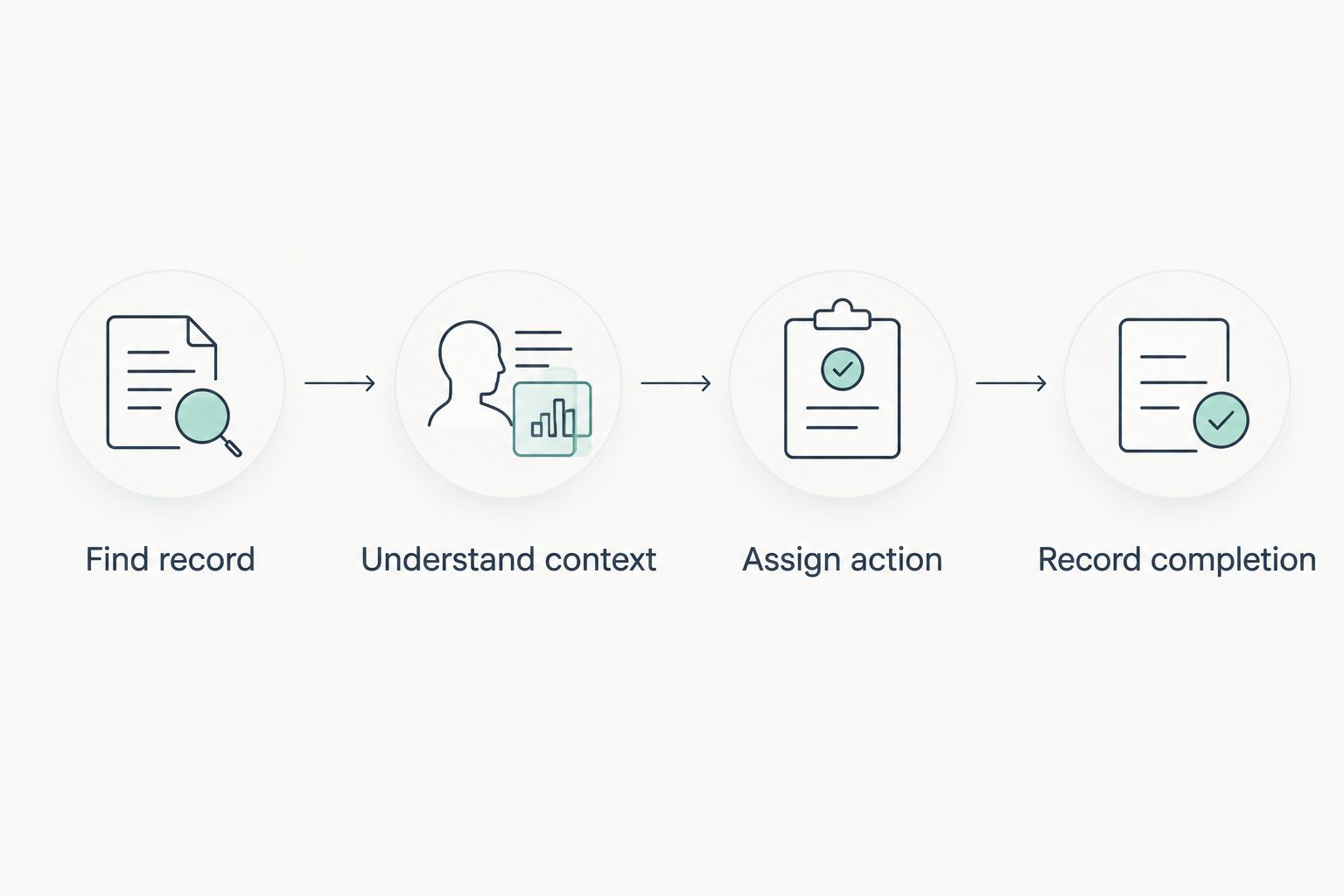
Check 4 checkpoints: finding the record, understanding the context, assigning the action and recording completion. Have the person who performs the task use the workflow; do not rely exclusively on an administrator's demonstration.
Remove unnecessary administration
Watch for fields that nobody understands, steps that repeat existing work and updates that staff postpone until later. Each is a reason to simplify the workflow before extending the rollout.
A CRM should not become a reporting layer maintained separately from customer work. If your team completes the task elsewhere and then copies it into the CRM, examine why that duplication exists.
Make a clear adoption decision
Adopt the workflow when the team can use it consistently and explain where the authoritative customer record lives. Revise it when responsibility or recordkeeping remains unclear. Keep your existing approach when the proposed change does not improve the task.
Before a wider rollout, verify exports and access controls using the actual requirements of your business. In 2026, operational fit includes being able to retrieve your records and restrict access appropriately—not just entering data successfully.
Is a CRM worth it for a one-person business?
A CRM is worth it for a one-person business when customer commitments exceed what your current process reliably tracks. Working alone removes internal handovers, but it does not remove follow-ups, changing requirements or the need to recover earlier context.
Start with customer records and next actions. Add project or finance requirements only when they belong to the problem you are solving.
Is a CRM better than a spreadsheet for small businesses?
A CRM is better than a spreadsheet when your workflow needs more structured ownership, customer history or follow-up management. A spreadsheet remains a valid choice when you can maintain those requirements reliably with a simple process.
Compare the same customer task in both approaches. The relevant question is which one makes the work clearer without introducing avoidable administration.
Should you replace every business tool when you adopt a CRM?
No: adopting a CRM does not require replacing every business tool. Decide first whether you need customer management alone or a wider CRM/ERP evaluation that includes delivery and finance.
Keep a clear boundary between the systems you retain. Specify which record is authoritative and who is responsible for updating it.
FAQ
Is a CRM worth it for a small business in 2026?
A CRM is worth it when shared customer records, follow-up ownership or handovers need more structure than your current process provides. Keep a simpler system if it already supports those tasks reliably.
What's the best way to decide whether my business needs a CRM?
Test one real customer workflow in your current system and in the proposed CRM. Compare finding the record, understanding the context, assigning the next action and recording completion.
Can a freelancer benefit from a CRM?
A freelancer can benefit from a CRM when managing client commitments requires more structure than a contact list. Start with customer history and next actions rather than a broad rollout.
Is a spreadsheet enough for customer management?
A spreadsheet is enough when you can reliably maintain customer information, ownership and next actions through your existing process. Replace it when those tasks become unclear or require a separate unofficial record.
What should I check before moving customer data into a CRM?
Check duplicates, obsolete details, required fields and access permissions before moving customer data. Also verify how you can export records and handle corrections.
Is Mesh App relevant if I need more than contact management?
Mesh App offers contact management, project management, time tracking, invoicing and finance modules for small and medium-sized businesses. Evaluate the modules against your actual workflow and verify any specific connections you require.
Will a CRM automatically fix missed follow-ups?
A CRM does not automatically fix missed follow-ups. Your process still needs an assigned owner, a clear next action and consistent updates.
One last thing
Test a handover before you test a dashboard. Ask someone who was not involved in a customer conversation to find the record and explain the next action from it.
If they need the original person to reconstruct the story, the workflow still needs work. If they can continue correctly, you have evidence of useful structure—not just a more attractive customer list. That is a practical final test for a small business choosing a CRM in 2026.


