

CRM data migration has no fixed duration: the schedule depends on what you move, how much cleanup the records need, and whether a trial import preserves their relationships. Set your switching date after testing a representative export—not from the time needed to upload a file—and include validation and final changes in the schedule.
- How long does data migration take when switching CRM providers? Base the schedule on a tested export and agreed scope.
- Separate CRM data migration from configuration, integrations, and team onboarding when planning your switch.
- Mesh App suits SMEs seeking modular CRM/ERP; confirm migration compatibility before committing to a switching date.
- Approve record relationships and business usability, not just a successful file upload.
Why this matters
An import can finish while the migration remains incomplete. Contacts might appear correctly, yet their company links, ownership, activity history, or project references still need checking. A successful upload is not the same as a usable CRM.
For a 2026 provider switch, define completion around the work your team must perform. Can someone find a customer, understand the latest interaction, and identify the next action without opening the old system? That is a more useful acceptance test than an import progress bar.
Mesh App is best for small and medium-sized businesses seeking a modular CRM/ERP platform. Its stated scope includes contact management, project management, time tracking, invoicing, and finance; that breadth makes it important to distinguish the records you want to migrate from the workflows you want to introduce.
How long does data migration take when switching CRM providers?
The dependable answer comes from a trial migration of your actual records. A contact-only transfer and a transfer that includes linked activities, attachments, and business records are different projects, even when both start with the same customer list.
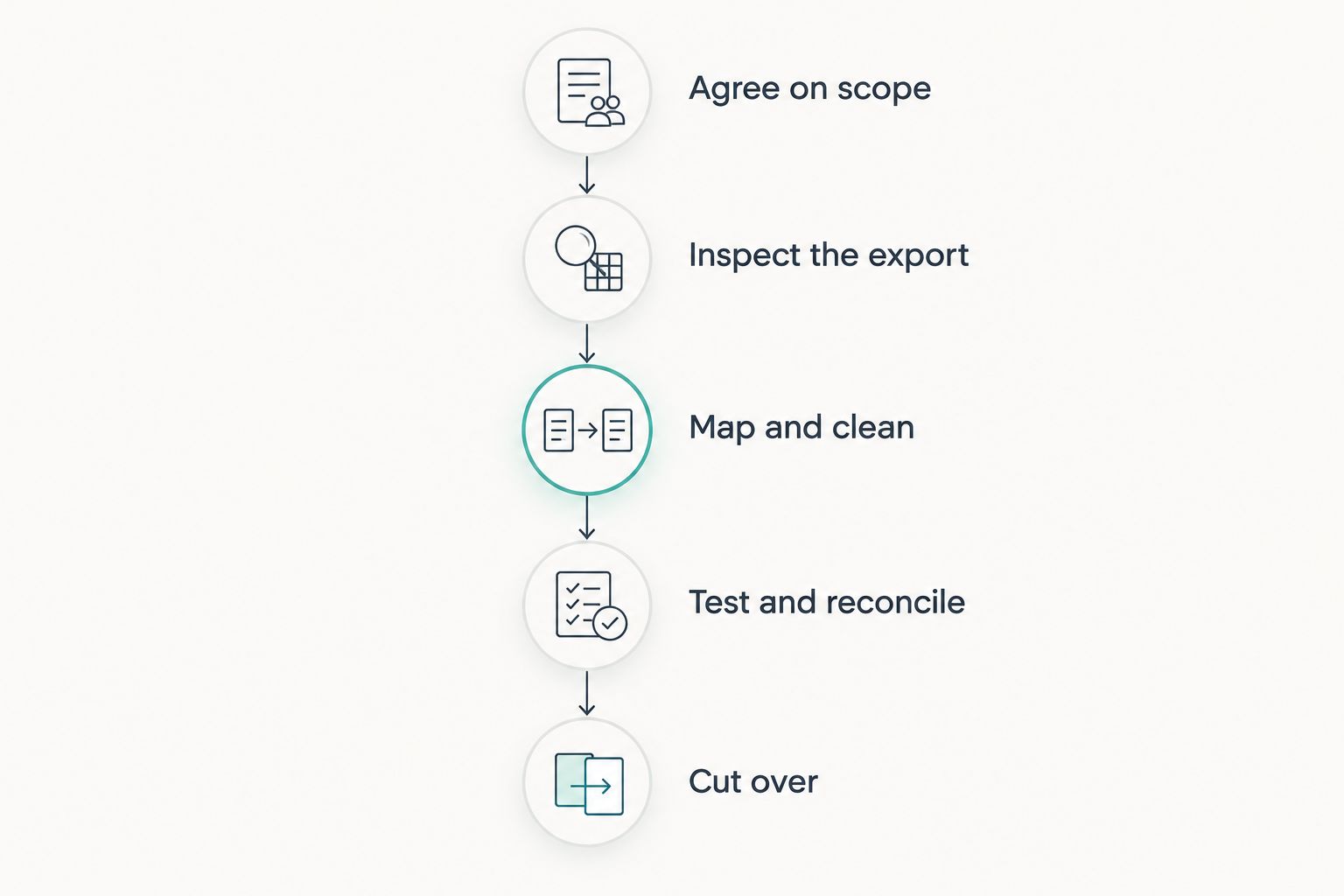
Use the following sequence to turn an open-ended question into a schedule your team can approve.
1. Agree on scope
List the record types you need in the destination CRM. Separate active operational records from historical material that only needs to remain accessible elsewhere, subject to your retention requirements.
Specify the fields, relationships, attachments, and ownership information that matter. Also identify what stays behind. Without that boundary, an apparently small migration can expand whenever someone remembers another spreadsheet or archive.
Completion condition: the business owner approves what moves, what stays, and where retained information remains accessible.
2. Inspect the export
Export representative records before setting the final date. Check whether the source provides stable identifiers, related records, attachments, and field values in a form the destination can accept.
Include difficult examples, not just clean contacts. A customer with several contacts and a long interaction history reveals more than an empty test record. Document anything that requires a separate export or manual reconstruction.
Completion condition: you know what the export contains and which requirements need additional work.
3. Map and clean
Match source fields to destination fields, then resolve ambiguous values and duplicates. Decide how ownership, status labels, dates, and company relationships should translate.
Keep a written mapping rather than relying on memory. The same decisions must apply to the trial import and the final transfer; otherwise, a successful test does not establish that the final result will match it.
Completion condition: the mapping is approved, and cleanup rules produce repeatable results.
4. Test and reconcile
Import a representative sample and inspect it in the destination CRM. Check totals alongside field values and relationships; matching record counts alone does not prove that records remain correctly connected.
Record the time spent preparing, transferring, correcting, and checking the sample separately. Those observations provide a basis for planning the remaining work, while export restrictions and import limits still need their own allowance.
Completion condition: users can perform the agreed tasks with the imported sample, and unresolved exceptions have owners.
5. Cut over and approve
Define when the old CRM stops accepting changes and how you will transfer changes made after the initial export. Assign responsibility for the final import, validation, user access, and the decision to proceed or roll back.
Your 2026 cutover plan should name the approver and the conditions for stopping. Keep access to required source records until the agreed checks and retention arrangements are complete.
Completion condition: the responsible business owner accepts the migrated records and confirms where new work must be recorded.
Contacts only: best for a deliberately limited transfer
A contacts-only migration keeps the scope focused on people, companies, and the fields you explicitly select. Its advantage is a narrower set of relationships to inspect; its limitation is that customer context can remain in the old system.
Choose this scope only after identifying how users will retrieve earlier conversations and supporting documents. A smaller migration is not a shortcut if staff must repeatedly search another system to complete everyday work.
For spreadsheet preparation, the guide to migrating contacts from Excel to a CRM addresses a related starting point. A provider-to-provider switch also requires checking what the source CRM exports beyond its contact table.
Contacts and history: best for preserving customer context
Adding activities, notes, and attachments expands the acceptance criteria. You must check whether historical items remain connected to the correct customer and whether their dates, authorship information, and meaning survive the transfer where required.
The benefit is continuity for customer-facing work. The drawback is a larger mapping and validation task, particularly when the source and destination represent interactions differently. Define which historical details are essential rather than treating every exported field as equally valuable.
Connected business records: best for cross-functional continuity
When your scope extends into projects, time records, invoices, or finance data, treat those records as distinct migration workstreams. Their relationships and validation requirements need explicit review; a successful contact import does not establish that financial or project records are correct.
Mesh App combines CRM/ERP modules covering these areas, but that module scope does not establish compatibility with a particular source export. Confirm the supported transfer route for each required record type before scheduling the switch.
Compare migration scopes before choosing a date
| Migration scope | Best for | Main advantage | Main limitation | Evidence needed before approval |
|---|---|---|---|---|
| Contacts only | Teams prioritizing a current customer directory | Narrower scope to map and inspect | Historical context remains separate unless included elsewhere | Correct fields, ownership, duplicates, and company links |
| Contacts and history | Teams needing prior customer interactions in the new CRM | More context within customer records | More relationship and attachment checks | Correct links, dates, content, and access |
| Connected business records | Teams moving linked operational workflows | Continuity across the selected business records | Each record type needs its own validation | Agreed checks for contacts, projects, time, and financial records in scope |
Choose the scope your team needs, then estimate it. Do not choose a date first and leave the scope undefined. These are planning options, not promises about any provider's import capabilities.
Why CRM migration timelines vary
The most useful schedule explains its dependencies. For your 2026 migration, assess these factors before accepting a completion date:
- Export completeness: Missing relationships or separately exported attachments create work beyond a basic table export. Inspect the files before approving the transfer method.
- Data quality: Duplicates, inconsistent labels, and incomplete required fields need agreed treatment. Unresolved cleanup decisions also prevent consistent testing.
- Relationship complexity: A standalone contact and a contact connected to several business records require different validation. Preserve the links your workflows depend on.
- Mapping differences: Fields, statuses, and record structures do not necessarily correspond directly. Decide how differences will be handled before the final import.
- Changes during migration: If staff keep editing the source, the final transfer needs a defined method for capturing those changes. Otherwise, the destination can start with outdated records.
- Approval requirements: Business users must verify usability, while the responsible owners review access and required records. Put those checks on the schedule instead of treating them as informal follow-up.
Ask whoever owns the migration to explain which dependencies remain unresolved. A date without those assumptions does not tell you what has actually been committed.
Does migration time include CRM implementation?
No. Data migration concerns transferring and validating records; CRM implementation also includes configuration, permissions, integrations, workflows, and preparation for use. Keep these activities separate in your 2026 project plan, even where they overlap.
An import can be accepted while an integration remains unfinished. Conversely, a configured CRM can still contain unusable customer records. Give each workstream its own completion conditions rather than reporting a single undifferentiated percentage.
Can your team keep using the old CRM during migration?
Your team can continue working in the old CRM only if the migration plan accounts for subsequent changes. Define whether you will pause edits, transfer changes later, or use another supported method agreed with the providers.
The decision affects business continuity as well as data consistency. Tell users exactly when the new CRM becomes the authoritative place to record work, and explain what to do if they discover a missing or incorrect record.
When should you cancel the old CRM?
Cancel the old CRM only after approving the migrated data and arranging access to records you must retain. An uploaded file is not sufficient evidence that the old environment is no longer needed.
Check contractual exit arrangements, export access, and retention obligations before ending access. Keep those decisions separate from whether staff have begun using the new CRM; operational cutover and account closure need not be the same event.
How to assess a provider's migration estimate
Ask for a written scope and acceptance conditions, not just a target date. A useful estimate distinguishes preparation, transfer, validation, correction, and cutover, with named responsibilities for each activity.
For a Mesh App CRM/ERP evaluation, use the same standard you would apply to any destination platform. The advantage of its modular scope is that you can evaluate several business functions together; the limitation is that module coverage alone says nothing about source-data compatibility or migration duration.
Before accepting a 2026 schedule, ask:
- Which source files and record types does the estimate cover?
- Who cleans the data and approves the field mapping?
- What will the trial import prove?
- How will changes made after export reach the destination?
- Which exceptions prevent approval, and who resolves them?
- What happens if the final checks fail?
Approve the estimate only when its scope matches your acceptance criteria. If attachments or historical interactions are excluded, make that exclusion explicit rather than discovering it during cutover.
FAQ
How long does data migration take when switching CRM providers?
CRM data migration has no fixed duration; the schedule depends on the agreed scope, data condition, and transfer method. Use a representative trial import to estimate preparation, correction, validation, and cutover—not just upload time.
Can I migrate just my contacts and leave the history behind?
You can define a contacts-only scope if the destination supports the required import and you retain appropriate access to necessary history. Confirm that staff can still find the customer context they need.
Does a successful CRM import mean the migration is finished?
A successful CRM import does not mean the migration is finished. Check field values, relationships, ownership, required history, and business usability before approving completion.
Will switching CRM providers cause downtime?
Downtime depends on the cutover method and the systems involved. Agree how staff will work during the transfer and how changes made after export will reach the destination.
Does Mesh App provide a fixed CRM migration timeline?
A Mesh App migration schedule needs an assessment of your source records and required destination scope. Confirm the supported transfer method and acceptance criteria before committing to a date.
Should I delete the old CRM data after importing it?
Do not delete source data solely because an import completed. First approve the migration, confirm required records remain accessible, and apply the retention and deletion requirements relevant to your business.
One last thing
Matching totals can conceal broken relationships. A contact and a note can both exist in the destination while the note is attached to the wrong customer.
Before signing off, ask a user to complete a real customer task using migrated records. Finding the right account, understanding its history, and identifying the next action tests something a row count cannot: whether the CRM supports the work it was meant to preserve.


