

Onboarding a team to CRM software takes as long as your team needs to complete its everyday CRM tasks independently with reliable data; there is no universal timetable. For your 2026 rollout, separate technical setup from user readiness, and include data preparation, role-based practice and unresolved workflow issues in the schedule—not just the training session.
- How long does it take to onboard a team to CRM software? Use demonstrated readiness, not a universal timetable.
- Mesh App suits small and medium-sized businesses seeking modular CRM/ERP software with contact, project, time and finance functions.
- CRM onboarding is complete when users can perform their assigned work independently and maintain reliable records.
- Set separate milestones for data migration, technical setup, team training and operational handover.
How long does it take to onboard a team to new CRM software?
Schedule CRM onboarding around completed work, not attendance at training. An account activation marks access; it does not establish that someone can find a customer, record the right information or hand work to a colleague correctly.
Use these 5 readiness checks to decide whether your team is ready. They are acceptance criteria, not an estimate of elapsed time. Keep the wider CRM implementation timeline separate from the point when employees can use the system without guidance.
| Readiness check | Evidence to request | What blocks completion |
|---|---|---|
| Access | Each person opens the records needed for their role | Missing access or inappropriate visibility |
| Data | Users find the correct customer and recognize the current record | Duplicates, missing fields or unclear source records |
| Daily tasks | Users complete their assigned work without prompting | Reliance on a trainer for routine actions |
| Handoffs | The next colleague receives enough information to continue | Unclear ownership or incomplete records |
| Support | Users know where to report a problem and who resolves it | Questions circulate without an owner |
A completion date becomes useful when it names the scope. For example, contact-management readiness means something different from readiness across projects, time tracking and invoicing. Write the required tasks next to the date so nobody mistakes a partial rollout for full adoption.
Why this matters
A CRM rollout changes how your team records and shares customer information. Training explains the intended process; independent practice shows whether that process works. Your schedule needs room for both.
For a 2026 onboarding plan, define success in operational language. Replace “everyone has been trained” with “everyone can complete the tasks assigned to their role.” That makes the handover decision concrete and gives managers a clear reason to approve or delay it.
Do not make the onboarding deadline the same as the software activation date. Technical access, clean records and competent use are different checkpoints. Treating them as separate decisions helps you identify the actual blocker rather than repeating the same training for every problem.
Contact-management onboarding: a narrower starting scope
Start with contact management when your immediate goal is to replace scattered customer records with an agreed working record. Define what employees must find, what they must update and who owns corrections. Avoid adding unrelated tasks merely because the software includes them.
A narrow starting scope lets you assess a specific outcome: users can maintain the customer information their work requires. Its limitation is equally clear. Contact-management readiness does not establish readiness for project delivery, time entry or invoicing.
Give employees examples drawn from their actual responsibilities. A person maintaining customer details needs different practice from a person reviewing records before assigning work. The completion standard should follow the task, not the employee’s job title alone.
Cross-module onboarding: assess each handoff separately
When onboarding includes projects, time tracking, invoicing or finance, define the work that crosses those boundaries. Identify which information the next role needs and what makes a record ready to pass on. Do not assume that successful contact entry proves competence elsewhere.
Cross-module practice gives you a way to examine the complete business process. The trade-off is a wider set of tasks to prepare and assess. Keep those tasks explicit so an unresolved invoicing question does not obscure an otherwise successful contact-management rollout.
Before approving the handover, ask employees to explain what they receive, what they change and what they pass to someone else. An unexplained transition is a process question. Resolve it before calling the team fully onboarded.
Why CRM onboarding time varies
For your 2026 rollout, use the following factors to define the work involved. These are planning considerations, not multipliers for a generic estimate. Each one needs a decision before you can build a defensible schedule.
- Module scope: Specify whether onboarding covers contacts alone or also projects, time tracking, invoicing and finance.
- Starting records: Decide which existing customer records belong in the CRM and how users will identify the correct record.
- Role coverage: List the tasks each role must perform rather than assigning everyone the same training.
- Handoff requirements: Define what information must pass between customer-facing, project and finance responsibilities.
- Practice access: Arrange time for employees to perform realistic tasks, not just watch a demonstration.
- Acceptance ownership: Name the person who approves readiness and the person who resolves each outstanding issue.
Turn each factor into a named action. “Clean up data” is too vague to schedule. “Resolve duplicate customer records before users practise searching” identifies both the task and the dependency.
Likewise, “train finance” says little about the required outcome. Describe the relevant invoice or finance task and the evidence that will demonstrate competence. Specific scope makes the onboarding conversation shorter and the completion decision easier.
Choose a rollout approach that matches your work
Use staged onboarding when you can separate tasks without breaking a required handoff. Use a coordinated rollout when the affected roles need to practise the same process together. Neither approach removes the need for data checks or independent task completion.
| Approach | Best for | Practical benefit | Limitation to plan around |
|---|---|---|---|
| Staged onboarding | Teams that can introduce a bounded contact-management workflow first | Keeps the initial practice and acceptance scope narrow | Later modules still require their own training and assessment |
| Coordinated onboarding | Teams whose customer, project and finance tasks must be assessed together | Lets participants practise the shared handoff | Requires preparation across all participating roles |
Do not choose an approach because it sounds faster. Map the work first. If a user’s task ends before another department needs the record, a staged introduction deserves consideration; if the handoff is essential to the task, include both roles in practice.
For a 2026 launch, write down what remains outside the first release. This prevents a limited contact-management rollout from being described as a completed CRM/ERP implementation. It also gives employees a clear answer when they ask which activities still belong in an existing process.
Build the onboarding schedule from evidence
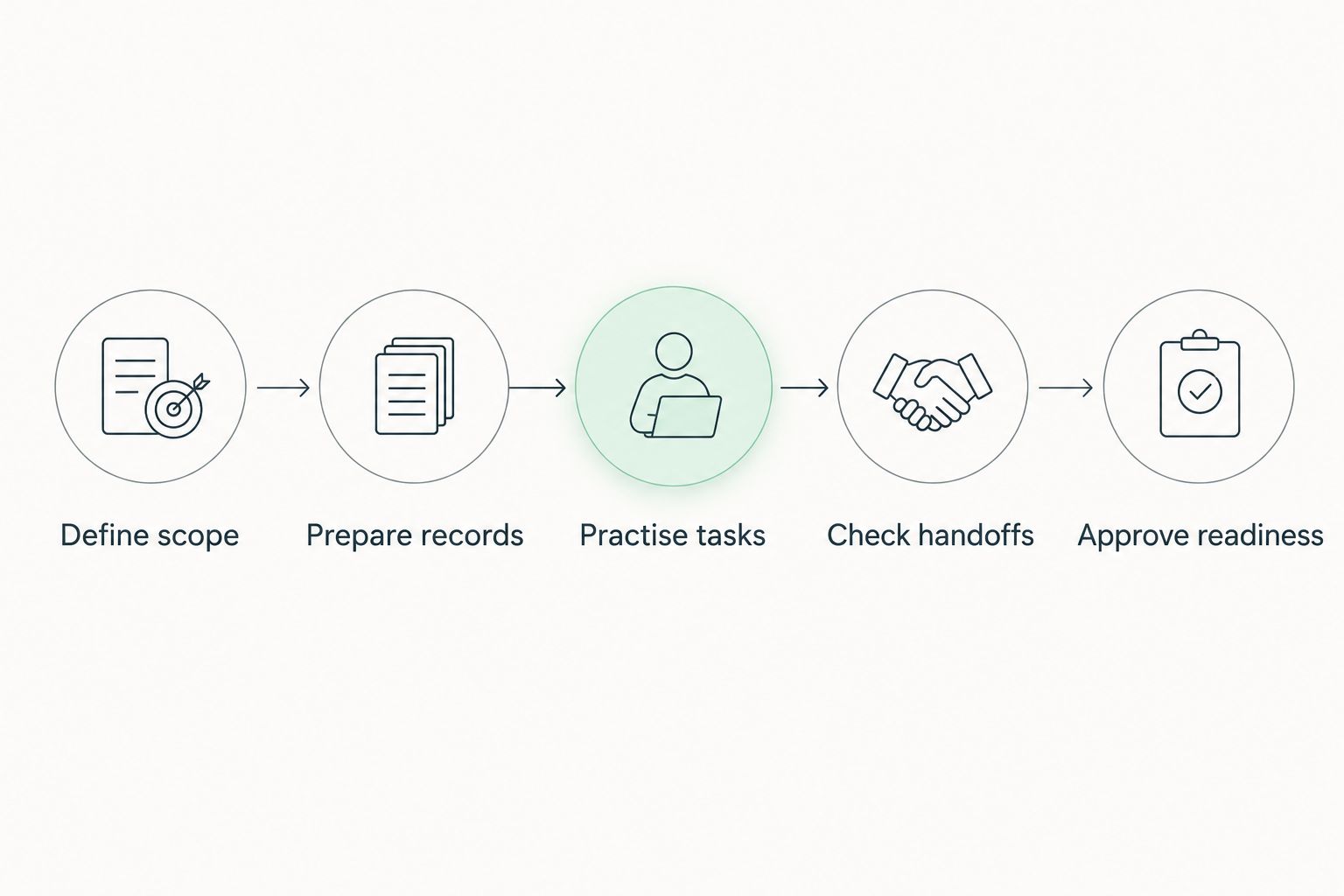
Use this sequence to turn a broad launch intention into work you can assign. The order follows dependencies: define the task before preparing the data, and prepare the data before assessing independent use.
- Define scope. List the roles, modules and daily tasks included in the rollout. Record exclusions alongside them.
- Prepare records. Select the customer information needed for practice and resolve unclear ownership or duplicates.
- Practise tasks. Have employees perform realistic work using the agreed process, with guidance available during learning.
- Check handoffs. Ask the receiving role to confirm that the record contains enough information to continue.
- Approve readiness. Review independent task completion and assign owners to any remaining issues.
The schedule should include a responsible person for each step. A date without an owner does not resolve a blocked import, an access issue or a disputed field definition. Name who makes the decision as well as who performs the work.
Keep a short issue list during practice. Describe the failed task, its effect and its owner. Separate a misunderstanding of the workflow from a data problem or an access problem; the remedy should address the failure rather than defaulting to another general demonstration.
When the same task fails again, review the instructions and the process together. Do not assume the employee simply needs more exposure. A confusing field definition or disputed ownership rule needs a decision before further practice becomes useful.
Test independent use before you close onboarding
Choose 3 practice tasks for each role as a starting assessment: find the relevant record, complete the assigned update and hand the work to the next person. Adapt the examples to the role. These are recommended exercises, not a claim that every role has only these responsibilities.
For each critical task, require 2 independent passes using different examples. This is an acceptance rule you can adopt, not an industry benchmark. The aim is to distinguish understanding the task from remembering a trainer’s demonstration.
Observe the outcome, not just the clicks. Can the employee explain why the record is correct? Can the receiving colleague continue without asking for information that should already be recorded?
Keep unresolved critical tasks open until the responsible role can complete them independently. If a task is outside the launch scope, record that exclusion instead of marking it as passed. A clear boundary is more useful than a broad declaration that the whole team is ready.
Where Mesh App fits in a modular rollout
Mesh App suits small and medium-sized businesses seeking modular CRM/ERP software with contact management, projects, time tracking, invoicing and finance. Those stated modules give you concrete areas to include—or exclude—when defining onboarding scope.
Review Mesh App against the tasks your team needs to perform. For a contact-focused introduction, assess contact-management work first. If your scope also includes project delivery or finance, define separate acceptance tasks for those areas rather than treating the platform as a single training topic.
The benefit of this modular scope is a clear way to organize the assessment. The limitation is that breadth alone does not establish team readiness. Confirm the workflow your business requires before setting a launch commitment, and do not treat the module list as evidence of an onboarding duration.
Does CRM training mean the team is fully onboarded?
Training completion does not equal onboarding completion. A training session shows that information was presented; independent task completion shows that an employee can use it. Include both learning and assessment in your plan.
Should you migrate every record before training starts?
Prepare the records required for the training scope before assessing users. Decide separately what historical information belongs in the live system; do not turn a practice exercise into an uncontrolled transfer of every existing record.
Can you onboard contacts before invoicing and finance?
You can plan contact onboarding separately when the initial workflow does not require invoicing or finance handoffs. Mark the boundary explicitly and assess the excluded workflows before bringing them into routine use.
FAQ
How long does it take to onboard a team to CRM software?
CRM team onboarding takes the time required to prepare usable records and demonstrate independent completion of the agreed tasks. Set the timetable from your role and module scope rather than a universal duration.
What's the difference between CRM implementation and team onboarding?
CRM implementation covers preparing the system and its working processes; team onboarding covers employees learning and demonstrating those processes. Track technical readiness and user readiness separately.
What's the best way to check whether CRM training worked?
Ask employees to complete realistic tasks independently and check the resulting records and handoffs. Watching a demonstration or attending a session is not the same as demonstrating competence.
Is staged CRM onboarding better than training everyone together?
Staged onboarding fits workflows that can be introduced separately; coordinated training fits roles that need to practise a shared handoff. Choose according to the work dependencies, not a promised speed advantage.
Should every employee receive the same CRM training?
Train employees on the tasks assigned to their roles and the shared rules that affect their work. Add cross-role practice where a colleague depends on the information they record.
Can Mesh App cover more than contact management?
Mesh App is a modular CRM/ERP platform offering contact management, project management, time tracking, invoicing and finance modules. Define separate onboarding tasks for each module included in your rollout.
When should we stop using the old customer spreadsheet?
Retire the old working spreadsheet when the agreed CRM workflow and relevant records have passed your acceptance checks. Specify where historical reference records remain and prevent conflicting updates across working systems.
One last thing
For your 2026 handover meeting, ask a receiving colleague—not the trainer—to inspect the result of a practice task. If that colleague cannot continue the work, the handoff has not passed, even if the person entering the record followed every demonstrated step.
Finish onboarding with evidence of usable work. Keep the launch date, but make readiness the condition for approval. That gives your team a clear standard without turning an unsupported time estimate into a promise.


