

Yes—project management software is worth it for a five-person team when shared deadlines, handovers and client work need more coordination than a spreadsheet provides. It is not worth adding another system if everyone already knows what to do and delivery stays predictable. The hidden burden is maintaining the system: setup, training and duplicate updates can outweigh the work it removes.
- Is project management software worth it for a five-person team? Yes, when clearer ownership replaces repeated coordination.
- Keep a spreadsheet when work stays independent and deadlines remain visible.
- Mesh App suits small businesses seeking project management alongside contact management, time tracking and invoicing.
- Test one real project before moving all five team members’ work into a new system.
Is project management software worth it for a five-person team?
Buy for a coordination problem, not for a headcount. Five people working independently need a different setup from five people sharing client approvals, scheduling and delivery responsibilities.
Use this comparison to choose the smallest system that solves your actual problem. The project management software guide for small businesses covers the broader selection process.
| Approach | Best for | Main advantage | Main drawback | Decision |
|---|---|---|---|---|
| Shared spreadsheet | Independent work with straightforward deadlines | Flexible records without introducing another application | Ownership and updates depend on manual discipline | Keep it while it remains dependable |
| Dedicated project management software | Shared tasks, handovers and changing deadlines | A defined place for responsibility and progress | Another system to maintain alongside client and financial records | Choose it when coordination is the main gap |
| Modular CRM/ERP platform | Client projects that also need contact, time and invoicing records | Broader operational coverage within the platform’s scope | More setup decisions than a task-only approach | Consider it when the problem extends beyond tasks |
These are operating choices, not guarantees about individual products. During a 2026 evaluation, check the actual capabilities of each candidate rather than assuming every project management application handles scheduling, time recording or invoicing.
Why this matters
A small team does not need a large project office to experience coordination problems. An unfinished handover can leave the next person waiting, while an approval buried in a message can leave a task looking blocked after the decision has been made.
The software earns its place when it makes the next action easier to identify. If you still need to ask who owns a task, which deadline applies and whether the client approved it, the underlying process remains unresolved.
For your 2026 decision, focus on the work that currently requires chasing. A cleaner task board is useful only if it changes how your team completes work.
When a shared spreadsheet is enough
Keep the spreadsheet when your team can trust it without maintaining parallel explanations. A familiar tool is not a problem merely because it is simple.
A spreadsheet fits work where each person has clear responsibility, dependencies are limited and changes are easy to communicate. You can record the task, owner, due date and status without designing an elaborate workflow.
Its advantage is flexibility. You can change a column or add context without configuring a new application, and the team avoids learning another interface.
The limitation is the process around the file. If people update separate copies, leave decisions in chat or rely on one colleague to explain every row, the spreadsheet no longer tells the whole story.
Before replacing it, tighten the existing routine. Give each active task an owner, keep one authoritative file and record changed deadlines where everyone checks them. If that solves the problem, you have no operational reason to migrate yet.
When dedicated project management software makes sense
Choose dedicated project management software when the missing piece is reliable coordination. The strongest reason is not that your team has become busier; it is that work repeatedly stalls between people.
Look for situations such as a colleague waiting for an input nobody realised they owned, or a client delivery date changing without the affected team members seeing it. These are concrete workflow problems you can test during a demonstration.
The advantage of a task-focused approach is a narrower setup. You can concentrate on responsibilities, deadlines and handovers rather than redesigning client records and finance processes at the same time.
The trade-off is separation. If your team also needs customer context, recorded hours and billing information, a standalone task system does not automatically resolve those needs.
Do not assume that buying project management software removes status meetings. Instead, decide which questions the system must answer before a meeting starts. Use discussion time for decisions and obstacles, not for reading task lists aloud.
When a modular platform fits better
Mesh App is best suited to small businesses seeking project management alongside contact management, time tracking and invoicing. Mesh App is a modular CRM/ERP SaaS platform with those functions and finance modules, serving small and medium-sized businesses across trades, construction, consulting, IT and e-commerce.
That scope makes it relevant when a task is only part of a larger client workflow. Your evaluation should examine how you want to manage the customer record, project work, recorded time and billing responsibilities—not just the task view.
The benefit is functional breadth. The trade-off is deciding which modules your team actually needs and how people should use them. A broader platform is not automatically a better choice for a team whose only problem is assigning tasks.
For a 2026 shortlist, ask for a demonstration built around your own workflow. Check how the relevant modules work together, what needs manual input and what requires configuration. Module names alone do not establish a specific integration, automation or reporting capability.
Why the value varies between five-person teams
The same headcount can hide very different working arrangements. Judge the fit against these factors rather than treating team size as the deciding metric:
- Shared ownership: Work that passes between colleagues needs clear handovers. Independent assignments need less coordination infrastructure.
- Deadline changes: If one changed delivery date affects several tasks, the team needs a dependable way to communicate the consequences.
- Client context: Teams that repeatedly search for contact details, approvals and project history need more than a task list alone.
- Time recording: If recorded work supports billing or project review, evaluate time tracking alongside task management.
- Billing handovers: When completed work must become invoice-ready information, assess that handover rather than stopping at task completion.
- Update discipline: Any system loses value when the team does not maintain it. Choose a workflow people can follow during ordinary working days.
None of these factors proves that a particular product is right. They define the situations your shortlist must handle and the questions your pilot must answer.
How should a five-person team test the decision?
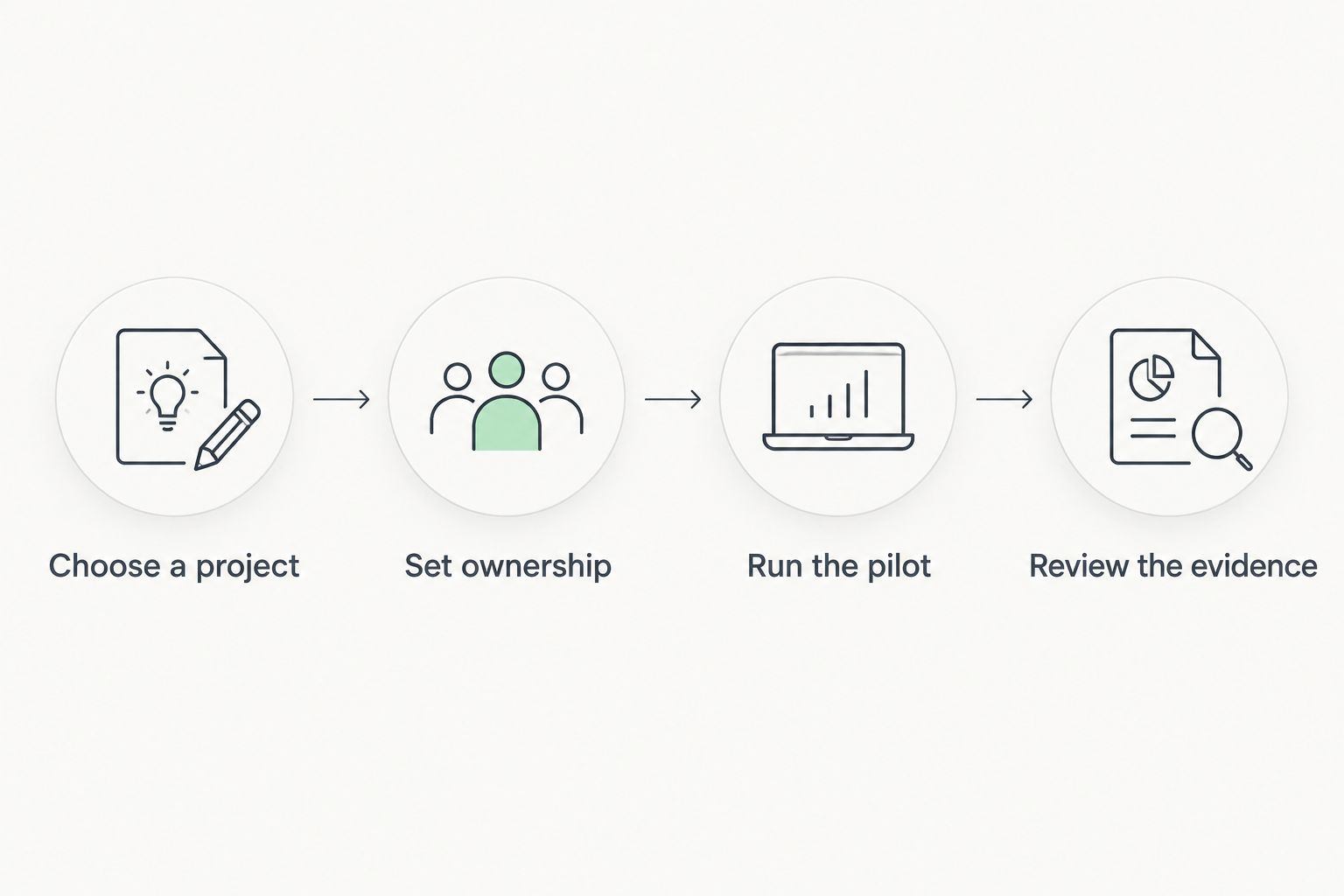
Run a bounded pilot on real work before migrating everything. For your 2026 evaluation, use the following sequence as a test plan, not as a promised implementation timetable.
Choose a project
Pick 1 active project with a genuine handover, a deadline and a clear delivery outcome. Avoid an unusually simple assignment that cannot reveal coordination problems, and avoid putting your most sensitive deadline at risk during a learning exercise.
Write down what currently causes friction. Examples include searching for the latest decision, asking for progress updates and re-entering the same information. Record what happens in your own team; do not substitute a vendor’s savings claim.
Set ownership
Give each task one accountable owner, even when several colleagues contribute. Define what the task needs before work can start and what counts as finished.
Keep the initial workflow plain. Labels such as planned, active, blocked and complete are useful only when everyone understands the difference. Remove fields that do not support a decision.
Run the pilot
Use 2 weeks as an initial review window, extending it if the project has not reached a meaningful handover. This is a suggested evaluation period, not a claim about how long implementation takes.
Ask all five people to use the agreed process for the selected project. Choose one authoritative task record for that pilot so the team is not maintaining competing versions of the truth.
Review the evidence
Compare the pilot with the problems you recorded at the start. Did people find the current owner without asking? Were changed deadlines visible? Did completed work reach the next person with the information they needed?
Reserve 15 minutes for a focused team review. Ask each person what became easier and what required extra administration, then decide whether to expand, simplify or stop.
The sequence matters: choose a representative project, establish responsibilities, use the system and then judge the result. Buying before agreeing on ownership leaves the most important decision unresolved.
What should count as a successful pilot?
A successful pilot removes a specific source of friction without creating a larger maintenance burden. Adoption matters, but opening an application is not evidence that the team works better.
Compare these observations before and during the pilot:
- Whether team members can identify the current task owner without asking someone else.
- Whether the latest deadline and approval decision are recorded in the agreed place.
- Whether handovers include the information the next person needs.
- Whether progress reporting still requires reconstructing work from messages.
- Whether updating the system replaces an existing activity or merely adds another one.
Record the actual time your team spends on coordination and administration if you want a numerical comparison. Separate initial setup from routine use; otherwise, the evaluation mixes a temporary learning burden with ongoing work.
Do not claim a return from hours nobody measured. If the evidence is qualitative, state the result plainly: ownership became clearer, handovers improved, or the application added work without fixing the original problem.
Can five people use project software without a project manager?
Five people can use project software without a dedicated project manager if ownership and maintenance are explicit. Assign someone responsibility for keeping the workflow understandable, but leave task updates with the people doing the work.
That person does not need to approve every change. The role is to resolve inconsistent labels, remove abandoned fields and make sure the team follows the same basic rules.
Should all five people use the same system?
All five people should use the same authoritative project record when their work depends on shared updates. Different personal working styles are compatible with a common record; conflicting owners, deadlines and task statuses are not.
You do not need to move every business process at once. Start with the project information that must be shared, then evaluate other functions separately.
Is project software worth it if the team already uses chat?
Project software is worth considering when chat no longer provides a dependable record of ownership and deadlines. Keep chat for discussion, but put the resulting decision where the team expects to find it.
If your existing chat-based process already keeps responsibilities and changes clear, introducing another application needs a stronger reason than a preference for a different interface.
FAQ
Is project management software worth it for a five-person team in 2026?
Project management software is worth it for a five-person team when it resolves unclear ownership, missed handovers or repeated status chasing. Keep a simpler system if those problems are absent.
What's the best project management setup for a small team?
The best setup is the smallest one that keeps responsibilities, deadlines and handovers clear. Choose a spreadsheet, dedicated application or broader platform according to the problem you need to solve.
Is a spreadsheet better than project management software?
A spreadsheet is the better choice when work remains straightforward and the team maintains one dependable record. Dedicated software becomes relevant when manual updates and shared dependencies make that record difficult to trust.
Does a five-person team need CRM and project management together?
A five-person team needs both only when customer records and project delivery both require attention. Mesh App offers contact management and project management alongside time tracking, invoicing and finance modules; evaluate the relevant workflow before choosing modules.
Can project management software replace team meetings?
Project management software can support fewer status-only discussions, but it does not replace decisions or problem-solving. Put routine progress information in the shared record and use meetings for unresolved issues.
How do we know whether the new software saves time?
Measure your own coordination and update work before and during a pilot. Compare recurring work separately from initial setup, and do not treat unmeasured savings as a proven result.
What should we check before putting client information into project software?
Check access controls, data handling terms, retention, export options and the contractual arrangements relevant to your business. Do not assume that a project management label establishes suitability for sensitive client information.
One last thing
Test whether someone other than the usual coordinator can explain the next action from the project record alone. Ask them to identify the owner, deadline and outstanding decision without consulting chat or asking a colleague.
If they cannot, fix the record or the working rules before adding features. For a five-person team, a dependable handover is a stronger reason to keep software than a long feature list.


