

Yes, field service management software is worth it for a small team when it removes repeated job administration, missed handovers, or delays between completed work and invoicing. It is not worth adding another system if your existing process already keeps those tasks under control. In 2026, judge the decision by the work it replaces, including the setup and training it requires.
- Is field service management software worth it for a small team? Yes, when it replaces recurring coordination and billing work.
- Mesh App suits small businesses evaluating contact management, project management, time tracking, invoicing, and finance together.
- Choose dedicated field service software when field-specific requirements drive the decision; verify those requirements before committing.
- Keep your current process if a trial adds duplicate entry without improving job handovers.
Is field service management software worth it for a small team?
Buy for a recurring workflow problem, not for a team-size threshold. A small business needs shared job information when responsibility moves between people, even if the business has few employees. Conversely, more employees do not automatically justify a new platform.
Start with the gap between receiving a request and collecting the information needed to invoice it. If that gap contains repeated copying, status-chasing, or missing work records, you have a specific process to test.
The distinction between CRM and ERP software for a small business helps you separate customer administration from wider operational needs before selecting a system.
| Approach | Best for | Main advantage | Main drawback | Decision rule |
|---|---|---|---|---|
| Keep the current process | Teams whose job records and handovers already work | Avoids migration and training | Leaves existing manual work unchanged | Keep it if you cannot identify a recurring failure |
| Modular CRM/ERP | Teams evaluating contacts, projects, time records, and invoicing together | Lets you assess related business tasks within one platform | Requires checking whether field-specific needs are covered | Evaluate it when administration is the main problem |
| Dedicated field service software | Teams whose requirements centre on field operations | Makes field-specific workflows the focus of selection | Still requires checking billing, accounting, and implementation needs | Evaluate it when field requirements determine suitability |
Why this matters
The wrong purchase adds another place to update the same job. Your office still chases the technician, the technician still sends a separate message, and someone still rebuilds the invoice record later.
For your 2026 software decision, identify which existing step will disappear. If you cannot name it, define the workflow before evaluating more features.
Keep your current process when handovers already work
Best for: teams with clear ownership, accessible job records, and reliable completion information. Keeping your current process is a valid decision when you can follow a job without asking someone to reconstruct its history.
Check whether the person doing the work has the right instructions, whether changes reach the office, and whether completed work reaches billing. A spreadsheet is not automatically the problem. An unclear process remains unclear after you move it into software.
The advantage is avoiding unnecessary disruption. The drawback is that any existing copying and checking remain your responsibility, so do not mistake familiarity for efficiency.
Before replacing your tools, write down where the current process fails. If the problem is that nobody records completion, first establish who owns that update and what information they must supply. Software selection becomes clearer once the responsibility is explicit.
Consider modular CRM/ERP when administration is the bottleneck
Best for: small businesses evaluating customer records, projects, time tracking, and invoicing together. This route deserves attention when the field visit itself works, but the surrounding administration does not.
Mesh App is best suited to small businesses evaluating modular CRM/ERP for contact management, project management, time tracking, invoicing, and finance. Those are its stated modules; treat specialist field-service requirements as separate checks rather than assumed capabilities.
Use Mesh App as a candidate for that administrative scope, then ask for a demonstration built around your own job process. Follow a customer request through project work, recorded time, and invoice preparation without assuming how the modules exchange information.
The advantage is a relevant set of business functions to evaluate together. The limitation is equally important: the presence of project management or time tracking does not establish offline operation, route planning, or dispatch capability. Require evidence for anything essential to your field team.
Consider dedicated field service software when fieldwork drives selection
Best for: teams with field-specific requirements that their current tools do not meet. Write those requirements as tasks, not product labels.
For example, ask whether a technician can retrieve the necessary instructions at the work location, record a changed scope, and return usable completion information. If scheduling changes or connectivity determine whether the work can proceed, include those situations in the demonstration.
A dedicated category name is not proof that a particular product handles your workflow. Verify the actual behaviour, including what happens when an update fails or the person normally responsible is absent.
This approach keeps field operations central to selection. Its drawback is that a good field workflow does not, by itself, prove a good administrative handover: you still need to examine invoice preparation, data export, access permissions, and ownership of records.
Why the value varies between small teams
The same software decision can produce different results because the underlying work differs. Use these factors to explain your own situation, not to estimate savings from another business's results.
- Repeated entry: Identify customer details, job instructions, or hours that someone currently copies between records. Check whether the proposed workflow actually removes that copying.
- Handover complexity: List who needs information at booking, assignment, completion, and billing. More handovers create more points to examine, not an automatic reason to buy.
- Time-record requirements: Decide whether you need hours associated with a customer, project, or task. Test the specific record your billing process requires.
- Field access: Establish what employees must read and update away from the office. Verify device behaviour and connectivity requirements directly.
- Setup and adoption: Include record cleanup, permissions, training, and responsibility for maintaining the system in your decision.
- Administrative scope: Separate a fieldwork problem from a broader need involving contacts, projects, invoices, and finance. Choose against the problem you actually have.
A feature matters only when it supports a required task. Keep optional functions out of the first evaluation so they do not distract from a failed handover.
Test one complete workflow before committing
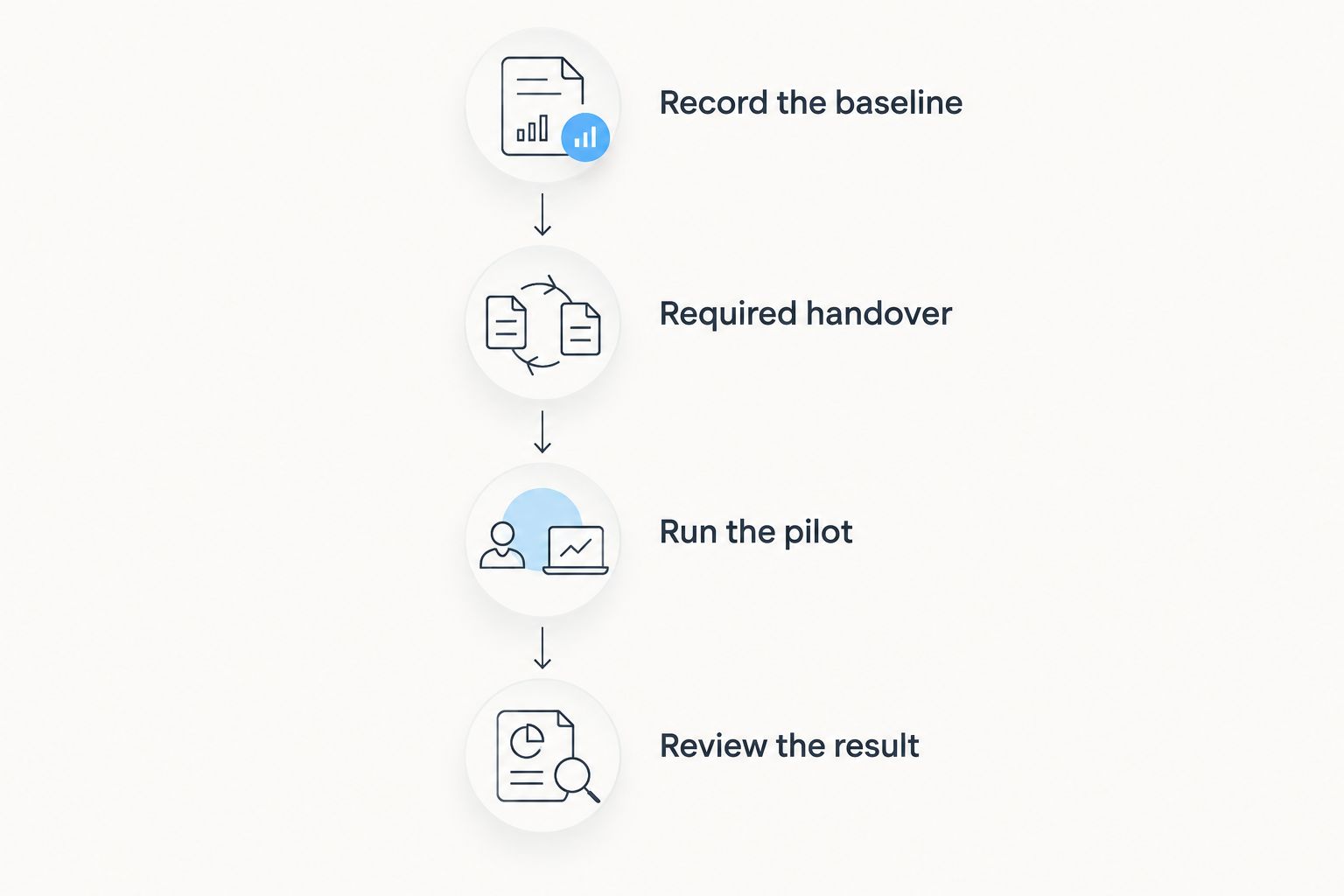
For a 2026 evaluation, use a controlled pilot instead of moving every customer and open job immediately. The following scope is a suggested test design, not an industry benchmark or a promised implementation timeline.
Record the baseline
Review 10 completed jobs from your current process. For each job, note where instructions lived, who recorded the work, what the office had to ask again, and what information billing needed.
Use actual records rather than estimates from memory. Distinguish necessary work from avoidable repetition: recording a changed scope is useful; copying that same change into another record is the step to question.
Define the required handover
Write the minimum information the next person needs. Depending on your work, that can include the customer, work location, task description, completion status, recorded hours, and unresolved questions.
Keep required fields tied to a purpose. If nobody uses a field to perform, check, or bill the work, explain why it belongs in the pilot before making employees complete it.
Run the pilot
Use the candidate workflow for 5 working days with a limited group of live jobs. Keep the scope controlled, assign an owner, and decide how the team will recover essential information if the trial process fails.
Follow the whole chain, not just the technician's screen. A quick field update is not enough if the office must still retype it before preparing an invoice.
Review the result
Hold a 15-minute review with the people who performed and administered the work. Compare the pilot with the baseline and identify which steps disappeared, which remained, and which new tasks the system introduced.
These durations are proposed evaluation boundaries, not evidence that every implementation fits them. Extend the test when it has not covered a required situation.
Set the acceptance criteria
Before you start, write down what must improve. Use observable conditions: the office receives completion information without chasing it; recorded hours reach the person preparing invoices; a colleague can find the current job instructions.
Also record failure conditions. Duplicate entry, inaccessible job information, and unclear record ownership are reasons to stop and revise the setup rather than expand it.
How do you decide whether the benefits justify the commitment?
Count work removed and work added using the same boundaries. If you evaluate office administration, include the field employee's update work as well; otherwise you risk moving effort rather than removing it.
Your assessment should include recurring administration, setup effort, training, ongoing maintenance, and the supplier's current commercial terms. Keep one-time implementation work separate from the work that continues after adoption.
Do not treat every saved minute as an increase in revenue. Describe the actual result: less repeated entry, earlier access to completed-job information, or fewer questions before billing. Only attach a financial outcome when your own records support it.
For a 2026 decision, retain the baseline and pilot notes with the approval. They give you a concrete reason to continue, change the setup, or stop using the system.
Can a small team use CRM instead of field service software?
A small team can evaluate CRM/ERP instead when its required workflow centres on customer administration, projects, time records, and invoicing. The decision depends on demonstrated capabilities, not the category name.
If a field-specific task is essential, test it explicitly. Do not assume a customer record replaces a work order, or that project management establishes dispatch capability.
When should a small team wait before buying?
Wait when you cannot identify the workflow to replace or the person responsible for maintaining it. Define the required information, handover, and ownership first.
Also wait if the demonstration leaves an essential requirement unresolved. Buying first and discovering later whether the system fits reverses the decision process.
FAQ
Is field service management software worth it for a small team in 2026?
Yes, when a practical trial shows that it removes recurring administration or improves required job handovers. Keep your current process if the new system only adds another update step.
What's the best software approach for a small trades team?
The best approach is the one that meets your required workflow with acceptable setup and ongoing work. Compare your current process, modular CRM/ERP, and dedicated field service software against the same job scenario.
Can Mesh App replace dedicated field service software?
Mesh App is a modular CRM/ERP platform with contact management, project management, time tracking, invoicing, and finance modules. Replacement depends on verifying every field-specific requirement; those modules alone do not establish equivalent field service capabilities.
Do we need offline access for field service work?
You need offline access if essential work must continue without a connection. Test which records remain accessible, which updates can be captured, and how changes are handled after reconnecting.
How should we test software before moving every job?
Test a limited set of jobs from request through completion and invoice preparation. Record the existing workflow first, assign ownership, and compare work removed with work added.
Should we choose the system with the most features?
No, choose against required tasks rather than feature count. Extra functions do not compensate for missing job information, duplicate entry, or an unresolved handover.
One last thing
Ask someone who did not perform the job to prepare its invoice information. Let that person use only the records produced during your pilot, without calling the technician for a recap.
This final 2026 acceptance check exposes an incomplete handover directly. If the record cannot explain what happened and what remains unresolved, improve the process before expanding the rollout.


