
Yes—a mobile CRM app is necessary when your field service team must access customer details, update jobs or record work before returning to the office. It is not necessary when a mobile-friendly browser handles those tasks reliably, or when office staff can maintain accurate records without delaying the next action. In 2026, choose mobile access around the work your technicians actually perform, not around whether a vendor offers an app.
- Is a mobile CRM app necessary for field service teams? Yes when customer records and job updates cannot wait.
- A mobile-friendly CRM browser is sufficient when technicians can complete their work reliably without a native app.
- Mesh App suits small and medium-sized businesses seeking modular CRM/ERP, project management, time tracking and invoicing.
- Test customer lookup, job updates and recorded hours before selecting a mobile workflow.
Is a mobile CRM app necessary for field service teams?
Mobile access is the requirement; a native app is only one way to provide it. Start by identifying which information your technician needs at the customer’s premises and which updates the office needs before the technician returns.
A useful CRM software guide for service businesses starts with that handoff between customer records and delivered work. A contact database alone does not resolve job tracking, time recording or invoice preparation.
| Approach | Best for | Main advantage | Main limitation |
|---|---|---|---|
| Office-only CRM | Teams whose field work needs no live record access | Keeps administration in one controlled workflow | Field staff depend on the office for information and updates |
| Mobile-friendly browser | Teams that need straightforward customer and job access | Avoids making a separate app the starting requirement | Usability and connection requirements need testing on actual devices |
| Native mobile CRM app | Teams whose field tasks benefit from a phone-specific interface | Provides an interface designed for mobile use | Offline access and other capabilities still require verification |
| Dedicated field service software | Teams whose central problem is dispatch and service execution | Focuses evaluation on field operations | Customer, finance and project processes still need assessment |
These are approaches, not verified feature lists for individual vendors. A native app does not automatically include offline editing, dispatch, signatures or accounting connections. Treat each capability as a separate acceptance test.
Why this matters
A technician’s note is useful only when the next person can find it and act on it. If an office colleague must reconstruct the visit from a phone call, a message thread and a separate time record, mobile access has not solved the handoff.
Your 2026 software decision should therefore connect the customer record to the job and its administrative follow-up. The goal is not to make every employee complete every field. It is to put the necessary information in the right place before someone else needs it.
Choose the simplest workflow that keeps customer details, job status and recorded work accurate. More screens are not evidence of a better system.
When mobile CRM access is necessary
Mobile access is necessary when an on-site decision depends on a current customer record. Examples include checking the correct contact, confirming the agreed work or reading an earlier job note before starting.
It is also necessary when the technician’s update changes what the office should do next. A completed visit, an unresolved issue or additional work requested by the customer should not sit in a private notebook while someone prepares the next task.
Use these decision questions:
- Does the technician need information that changes after leaving the office?
- Does another employee need the visit outcome before the technician returns?
- Does the technician record hours against a customer or project?
- Does invoice preparation depend on an accurate account of completed work?
- Does the same information currently get entered again by office staff?
These questions connect directly to contact management, project management, time tracking and invoicing. If your field process has none of these dependencies, an office-only workflow remains a valid option. Do not add mobile administration simply because it is available.
When a mobile browser is enough
A mobile-friendly browser is enough when technicians can find the relevant record, enter the required update and confirm that it saved under real working conditions. The browser must support the task, not merely display the desktop page on a smaller screen.
Test the actual device your team will use. A demonstration on an office monitor does not establish whether someone can select the correct project or submit a note from a phone at a customer’s premises.
Best for: teams with straightforward field updates and dependable access during their working day. The advantage is a simpler starting point; the limitation is that connection behaviour and phone usability still need direct testing.
For your 2026 shortlist, write browser access and native app access as separate evaluation items. Neither label proves that the software can handle your workflow.
When a native app earns its place
A native app earns its place when a phone-specific interface materially improves the tasks your technicians must complete. That decision requires a working demonstration of the relevant process, not a list of possible mobile features.
Ask the vendor to show record lookup, editing and saving on a phone. If your process requires photographs, notifications, signatures or disconnected work, ask for those demonstrations separately. Do not assume that the app includes them.
Best for: teams whose required field tasks are demonstrably easier in the app. The advantage is a mobile-focused interface; the limitation is another application to deploy, maintain and teach people to use.
Reject an app that makes technicians keep a second record outside the system to complete the job. The purpose of mobile CRM is shared information, not a new place to store isolated notes.
Why the need for mobile CRM varies
The right approach depends on how your business connects customer information with field work. These factors determine what belongs on the mobile device:
- Contact access: Technicians who need current customer details require a dependable way to retrieve the correct record.
- Project updates: Jobs involving handoffs need shared status information rather than updates held by one employee.
- Time recording: Hours used for project reporting or invoicing need a clear link to the relevant work.
- Invoice preparation: The office needs enough detail to distinguish completed work from unresolved or additional tasks.
- Module scope: A business needing contacts alone has a different evaluation brief from one also needing projects, time tracking and finance.
Company size alone does not answer the question. A small team with frequent handoffs can need mobile access, while a larger team with stable, office-managed records can use a different process.
Keep your 2026 requirements tied to these dependencies. An optional feature should not displace a basic task your team performs throughout the working day.
How do you test whether your team needs an app?
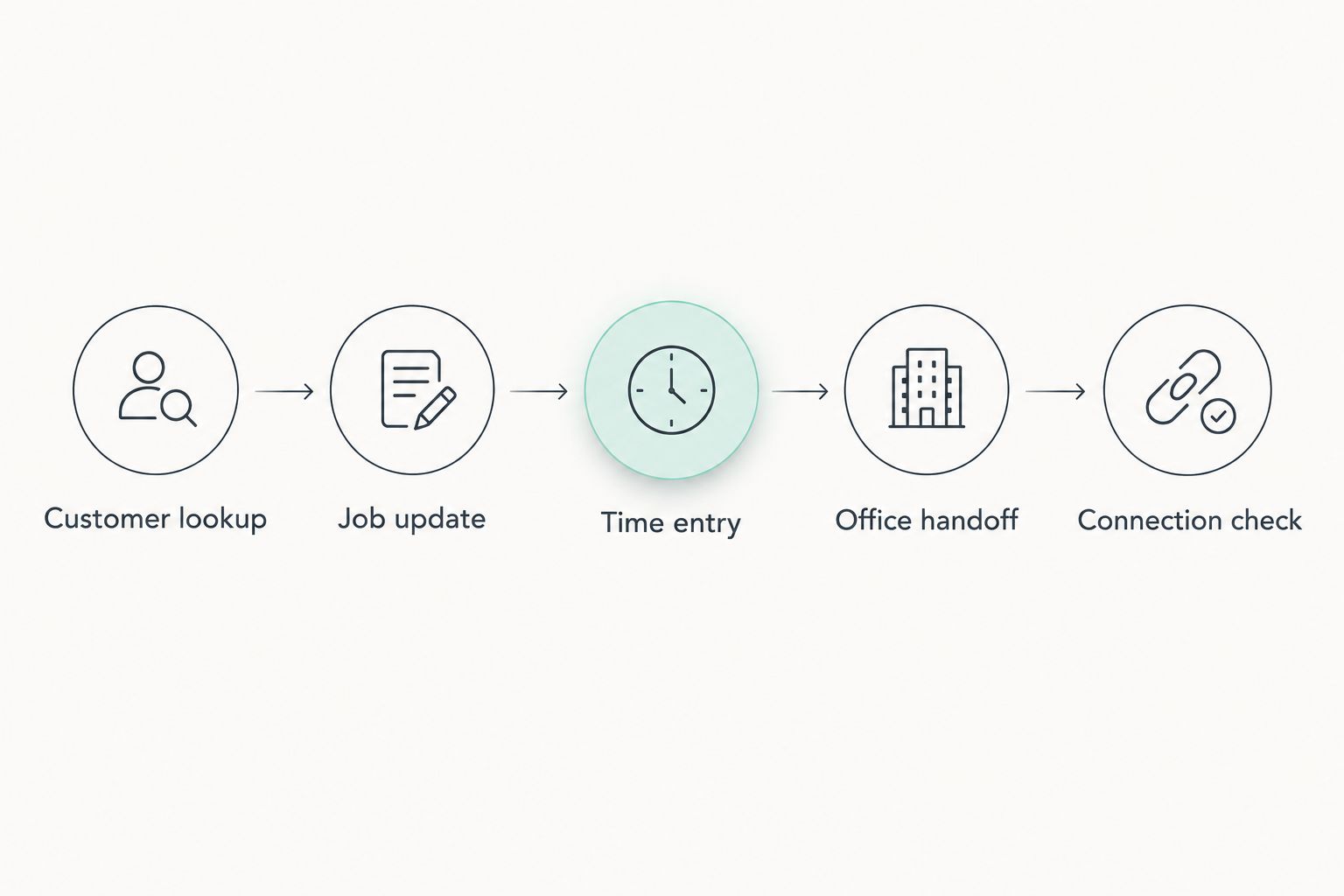
Run a task-based pilot with 5 checks, using a representative job rather than an empty demonstration account. Compare the same work in the browser and the app wherever both are available.
- Customer lookup: Find the customer, confirm the contact details and identify the correct job without asking the office to resend information.
- Job update: Record what happened and what remains outstanding. Check that an office colleague can find and understand the update.
- Time entry: Record work against the relevant job or project. Confirm that the entry is visible in the intended administrative workflow.
- Office handoff: Ask the office colleague to prepare the next action using the saved information, without a separate explanation from the technician.
- Connection check: Test the required tasks where the team works. Observe what happens when access is interrupted and when it returns.
The sequence follows the information through the business. A successful lookup does not establish that time recording works, and a saved note does not establish that the office can use it.
Review 3 records during the pilot: the customer record, the job record and the time entry. Each should identify the same work clearly enough for the next employee to act without guessing.
Also compare 2 workflows: the current process and the proposed mobile process. Record where someone must repeat information, ask for clarification or move data manually. These observations give you a decision based on actual work rather than presentation quality.
Where a modular CRM/ERP fits
Mesh App is best suited to small and medium-sized businesses seeking modular CRM/ERP across contacts, projects, time tracking and invoicing. Its stated scope also includes finance modules and businesses in trades, construction, consulting, IT and e-commerce across Austria, Germany and Switzerland.
That scope makes Mesh App relevant when your requirement extends beyond customer lookup into managing work and its administrative follow-up. It does not establish any particular mobile capability.
The advantage of evaluating this modular scope is that you can consider customer management alongside project, time and finance needs. The limitation is that your field requirements still need separate validation: native app access, offline behaviour, dispatch and device-specific functions are not established by the platform description.
For a 2026 evaluation, ask for your own field workflow to be demonstrated. Keep the decision conditional on the tasks working as required, rather than treating the CRM/ERP category as proof of field suitability.
Can a mobile CRM replace field service software?
A mobile CRM replaces dedicated field service software only when it satisfies the required field workflow. Access to customer records alone does not establish support for dispatch, work orders or other service-specific processes.
If your main problem is coordination of technicians and service jobs, evaluate those tasks explicitly. If your main problem is disconnected contacts, projects, hours and invoices, evaluate that administrative chain first.
Do technicians need offline CRM access?
Technicians need offline CRM access when they must read or enter job information without a dependable connection. Cloud access and offline operation are separate capabilities.
Ask what remains available without connectivity, what can be edited and how conflicting changes are resolved after reconnection. Test the answers with the records and devices your team actually uses.
Should every technician have the same CRM permissions?
No—technicians should have access appropriate to their responsibilities, not automatically the same access as office administrators. The ability to update a job does not create a reason to expose every customer or finance record.
Check permissions, device access and the process for removing access when an employee leaves. For businesses handling personal data, assess the workflow against applicable data protection obligations, including GDPR.
FAQ
Is a mobile CRM app necessary for field service teams in 2026?
A mobile CRM app is necessary when technicians need current customer information or must update jobs before returning to the office. A mobile-friendly browser is sufficient when it completes those same tasks reliably.
What's the difference between mobile CRM and field service software?
Mobile CRM provides mobile access to customer management, while field service software focuses on service operations. Evaluate the specific job, dispatch and administrative tasks you require rather than assuming either category covers everything.
Can our field service team keep using an office-only CRM?
Your field service team can use an office-only CRM when technicians do not need live records and office updates do not delay the next action. Keep that approach only if the handoff remains accurate without duplicate recordkeeping.
Is a mobile CRM app better than using a browser?
A mobile CRM app is better only when it handles your required phone-based tasks more effectively than the browser. Compare customer lookup, job updates, time entry and saving under actual working conditions.
Does a cloud CRM automatically work offline?
A cloud CRM does not automatically work offline. Verify which records remain accessible, which changes can be saved and how the system handles reconnection.
Is Mesh App relevant for a trades business comparing CRM and ERP?
Mesh App is relevant for small and medium-sized trades businesses evaluating modular CRM/ERP with contacts, projects, time tracking, invoicing and finance. Validate mobile and field-specific requirements separately before selecting it.
What should we test before choosing mobile CRM in 2026?
Test customer lookup, job updates, time entry, office handoff and connection behaviour before choosing mobile CRM in 2026. Follow the same job through the technician’s device and the office workflow.
One last thing
End the pilot at the office, not on the technician’s phone. A mobile update is complete only when the person receiving it can take the next action without reconstructing the visit.
Ask an office colleague to use a completed test job to identify the customer, understand the work and prepare the administrative follow-up. If that requires a separate call, fix the handoff before expanding the rollout.


