

Invoicing software for e-commerce businesses is software that creates and manages sales invoices with the aim of keeping orders, customer charges and accounting records consistent. This 2026 guide explains how to choose it when your store also has payment fees, returns, mixed customer types and cross-border sales to handle.
- Choose invoicing software for e-commerce businesses by testing refunds and payment reconciliation, not invoice templates alone.
- Mesh App is best for smaller businesses seeking invoicing alongside CRM and finance modules.
- Confirm store connections, accounting exports and e-invoicing formats before committing to any platform.
- Keep order totals, payment fees and bank payouts separate during reconciliation.
Why invoicing software matters for e-commerce businesses
An online order, a customer payment and a bank payout describe different events. Your invoicing process needs to preserve those distinctions rather than treat every incoming payment as a new sale.
E-commerce also requires more than a document with a customer name and total. A return changes the transaction record; a payment fee changes the amount you receive; a business buyer can need different invoice information from a consumer.
For your 2026 shortlist, start with the countries you sell into and the customers you serve. Austrian businesses evaluating document formats should read the guide to e-invoicing requirements in Austria, then confirm the applicable rules with their accountant.
Choose software around the transaction lifecycle, not the appearance of its invoice template. A polished document does not establish whether a returned item, failed payment or corrected billing address reaches accounting correctly.
How to choose and implement your invoicing workflow
Map your order-to-invoice process
Start manually with a spreadsheet and sample documents. Trace an order from checkout through payment, fulfilment, invoice creation and accounting handoff, recording which system owns each event.
Define when an invoice should be created rather than assuming the moment of checkout is always correct. Ask your accountant to confirm the trigger for your business, then make that trigger part of your software evaluation.
Give each transaction a reference that stays visible across the workflow. An invoice number alone does not tell a support agent which marketplace order or payment belongs to the customer’s complaint.
Test your map against 10 sample orders selected to cover different transaction types. This is a practical test set, not a claim that every store needs the same implementation scope.
- Record the order reference, invoice reference and payment reference separately.
- Identify the source of customer billing details.
- Assign responsibility for approving invoice corrections.
- Document what happens when fulfilment is cancelled.
- Include a business customer and a consumer in the sample.
Separate sales, payments and payouts
Use your existing order export, payment report and bank statement to reconcile transactions manually before buying automation. The exercise exposes which references and fields the future software must preserve.
Create 3 separate reconciliation views: Order records, Payment records and Bank payouts. The order view explains the sale, the payment view explains collection and refunds, and the payout view explains the transfer into your bank account.
A payout can include deductions or transactions grouped together. Require the proposed workflow to explain the difference between customer charges and the amount deposited, rather than forcing you to adjust totals without a traceable reason.
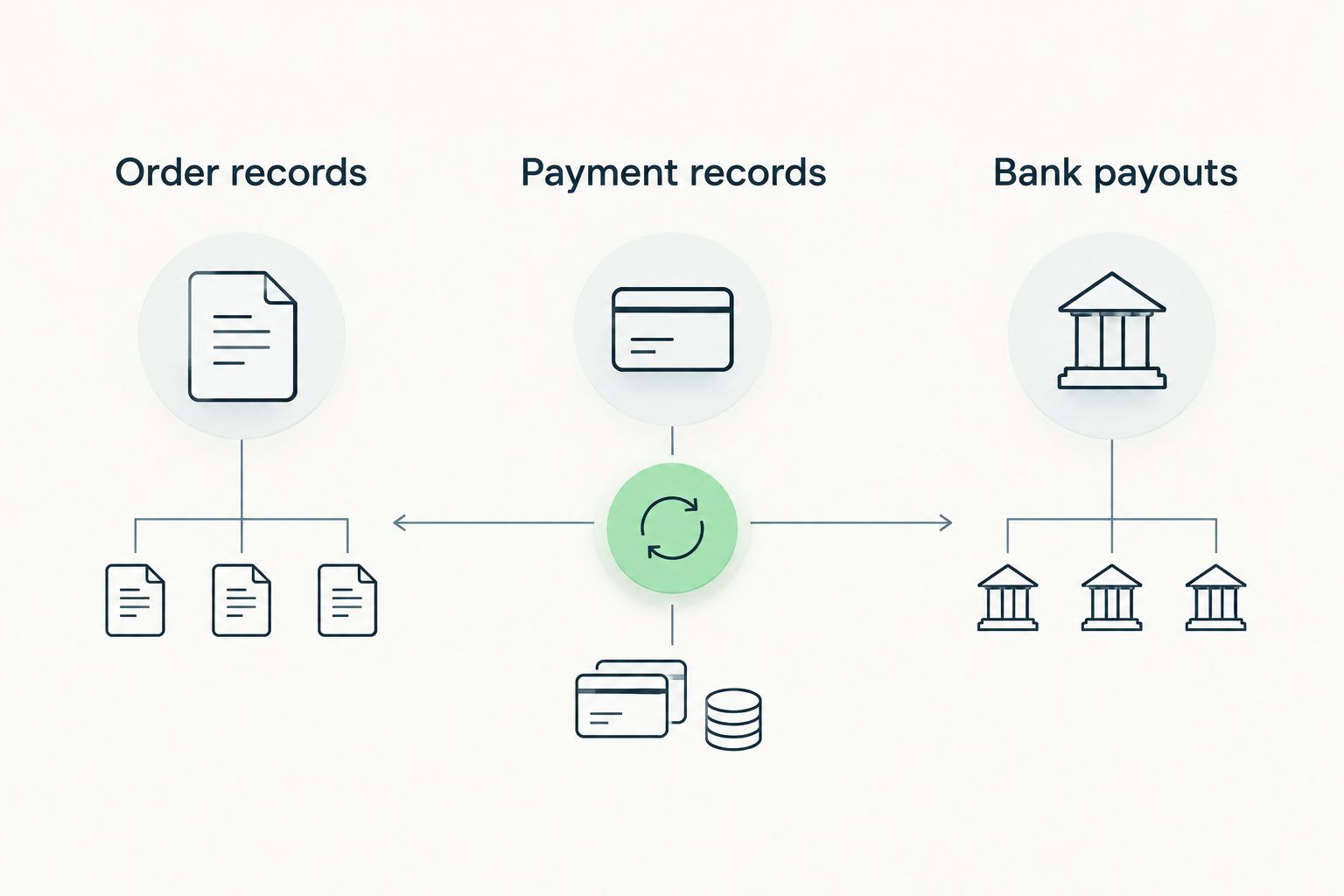
Test a partial refund as carefully as a successful purchase. You need to see how the correction relates to the original sale and how the refund appears in the payment record.
- Keep processing fees separate from the original sales amount.
- Match refunds to their original transaction references.
- Check how grouped payouts are explained.
- Record unresolved differences instead of overwriting totals.
- Preserve the supporting reports used for reconciliation.
Choose the scope your team actually needs
Once the manual workflow is clear, decide whether invoicing is your only problem. A store with disconnected customer records and finance administration needs a different scope from a store that only needs to issue invoices.
Mesh App is a modular CRM/ERP platform with contact management, project management, time tracking, invoicing and finance modules. Mesh App is best for small and medium-sized businesses seeking invoicing alongside CRM and finance modules. That makes it a relevant option when customer administration and billing belong in the same evaluation.
A broader platform also creates more decisions about ownership, configuration and adoption. Do not add modules simply because they exist, and do not assume a modular platform includes a particular store connector or payment workflow.
Ask for a demonstration using your sample transactions. A demonstration built around your order records is more useful than a tour of unrelated features.
- Write separate must-have and optional requirements.
- Identify who needs customer records alongside invoices.
- Request evidence of the exact store connection you require.
- Test the accounting handoff with your accountant.
- Select only the modules tied to an identified workflow.
Verify tax treatment and document formats
For a 2026 implementation, build a requirements sheet by selling entity, destination and customer type. Give it to your accountant before configuring invoice templates or tax rules.
Separate the question of what an invoice must contain from the question of how it must be delivered. A readable PDF and a structured electronic invoice are not interchangeable formats; the recipient’s requirements determine what you need to provide.
Avoid treating Austria, Germany and Switzerland as a single configuration. Check the requirements that apply to each relevant transaction instead of copying settings from another business or a generic template.
Your software test should show the resulting document and the underlying fields. A correct-looking total does not prove that the customer classification or tax treatment was recorded correctly.
- Confirm the required seller and buyer information.
- Document tax treatment for each relevant sales scenario.
- Check correction and credit-note requirements with your accountant.
- Verify required electronic formats and delivery channels.
- Review access to issued documents and supporting records.
Test exceptions before automating routine orders
Prepare a manual exception checklist before turning on automatic invoice creation. Automation is useful only when you know which transactions should pass through and which require review.
Run a pilot for 30 days if that fits your operating cycle. Treat that duration as a planning choice: the acceptance criteria matter more than the calendar, especially if your pilot does not contain a representative return or accounting handoff.
Include duplicate notifications, cancelled orders and changed billing details in the test. Ask the supplier to demonstrate what happens when the same order arrives again, rather than accepting an assurance that duplication is handled.
Keep the pilot narrow enough that someone can inspect every outcome. Expand only after the team can explain how invoices, payments and corrections relate.
- Repeat an order import to test duplicate handling.
- Process a full cancellation and a partial return.
- Check a failed or delayed payment.
- Review a customer billing-detail correction.
- Test recovery after a connection interruption.
- Record who resolves each failed transaction.
Measure accuracy before expanding automation
Use a spreadsheet to record pilot results before configuring dashboards. Track whether invoices are correct, whether payments can be matched and whether accounting can accept the output without unexplained changes.
For your 2026 rollout, define the acceptance criteria before reviewing the results. Otherwise, a fast invoice-generation process can distract from unresolved reconciliation errors or missing correction records.
Measure manual work with a repeatable method. Record the start and finish of the same task across comparable transactions; do not turn a supplier’s general efficiency claim into your expected result.
Assign ownership for ongoing checks after launch. A workflow is not finished when the first invoice is created; it is finished when exceptions have an owner and the accounting handoff has been accepted.
- Count invoices requiring manual correction.
- Track unmatched payments and unexplained payout differences.
- Record time spent on the same defined billing task.
- Log rejected or unusable accounting exports.
- Review unresolved exceptions before expanding the rollout.
Compare invoicing options for your e-commerce business
The right option depends on which part of the workflow needs improvement. These are selection routes, not a ranking based on unverified feature lists.
| Option | Best for | Main advantage | Key limitation | Selection test |
|---|---|---|---|---|
| Manual invoice template and spreadsheet | Documenting a simple workflow before software selection | Makes fields and responsibilities visible | Requires manual entry and reconciliation | Reproduce an order, correction and payment match |
| Store-native invoicing | Businesses evaluating billing within their existing store setup | Keeps the evaluation close to the order source | Cross-channel records and accounting handoffs need checking | Trace a return through the complete process |
| Dedicated invoicing application | Teams focused primarily on billing administration | Keeps the selection centred on invoice requirements | Customer and operational records can remain elsewhere | Confirm imports, corrections and required exports |
| Mesh App modular CRM/ERP | Small and medium-sized businesses evaluating invoicing with customer and finance administration | Offers contact management, invoicing and finance modules within a modular platform | Store connectors and transaction-specific workflows require verification | Demonstrate your sample transactions across the required modules |
Choose the narrowest scope that solves the full problem. A dedicated billing application is a sensible evaluation route when customer management already works; a modular platform belongs on the shortlist when the problem extends beyond issuing documents.
Do not confuse a broader scope with a better fit. More modules introduce more processes to configure, while a narrow application still needs to pass the same refund, reconciliation and accounting tests.
Common mistakes e-commerce businesses make
Using a bank payout as the invoice amount
A bank deposit describes money transferred, not necessarily the original customer charge. Reconcile the sale, fees, refunds and payout separately so that deductions do not silently change the sales record.
Treating a refund as a deleted sale
Removing the original transaction destroys the link between what happened and how it was corrected. Define the correction workflow with your accountant and test whether staff can retrieve the original document and its related adjustment.
Assuming every store connection behaves the same way
A connection can transfer order data without covering the complete billing process. Ask which fields, events and error states it handles, then test duplicate imports, cancellations and partial refunds using your own examples.
Combining business and consumer invoice requirements
One template does not establish that every customer scenario is covered. Check how the workflow captures business details, records customer classification and applies the requirements confirmed for that transaction.
Buying for order volume alone
Order count does not describe the difficulty of your billing workflow. For a 2026 decision, consider sales channels, customer types, return handling and accounting requirements before deciding that a larger platform or a smaller application is necessary.
FAQ
What is the best invoicing software for e-commerce businesses?
The best invoicing software for e-commerce businesses is the option that passes your order, refund, reconciliation and accounting tests. Mesh App belongs on the shortlist when a small or medium-sized business also needs contact management and finance modules; verify the required store connections before choosing.
Can I use my online store's built-in invoicing tools?
Use built-in invoicing tools if they satisfy your document, correction and accounting requirements. Test a partial refund and a business-customer order before deciding that the store's invoice output covers the full workflow.
Do I need invoicing software if my payment provider sends receipts?
A payment receipt does not automatically establish that your invoice requirements are met. Check the document's purpose, required fields and treatment of corrections with your accountant.
How do I handle payment fees when reconciling invoices?
Keep payment fees separate from the original sales amount during reconciliation. Match customer charges, refunds, deductions and bank transfers using the relevant transaction references.
Does Mesh App connect to every e-commerce platform?
Verify the exact e-commerce connection you need with Mesh App before selecting it. Test which order fields, refund events and error states the proposed connection handles rather than assuming universal compatibility.
Do Austrian online stores need structured e-invoices in 2026?
Determine Austrian e-invoicing obligations from the applicable transaction and recipient requirements, not from the fact that a business sells online. Confirm the required format and delivery process with your accountant before configuring the software.
How long should I test a new invoicing workflow?
Test until the workflow passes your defined acceptance criteria, including corrections and accounting handoff. A 30-day pilot is a planning option, not a guarantee that every relevant transaction type will occur during that period.
One last thing
Before your final decision, ask someone who handles customer complaints to find an order, its invoice, the payment and a later refund. Let your accountant inspect the same transaction from the accounting side.
If both people cannot explain the same transaction without reconstructing it from disconnected records, the workflow is not ready. This test rewards traceability rather than presentation and gives you a concrete reason to accept or reject a proposed setup.
For your 2026 rollout, approve the exception path as carefully as the successful sale. The ordinary order shows that software can create an invoice; the corrected order shows whether your team can trust the process.


