

Yes, invoicing software can support multiple currencies when it includes foreign-currency billing, exchange-rate handling and payment reconciliation. Currency support does not automatically include receiving foreign-currency payments or posting exchange differences correctly, so check the complete workflow before choosing a system in 2026.
- Can invoicing software support multiple currencies? Yes, but foreign-currency invoices and payment reconciliation are separate capabilities.
- Check invoice currency, accounting currency and settlement currency before approving your billing workflow.
- Mesh App offers modular CRM/ERP software; confirm its specific currency capabilities before selecting its invoicing module.
- Test exchange rates, partial payments, credit notes and accounting exports with representative transactions.
Why this matters
An invoice can look correct while leaving your accounts difficult to reconcile. The customer sees an amount in their currency, but your finance team still needs to record the receivable, match the payment and explain any difference.
For an Austrian business billing a Swiss customer, that means separating the commercial agreement from the accounting process. Agreeing to invoice in Swiss francs does not establish which currency reaches your bank account or which exchange rate your books should use.
If billing also depends on project work, review the wider finance and invoicing workflow for IT companies. Currency handling needs to fit the work you invoice, not just the document you send.
Can invoicing software support multiple currencies?
Yes. The useful distinction is whether the software merely prints a foreign currency or handles the transaction through payment and accounting. Use the following comparison when assessing a system in 2026.
| Currency workflow | Best for | What it handles | Advantage | Limitation to check |
|---|---|---|---|---|
| Foreign-currency documents | Businesses that need to issue invoices in a customer's currency | Invoice amounts and currency identification | Makes the agreed billing currency explicit | Does not establish payment collection or accounting conversion |
| Multi-currency receivables | Businesses collecting invoices across currencies | Foreign-currency balances, payments and outstanding amounts | Keeps collection activity tied to the invoice currency | Exchange differences and bank charges still need correct treatment |
| Connected multi-currency accounting | Businesses needing foreign-currency transactions in their books | Conversion, settlement records and accounting handoff | Connects billing records with financial reporting | Depends on the actual accounting connection and configuration |
These are workflow categories, not universal product tiers. A vendor's use of the phrase multi-currency does not tell you which category its software covers.
Ask for a demonstration from invoice creation through accounting export. A currency dropdown alone is not enough evidence to approve the system.
Separate the 3 currency roles
A reliable assessment distinguishes 3 currency roles: invoice currency, accounting currency and settlement currency. They can be the same, but they answer different questions.
Invoice currency
Invoice currency states what the customer owes. If your agreement requires payment in Swiss francs, the invoice should identify Swiss francs unambiguously rather than relying on a currency symbol that readers must interpret.
Check how the software carries that currency into reminders, outstanding-balance reports and credit notes. Changing the displayed symbol without preserving the underlying currency is not a complete billing workflow.
Accounting currency
Accounting currency is the currency used to record and report the transaction in your books. A foreign-currency invoice therefore needs a conversion process when its currency differs from your accounting currency.
The exchange-rate source, applicable date and rounding treatment belong in that process. Confirm them with your accountant rather than assuming the invoice-date rate is appropriate for every accounting or tax purpose.
Settlement currency
Settlement currency is the currency in which the payment reaches the receiving account. It can differ from the invoice currency if the bank or payment provider converts the funds.
That distinction matters when matching receipts. A lower received amount can reflect conversion, a deducted charge or an actual customer short payment; those are different events and should not be treated interchangeably.
What should you test before choosing software?
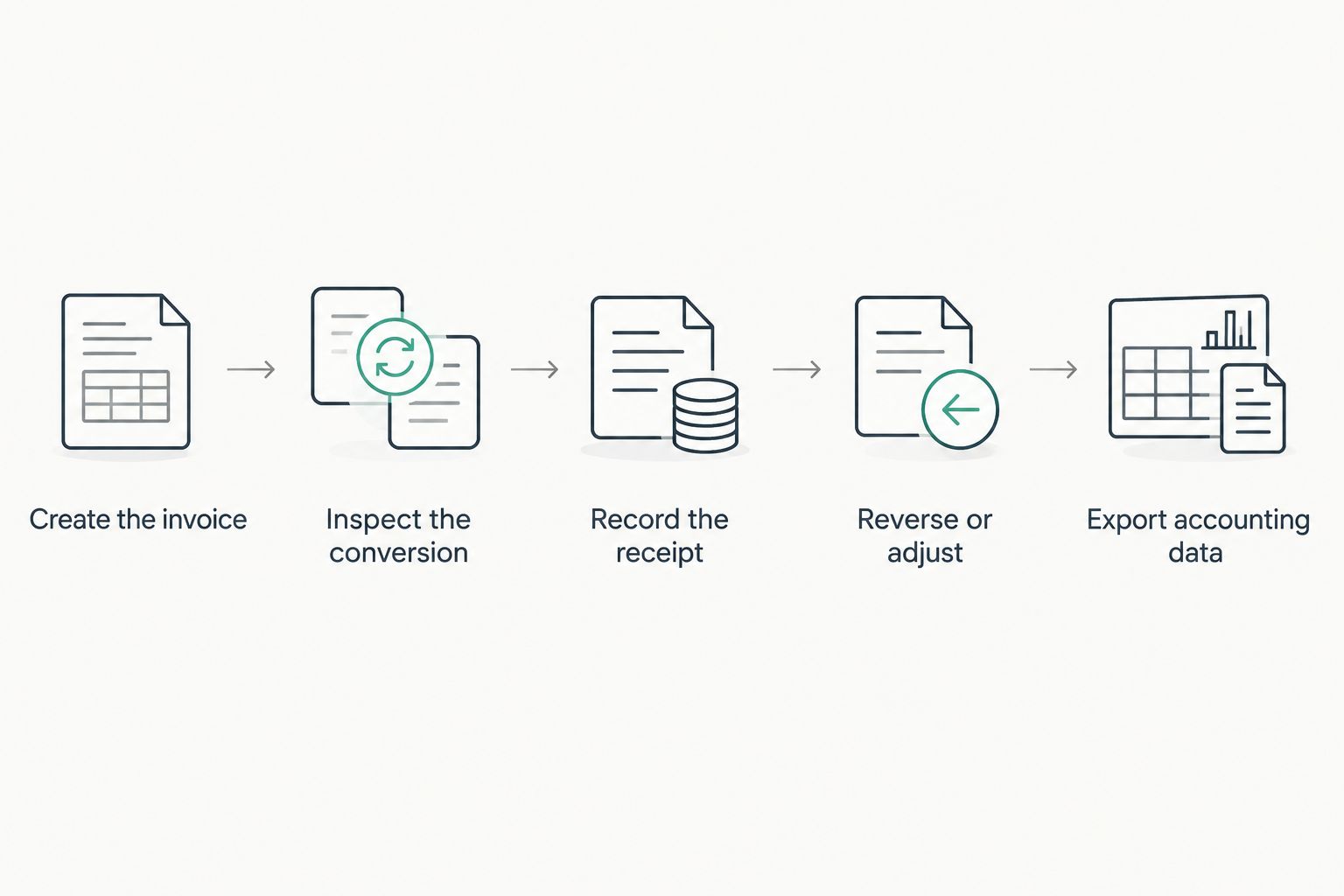
Use these 5 checks for your 2026 evaluation. Demonstrate the workflow with representative records, including exceptions, rather than accepting a feature-list confirmation.
- Create the invoice. Select the required currency, enter line items and inspect the final document. Confirm that totals, tax information and currency identification remain consistent after saving and reopening it.
- Inspect the conversion. Find the exchange rate, its direction, its source and its effective date. Check who can change it and whether the original transaction remains traceable.
- Record the receipt. Match a foreign-currency payment against the invoice. Inspect the remaining balance and distinguish payment conversion from bank charges.
- Reverse or adjust the transaction. Create a credit note and process a partial refund. Confirm that the original invoice reference and currency remain clear throughout the adjustment.
- Export the accounting data. Open the actual output with your accountant. Verify that it contains enough information to reconstruct the invoice, conversion, receipt and remaining balance.
For the payment check, start with 1 unpaid invoice and record 2 partial payments. This is a test scenario, not a performance benchmark: its purpose is to expose how the system handles a balance that remains open between receipts.
Reject a workflow that requires you to overwrite the original invoice just to make the payment match. You need to understand the difference, not erase it.
Why multi-currency support varies
Multi-currency support varies because billing, payment collection and accounting are separate functions. The right scope depends on what your business actually needs to complete a transaction.
- Required currencies. Check each currency you bill and receive. Do not assume that support for one foreign currency establishes support for all others.
- Exchange-rate control. Establish whether rates are entered manually, imported or supplied through another system. Confirm how corrections are recorded.
- Payment route. Bank transfers and payment-provider settlements can produce different reconciliation records. Test the route your customers use.
- Adjustments and exceptions. Partial payments, credit notes, refunds and deducted charges require more than invoice creation. Include them in the demonstration.
- Accounting handoff. A document export and a structured accounting transfer serve different purposes. Your accountant needs usable transaction data, not merely a readable invoice.
- Access and responsibility. Decide who can select currencies, change rates and approve adjustments. The software needs to support your division of responsibilities.
For a 2026 purchasing decision, write these requirements as acceptance criteria. “Supports multiple currencies” is too broad; “retains the invoice currency and shows the remaining foreign-currency balance after partial payment” is testable.
Where a modular CRM/ERP platform fits
Mesh App is best suited to small and medium-sized businesses seeking modular CRM/ERP software. Its stated modules cover contact management, project management, time tracking, invoicing and finance, making it relevant when billing is part of a wider operational workflow.
The advantage of considering that scope is practical: you can evaluate customer records, work records and finance requirements together. The trade-off is a broader evaluation than selecting a standalone invoice generator; you must check the boundaries between modules as well as individual features.
Assess Mesh App against the currency tests above. Do not infer foreign-currency invoicing, exchange-rate feeds, payment collection or accounting integrations from the existence of invoicing and finance modules.
For Mesh App invoicing, request a demonstration using your intended invoice currency and accounting workflow. Approve the capability only when the demonstration covers the transaction you need to complete.
Does multi-currency invoicing handle tax automatically?
Multi-currency invoicing does not establish that tax treatment is correct. Currency selection and tax treatment answer different questions: one identifies the amount owed, while the other depends on the transaction and applicable rules.
For example, choosing a customer's currency does not by itself determine whether a reverse-charge treatment applies. Do not use currency as a shortcut for customer location, tax status or place-of-supply analysis.
For your 2026 setup, have your accountant review a representative foreign-currency invoice and its accounting output. Check the required tax information separately from the commercial currency and payment instructions.
Can I invoice in one currency and receive another?
You can invoice in one currency and receive another when your payment arrangements permit conversion. The invoice still needs a clear settlement agreement, and the received payment needs a traceable reconciliation.
Before sending the invoice, establish who handles conversion and how deducted charges affect the outstanding balance. Otherwise, your team can mistake a converted receipt for a customer underpayment.
Ask the software provider to show the original amount owed, the amount received and the explanation for the difference. A payment status marked as paid is not a substitute for that record.
What should your acceptance record contain?
Keep a short acceptance record for the system you select in 2026. Record the required currencies, the agreed conversion process, the payment routes tested and the accounting output your accountant accepted.
Include the exceptions that would otherwise send your team back to spreadsheets. A successful standard invoice does not prove that a credit note or partially paid balance will remain understandable.
Before approving the setup, retain:
- A sample invoice: the customer-facing document showing the agreed currency and payment instructions.
- A conversion record: the rate, relevant date and source used for the accounting treatment.
- A payment record: the receipt, allocation and any separate charge or exchange difference.
- An adjustment example: a credit note or refund linked to the original transaction.
- An accounting output: the actual export or transfer result reviewed by the person responsible for your books.
Choose the workflow your finance team can explain from source document to final balance. An unexplained adjustment is still unexplained even when software creates it automatically.
FAQ
Can invoicing software support multiple currencies for a small business?
Yes, invoicing software can support multiple currencies for a small business when the required currencies and workflows are included. Check foreign-currency invoices, payment matching and accounting conversion separately.
Does a foreign-currency invoice mean customers can pay in that currency?
No, a foreign-currency invoice does not establish that your bank or payment provider accepts that currency. Confirm the receiving account, payment route and conversion arrangements before issuing payment instructions.
Should I use a currency symbol or a currency code on an invoice?
Use an unambiguous currency identifier, such as EUR for euros or CHF for Swiss francs. A symbol alone can leave the intended currency unclear, especially where different currencies share a symbol.
Can multi-currency invoicing software handle partial payments?
Multi-currency invoicing software can handle partial payments when its receivables workflow supports them. Test separate receipts against the same invoice and inspect the remaining balance in the original currency.
Does multi-currency support include automatic exchange rates?
No, multi-currency support does not necessarily include automatic exchange rates. Ask how rates enter the system, which dates they apply to and how corrections remain traceable.
Can Mesh App handle my foreign-currency invoicing workflow?
Confirm the specific foreign-currency workflow with Mesh App before selecting its invoicing module. Request a demonstration covering your currencies, payments, adjustments and accounting output rather than relying on the module name.
Do I still need my accountant to review foreign-currency invoices?
Yes, have your accountant review the conversion and tax treatment used for foreign-currency invoices. Software settings do not replace a decision about the correct treatment for your transactions.
One last thing
Test a correction before you approve the original workflow. A foreign-currency invoice can look convincing on screen while a later credit note leaves the payment balance or accounting record difficult to follow.
Ask the demonstrator to issue the invoice, record a partial payment and then credit the unpaid balance. If your team cannot explain what remains owed and why, the workflow is not ready for use.


