

Yes, invoicing software can handle recurring billing when it supports scheduled invoice creation for repeat services or subscriptions. Automatic invoicing does not necessarily include automatic payment collection, failed-payment retries, or subscription changes. For your 2026 selection, check those functions separately before treating a recurring invoice feature as a complete billing system.
- Can invoicing software handle recurring billing? Yes, with scheduling support; automatic payment collection requires a separate capability.
- Recurring invoices suit fixed repeat charges; usage-based billing also needs accurate activity records and calculation rules.
- Mesh App offers invoicing and finance modules; verify recurring billing requirements against the workflow you need.
- Test cancellations, billing changes, and failed payments before allowing invoices to send automatically.
Can invoicing software handle recurring billing?
Yes—but distinguish creating an invoice from collecting its payment. A recurring invoicing function schedules the next document using agreed billing details. Payment automation requires a supported payment method, appropriate customer authorisation, and a process for recording the result.
Use this comparison to identify the workflow you actually need. For the collection stage, the guide to automatic payment reminders covers a separate question from recurring invoice creation.
| Billing approach | Best for | Main advantage | Main limitation |
|---|---|---|---|
| Scheduled recurring invoices | Repeat services with stable charges | Reuses agreed details and a billing schedule | Does not itself establish automatic payment collection |
| Recurring invoices with payment collection | Repeat charges with an authorised payment method | Connects invoice generation with collection | Needs payment handling and a failed-payment process |
| Usage-based recurring billing | Services charged according to measured activity | Bills according to approved usage | Requires reliable records and calculation rules |
These are workflow categories, not promises about every invoicing application. Select the category first, then require the software provider to demonstrate it with your billing scenario.
Why this matters
A repeating document solves only part of the job. Your team still needs to know whether the charge is correct, whether the customer received it, whether payment arrived, and whether the service remains active.
For a 2026 software shortlist, evaluate the complete billing cycle rather than the recurring invoice checkbox. A scheduled invoice that continues after cancellation creates a different problem from an invoice that never reaches the customer. Both belong in your acceptance test.
Automation also changes where you apply control. Instead of reviewing every invoice from scratch, you review the rules, exceptions, and evidence that generated it. That makes a clearly assigned billing owner essential.
Scheduled recurring invoices: best for stable repeat charges
Scheduled recurring invoices fit an agreement with a predictable billing interval and a charge that stays unchanged until someone approves an amendment. Examples include a maintenance agreement or a consulting retainer. The schedule should reflect the agreement, not merely the date someone created the template.
The advantage is consistency. You avoid rebuilding the same billing details for each period, and you can check a defined schedule instead of relying on a personal reminder.
The limitation is that repeated information can become repeatedly wrong. A changed billing address, cancelled service, or outdated charge must reach the recurring schedule before the next invoice is generated.
Choose scheduled invoices when the amount is stable and your team has a clear process for approving changes. Require a preview, a stop condition, and a way to identify the agreement behind each invoice.
Recurring payment collection: best for authorised repeat payments
Recurring payment collection adds a payment step to the invoicing workflow. It requires more than storing a customer's email address or sending an invoice automatically. Confirm how customer authorisation is obtained, how payments are initiated, and how their outcomes appear in the billing record.
The advantage is a connected collection process. Your team can distinguish a generated invoice from a collected payment without treating document creation as proof of settlement.
The limitation is exception handling. A failed payment needs a defined response, while a cancellation must stop the correct future actions. Check invoice generation and payment collection independently; stopping one does not establish that the other has stopped.
Choose recurring collection only when you can demonstrate successful payment, failed payment, and cancellation handling. Keep responsibility for exceptions with a named team member rather than an unattended notification inbox.
Usage-based recurring billing: best for variable service activity
Usage-based billing repeats the billing cycle, but not necessarily the charge. The invoice depends on approved activity, such as billable hours or service quantities. The recurring schedule determines when to bill; the underlying records determine what to bill.
Its advantage is that the charge follows the agreed work or consumption. Its limitation is dependence on accurate inputs: incomplete records, unapproved work, and unclear cut-off rules undermine the resulting invoice.
For your 2026 requirements, write down what counts as billable activity and who approves it. Also define how late records are handled after a period closes. Software cannot resolve an ambiguous commercial agreement simply by running on a schedule.
Choose usage-based recurring billing when your activity records and approval process are ready to support it. Demonstrate the calculation using approved records before testing automatic sending.
How do you set up recurring billing safely?
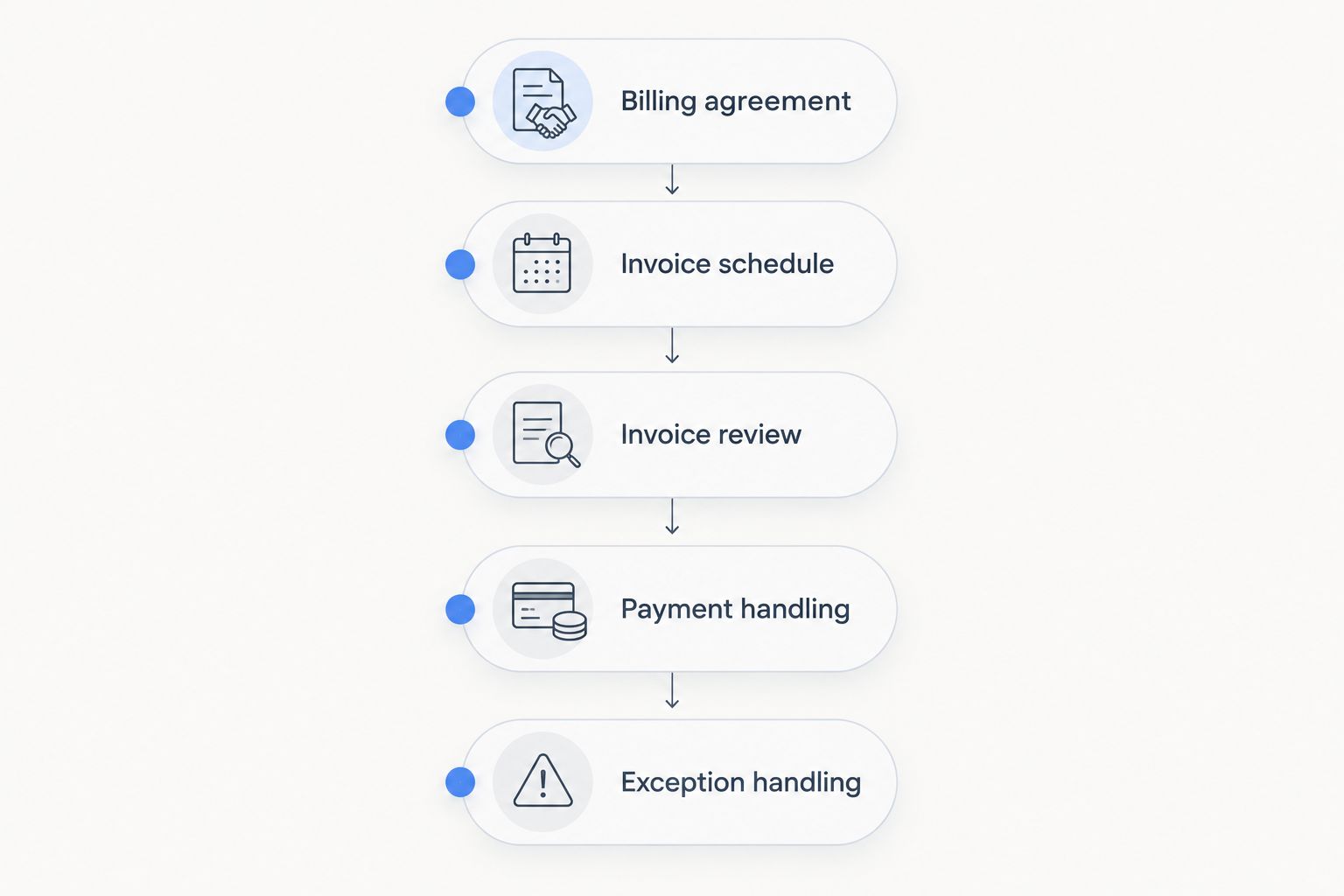
Use the following sequence as an acceptance test, not as instructions for a particular application. The names of settings differ, but the decisions remain the same.
- Billing agreement. Record the customer, service, billing interval, start condition, and cancellation terms. Identify the agreement that authorises the charge and confirm who can change it.
- Invoice schedule. Set the billing date and the service period separately. Decide whether the system creates a draft for review or sends an issued invoice without another approval.
- Invoice review. Check the recipient, line description, applicable tax treatment, payment terms, and period covered. For variable charges, approve the activity records before the invoice enters the sending workflow.
- Payment handling. Establish whether the customer pays after receiving the invoice or has authorised recurring collection. Confirm how successful and unsuccessful payments are recorded.
- Exception handling. Test a cancellation, a changed billing detail, and a failed payment. Check that the next scheduled action reflects the change rather than continuing with old information.
A demonstration should show the resulting records, not just settings screens. Ask to see the draft, the issued invoice, the payment status, and the next scheduled action. That reveals whether the workflow stays consistent after something changes.
What should you check before enabling automatic sending?
Enable automatic sending only after the recurring schedule produces the correct invoice in a test. Check the document itself, not just the template. A correct template does not prove that the billing period, customer details, and current agreement were applied correctly.
Keep variable or disputed charges under review until the approval process is clear. Automatic sending is appropriate for an established rule; it is not a substitute for deciding whether work is chargeable.
What should you check when a customer cancels?
Verify both the next invoice and the next payment action after cancellation. Record the effective end date, determine whether a final invoice remains due under the agreement, and inspect the future schedule.
Do not use invoice deletion as a general cancellation procedure. Separate the commercial decision to end a service from the handling of documents already issued. Follow the applicable accounting requirements for corrections.
Why recurring billing requirements vary
The right setup depends on what repeats and what changes. These factors explain why a basic schedule fits some agreements while others need additional controls:
- Charge structure. A fixed charge uses agreed invoice details; a variable charge needs activity records and calculation rules.
- Billing timing. Advance billing and billing after service delivery require different checks on the period being charged.
- Payment method. Customer-initiated payment and authorised recurring collection need different operational steps.
- Agreement changes. Renewals, pauses, cancellations, and amended services must update the future schedule.
- Record connections. Billing that depends on customer, project, or time records needs a clear path from those records to the invoice.
- Document requirements. Invoice content and delivery format must satisfy the requirements that apply to the transaction.
Write your 2026 requirements around these decisions, not a generic feature list. A provider should be able to explain what happens when each factor changes and show where your team reviews the result.
Where does a modular CRM/ERP platform fit?
Mesh App is best suited to small and medium-sized businesses seeking modular CRM/ERP software with invoicing and finance modules. It also offers contact management, project management, and time tracking, making it relevant when your software selection extends beyond standalone invoicing.
The benefit of considering Mesh App is its stated range of business modules. The decision constraint is fit: the modules alone do not establish how a particular recurring billing workflow operates. Evaluate the billing scenario rather than inferring payment automation from the presence of finance functions.
For a 2026 evaluation, ask Mesh App to demonstrate the agreement, schedule, invoice, payment status, and cancellation steps relevant to your business. Use the same acceptance test for every shortlisted application. That keeps the decision tied to your work rather than terminology.
Can recurring invoices handle changing amounts?
Recurring invoices can support changing amounts when the selected software provides the required calculation or amendment workflow. A fixed template alone does not establish usage-based billing, mid-period adjustments, or automatic recalculation.
Define the calculation before selecting the software. Specify the source records, the approval step, and how the invoice explains the charge to the customer.
Does recurring billing mean customers pay automatically?
Recurring billing does not automatically mean customers pay automatically. Scheduled invoice creation and authorised payment collection are separate capabilities, even when a product presents them within the same billing area.
Ask the provider to demonstrate the payment result and its connection to the invoice. An invoice marked as sent is not evidence that money was collected.
Can you pause billing without cancelling the agreement?
You can pause billing if the selected software supports a pause workflow that matches the agreement. Check whether pausing affects invoice creation, payment collection, or both, and how billing resumes.
Require the next scheduled action to be visible after the pause. A status label is not enough if the future invoice or payment remains active.
FAQ
Can invoicing software handle recurring billing for a small business?
Yes, invoicing software can handle recurring billing when it supports scheduled invoice creation. Check payment collection, cancellations, and variable charges separately before choosing a system.
What's the difference between a recurring invoice and an automatic payment?
A recurring invoice is a document created on a schedule; an automatic payment is a collection action using an authorised payment method. Creating or sending the invoice does not prove that payment occurred.
Can I review recurring invoices before customers receive them?
You can review recurring invoices before sending when the application supports a draft or approval stage. Require a demonstration of that workflow before relying on it for variable or disputed charges.
Can recurring billing include tracked hours?
Recurring billing can include tracked hours when the system supports billing from approved time records. Define the billing period, approval responsibility, and handling of late entries before automating invoice creation.
What happens if a recurring payment fails?
A failed recurring payment needs an exception workflow that records the failure and assigns follow-up responsibility. Confirm whether retries and customer notifications are supported rather than assuming they accompany recurring invoices.
Can recurring invoices meet e-invoicing requirements in Austria?
Recurring invoices must meet the document and transmission requirements applicable to the transaction. Scheduling alone does not establish e-invoicing compliance; check the required format and delivery process separately.
Is Mesh App relevant when I need invoicing alongside CRM and projects?
Mesh App is relevant for small and medium-sized businesses seeking contact management, project management, time tracking, invoicing, and finance modules. Evaluate your recurring billing requirements through a specific workflow demonstration.
One last thing
The most revealing billing test is a change made before the next scheduled run. Amend the agreement in your test scenario, then inspect the next invoice and payment action. Confirm that the old instruction no longer drives the charge.
A normal recurring cycle proves that a schedule runs. A changed cycle shows whether your business can control it. Use that distinction as your final acceptance criterion before enabling unattended billing.


