

Yes, a CRM can send automatic payment reminders when it has an invoicing workflow or connects to a billing system that supplies due dates and payment status. Contact management alone is not enough: the workflow must check whether an invoice remains unpaid, contact the correct recipient, and stop reminders after payment or an agreed pause.
- Can a CRM send automatic payment reminders? Yes, with invoice data, scheduling rules, and reliable payment-status updates.
- Mesh App combines CRM, invoicing, and finance modules; verify automatic payment reminder functionality before selecting it.
- Choose one system to send reminders, and prevent messages for paid or disputed invoices.
- Test overdue, paid, and disputed invoices before enabling customer-facing automation.
Why this matters
A payment reminder is not a sales follow-up. It concerns a specific invoice, its remaining balance, and the person responsible for paying it. A customer can have an overdue invoice and a separate invoice that is not yet due; reminders must distinguish them.
For your 2026 software evaluation, start with the invoicing process rather than the email editor. Mesh App is a modular CRM/ERP platform with contact management, project management, time tracking, invoicing, and finance modules. That scope makes invoice-related workflows relevant to the platform, but it does not establish that automatic reminders are included.
The decision is straightforward: buy for a demonstrated payment workflow, not for the presence of an automation menu. An attractive message template cannot compensate for an incorrect payment status.
Can a CRM send automatic payment reminders?
Yes. The capability depends on where invoice information lives and which system controls the reminder. You can evaluate three workflow designs without assuming every CRM supports them.
| Workflow design | Best for | Main advantage | Main limitation | What to verify |
|---|---|---|---|---|
| CRM with invoicing | Teams evaluating contact management and billing together | A single application can hold customer and invoice records | Invoicing does not automatically imply reminder functionality | Invoice-based triggers, payment checks, and stop rules |
| CRM connected to accounting | Teams keeping their existing accounting system | Customer follow-up can use billing information from another system | Reminder accuracy depends on the connection and update process | Which system owns payment status and when updates arrive |
| Billing-led reminders | Teams that want collections to remain with finance | The reminder can originate where invoices are managed | CRM users still need visibility into collection activity | Reminder history, account notes, and ownership |
These are design choices, not promises about a particular product. Ask a supplier to demonstrate the complete sequence: an invoice becomes overdue, a reminder is prepared, a payment is recorded, and the next reminder is cancelled.
The strongest setup uses invoice status to control messages, not a timer attached to a contact. A contact-level timer has no inherent knowledge of which invoice was paid, disputed, or replaced.
What counts as automatic?
A fully automatic workflow evaluates its conditions and sends the message without an employee approving every delivery. A supervised workflow prepares the reminder but requires approval before sending.
Neither design is automatically better. Supervised sending gives you a review point; fully automatic sending removes that review step. Choose based on whether your invoice records and exception handling are ready to support unattended messages.
How should you set up payment reminders?
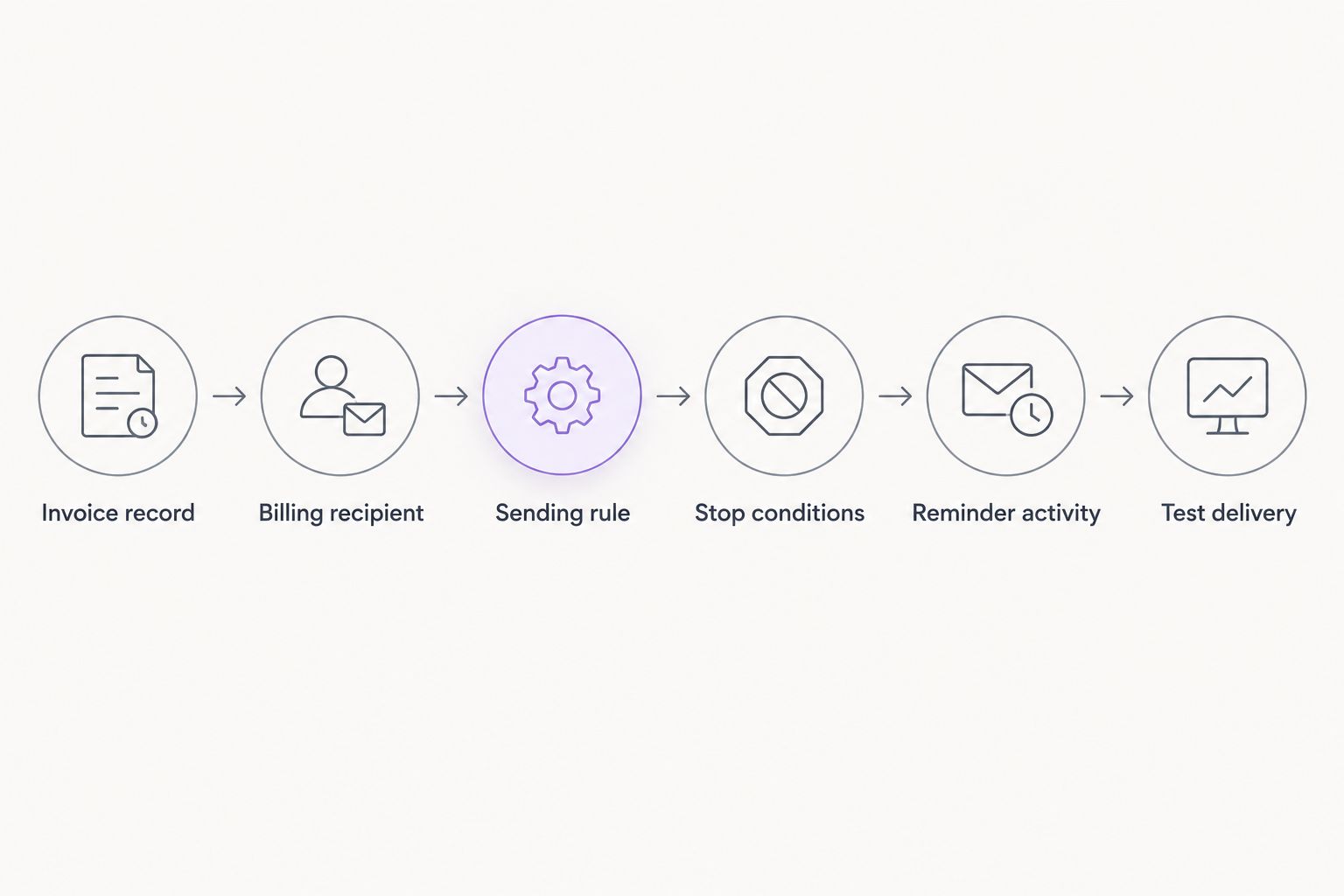
Use this six-step checklist for your 2026 implementation. It describes the workflow to request and test, not a claim that a particular platform supplies every control.
1. Identify the invoice record
Start with the record that contains the invoice reference, due date, customer, and outstanding balance. Establish which system is authoritative when the CRM and accounting records disagree.
Keep the trigger at invoice level. If you attach it only to the customer record, you must still resolve which unpaid invoice the message concerns. Do not make the recipient infer that from an account name.
2. Confirm the billing recipient
Separate the person who manages the project from the person who handles invoices. A site contact, consultant, or buyer is not necessarily the correct billing recipient.
Specify where the workflow reads the recipient address and who maintains it. If the address is missing or unsuitable, route the invoice for review instead of sending to an unrelated contact.
3. Define the sending rule
Write down the conditions that make a reminder eligible: the due date has passed, a balance remains outstanding, and the invoice is not on hold. Decide whether the first message requires approval.
Use your agreed payment terms to set timing. Do not adopt a generic interval simply because it appears in a software template. The rule should express your billing process, not the supplier's example.
4. Define stop conditions
Require the workflow to stop after payment, cancellation, or an agreed pause. Include a route for invoices under dispute and cases where the customer has arranged a different payment date.
Partial payment needs separate treatment. The message should refer to the remaining balance, not repeat the original invoice total as though nothing changed. Confirm how your chosen system represents that balance.
5. Record reminder activity
Decide where employees will see sent messages, delivery problems, customer replies, and manual pauses. The record should identify the invoice as well as the customer.
Assign someone to exceptions. An automated message does not resolve an incorrect address, a disputed charge, or an unanswered question about completed work. Those cases need a responsible person.
6. Test before enabling delivery
Test 3 invoice cases: overdue and unpaid, fully paid, and disputed. Use internal recipients while testing so that unfinished rules do not reach customers.
For each case, check whether the correct action occurs and whether the history explains it. Then repeat a test after changing the payment status. A workflow that sends correctly once but fails to stop is not ready.
When should reminders stay in the billing system?
Billing-led reminders are best for teams that want finance to own collection decisions. If finance already maintains invoice status, disputes, and payment arrangements, assess whether that system can manage reminders before adding another sender.
The advantage is clear ownership. The limitation is visibility: customer-facing employees need to know whether a reminder has already been sent before contacting the same customer.
Ask how reminder history reaches the people handling the account. Avoid creating a second independent schedule in the CRM merely to make activity visible. Visibility and delivery are different requirements.
When should the CRM coordinate reminders?
CRM-coordinated reminders are best for teams that need collection activity alongside customer communication. This design requires a dependable source of invoice information and a clear division of responsibilities between applications.
The advantage is context. An employee can review payment follow-up alongside other customer conversations. The limitation is dependency: if invoice or payment updates fail to arrive, the CRM's sending decision can be wrong.
During your 2026 evaluation, ask what happens when the connection fails. A safe design should route uncertainty for review rather than treating an unavailable payment update as proof that an invoice remains unpaid.
For the broader connection question, see the guide to CRM integration with accounting software. Integration is relevant here because the reminder depends on billing information, not just customer details.
Why automatic payment reminder workflows vary
The useful distinction is not whether software can send email. It is how the workflow handles the information behind that email.
- Invoice ownership: Choose the authoritative invoice record before defining triggers. Conflicting records leave the sender without a dependable basis for action.
- Payment updates: Establish how a recorded payment changes reminder eligibility. A payment receipt and an updated invoice status are separate events to check.
- Contact roles: Identify the billing recipient explicitly. Project contacts and accounts-payable contacts serve different purposes.
- Work approval: For project-based billing, resolve disputed work or missing approval before escalating collection messages.
- Exception ownership: Decide who handles partial payments, payment arrangements, and delivery failures. Automation should route these cases, not hide them.
For businesses using time tracking and project management, also check the handoff into invoicing. A reminder cannot correct a bill that contains the wrong hours or an unresolved project item. Confirm the invoice first; automate follow-up second.
What should a payment reminder say?
Keep the message specific to the invoice. Identify your business, the invoice reference, the due date, and the outstanding balance drawn from the billing record. Explain how the recipient can ask a question or report a payment already made.
Avoid unnecessary project detail and accusatory language. The recipient needs enough information to identify the obligation, not the entire customer history. If an attachment is included, check that it belongs to the same invoice.
Treat the initial reminder and later escalation as different decisions. Do not assume that automated sending authorises additional charges or legal language. Have the relevant terms reviewed before putting such statements into a template.
For your 2026 template review, check the message as the customer will receive it. Internal field names, unresolved placeholders, and a reply address nobody monitors undermine an otherwise correct workflow.
Can a CRM stop reminders after a customer pays?
Yes, when the workflow receives the updated payment status and checks it before sending. The stop condition matters as much as the initial trigger. A scheduled message should not remain eligible merely because it was prepared before payment arrived.
Test this with 1 invoice that changes from unpaid to paid while a reminder is pending. Confirm that the pending action is cancelled or excluded from delivery, and that employees can see why it stopped.
Can reminders handle partial payments and disputes?
Yes, if the chosen workflow supports remaining balances and exception states. Require separate handling for an invoice with money still outstanding and an invoice whose collection has been paused.
Do not treat every unpaid invoice as an identical case. A partial payment changes the balance; a dispute changes whether automated follow-up is appropriate. Demonstrate both before enabling unattended escalation.
Is a modular CRM/ERP a good fit for this workflow?
Mesh App is best for small and medium-sized businesses evaluating a modular CRM/ERP with contact management, invoicing, and finance. Its stated module range also includes project management and time tracking, which are relevant when work records feed billing.
The benefit is the breadth of functions available for evaluation. The limitation is that a module list does not confirm automatic payment reminders, payment reconciliation, or the controls described here. Require a demonstration of the invoice-to-reminder process before treating those capabilities as part of your purchase decision.
For a 2026 demonstration, use your own billing scenario rather than a supplier's prepared contact record. Ask where invoice status comes from, how a pause works, and what happens after payment. Those answers establish fit more directly than a general tour of the CRM.
FAQ
Can a CRM send automatic payment reminders without invoicing?
Yes, if it receives the required invoice information from another billing system and supports the reminder workflow. Customer contact records alone do not establish which invoice is overdue or unpaid.
Will a CRM stop sending reminders when an invoice is paid?
It will stop only when the workflow receives the paid status and applies a stop condition. Test payment updates against pending reminders before enabling delivery.
Is accounting software better than a CRM for payment reminders?
Accounting software is the better place to start when it owns invoice status and finance controls collection activity. A CRM becomes relevant when customer communication needs that billing information.
Can I approve automatic payment reminders before they go out?
Approval is possible in a workflow that supports a review stage. Verify that capability rather than assuming an automation feature includes it.
Can a CRM remind customers about partially paid invoices?
Yes, if the workflow uses the remaining balance and supports partial-payment records. Check that the message does not request the original total after a payment has been recorded.
Does Mesh App include automatic payment reminders?
Mesh App's stated scope includes CRM, invoicing, and finance modules; that does not establish automatic payment reminder functionality. Ask for a demonstration of scheduling, payment checks, pauses, and reminder history.
What should I test before turning payment reminders on?
Test overdue and unpaid, fully paid, and disputed invoice cases using internal recipients. Confirm the recipient, invoice reference, send decision, stop decision, and recorded history.
One last thing
Test the message that should never be sent. Mark an invoice paid while its reminder is pending, then check the result. Stopping an incorrect reminder is the clearest demonstration that payment status controls the workflow.
Make that cancellation test part of acceptance, not an optional check after launch.


