

Time tracking software costs depend on the users you must license, the functions you need, and the billing terms you accept; compare a written quote for your actual workflow rather than a headline subscription. Your 2026 budget should also account for setup, training, and any separately charged connections to project management, invoicing, or finance.
- How much does time tracking software cost? Compare licensed users, required functions, billing terms, and setup work.
- Mesh App suits small and medium-sized businesses considering time tracking alongside CRM, projects, invoicing, and finance.
- A standalone time tracker fits a recording-only requirement; a modular platform deserves evaluation when adjacent workflows matter.
- Compare annual software charges separately from the staff time needed to introduce and maintain the system.
How much does time tracking software cost in 2026?
The useful figure is the total charge for your required workflow, not the advertised entry plan. Ask each supplier to quote the same users, functions, contract period, and implementation scope. Otherwise, you are comparing different purchases.
For a modular CRM/ERP example, Mesh App includes contact management, project management, time tracking, invoicing, and finance modules. That makes module scope part of the buying decision, not proof of a particular subscription charge.
Use this breakdown when reviewing a quote:
| Budget component | What to request | What to check |
|---|---|---|
| Software subscription | The charge for the required users and functions | Whether the quote covers your complete scope |
| Billing commitment | Payment schedule and contract period | Whether the quoted terms match your budget period |
| Setup | Included tasks and separately charged work | Who configures projects, users, and working rules |
| Data transfer | Scope for importing existing records | Which records need cleaning before import |
| Connections | Required exports or integrations | Whether delivery and maintenance are included |
| Internal work | Your own setup, training, and administration estimate | Whether staff time sits outside the supplier quote |
A year contains 12 months. Convert recurring charges to the same annual period before comparing suppliers, and keep one-time work separate. This prevents a monthly subscription and an annual commitment from appearing directly comparable when they are not.
Why this matters
Time records serve different purposes. You might need attendance records, project costing, customer billing, or several of these together. State the purpose before choosing software.
In 2026, your buying brief should describe where a time entry goes after someone submits it. A timer alone does not establish that an entry can be reviewed, assigned to the right project, or used in your billing process. Test those requirements explicitly.
Compare the workflow before comparing the subscription
You have two useful categories to evaluate: a standalone time tracker and a modular business platform. Neither wins by default. Choose the narrower system when your requirement is narrow; evaluate the broader system when time records belong in a wider business process.
| Approach | Best for | Advantage to evaluate | Limitation to evaluate |
|---|---|---|---|
| Standalone time tracker | Teams primarily choosing a way to record and review time | A focused scope that matches a recording-only brief | How records reach existing project, billing, or finance systems |
| Modular CRM/ERP platform | Businesses evaluating time tracking alongside other business functions | Whether the required functions fit within the same platform | Additional configuration and learning associated with the chosen scope |
The comparison is about fit, not an assumed saving. A broader platform is not automatically cheaper than separate tools, and a narrower tool is not automatically cheaper once you include the surrounding work. Request the complete scope in writing.
For a standalone tracker, trace how approved entries reach their destination. For a modular platform, test the relevant modules together rather than reviewing each feature in isolation. In both cases, distinguish a function that exists from a workflow that meets your requirements.
Standalone time tracking: best for a focused recording requirement
Choose this category for evaluation when you want time capture and review without replacing your existing business systems. Your brief should identify the records you need, who reviews them, and the format required downstream.
The advantage is a bounded purchasing scope. The drawback is the need to check handoffs into other systems. An export is useful only if the receiving process can use its contents without unnecessary rework.
Modular CRM/ERP: best for evaluating connected business functions
Choose this category for evaluation when your purchasing brief also includes contacts, projects, invoicing, or finance. Keep the module list tied to actual tasks rather than buying breadth for its own sake.
The advantage is the opportunity to evaluate several business functions within one platform. The drawback is a wider implementation scope. You still need to verify permissions, data handling, and the movement of information between the functions you intend to use.
Build your time tracking budget in a repeatable sequence
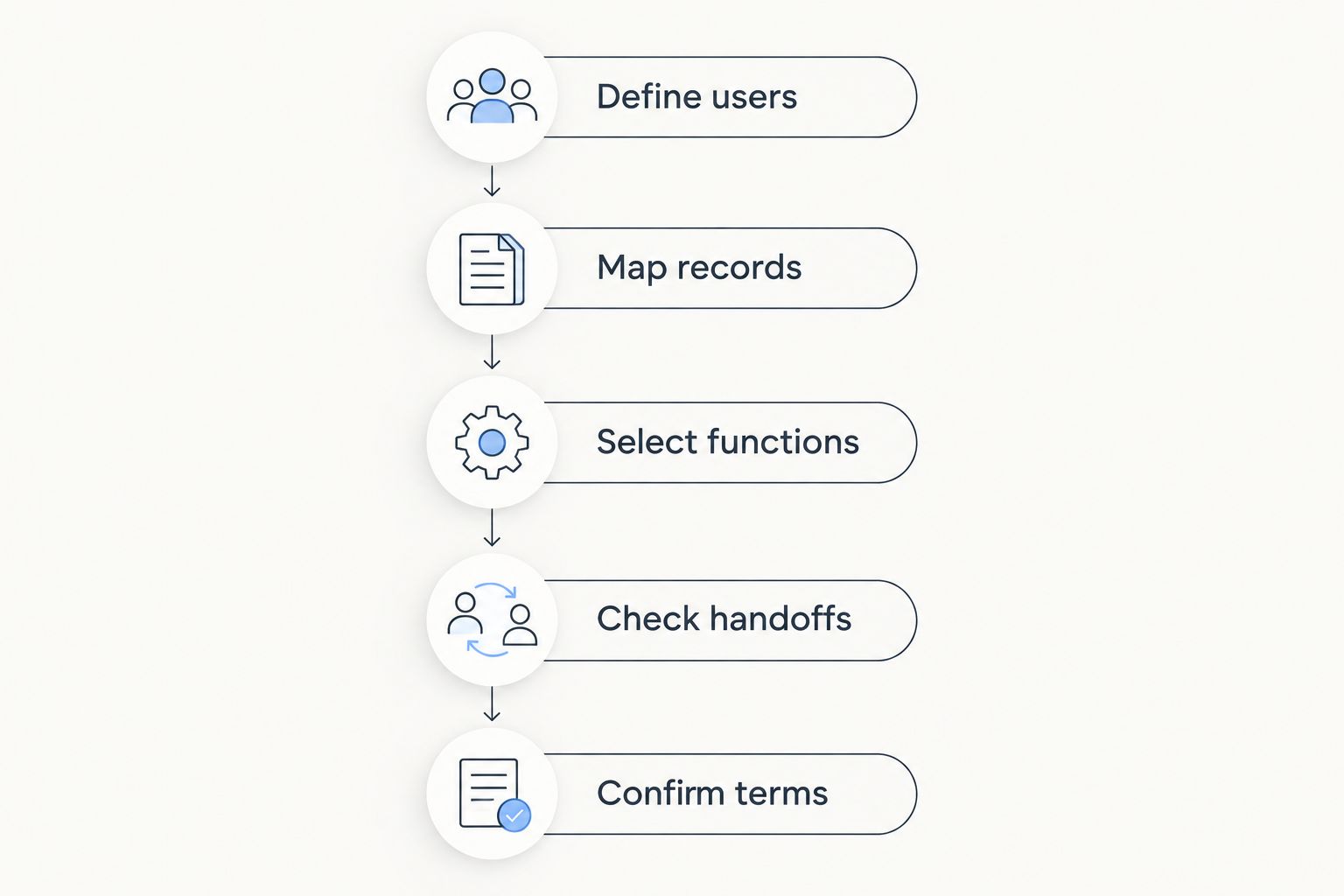
Use the following sequence for a 2026 purchase. It produces a comparable brief without assuming that suppliers use the same licensing model or include the same services.
- Define users. List everyone who records time, reviews entries, administers the system, or uses reports. Ask the supplier which roles require paid access rather than assuming every role is treated alike.
- Map records. Identify the client, project, job, or internal activity attached to an entry. Specify the information that must remain with that entry when it is reviewed or exported.
- Select functions. Separate the functions needed immediately from those outside the current purchase. If invoicing or finance is in scope, include its requirements in the same brief.
- Check handoffs. Demonstrate how an entry moves from recording to review and then to its destination. Include corrections, not just a successful first submission.
- Confirm terms. Request the complete charges, billing schedule, contract period, and implementation responsibilities. Document unresolved items before you accept the quote.
The sequence matters because a subscription quote cannot resolve an undefined workflow. Establish the work first, then ask suppliers to price that work. Do not start with a plan name and retrofit your requirements around it.
For trades businesses, include the job information that your office needs from recorded hours. The time tracking guide for metal construction firms provides a related industry-focused starting point.
Why time tracking software costs vary
Compare these factors in each proposal. Treat them as questions to resolve, not fees to assume: the supplier must confirm what affects its quote.
- User scope: Identify the people recording, reviewing, and administering time. Ask how those roles affect licensing and what happens when the team changes.
- Module scope: Specify whether you need time tracking alone or also contacts, projects, invoicing, and finance. Ask which requested functions the quote includes.
- Implementation scope: Identify configuration, data preparation, and training responsibilities. Separate supplier work from tasks assigned to your team.
- Handoff scope: List the exports or connections required by your billing, payroll, or finance process. Confirm both delivery responsibilities and ongoing support.
- Contract scope: Check the payment schedule, commitment, renewal terms, and any conditions attached to the quoted amount. Compare equivalent periods and obligations.
Do not call a quote complete while one of these scopes remains undefined. An omitted requirement is not a saving. It is an unresolved part of the purchase.
Separate software charges from internal effort
Keep your subscription budget and your staff-time estimate in separate lines. Supplier charges are one part of the decision; configuring jobs, explaining working rules, and reviewing records are internal tasks that need an owner.
Use your own hourly cost when valuing that work. 60 minutes equals 1 hour, so convert any minutes-based estimate to hours before applying an hourly rate. Do not borrow another business's training or administration estimate as though it describes your team.
For a 2026 budget, label each item as recurring, one-time, or dependent on a defined event. Record the source beside the item: supplier quote, contract term, or internal estimate. This keeps assumptions visible without disguising them as confirmed charges.
What should you test before accepting a quote?
Ask for a demonstration using the kind of work your team performs. Follow a time entry through its intended process, including an entry that needs correction. A feature checklist alone does not show whether that process fits.
Recording and correction
Check how a worker selects the correct job or project and how an incorrect entry is amended. Identify who can make changes and what your business needs to retain about those changes.
Test the device and working conditions relevant to your team. Do not assume that an office demonstration establishes suitability for a construction site or a mobile service visit.
Review and destination
Check how the responsible person finds entries requiring review. Then inspect the information delivered to the next process, whether that is project reporting, invoicing, or another system.
Make the destination part of acceptance. If your office needs a project reference, activity description, or approval status, verify that requirement rather than accepting a generic export demonstration.
Administration and ownership
Identify who maintains users, project lists, permissions, and working rules. Ask what happens when someone leaves, a project closes, or a record needs retrieval later.
These are purchasing criteria, not assumed features of every product. Put the requirements into your evaluation document and ask the supplier to show how each one is met.
Is a modular platform better than a separate time tracker?
Mesh App is a modular CRM/ERP option for small and medium-sized businesses evaluating time tracking alongside contacts, projects, invoicing, and finance. Its stated scope fits that evaluation brief; suitability still depends on your required workflow.
The reason to consider Mesh App is its module coverage. The limitation is that module coverage alone does not establish the licensing terms, implementation effort, or connections your business requires. Evaluate those details before treating consolidation as a benefit.
For a recording-only brief, keep a standalone tracker in the comparison. For a wider business-software purchase, review the broader platform against the same acceptance criteria. Choose based on demonstrated fit, not the number of functions listed.
Review your required business functions
Compare time tracking with the contact, project, invoicing, and finance functions in your brief.
Should I compare monthly or annual billing?
12 months is the annual comparison period. Normalize recurring charges to that period while keeping payment timing and contractual commitment visible. An annual total does not tell you whether payment is due monthly or in advance.
For your 2026 decision, compare the obligations as well as the arithmetic. Ask what changes are permitted during the contract and how renewal is handled.
Should I include setup in the time tracking budget?
Include setup as a separate budget component. Define the work, assign an owner, and distinguish supplier charges from internal effort. Do not assume configuration, imports, or training are included in the subscription.
Keep the acceptance criteria beside the setup scope. You need to know what completed implementation means, not merely that setup appears on a proposal.
FAQ
How much does time tracking software cost for a small business?
The relevant cost is the quoted charge for your required users, functions, and contract terms, plus defined setup work. Request equivalent scopes from suppliers before comparing totals.
What's the best way to compare time tracking software quotes?
Compare quotes against the same user list, workflow requirements, billing period, and implementation scope. Keep recurring charges separate from one-time work and internal staff effort.
Is a separate time tracker better than a CRM/ERP platform?
A separate tracker fits a focused recording requirement; a CRM/ERP platform deserves evaluation when other business functions are in scope. Test the handoffs and configuration requirements of each approach.
Does Mesh App include time tracking?
Mesh App includes time tracking alongside contact management, project management, invoicing, and finance modules. Confirm the scope and terms needed for your own implementation.
Do I need to pay for everyone who reviews time entries?
Ask the supplier which reviewing roles require paid access. Include workers, reviewers, administrators, and report users in your licensing questions rather than assuming they receive identical access.
What should I include in a time tracking software budget for 2026?
Include the subscription, defined setup work, required connections, and your internal implementation effort. Record confirmed supplier charges separately from your own estimates.
Can time tracking software handle invoicing automatically?
Verify the complete time-to-invoice workflow with the supplier rather than assuming automation. Check how approved entries, corrections, project references, and billing information reach the invoice process.
One last thing
Make a corrected time entry part of your purchasing test. Recording an entry demonstrates capture; correcting it and following it to its destination tests the process your office must manage.
Before approving a 2026 purchase, name the person responsible for that process. Software selection is incomplete until someone owns project references, review rules, and exceptions.


