

CRM software costs depend on the users, functions and services included in your agreement; a subscription figure alone does not establish your full budget. For a 2026 purchase, compare the subscription with setup, data migration, training and ongoing administration before choosing a system. Ask for a written breakdown against your actual workflow, not just a headline subscription.
- How much does CRM software cost? Compare the complete scope, not the subscription alone.
- Mesh App suits small and medium-sized businesses seeking modular CRM/ERP functions across customer management and operational work.
- Separate CRM subscription commitments from migration, training and internal administration when comparing proposals.
- Choose contact management alone when that meets your needs; assess project management and invoicing only when relevant.
How much does CRM software cost in 2026?
Your CRM budget is the total commitment required to put the system into use and keep it useful. Compare proposals covering the same people, functions, contract period and implementation work. Otherwise, you are comparing different purchases.
Mesh App offers a modular CRM/ERP platform with contact management, project management, time tracking, invoicing and finance modules. That scope makes the distinction between customer management and broader operational software relevant: decide which work belongs in your system before requesting a proposal.
Use this breakdown to build your comparison. These are budget categories to check, not charges every supplier necessarily applies.
| Budget category | What to establish | What belongs in your comparison |
|---|---|---|
| Subscription | Included functions, access and contract terms | The commitment for your chosen scope |
| Setup | Configuration responsibilities and deliverables | External charges and internal preparation |
| Data migration | Records, files and history to transfer | Import work, cleanup and validation |
| Training | Who needs instruction and who provides it | Supplier training and staff participation |
| Connections | Other systems that must exchange information | Setup, maintenance and ownership |
| Administration | Who manages access, records and changes | Ongoing internal work or contracted support |
A useful CRM comparison states what each proposal includes and what you must still provide. An unspecified migration task is not equivalent to an agreed import with validation. A software subscription is not equivalent to a completed rollout.
Build the budget around the contract period
Use the same comparison period for every proposal. Include any upfront work, recurring commitments and internal implementation tasks that fall within that period. Keep optional future purchases separate from the scope you need now.
Also distinguish a payment schedule from a contractual commitment. Ask when invoices are due, how renewal works and what happens when you change the number of users or selected functions. Record the answers alongside the proposal rather than relying on a sales conversation.
Why this matters
A CRM decision affects how your team records customers, hands over work and retrieves information. A narrow subscription comparison leaves those responsibilities outside the decision, even though someone still has to perform them.
For your 2026 shortlist, define the business process first. If your problem is inconsistent contact records, evaluate contact management. If your problem spans customer records, project work, tracked time and invoices, assess that wider scope without assuming every module is necessary.
The goal is not the largest feature list. Buy the scope your team can explain, use and maintain. Extra functions require a purpose; they do not become valuable simply because they appear in a proposal.
Contact management only
Best for: teams whose immediate requirement is maintaining customer and contact information. Start here when you need a shared customer record but do not need the CRM purchase to cover project delivery or invoicing.
The advantage is a clear evaluation boundary. You can focus your questions on record structure, access, imports and the information staff need to retrieve. That makes it easier to distinguish essential requirements from unrelated functions.
The limitation is equally clear: contact management does not, by itself, answer every operational requirement. If you also need project tracking or invoicing, identify where that work will happen and how staff will connect it to customer records.
Ask the supplier to demonstrate your contact workflow using a representative example. Check how staff add, update and find information. Do not treat the presence of a contact screen as proof that your full process fits.
CRM with operational modules
Best for: teams evaluating customer management alongside project management, time tracking, invoicing or finance. This scope fits a broader purchasing question than contact management alone.
The advantage is the ability to assess related work together. You can examine what happens after a customer enquiry becomes a project and what information staff need during delivery and billing. Evaluate the actual handoffs rather than assuming that modules automatically share every required field.
The limitation is a wider implementation scope. More functions mean more decisions about ownership, permissions, records and working practices. Include those decisions in your rollout plan instead of leaving them to staff after purchase.
Mesh App is a modular CRM/ERP option for small and medium-sized businesses that need customer management alongside operational functions. Its stated modules cover the relevant categories; your evaluation still needs to establish the selected scope, commercial terms and fit for your working process.
Separate CRM and operational tools
Best for: teams that want to retain existing project, time-tracking or invoicing systems. Consider this approach when replacing those systems is outside the current CRM decision.
The advantage is a narrower replacement project. You can evaluate the CRM without automatically changing every operational tool your team uses. Existing processes remain part of the assessment rather than being discarded by default.
The limitation is the handoff between systems. Define where each record belongs, which information must move and who resolves inconsistencies. A separate-tool approach needs an explicit coordination plan, even when staff transfer information manually.
Compare the scope, not just the feature list
| Approach | Best for | Main advantage | Main limitation | Evidence to request |
|---|---|---|---|---|
| Contact management only | A focused customer-record requirement | Clear purchasing boundary | Other operational work remains elsewhere | A demonstration of your contact workflow |
| CRM with operational modules | Customer and delivery processes assessed together | Related functions evaluated in one scope | More configuration and ownership decisions | A demonstration of the full handoff |
| Separate tools | Keeping existing operational systems | A narrower replacement project | Coordination between systems | A documented information-transfer process |
Choose the approach that matches the work you are changing. Do not expand a contact-management purchase into an operational replacement without an explicit business reason.
Why CRM costs vary
For a 2026 evaluation, use these factors to explain differences between proposals. Treat each as a question to resolve, not an assumption about a supplier's charging model.
- User access: Establish who needs access and what each role must do. Ask how those requirements affect the agreement.
- Module scope: Separate contact management from project management, time tracking, invoicing and finance. Request a clear list of included functions.
- Data preparation: Identify the records and history you need to carry across. Assign responsibility for cleanup, mapping and validation.
- Workflow requirements: Describe the handoffs between customer management and operational work. Establish which steps the proposed setup covers.
- Implementation responsibilities: Specify who configures the system, trains staff and checks the finished setup. Keep supplier tasks and internal tasks distinct.
- Contract terms: Check commitment, renewal, changes and termination. Compare equivalent terms rather than treating every payment arrangement as interchangeable.
A detailed proposal lets you trace each commitment to a requirement. If an item has no stated purpose, question it. If a requirement has no assigned owner, resolve that gap before signing.
How do you calculate your own CRM budget?
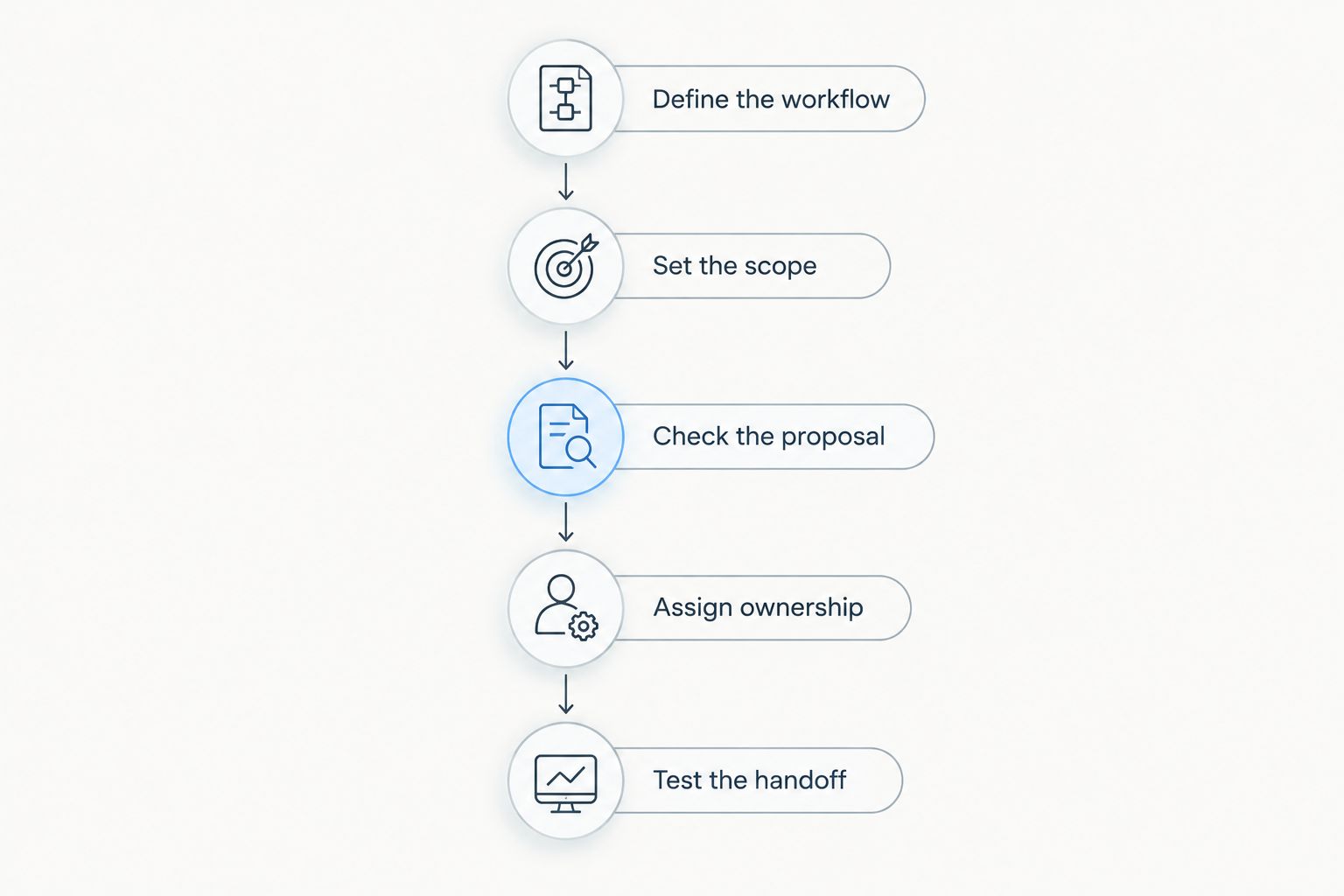
Build your budget from a defined scope and a written proposal. Use the following sequence to turn a broad software question into a purchasing decision.
- Define the workflow. Describe the customer process you want to improve, including where information enters and who uses it.
- Set the scope. Name the required functions and identify the operational tools you intend to retain.
- Check the proposal. Match included access, functions and services to your requirements. Record exclusions explicitly.
- Assign ownership. Give setup, migration, training and administration to named roles inside your business or to the supplier.
- Test the handoff. Walk through a representative customer record and the next operational step before accepting the scope.
These steps apply whether you choose a contact-focused CRM or a broader CRM/ERP system. Keep the resulting document short enough that the people responsible for implementation will actually use it.
For a service business, test what happens when customer information moves into scheduled or project work. The CRM software for service businesses guide provides a relevant next reading topic when your evaluation extends beyond contact records.
What should you ask before accepting a CRM proposal?
Ask questions that produce specific answers. A claim that a system supports your business is less useful than a demonstration of the process your staff must complete.
- Which functions and forms of access are included in this proposal?
- What configuration will be completed before staff begin using the system?
- Which records will be imported, and who will validate the result?
- What must our team prepare or complete internally?
- How will customer information move into project or invoicing work?
- What changes require a revised agreement?
- How do we retrieve our records when the agreement ends?
Use the answers to mark each requirement as included, excluded or still unresolved. Do not accept an unresolved item as included merely because it appeared in a demonstration.
For a 2026 purchase, keep the agreed scope with the contract and implementation plan. That gives your team a reference when responsibilities or expectations differ during setup.
Is a modular CRM better than buying separate tools?
A modular CRM is the better choice when its selected functions fit the processes you want to manage together. Separate tools are the better choice when retaining existing operational systems is a requirement and you have a workable handoff between them.
Neither approach removes the need to define records, responsibilities and access. Assess the process from customer information through the relevant operational step, then choose the scope that fits.
Do not buy operational modules solely to avoid discussing how your team works. Software selection should follow that discussion, not replace it.
Should you include internal staff time in the CRM budget?
Yes. Your CRM budget should distinguish supplier commitments from the work your own staff must perform, including preparation, validation, training participation and administration.
Assign that work before purchase. You do not need an invented industry average to identify who will prepare contact records or approve the imported data; you need an agreed responsibility and room in the implementation plan.
FAQ
How much does CRM software cost in 2026?
CRM software costs depend on the agreed users, functions, services and contract terms. Compare the subscription with setup, migration, training and administration to establish the full scope of your commitment.
What should a CRM proposal include?
A CRM proposal should identify included access, functions, services, responsibilities and contract terms. Ask the supplier to document exclusions and demonstrate your required workflow.
Is contact management enough for a small business?
Contact management is enough when your purchasing requirement is limited to customer and contact information. If you also need project management, time tracking or invoicing, evaluate where that work will happen.
Is a modular CRM better than separate software?
A modular CRM is better when the selected functions fit work you want to manage together. Separate software fits teams retaining existing tools, provided the information handoff is defined.
What does Mesh App offer for CRM and operational work?
Mesh App offers a modular CRM/ERP platform with contact management, project management, time tracking, invoicing and finance modules. It serves small and medium-sized businesses across trades, construction, consulting, IT and e-commerce in Austria, Germany and Switzerland.
Should I budget for data migration and training?
Yes, include data migration and training in your planning, whether the supplier or your team performs them. Establish responsibilities and deliverables rather than assuming those tasks are part of the subscription.
How do I compare CRM proposals fairly?
Compare CRM proposals against the same users, functions, contract period and implementation requirements. Keep optional future purchases separate and record every exclusion before deciding.
One last thing
Before committing to a CRM in 2026, ask someone who will use it to walk through a real working example with sensitive information removed. Include the handoff to the next person responsible for the customer or project.
Watch where information must be re-entered, clarified or supplied from elsewhere. The best final check is whether your team can explain how the work gets completed—not whether the demonstration contains every feature on your list.


