

The cost to switch CRM providers is the combined cost of data migration, configuration, integration work, training, contract overlap and the replacement subscription—not just the new licence. Your budget also needs to account for staff time spent checking records and keeping customer work moving during the change. For a 2026 decision, get a scoped migration proposal before comparing subscription terms.
- How much does it cost to switch CRM providers? Budget for migration, setup, training and contract overlap—not subscriptions alone.
- Define which records, attachments and workflows must transfer before requesting a CRM migration proposal.
- Mesh App suits SMEs seeking CRM alongside project management, time tracking, invoicing and finance modules.
- Accept the migration only after checking customer relationships, permissions and essential workflows.
How much does it cost to switch CRM providers?
Your switching budget is the replacement subscription plus the work required to make the new CRM usable. Separate one-off implementation work, ongoing commitments and internal effort so that a low subscription does not hide an expensive transition.
Start with a written inventory of what must move. The guide to switching from Excel to CRM without losing data provides a related starting point for organising records before an import.
Use this breakdown when requesting a 2026 proposal:
| Budget component | What to include in the scope | What to clarify before approval |
|---|---|---|
| Data preparation | Duplicate handling, field cleanup and record ownership | Who corrects source data and approves changes? |
| Migration | Contacts, companies, activities, attachments and relationships | Which record types transfer, and which remain archived? |
| Configuration | Fields, pipelines, permissions, templates and reports | What is included, and what requires separate work? |
| Integrations | Connections to systems your team must keep using | Who rebuilds, tests and maintains each connection? |
| Training | Role-specific instruction and process documentation | Does training cover your actual workflows? |
| Transition | Contract overlap, final transfer and operational support | What happens if acceptance checks fail? |
| Ongoing operation | Subscription commitments, support and maintenance | Which responsibilities remain with your team? |
Treat this as a scope checklist, not a universal list of mandatory services. A contact-only move and a CRM replacement with linked business processes are different projects; their proposals should describe different work.
Why this matters
A CRM switch changes how your team finds customer information, assigns work and records activity. A successful import is necessary, but it does not prove that your business can operate correctly in the replacement system.
For your 2026 business case, separate the reason for leaving from the requirements for arriving. An inconvenient interface is a reason to investigate alternatives; it is not a complete specification for data transfer, reporting or user access.
Compare suppliers against the same migration scope, not against differently packaged subscription offers. Otherwise, you are comparing different projects while treating them as equivalent.
Contact-only migration: keep the scope narrow
A contact-only migration focuses on people, organisations and the fields your team needs to identify and contact them. It excludes other records unless you explicitly add them to the scope.
Its advantage is a clearer boundary for preparation and testing. Its limitation is equally clear: a customer record without relevant history does not replace a CRM that your team uses to understand previous conversations or outstanding commitments.
Before choosing this approach, check whether contact records depend on company links, account owners, custom fields or consent information. Write down how each essential field should appear after transfer, including how empty and conflicting values are handled.
Best for: a business that needs a clean contact database and has deliberately decided where historical information will remain accessible.
History-preserving migration: test relationships, not just rows
A history-preserving migration includes the customer context you decide to retain, such as activities, notes, opportunities and attachments. The key task is preserving the connection between each item and the correct customer or company.
Its advantage is continuity: staff can work from the history you have chosen to transfer. Its limitation is the additional mapping and validation work required when the source and destination organise information differently.
Ask for a record-type inventory rather than a promise to migrate everything. Specify what happens to closed opportunities, inactive users, archived customers and files that cannot be transferred in their original form.
Best for: teams that rely on previous interactions to manage current customer work and need that context inside the replacement CRM.
Connected-system replacement: include work beyond the CRM
A connected-system replacement covers the CRM and the business processes that depend on it. That includes any required connections to project delivery, time recording, invoicing or finance systems.
Its advantage is that the transition plan addresses the complete workflow instead of stopping at customer records. Its limitation is the broader set of dependencies: a contact import can pass while a downstream process still fails.
List the source of truth for each shared field. If a customer address changes, your plan should state where the change starts, where it must appear and who checks that the receiving system handled it correctly.
Best for: businesses whose customer information drives operational or financial processes beyond sales.
Compare the migration approaches
| Approach | Best for | Main advantage | Main limitation |
|---|---|---|---|
| Contact-only migration | Teams needing a defined contact database | Narrower transfer scope | Customer history stays outside the new CRM unless added |
| History-preserving migration | Teams dependent on past interactions | Selected context remains connected to customers | Relationships and attachments require additional validation |
| Connected-system replacement | Teams with linked operational workflows | Covers dependencies beyond the CRM | Requires coordination across systems and process owners |
Do not select the narrowest approach merely to reduce the proposal. Select the narrowest approach that still supports the work your team must perform.
Why CRM switching costs vary
Your migration scope determines which work needs estimating. These factors belong in the brief because each changes the tasks involved:
- Data condition: Duplicate customers, inconsistent field values and missing ownership require decisions before import.
- Record scope: Contacts alone are different from contacts linked to activities, opportunities, files and historical records.
- Configuration differences: Existing fields, pipeline stages and permissions need mapping to the destination system.
- Connected workflows: Required integrations need defined data flows, responsibility and acceptance checks.
- User responsibilities: Different roles need instructions for the tasks they actually perform, not just a general product tour.
- Exit conditions: Existing contract terms, export access and retention requirements shape the transition plan.
Ask suppliers to identify which assumptions their proposals use. An estimate based on clean contact records does not cover unresolved duplicates, missing attachments or undocumented custom workflows unless the scope says so.
How do you build a CRM switching budget you can approve?
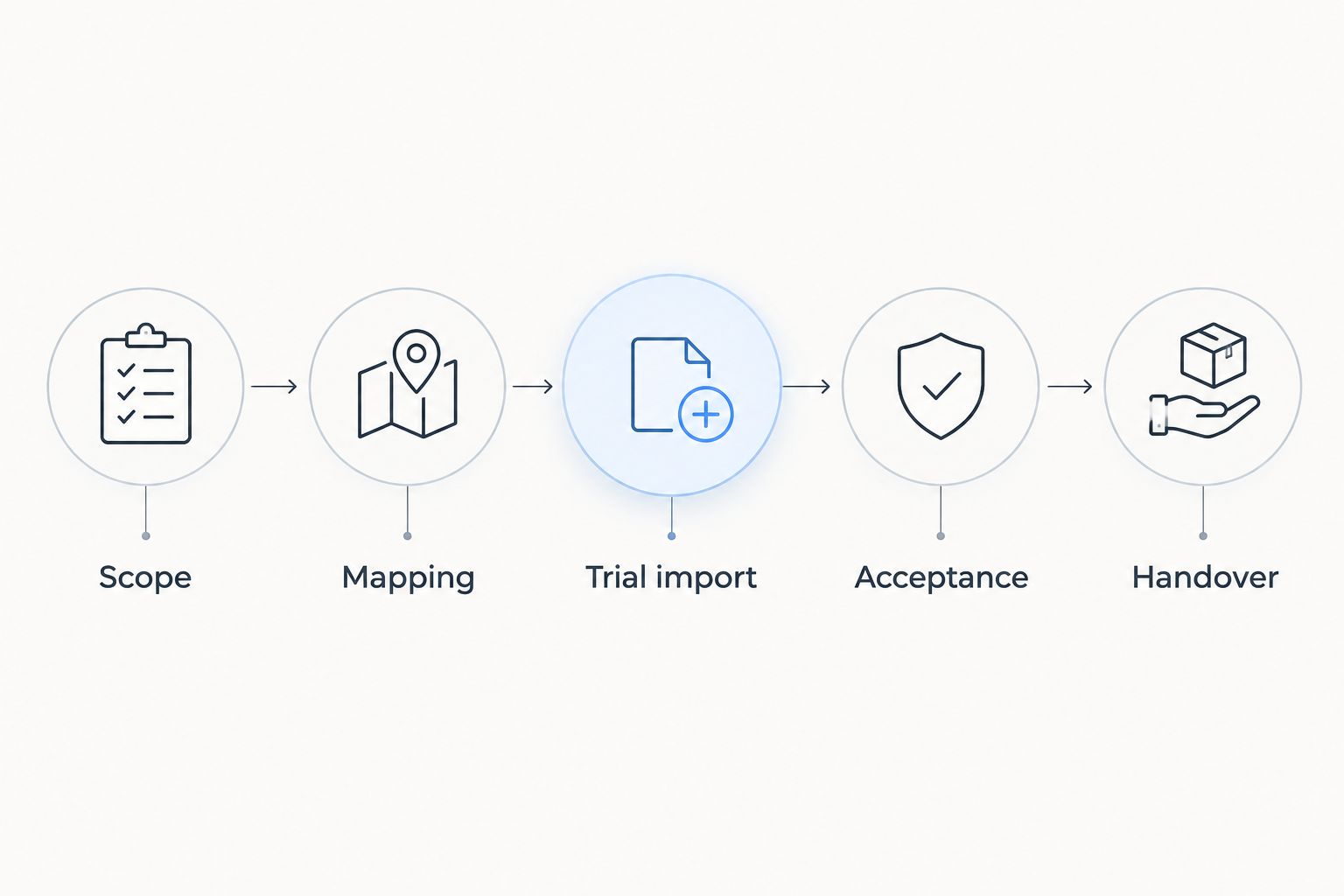
Build the budget around a defined handover, not an import event. For a 2026 procurement decision, the following sequence gives your team a shared basis for approving the work.
- Scope. List the records, workflows and users included. Name the business owner who can approve exclusions.
- Mapping. Match source fields and relationships to destination fields. Resolve unclear definitions before the main transfer.
- Trial import. Transfer representative records, including difficult cases such as duplicates, attachments and reassigned owners.
- Acceptance. Check imported information and complete essential workflows using the intended user permissions.
- Handover. Complete the final transfer, explain operating responsibilities and confirm how retained historical information remains accessible.
The trial should include the records that make your business difficult to migrate, not just the cleanest examples. A straightforward contact record does not test a customer with several projects, conflicting addresses or a long activity history.
Record external work and internal effort separately. Your staff still spend time answering mapping questions, checking records and learning revised processes even when an outside provider performs the transfer.
What should a migration proposal include?
Ask for deliverables that you can verify. A proposal should distinguish included work, assumptions, exclusions and the process for approving changes.
Your approval checklist should cover:
- The source systems and record types included.
- The treatment of duplicates, rejected records and incomplete fields.
- The handling of attachments and customer relationships.
- The configuration and integrations included in delivery.
- The training responsibilities for each user role.
- The acceptance criteria, final-transfer process and post-handover responsibilities.
Also ask who owns corrections when a trial exposes a problem. Fixing a source-data error, changing a mapping rule and requesting a new feature are different tasks; the proposal should distinguish them.
Do not accept “migration included” as a complete scope. Request a written description of what transfers, what does not and how the result will be checked.
Where Mesh App fits in the decision
Mesh App is best suited to SMEs seeking a modular CRM/ERP platform spanning contacts, projects, time tracking, invoicing and finance. That makes Mesh App relevant when your replacement decision extends beyond contact management.
The benefit of considering Mesh App CRM/ERP is its stated breadth of modules. The decision constraint is fit: module coverage alone does not establish how your existing records, custom fields or connected processes will transfer.
Evaluate Mesh App against the same migration checklist you use for any replacement. Ask for confirmation of the required transfer scope rather than assuming that a modular platform automatically reproduces your current setup.
Should you switch everything at once or in stages?
Choose the handover method around your operational dependencies. A single cutover gives the team a clear point at which the new CRM becomes authoritative, but it concentrates preparation and acceptance around that event.
A staged move separates parts of the transition. Its trade-off is temporary coordination between systems, including explicit rules about where users create and update records.
Whichever method you choose in 2026, define the source of truth during the transition. Without that rule, staff can update different versions of the same customer record while believing they are using the correct system.
Can you reduce switching work without losing essential history?
Reduce switching work by removing unnecessary scope, not by skipping validation. Decide which information supports active work, which must remain accessible and which should be handled under your retention policy.
Archive decisions need an owner. Before excluding historical records, confirm how authorised staff will retrieve them and whether the archive preserves enough context to understand them.
Keep optional process redesign separate from the transfer. A CRM replacement does not require every report, pipeline and template to be redesigned before users can begin working.
FAQ
How much does it cost to switch CRM providers in 2026?
The cost to switch CRM providers is the replacement subscription plus data preparation, migration, configuration, integrations, training and transition work. Request a scoped proposal that also identifies internal responsibilities and existing contract commitments.
Is CRM migration included in the subscription?
Do not assume CRM migration is included in the subscription. Ask the provider to specify included record types, preparation work, configuration, testing and exclusions in writing.
Can I migrate CRM data myself?
You can assess a self-managed migration by checking the source export and destination import capabilities against your required records. Test field mapping, relationships and attachments before transferring the complete dataset.
Do I need to move every historical CRM record?
You do not need to include every historical record in the active CRM migration. Decide what supports current work and how excluded information will remain accessible under your retention policy.
Should I cancel my old CRM before the migration?
Keep the access needed for export and verification until the transition meets your acceptance criteria. Check notice periods, termination terms and retained-data access before scheduling cancellation.
What should I check after importing CRM contacts?
Check field accuracy, customer-company relationships, ownership, permissions and any activities or files included in the scope. Then complete essential workflows using the accounts and roles your team will actually use.
How do I compare proposals from different CRM providers?
Compare proposals against the same records, workflows, integrations and acceptance criteria. Separate included work from assumptions and exclusions so that different project scopes do not appear equivalent.
One last thing
A matching record count does not prove a successful CRM migration. Customer names can arrive while ownership, relationships or attachments remain incorrect.
Before approving your 2026 handover, ask a user to complete an ordinary customer task from start to finish. That checks whether the transferred information supports real work—not merely whether the import finished.


