

Setting up e-invoicing in Austria has no single fixed duration: your timeline depends on the recipient’s requirements, your submission route and the readiness of your invoice data. For a 2026 rollout, define completion as an invoice accepted through the required channel, with a repeatable process for handling errors—not simply an account created or a PDF generated.
- How long does it take to set up e-invoicing in Austria? Plan around acceptance milestones, not an unsupported deadline.
- Mesh App combines invoicing, finance and customer management; verify recipient-specific e-invoicing compatibility before choosing a submission route.
- Confirm the required format and delivery channel before configuring invoice templates or importing customer records.
- Finish with an accepted invoice, accessible records and a named owner for rejected submissions.
How long does it take to set up e-invoicing in Austria?
Your setup is complete when you can submit a valid invoice, confirm its acceptance and repeat the process without improvising. A calendar estimate becomes useful only after you identify the work between your current system and that outcome.
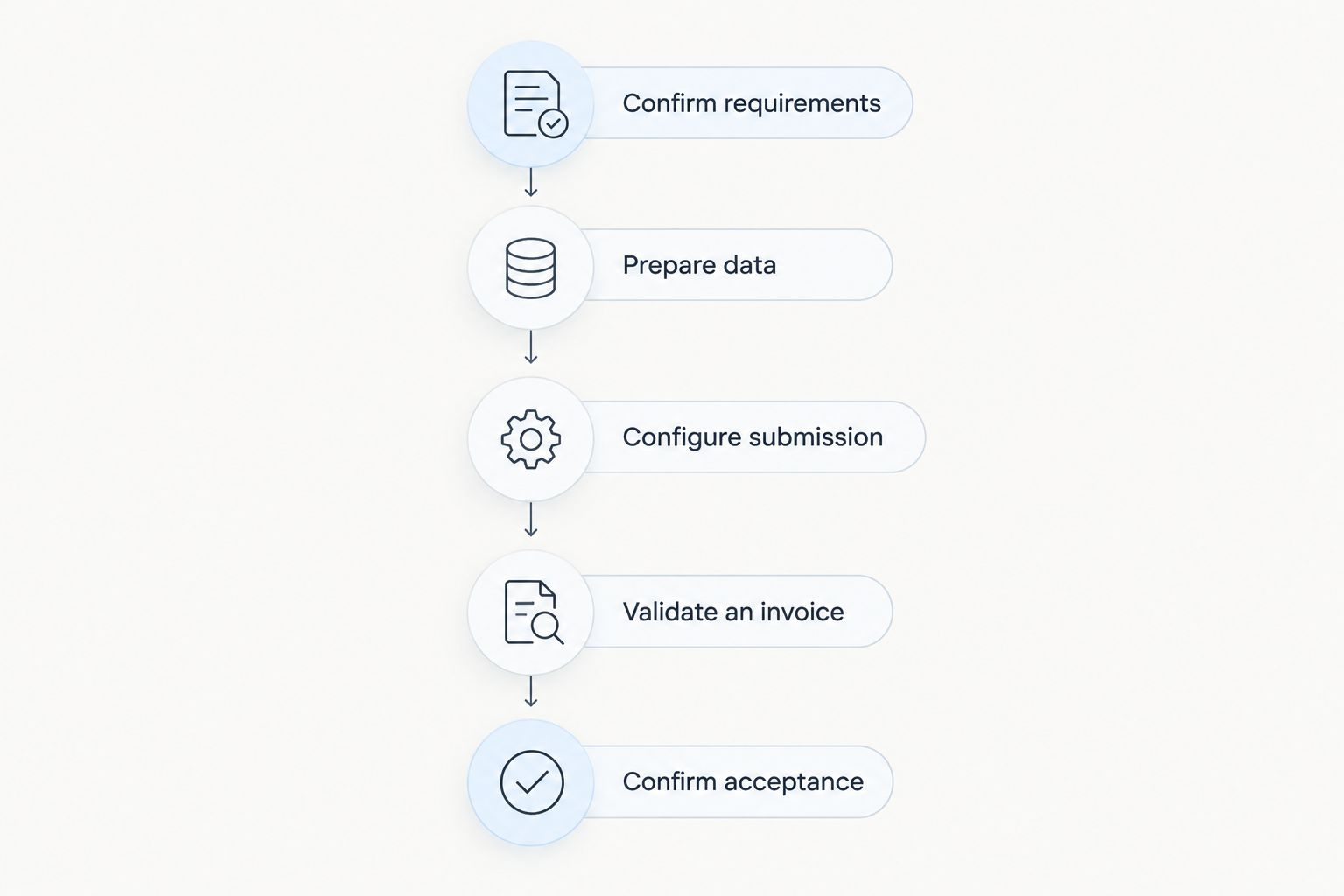
Use these milestones to build your implementation schedule:
- Confirm requirements. Identify the recipient, required invoice format, submission channel and mandatory references.
- Prepare data. Check supplier details, customer records, tax treatment, payment details and invoice numbering.
- Configure submission. Establish access to the required channel and assign responsibility for sending invoices.
- Validate an invoice. Check the invoice structure, calculations and recipient-specific fields.
- Confirm acceptance. Follow the recipient’s testing process, then document how staff handle rejected submissions.
Mesh App offers invoicing alongside contact management, project management, time tracking and finance modules. That scope is relevant when billing draws on customer or project records, but it does not establish compatibility with a particular Austrian submission channel.
Why this matters
An invoice can look correct to a person and still fail a structured submission check. A missing order reference or an invalid recipient identifier is a different problem from a formatting issue, and each needs a different fix.
For your 2026 implementation plan, separate software configuration from recipient acceptance. Otherwise, a completed template becomes a misleading finish line while the actual delivery process remains untested.
The practical question is not just when you can create an invoice. It is when your team can send the right invoice to the right recipient and know what happened next.
Choose the setup route before setting the deadline
The submission route determines what you need to configure. Start with the recipient’s instructions rather than assuming every Austrian customer accepts the same format or channel.
For Austrian federal-government invoicing, the official e-Rechnung.gv.at guidance is the relevant starting point for submission requirements. Do not apply that workflow automatically to every private-sector customer or other public body.
| Setup route | Best for | Practical advantage | Limitation to check |
|---|---|---|---|
| Manual entry through an accepted portal | Businesses choosing a manual submission process | Separates submission from a broader software integration | Staff must enter and check invoice information in the portal |
| Upload of a supported structured file | Businesses whose system produces the required file | Uses invoice data already prepared in the source system | File structure and recipient-specific fields still need validation |
| Connected system-to-system submission | Businesses seeking a repeatable submission workflow | Links invoice preparation with delivery | Requires confirmed connectivity, field mapping and error handling |
These are workflow choices, not promised features of any particular product. Choose the route your recipient accepts and your team can operate reliably.
For a 2026 decision, request evidence of the exact workflow: the supported format, delivery route, required identifiers and method for viewing acceptance or rejection. A general statement that software supports electronic invoices is not enough.
Prepare invoice data before changing templates
Begin with a representative invoice and its underlying records. Check the information at its source rather than correcting the same error separately on every invoice.
Your preparation checklist should cover:
- Supplier details: the legal identity and tax information applicable to your business.
- Recipient details: the correct billing entity and any required electronic identifier.
- Invoice references: purchase-order, contract or buyer references required by the recipient.
- Invoice lines: descriptions, quantities, units, amounts and tax treatment.
- Payment details: the payment information and terms intended for that invoice.
- Recordkeeping: where the issued invoice and submission evidence will be retained.
Ask your accountant to resolve tax-treatment questions before you lock the template. Ask the customer to confirm buyer references before you submit.
Do not use this project as a reason to migrate every historical customer record. Prepare the records needed for the agreed rollout scope, then handle unrelated data cleanup separately. That keeps the acceptance test focused on invoicing rather than turning it into a general database project.
Configure, validate and confirm acceptance
Treat configuration, validation and acceptance as separate checkpoints. Completing a checkpoint gives you evidence to proceed; it does not prove that the next checkpoint will pass.
Confirm requirements
Record the recipient’s required format, submission channel and identifying references. Assign someone to resolve ambiguities with the recipient rather than leaving the person configuring the software to guess.
Prepare data
Check the customer and supplier records against the invoice you intend to issue. Correct missing fields at the source, and identify which information belongs on the customer record versus the individual transaction.
Configure submission
Set up the chosen delivery route and the permissions staff need. Document who prepares invoices, who approves them and who is responsible for submission.
Validate an invoice
Check both the structured file and the business content. A technically valid file still needs the correct customer, amounts, tax treatment and references.
Confirm acceptance
Use the recipient’s stated test procedure where one exists. If no test environment is offered, agree on an appropriate first-submission process; do not send a fictitious live invoice simply to check connectivity.
Keep the result of each checkpoint with the implementation notes. Your next billing cycle should follow a documented process, not depend on the person who configured the initial submission remembering every setting.
Why e-invoicing setup time varies
The work changes with your starting point. Use these factors to explain the schedule internally rather than attaching an unverified duration to every implementation.
- Recipient requirements: different customers can require different references, formats or delivery routes. Confirm the requirements for the customers included in your rollout.
- Data readiness: incomplete customer details or inconsistent tax fields create preparation work before submission testing can begin.
- Submission method: manual entry, file upload and a connected workflow involve different configuration and operating tasks.
- Access and ownership: establish who can configure the channel, approve invoices and investigate rejected submissions.
- Accounting workflow: agree how issued invoices, corrections and submission evidence reach the people responsible for bookkeeping.
- Rollout scope: adding customer-data migration, time tracking or project billing introduces work beyond the submission channel itself.
For your 2026 schedule, turn each unresolved factor into an assigned task with a completion condition. “Customer reference confirmed” is actionable; “e-invoicing almost ready” is not.
Keep regulatory scope separate from implementation scope. The guide to whether e-invoicing is mandatory for businesses in Austria addresses the obligation question; your setup plan still needs the individual recipient’s requirements.
Can you set up e-invoicing without replacing your CRM or ERP?
Replacing your CRM or ERP is not automatically part of e-invoicing setup. First check whether your existing workflow can provide the required invoice data and use an accepted submission route.
A broader replacement is a separate decision. Combining it with the e-invoicing rollout expands the work to include migration, permissions and staff adoption, so keep separate acceptance criteria for each project.
Mesh App is best suited to small and medium-sized businesses seeking invoicing alongside contact, project, time-tracking and finance modules. Its relevant strength is that modular scope; recipient-specific e-invoicing compatibility still needs confirmation before you base a submission plan on it.
Ask any prospective provider to demonstrate your intended workflow using representative invoice fields. Check what happens after submission, not just how the invoice is generated.
Does sending a PDF count as finishing e-invoicing setup?
A PDF does not prove that you have completed a structured e-invoicing workflow. A readable document and machine-processable invoice data serve different purposes, and acceptance depends on the recipient’s requirements.
If the recipient requires structured data, check the actual structured output. Reviewing the PDF alone does not establish whether required identifiers, references and tax fields are correctly represented in the submitted file.
Keep a human-readable view available for checking invoice content, but do not confuse visual approval with technical acceptance. Both checks belong in the implementation plan when the chosen workflow requires them.
What should be ready before the first live invoice?
The first live invoice needs a confirmed recipient, a valid submission route and a named person responsible for the result. Before sending it, verify that the team knows how to find its status and correct a rejection.
Use this go-live checklist:
- The recipient has confirmed the required submission route and references.
- The invoice contains the intended business and tax information.
- Staff can distinguish a saved draft from an issued and submitted invoice.
- The responsible person can find acceptance or rejection information.
- The team knows where issued records and submission evidence are stored.
- Corrections follow the agreed accounting process rather than overwriting an issued record.
- A substitute knows what to do when the usual invoice owner is unavailable.
For a 2026 rollout, make these checks your go-live decision. A configured account is a starting point; a controlled billing process is the deliverable.
FAQ
How long does it take to set up e-invoicing in Austria?
There is no single fixed setup duration for e-invoicing in Austria. Your schedule depends on recipient requirements, data readiness, channel access and successful submission checks; define completion around acceptance rather than account creation.
Can I start by emailing PDF invoices?
Emailing a PDF does not demonstrate compliance with a recipient’s structured e-invoicing requirements. Confirm the required format and delivery channel before treating email as your submission process.
Do I need a new ERP system for Austrian e-invoicing?
A new ERP system is not automatically required for Austrian e-invoicing. Check whether your current process can supply the necessary data and use an accepted submission route before planning a replacement.
What information should I prepare before setup?
Prepare supplier and customer details, applicable tax information, invoice lines, payment details and required buyer references. Confirm recipient-specific fields with the customer before configuring the final workflow.
What is the difference between validating and accepting an invoice?
Validation checks whether an invoice meets specified rules; acceptance confirms its status in the recipient’s submission process. Check the meaning of each status in your chosen channel rather than assuming a valid file has been accepted.
Can Mesh App be part of an e-invoicing project?
Mesh App offers invoicing and finance modules alongside contact management, project management and time tracking. Confirm support for your required format, submission route and recipient references before selecting it for an e-invoicing workflow.
Should I test with a made-up invoice?
Do not send a fictitious live invoice simply to test connectivity. Follow the recipient’s testing instructions or agree on an appropriate process for the first legitimate submission.
What proves that my e-invoicing setup is finished?
Completion means you can submit a valid invoice through the required channel, confirm its status and repeat the process. Keep accessible invoice records, submission evidence and instructions for handling rejected invoices.
One last thing
Test the rejection process before you hand over the workflow. Ask the person responsible for billing to explain where they would find an error, who would correct it and how they would confirm the resubmission result.
If the answer depends entirely on the original implementer, the handover is unfinished. A useful 2026 setup leaves your business with an operating process, not just working settings.


