

Electricians’ ERP software is a system for managing customers, jobs, labour records and billing with the aim of keeping electrical contracting work organised from enquiry to payment. Unlike a contact database alone, ERP software for electricians needs to support the handover between the office, the job site and the person preparing invoices.
- Choose ERP software for electricians around job handovers, time tracking and invoicing, not feature counts.
- Mesh App suits electrical SMEs seeking contact management, projects, time tracking, invoicing and finance modules.
- Test site access, accounting handovers and electrical documentation requirements before choosing a platform.
- Start with a controlled pilot; keep specialist requirements separate from general business administration.
Why ERP software matters for electricians
An electrical job involves different records: the customer requesting work, the installation address, the agreed scope, the hours worked and the invoice recipient. Those records belong together, but they are not interchangeable. A property manager commissioning work is not necessarily the person providing site access or paying the invoice.
Choose ERP when the problem spans several business processes, not just customer follow-up. If your only gap is tracking enquiries, start by comparing CRM and ERP software for a small business. A wider system needs a wider business reason.
For your 2026 shortlist, write down the handovers that currently require someone to copy information or ask a colleague for an update. Use those handovers as your evaluation criteria. A long feature list does not prove that an electrician can record work correctly or that the office can prepare the corresponding invoice.
Electrical documentation also needs separate attention. Do not treat a general project record as proof that a system supports inspection reports, test certificates or your required technical forms.
How to choose and introduce ERP software
Use the following sequence to define the work before configuring the software. Keep each decision tied to a real electrical job, including its customer, site, labour records and billing documents.
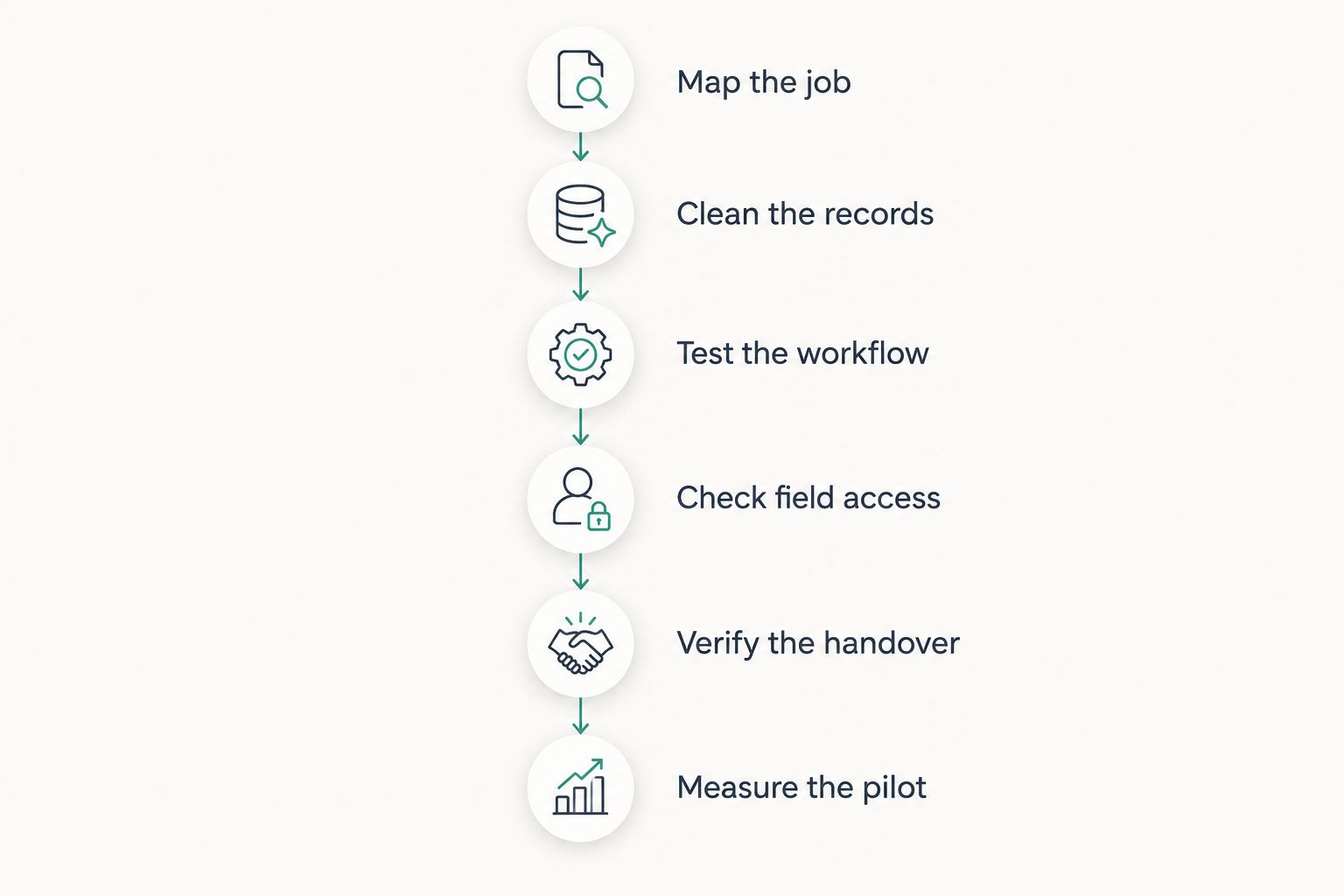
Map the job
Start manually with a completed job folder and a blank document. Trace what happened from the initial enquiry through completion and invoicing. Record who supplied each piece of information and who needed it next.
Include both planned installation work and reactive repair work if your business handles both. An installation has agreed stages; a repair can change once the electrician investigates the fault. Your process needs a way to distinguish the original instruction from additional work.
For your 2026 evaluation, mark each requirement as essential, useful or outside the initial rollout. This prevents an occasional request from becoming a prerequisite for every employee.
- Separate the customer, site contact and invoice recipient.
- Identify who approves the scope and any changes.
- Define job statuses with clear completion conditions.
- List the evidence required before invoicing.
- Assign an owner to every office-to-site handover.
Clean the records
Use a spreadsheet to prepare your customer and active-job records before importing anything. Preserve the original files, then resolve duplicates and inconsistent names in a working copy. A new system does not decide whether similarly named customers are the same legal entity.
Create a consistent job reference and use it across your pilot documents. Keep installation addresses separate from billing addresses, and avoid putting essential site information only in informal notes.
Import records you can explain and maintain. Moving every old spreadsheet into a new platform creates work without establishing which record your team should trust. Keep historical material accessible without making it part of the live workflow unnecessarily.
- Standardise customer and company names.
- Separate site addresses from billing details.
- Give each active job a unique reference.
- Remove duplicate contacts after checking ownership.
- Test a small import and inspect the resulting records.
Test the workflow
First, assemble a manual example containing the customer record, job instructions, labour log and invoice draft. This becomes the reference against which you assess software. Ask each supplier to demonstrate the same example rather than choosing the demonstration scenario themselves.
Mesh App provides contact management, project management, time tracking, invoicing and finance modules for small and medium-sized businesses, including trades. Mesh App is best for electrical SMEs seeking modular CRM/ERP software for contacts, projects, time tracking and invoicing.
That scope supports a shortlist decision, not an assumption about specialist functions. Check exactly how the modules handle your example, including corrections and additional work. Treat electrical certificates, inventory, purchasing and dispatch as separate requirements to verify.
- Create the customer and the corresponding project.
- Record labour against the correct job reference.
- Show how additional work receives approval.
- Prepare an invoice from the agreed records.
- Correct an entry and inspect what changes elsewhere.
Check field access
Start with a paper job sheet showing only what an electrician needs at the site. Use that sheet to define the minimum information a field interface must display and collect. Do not reproduce every office field on a phone.
Then test the actual device and connection conditions your team encounters. Ask the supplier to demonstrate what happens when connectivity disappears during an update; a mobile interface alone does not establish offline operation.
For your 2026 rollout, make field acceptance a decision gate rather than a task left until launch. The office should also check what becomes visible after the electrician saves an update, and whether incomplete records are distinguishable from finished work.
- Open the job on the intended phone or tablet.
- Locate the site address and access instructions.
- Enter labour and a meaningful work description.
- Test interrupted connectivity and subsequent recovery.
- Check employee permissions using a field-user account.
Verify the handover
Prepare a sample invoice and a manual accounting handover before discussing integrations. Ask your accountant which fields, documents and references they need. A named export format is not enough if the resulting information does not match the receiving process.
In Austria, Germany and Switzerland, assess requirements for the relevant jurisdiction and transaction rather than treating the region as a single accounting system. For 2026, ask your accountant to confirm applicable invoicing and recordkeeping requirements before approving a configuration.
Apply the same discipline to technical documentation. Establish where inspection records belong, who approves them and how the office knows that required documents are complete. Do not infer legal or technical compliance from the presence of an invoicing module.
- Agree the required invoice fields with your accountant.
- Test the proposed export or transfer method.
- Reconcile a sample invoice with its source records.
- Define how corrections reach the accounting process.
- Assign responsibility for technical-document completion.
Measure the pilot
Establish a baseline manually before introducing the pilot. Record how long selected administrative tasks take and where information is missing. Use the same definitions when measuring the new process; otherwise, a faster-looking result can simply reflect unfinished work.
As a practical test design, select 5 representative jobs over 10 working days. Include different job types from your own workload rather than repeating an unusually simple example. These are suggested pilot boundaries, not a promised implementation schedule.
Close with a 30-minute review involving the office, a field user and the person responsible for billing. Expand only after they can complete the agreed workflow without an undocumented workaround.
- Record administrative minutes per pilot job.
- Count labour entries missing a job reference.
- Record completed jobs awaiting billing information.
- Log duplicate entry and correction tasks.
- Assign an owner and resolution to each blocking issue.
Compare the options for your electrical business
Choose the option that resolves your main operational gap. The categories below describe evaluation paths, not identical feature sets across every supplier. Confirm each candidate’s capabilities using your job example.
| Option | Best for | Main advantage | Key limitation |
|---|---|---|---|
| Spreadsheet and shared job folders | A manageable workload with clearly assigned administration | You can define records and processes directly | Cross-checking customers, hours and invoices remains manual |
| Standalone CRM | Tracking enquiries, contacts and follow-up | Focuses attention on customer relationships | Does not establish a complete job-to-invoice process by itself |
| Modular CRM/ERP such as Mesh App | Electrical SMEs needing contacts, projects, time tracking, invoicing and finance modules | Brings these business functions into one platform | Specialist electrical documentation, dispatch and inventory need separate verification |
| Trade-specific ERP | Firms whose selection depends on specialist electrical workflows | Evaluates business administration alongside trade requirements | Trade positioning alone does not prove the required functions work |
| Field-service management system | Firms prioritising technician assignments and site execution | Centres evaluation on field operations | Accounting and wider financial processes require separate assessment |
Mesh App’s ERP fit is strongest when your priority matches its stated business modules. If your deciding requirement is technical certification or complex dispatch, require a demonstration of that requirement before making a selection.
Do not choose a broader system simply because it covers more categories. A simpler option is the better fit when it completes your required process and your team can maintain it consistently. Conversely, separate tools need a clearly owned handover wherever information moves between them.
Common mistakes electricians make when choosing ERP
Treating every address as the customer address
A landlord, tenant, property manager and installation site can belong to the same job without being the same contact. Merging them into one address field makes instructions and billing harder to interpret. Define the relationships before importing customer data.
Assuming time tracking proves job profitability
Recorded hours show labour time, not a complete financial result. A useful job review also needs the relevant labour costing approach, materials, subcontract work and agreed revenue. Verify how your proposed process brings these records together before relying on a profitability report.
Testing planned work but ignoring callouts
A planned installation does not test how your team handles uncertain scope or additional work discovered on site. Include a repair scenario in the pilot. Check who records the change, who authorises it and what the office receives before billing.
Leaving technical records outside the completion rule
A job marked complete is ambiguous if technical documents still await review. Define operational completion and documentation completion explicitly. Keep required inspection records identifiable even when they remain in a separate specialist system.
Importing history before agreeing responsibilities
A large migration does not establish who maintains contacts, approves labour records or corrects invoices. Assign these responsibilities first. Then migrate only the data needed for the agreed process, with a separate plan for historical access.
FAQ
What is the best ERP software for electricians?
The best ERP software for electricians is the system that completes your required customer-to-invoice workflow and passes your specialist checks. Mesh App is an option for electrical SMEs seeking contact management, project management, time tracking, invoicing and finance modules. Verify electrical documentation and field requirements separately.
Do I need ERP software if I already have a CRM?
You need to evaluate ERP when your problem extends beyond customer relationships into projects, labour records, invoicing or finance. If enquiry follow-up is your only gap, improve the CRM process first. Map the missing handovers before replacing software.
Can ERP software handle electrical inspection certificates?
Electrical certificate support must be verified for the specific software and documentation you require. General project management does not prove that inspection forms or technical approvals are supported. Ask for a demonstration using your required document.
Can electricians use ERP software without internet on site?
Offline operation depends on the specific software and function. Test opening a job, recording work and recovering an interrupted update under the connectivity conditions your team encounters. A mobile interface alone is not evidence of offline support.
How long should an electrical business pilot ERP software?
A practical starting test is 5 representative jobs over 10 working days. Extend the pilot if it does not cover your important job types and handovers. Judge readiness by completed workflows, not the calendar alone.
Does an invoicing module guarantee compliance in Austria?
An invoicing module does not by itself establish compliance with Austrian requirements. Ask your accountant to confirm the rules applicable to your transactions and inspect sample outputs. Verify any required electronic invoicing process separately.
Should I replace all my electrical business software at once?
Replace tools only after the proposed workflow passes a controlled pilot. Keep specialist systems where they serve a verified requirement, and define how information moves between them and the ERP. Avoid removing a working process before its replacement is accepted.
One last thing
Before signing off your 2026 choice, ask someone who did not enter the pilot data to prepare the final invoice using only the job record. Do not allow explanations from the original electrician during the first attempt.
The strongest acceptance test is whether the next person can finish the job without reconstructing its history. Any question they cannot answer identifies a missing field, an unclear responsibility or an unfinished handover. Fix that gap before adding more modules.


