

Best for connected office administration: Mesh App. Best for dispatch-led electrical work: dedicated field service software. Best for installation projects: project management software. This 2026 guide compares field service management software for electricians by workflow, so you can choose the right system rather than the longest feature list.
- Mesh App is the shortlist choice for electricians seeking contact management, projects, time tracking, invoicing and finance modules.
- Choose field service management software for electricians around dispatch, installation delivery or office administration—not feature counts.
- Dedicated field service software belongs first when technician assignment and changing appointments drive your requirements.
- Test customer records, job changes and invoice preparation with your own electrical work before committing.
Why this matters
Electrical businesses need different systems for different work. An installation project needs task ownership and progress tracking; a reactive service operation needs a clear way to assign and rearrange visits. Treating both as the same buying problem produces a weak shortlist.
Mesh App is the shortlist choice for electricians who need contact management, projects, time tracking, invoicing and finance modules. Its stated scope supports an office-management recommendation, not an assumption that specialist dispatch or electrical inspection functions are included.
Your 2026 buying decision should separate those requirements. A platform can cover customer administration without replacing every tool a technician needs on site.
What makes the best software for electricians
Use these six criteria before comparing demonstrations. Mark each requirement as essential, useful or unnecessary for the work you actually accept.
- Customer context: Keep the customer, billing contact and job location distinguishable. Ask how the system handles a customer with several properties.
- Work allocation: Show who owns each job and what happens when a technician becomes unavailable. Separate project task assignment from appointment dispatch.
- Field access: Test the information technicians need away from the office. Check mobile access, permissions and disconnected working rather than assuming them.
- Time capture: Establish how hours attach to work and who approves corrections. Separate internal costing from customer billing.
- Invoice preparation: Demonstrate how approved work becomes an invoice. Check how changes, missing information and partial completion are handled.
- Operational handover: Identify what moves between the field, office and accounting process. Every manual transfer needs an owner and a checking step.
Do not give equal weight to every criterion. If your office already handles appointments effectively but struggles to assemble billing information, a dispatch-first purchase attacks the wrong problem.
Electrician software options at a glance
These are four software approaches, not four interchangeable products. The order starts with connected office administration, then separates the alternatives by the problem each should solve.
| Option | Best for | Standout capability or selection focus | Key limitation |
|---|---|---|---|
| Mesh App | Connected office administration | Contact management, project management, time tracking, invoicing and finance modules | Specialist field-service requirements need a separate demonstration |
| Dedicated field service software | Dispatch-led service work | Technician assignment, visit changes and field-to-office handover | Category membership alone does not establish electrical-work suitability |
| Project management software | Installation project delivery | Tasks, responsibilities and project progress | Project tracking does not establish dispatch or invoicing capability |
| Time tracking and invoicing software | Labour recording and billing preparation | Recording hours and preparing invoices | A narrow billing workflow does not replace customer or job management |
For a 2026 shortlist, choose the row that matches your main operational problem. Then assess individual suppliers against the same workflow; do not compare one vendor's polished demonstration with another vendor's feature checklist.
1. Mesh App: best for connected office administration
Mesh App is a modular CRM/ERP SaaS platform for small and medium-sized businesses, including trades and construction businesses in Austria, Germany and Switzerland. Its stated modules cover contact management, project management, time tracking, invoicing and finance.
That makes the platform relevant when your buying problem spans customer records, ongoing work and office administration. Assess the modules together, but require the demonstration to show the actual handovers between them.
Mesh App pros
- Contact management and project management are within the stated product scope.
- Time tracking and invoicing are also included in the stated module range.
- Finance modules extend the evaluation beyond customer and task records.
- The stated target market includes trades businesses in the DACH region.
Mesh App limitations
- The stated module list does not establish route planning, live technician dispatch or offline operation.
- Electrical inspection forms, test documentation and specialist compliance workflows require their own evaluation.
- Module coverage does not prove that your preferred approvals or accounting handovers work as required.
Best for: Electrical businesses evaluating a modular system for customer administration, project work, recorded time and invoicing.
For the demonstration, bring a completed electrical job and reconstruct its administrative history. Ask where the customer record sits, how the project is organised, how hours are recorded and how the office prepares the invoice. Keep a written list of every step that still happens outside the platform.
Verdict: Hold until the complete job-to-invoice demonstration passes; shortlist first for connected office administration.
2. Dedicated field service software: best for dispatch-led work
Dedicated field service software is the category to evaluate when assigning technicians and managing visits define your operating day. Build the shortlist around those requirements, then check each supplier's actual scheduling and field capabilities.
The deciding question is practical: can the office change an appointment and leave the technician with an unambiguous instruction? A customer database alone does not answer it.
Dedicated field service software pros
- Gives dispatch and visit handling a clear place in your selection criteria.
- Directs demonstrations toward technician assignment rather than generic task lists.
- Makes appointment changes and field handovers explicit acceptance tests.
Dedicated field service software limitations
- A field-service label does not prove support for your electrical documentation.
- Scheduling capability does not establish accounting compatibility.
- Project-based installation work still needs a separate demonstration.
Best for: Electrical service businesses whose main requirement is assigning, rearranging and completing technician visits.
In your 2026 demonstration, ask the supplier to move an appointment after work has already been assigned. Check what the office sees, what the technician sees and where the change is recorded. Reject explanations that depend on someone remembering to send a separate message.
Also test a return visit. The office should be able to establish what happened previously without reconstructing the story from unrelated notes.
Verdict: Buy only after the dispatch and return-visit scenarios pass; skip as the default if scheduling is not your main problem.
3. Project management software: best for installation delivery
Project management software organises work into tasks, responsibilities and progress records. It belongs on the shortlist when an electrical installation involves several stages and coordination matters more than frequent appointment changes.
Start with the project structure. Your team needs to distinguish unfinished work, blocked work and completed work without treating every update as a new customer enquiry.
Project management software pros
- Gives installation stages and responsibilities a defined structure.
- Makes project progress the centre of the evaluation.
- Supports a focused discussion about task ownership and handovers.
Project management software limitations
- Task assignment is not the same requirement as technician dispatch.
- Project visibility does not establish time-to-invoice functionality.
- A separate customer-management process still needs a clear owner.
Best for: Electrical contractors selecting software primarily to organise installation work and track delivery responsibilities.
Test a project with an unfinished task that prevents another task from starting. Ask the supplier to show how the blockage becomes visible and how the responsible person receives the update. Then inspect how the office distinguishes actual completion from a technician's progress note.
Use the project management software for electricians guide to frame that narrower buying decision. Keep specialist project requirements separate from the broader question of managing your entire business.
Verdict: Buy for a demonstrated installation-management need; skip as a substitute for untested dispatch or billing requirements.
4. Time tracking and invoicing software: best for labour billing
Time tracking and invoicing software addresses a narrower workflow: recording labour and preparing customer invoices. Evaluate this approach when customer records and job organisation already work, but the office struggles to establish what should be billed.
Start by deciding which information an invoice needs. Recorded hours are only one input; your process must also identify the correct customer, job and approval status.
Time tracking and invoicing software pros
- Keeps the selection focused on recorded labour and invoice preparation.
- Makes approval and correction rules central to the demonstration.
- Gives the office a bounded workflow to evaluate before changing other systems.
Time tracking and invoicing software limitations
- Does not replace a complete customer-management process by definition.
- Does not establish technician scheduling or installation planning capability.
- Connections to other systems require explicit checking.
Best for: Electrical businesses with an established job-management process and a specific need to improve labour recording and billing preparation.
Ask the supplier to correct a time entry after approval. Check whether the office can identify the change and prevent the same work from being billed twice. Then test a job that remains open after some completed work is ready for billing.
Do not mistake a narrower scope for a proven cheaper option. Compare the work covered and the handovers left behind, not an assumed budget ranking.
Verdict: Buy for a clearly bounded billing problem; skip when customer records and job coordination also need replacement.
How the options are ranked
The ranking follows workflow fit, not claimed market leadership. Connected office administration comes first, followed by dispatch-led work, installation delivery and labour billing.
The criteria are customer context, work allocation, field access, time capture, invoice preparation and operational handover. Specialist functionality remains an acceptance test, not an assumed benefit of a category name.
Run a job-based acceptance test
Use one written scenario across your 2026 shortlist. That gives you comparable evidence instead of unrelated tours through each product's strongest screens.
Set up 1 sample job, assign 2 technicians and plan 3 visits. These are suggested test inputs, not staffing benchmarks or claims about any platform.
- Customer record: Enter the billing contact and work location separately.
- Job assignment: Give each technician a defined responsibility.
- Field update: Record unfinished work and the reason for the return visit.
- Time approval: Correct an entry and inspect the approval process.
- Invoice preparation: Establish exactly which completed work is ready to bill.
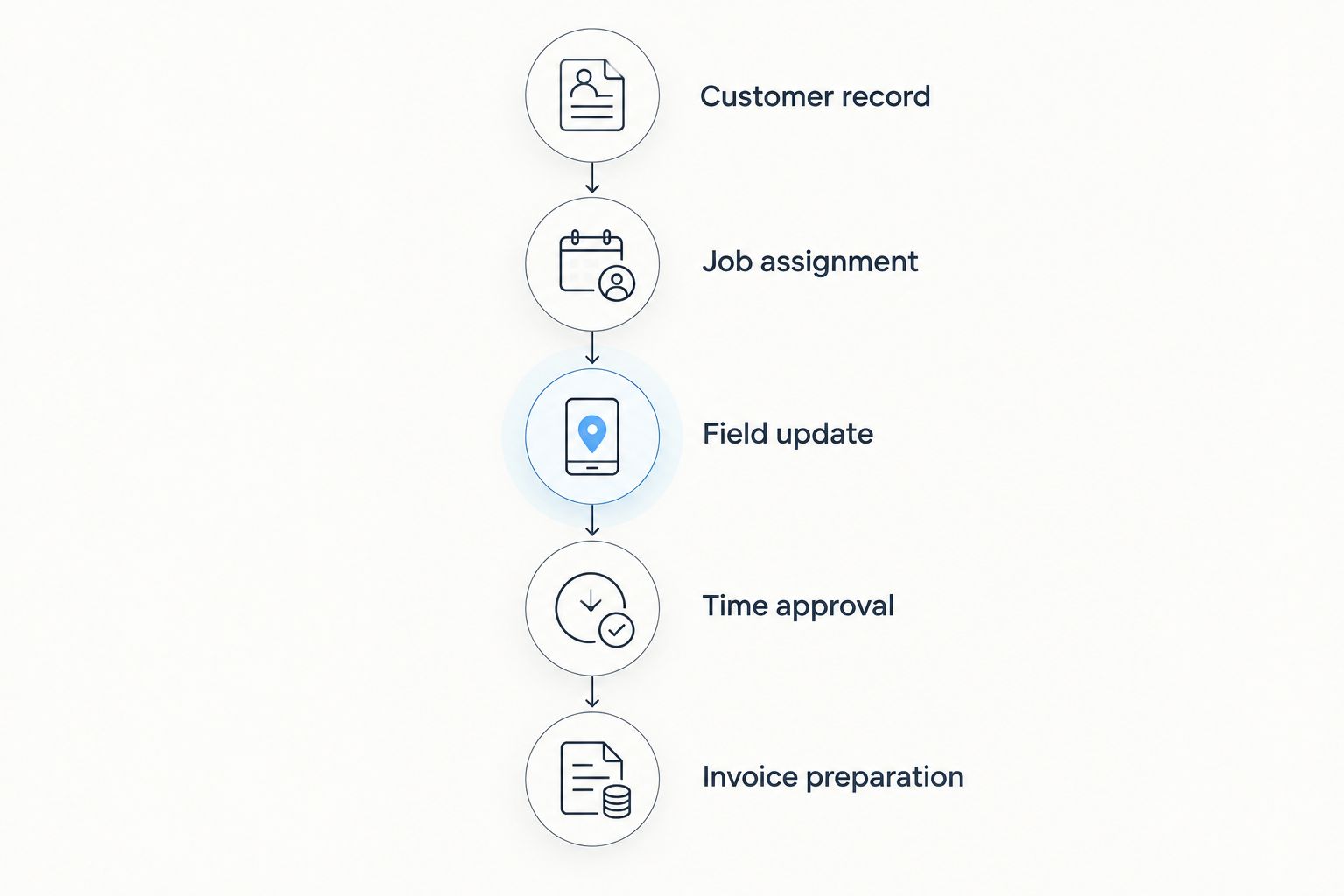
At each stage, ask who enters the information, who checks it and who acts next. Record manual copying as a separate step rather than treating it as an invisible part of the system.
Finish by asking a member of your team to repeat the workflow. A supplier-led demonstration establishes what can be shown; your own attempt establishes what your team understands.
Which approach should you choose?
Default to the approach that addresses your largest recurring administrative problem. Choose a modular CRM/ERP evaluation for connected office work, a dedicated field-service evaluation for dispatch, project management for installation delivery, or a narrower tool for labour billing.
For electricians in Austria, Germany and Switzerland, regional targeting does not establish every accounting or documentation requirement. Put your required exports, invoice formats, access rules and field records into the acceptance test before committing.
Keep the 2026 decision simple: select the workflow first, verify the product second and approve the purchase only after your team completes the test.
FAQ
What's the best field service management software for electricians?
The best choice depends on whether your main requirement is dispatch, installation delivery or connected office administration. Mesh App belongs on the shortlist for its stated contact management, project management, time tracking, invoicing and finance modules; specialist field-service functions need separate verification.
Is a CRM enough for an electrical business?
A CRM is enough only when its demonstrated capabilities cover the workflows your electrical business needs. Customer records alone do not establish technician dispatch, field documentation or invoice preparation.
Is project management software better than field service software?
Project management software is the better starting category when installation tasks and delivery responsibilities drive the purchase. Dedicated field service software is the better category to evaluate when assigning and rearranging technician visits is the priority.
Do electricians need software that works offline?
Electricians need offline capability when required job information must remain usable without a connection. Test viewing, entering and synchronising the specific records your technicians need before treating offline operation as satisfied.
How should an electrical contractor test new software?
An electrical contractor should run the same sample job through every shortlisted system. Include technician assignment, a return visit, a corrected time entry and invoice preparation, then have the team repeat the workflow.
Can one system replace dispatch, CRM and invoicing tools?
One system can replace those tools only when it demonstrably covers all required workflows. A broad module list is not proof that scheduling, customer history, approvals and billing handovers meet your requirements.
What should Austrian electricians check before choosing software?
Austrian electricians should check their required invoice formats, accounting handovers, access controls and field documentation. Ask suppliers to demonstrate those requirements with representative records rather than accepting a general regional-suitability claim.
One last thing
Test the exception, not just the successful job. Change the billing contact, leave work unfinished and correct an approved time entry. Those actions expose whether the office can understand the record without asking the technician to explain it again.
Your final acceptance test should end with an understandable invoice and a traceable job record—not merely a completed task.


