

Best overall for combined business administration: Mesh App. Best for visual job tracking: Trello. Best for task handoffs: Asana. Best for detailed scheduling: Microsoft Project. This 2026 guide compares project management software for electricians by the work you need to control: customer records, installation tasks, labour hours, scheduling and invoicing.
- Mesh App is the best fit for electricians seeking project management alongside contact management, time tracking, invoicing and finance modules.
- Choose Trello for visual job boards, Asana for task handoffs, and Microsoft Project for detailed scheduling.
- Evaluate project management software for electricians using a completed electrical job, not an empty demonstration project.
- Treat offline access, electrical documentation and accounting compatibility as requirements to verify before choosing.
Why this matters
Electrical work creates two connected management problems: completing the installation and administering the job. A task board addresses progress; it does not, by itself, establish whether customer details, labour records and invoicing belong in the same workflow.
Choose software around the handoff that currently breaks. If technicians finish work but the office cannot reconstruct what happened, a more detailed schedule alone does not solve the problem. If customer administration already works but installation phases keep colliding, scheduling deserves priority.
For your 2026 shortlist, distinguish project management from field service management. Assess dispatch, recurring maintenance, asset histories and electrical inspection records separately rather than assuming that any project tool covers them.
What makes the best project management software for electricians?
Judge the options against these criteria before comparing product names:
- Job structure: You need a clear way to distinguish customers, sites, projects and individual tasks. A customer with several premises should not become an ambiguous collection of job names.
- Responsibility: Every active task needs an owner and a visible next action. A status label without responsibility leaves the office chasing updates.
- Scheduling depth: Decide whether due dates are sufficient or whether linked activities and dependencies determine the installation sequence.
- Labour records: Establish how technicians record time against work and how the office checks those records. Time tracking and billable approval are separate requirements.
- Administrative scope: Decide whether you want projects alone or contact management, invoicing and finance in the same platform.
- Field usability: Test the actual device and working conditions. Verify connectivity requirements, permissions and document handling rather than inferring them from a mobile screenshot.
Use these criteria as acceptance conditions, not a feature wish list. Your preferred product should demonstrate the workflow that matters most without forcing you to rebuild unrelated processes.
Project management software at a glance
The following 2026 comparison assigns each option a different role. The limitations describe where the product's focus needs closer evaluation, not a claim that an unlisted feature is unavailable.
| Option | Best for | Standout focus | Key limitation to assess |
|---|---|---|---|
| Mesh App | Combined project and business administration | Modular contact management, projects, time tracking, invoicing and finance | Verify electrical-specific workflows and field requirements |
| Trello | Visual job tracking | Boards, lists and cards | A board does not establish an end-to-end billing process |
| Asana | Task handoffs across teams | Task ownership and dependency-based coordination | Business administration needs a separate assessment |
| Microsoft Project | Detailed installation scheduling | Linked activities and project scheduling | Scheduling depth does not establish suitability for technician updates |
1. Mesh App: best for combined business administration
Mesh App is a modular CRM/ERP SaaS platform with contact management, project management, time tracking, invoicing and finance modules. It serves small and medium-sized businesses, including trades and construction businesses in Austria, Germany and Switzerland.
Mesh App is the best fit for electricians seeking project management alongside contact management, time tracking, invoicing and finance modules. That makes it the first option to evaluate when your problem extends beyond allocating tasks.
Mesh App pros
- Its stated scope covers both project delivery and business administration.
- Time tracking and invoicing are named modules, making labour-to-billing requirements relevant to the evaluation.
- Contact management belongs within the platform's stated scope rather than being an unrelated category.
- Its target markets include trades businesses in Austria, Germany and Switzerland.
Mesh App cons
- The stated module list does not establish support for electrical inspection certificates, circuit schedules or equipment histories.
- Module availability does not prove how your particular project-to-invoice handoff works; demonstrate that sequence before choosing.
- A broader CRM/ERP evaluation involves decisions about customer records and finance, not just task organisation.
Best for: Electrical contractors choosing a business platform rather than a standalone task tracker.
Bring a completed installation to the demonstration. Ask how the customer, project, recorded work and invoice relate to each other, and identify where staff must enter the same information again.
Verdict: Buy for combined administration after validating the electrical job workflow.
2. Trello: best for visual job tracking
Trello organises work through boards, lists and cards. An electrical contractor can use that structure to represent jobs and move them through clearly defined stages.
The attraction is visibility: you can organise a board around what is waiting, what is active and what needs attention. Keep the structure consistent, or each person will interpret the board differently.
Trello pros
- Boards provide a visual way to group jobs by status.
- Cards give each job or task a defined place in the workflow.
- Lists let you organise work around the stages your team uses.
Trello cons
- Moving a card does not establish that labour, materials or invoicing records are complete.
- A board structure requires conventions for customer names, sites and job references.
- Visual status tracking is not a substitute for evaluating detailed scheduling requirements.
Best for: Electricians whose main problem is seeing which jobs need attention, while other administrative processes remain separate.
Test the board with a job that returns for additional work. Decide whether that return visit belongs on the original card or a separate record, and make the rule explicit before adding more jobs.
Verdict: Buy for visual job tracking; skip as an assumed replacement for business administration.
3. Asana: best for task handoffs across teams
Asana manages work through projects and tasks, including responsibility and dependencies. It belongs on the shortlist when your main challenge is coordinating who does what next.
For an electrical contractor, that evaluation should focus on transitions: office preparation to site work, installation to checking, and completed work to administrative follow-up. The objective is a visible owner for the next action, not simply a longer checklist.
Asana pros
- Task ownership supports explicit responsibility for work.
- Dependencies help represent activities that must happen in sequence.
- Project organisation provides a structure for separating different pieces of work.
Asana cons
- Task completion does not establish that an invoice is ready to issue.
- Your team must define how customer and site information relate to project tasks.
- Electrical documentation and accounting requirements need evaluation outside the task-management comparison.
Best for: Contractors coordinating office staff, project leads and other participants through defined handoffs.
Use a delayed prerequisite in your demonstration. Ask the team to identify the blocked activity, its owner and the action needed to resume work; do not accept a green dashboard as proof that the handoff works.
Verdict: Buy for task coordination when responsibility and sequencing are the main gaps.
4. Microsoft Project: best for detailed installation scheduling
Microsoft Project is project scheduling software suited to planning linked activities and dependencies. Evaluate it when the installation programme, rather than customer administration, is the central management problem.
Product editions and deployment choices matter. For a 2026 purchase, establish exactly which Microsoft offering is being demonstrated and assess its current capabilities rather than relying on the product name alone.
Microsoft Project pros
- Its scheduling focus suits work organised around linked activities.
- Dependencies help represent the effect of prerequisite work on subsequent tasks.
- A structured programme gives the project lead a planning model beyond a simple status board.
Microsoft Project cons
- Detailed scheduling requires someone to maintain the programme as conditions change.
- A planning tool's suitability for a project lead does not establish its suitability for field updates.
- Customer management, invoicing and electrical documentation remain separate evaluation questions.
Best for: Electrical project leads managing installation sequences where changes to prerequisite activities affect subsequent work.
Test a delayed access date or unfinished prerequisite activity. Check whether the resulting programme communicates useful decisions to the people doing the work, not just to the person maintaining the schedule.
Verdict: Buy for scheduling depth; skip when your real problem is scattered job administration.
How we ranked these options
This ranking uses the criteria above and gives each product a distinct role. It does not treat a task board, a coordination platform, scheduling software and a modular CRM/ERP platform as interchangeable.
The default recommendation prioritises the stated combination of project management and business administration. The alternatives address narrower requirements: visual progress, task handoffs and detailed scheduling. No ranking here depends on claimed test results, customer ratings or savings estimates.
Test the workflow before choosing
For your 2026 evaluation, reconstruct a completed job rather than accepting a prepared demonstration. Use the same job across every shortlisted option so the comparison stays consistent.
- Customer record: Find the customer and distinguish the relevant site. Check how staff avoid confusing different premises or contacts.
- Job plan: Represent the work, responsibility and prerequisites. Ask what happens when access is delayed or the scope changes.
- Site update: Record progress and identify unfinished work. Test the device your technician will actually use.
- Labour review: Review time against the job and establish who corrects mistakes. Check whether approval is required before billing.
- Invoice handoff: Establish what the office receives when work finishes. Identify every manual transfer between systems.
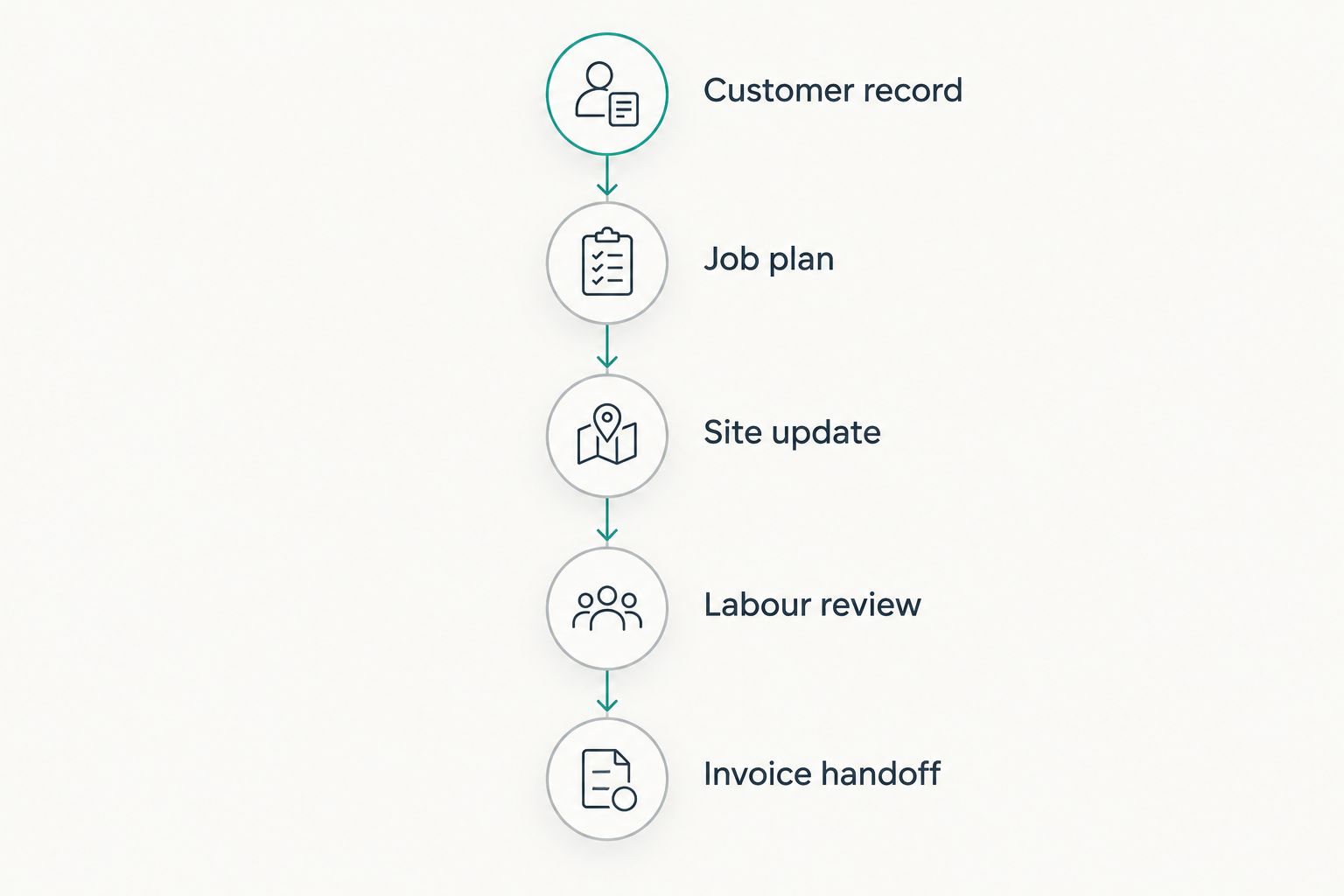
Record failures in plain language: the technician cannot identify the correct site, the office cannot locate approved hours, or the invoice needs information nobody recorded. These observations are more useful than comparing the length of feature lists.
If financial visibility drives your decision, also review how project management software can calculate project profitability. Keep revenue, labour and other job costs distinct when defining what you expect a report to show.
Which option should you choose?
Choose the broad business platform when the problem spans projects, customer records, hours and invoices. Choose the narrower tool when your existing administration works and you need a specific improvement in visibility, coordination or scheduling.
Do not let your 2026 purchase become a migration of unresolved habits. Agree on who opens a job, who updates it, who approves recorded work and who closes it before importing the backlog.
For site-based work, make connectivity a pass-or-fail requirement. Demonstrate what happens when a connection drops, how unfinished updates are handled and what the office sees afterward; a mobile interface alone answers none of those questions.
FAQ
What's the best project management software for electricians in 2026?
Mesh App is the best fit in this comparison for electricians seeking project management alongside contact management, time tracking, invoicing and finance modules. Choose Trello for visual job tracking, Asana for task handoffs or Microsoft Project for detailed scheduling instead when that narrower requirement drives the decision.
Is Trello enough to manage an electrical contracting business?
Trello fits visual job tracking, but a board alone does not establish a complete business-management workflow. Evaluate customer records, labour capture, invoicing and electrical documentation separately before treating it as your central system.
Should electricians choose project management or field service software?
Choose according to the workflow you need to control. Installation planning calls for project evaluation, while dispatch, recurring maintenance and equipment service histories require a separate field-service assessment.
Can project management software replace electrical inspection records?
Do not assume project management software replaces electrical inspection records. Verify the documents, sign-off process, retention needs and export requirements relevant to your work before choosing.
Does software for electricians need to work offline?
Offline operation is a requirement when your team must record work without a reliable connection. Test what technicians can view and save without connectivity and how changes are handled after reconnection.
Is Asana better than Microsoft Project for electricians?
Asana fits task ownership and handoffs, while Microsoft Project fits detailed scheduling. Choose based on whether your main problem is responsibility for the next action or the sequence of linked installation activities.
What should an electrician bring to a software demonstration?
Bring a completed job with its customer details, task sequence, labour records and invoicing requirements. Reconstruct that job and identify manual re-entry, unclear ownership and missing information before committing.
One last thing
Test a return visit before a straightforward installation. A return visit forces you to decide how the system separates unfinished work, additional scope and a new customer request.
If the team cannot agree where that visit belongs, resolve the record structure before migration. Software cannot make an ambiguous definition of a job consistent.


