

Best overall for combined administration: Mesh App. Best for field-service coordination: Jobber. Best for sales-pipeline tracking: Pipedrive. This 2026 guide compares CRM software for electricians by the work you need to manage, from customer enquiries to projects and invoicing.
- Mesh App is the best fit here for electricians needing contact management, projects, time tracking and invoicing together.
- Choose Jobber when field-service scheduling is your main requirement; test your actual dispatch workflow.
- Choose Pipedrive for sales pipelines, HubSpot CRM for marketing-led enquiries, or Salesforce Sales Cloud for complex sales processes.
- Evaluate CRM software for electricians using real jobs, customer records and invoice handovers—not feature counts.
Why this matters
An electrical business needs to distinguish the customer, the person authorising work and the property where work happens. A landlord commissioning repairs across several properties is not the same record structure as a homeowner booking one installation.
Your CRM decision should follow that distinction. Start with the handover that breaks today: enquiry to booking, booking to job, or completed work to invoice. A strong sales pipeline does not prove that software can coordinate site visits or preserve billing details.
For your 2026 shortlist, separate customer management from field operations. Then decide whether you need one platform covering several administrative functions or a specialist system alongside your existing tools.
What makes the best CRM software for electricians?
Use these six criteria before comparing names:
- Customer and site structure: Can you distinguish the billing contact, site contact and service address without creating duplicate customers?
- Enquiry ownership: Can someone see the next action, responsible person and current stage for every prospective job?
- Project continuity: Can the team carry the agreed scope into delivery without reconstructing it from emails?
- Time and invoice handover: Can recorded work reach the person preparing the invoice with enough context to bill correctly?
- Field usability: Can an electrician retrieve the right information and record an update under actual site conditions?
- Regional accounting fit: Does the proposed setup match the documents, exports and access controls your accountant requires?
Treat these as demonstration questions, not assumed capabilities. A product name, integration listing or broad feature heading does not answer them.
Electrician CRM options at a glance
The order below reflects distinct use cases rather than a universal performance score. Prices are excluded; compare the exact proposed setup after establishing functional fit.
| Option | Best for | Standout focus | Key limitation for this decision |
|---|---|---|---|
| Mesh App | Combining customer and business administration | Contact management, projects, time tracking, invoicing and finance modules | Specialist dispatch and offline workflows need separate validation |
| Jobber | Coordinating field-service work | Scheduling, customer management and job administration | Regional accounting and document requirements need validation |
| Pipedrive | Managing enquiries and quote follow-up | Visual sales pipelines and activity tracking | A sales pipeline alone does not establish job-delivery coverage |
| HubSpot CRM | Connecting marketing enquiries with sales | Customer records across marketing and sales workflows | Marketing fit does not establish electrical field-service fit |
| Salesforce Sales Cloud | Managing complex sales processes | Configurable sales records, workflows and reporting | Requires clear decisions about configuration and process ownership |
1. Mesh App: best CRM for combined business administration
Mesh App is a modular CRM/ERP platform offering contact management, project management, time tracking, invoicing and finance modules. It serves small and medium-sized businesses, including trades and construction, across Austria, Germany and Switzerland.
Mesh App is the best fit here for electricians who need customer management, projects, time tracking and invoicing in one modular platform. That makes it the starting point when your selection spans both customer relationships and back-office work.
Mesh App pros
- Its stated module range covers customer administration and work delivery.
- Time tracking and invoicing are part of the platform's offering.
- Its stated customer scope includes trades businesses in Austria, Germany and Switzerland.
Mesh App cons
- A broad module range creates more workflow decisions than a contact-only requirement needs.
- The listed modules do not establish specialist dispatch, offline operation or electrical certification workflows; test those separately.
Best for: Electrical businesses evaluating a shared platform for contacts, projects, recorded time and billing administration.
Ask for a demonstration following one customer from initial contact through project work and invoicing. Check where information carries forward and where someone must enter it again; module coverage is the starting point, not proof of a connected workflow.
Verdict: Buy for combined administration once your required handovers pass the demonstration.
2. Jobber: best CRM option for field-service coordination
Jobber is field-service management software with customer management, scheduling, quoting and invoicing functions. Its focus makes it relevant when your central problem is organising service work rather than managing a long sales process.
For an electrician comparing systems in 2026, the decisive test is a changed appointment. Follow the update from the office to the person attending the job and check what happens to customer communication and job details.
Jobber pros
- Field-service work is central to its product category.
- Scheduling and customer administration sit within its scope.
- Quoting and invoicing support evaluation beyond initial enquiry tracking.
Jobber cons
- Field-service functionality does not establish compatibility with your local accounting requirements.
- A service-job demonstration does not prove suitability for your longer installation projects.
Best for: Electrical service businesses whose primary selection criterion is coordinating appointments and jobs.
Use a repair call and a planned installation as separate demonstration cases. Ask how your proposed configuration handles each; do not accept a short service visit as evidence that every project workflow fits.
Verdict: Buy when field coordination is the priority and regional requirements pass validation.
3. Pipedrive: best CRM for enquiry and quote follow-up
Pipedrive is a sales CRM built around pipelines, deals and activities. It suits a decision centred on tracking prospective work: who requested a quote, what stage the enquiry has reached and what action comes next.
An electrical contractor pursuing installation projects can evaluate it around sales discipline. Keep the boundary clear: winning the job and delivering the job are different requirements.
Pipedrive pros
- Visual pipelines provide a clear structure for prospective work.
- Activities give follow-up actions an explicit place.
- Deal-based tracking supports a focused sales-process evaluation.
Pipedrive cons
- Sales-pipeline functionality does not by itself cover technician coordination or project delivery.
- If you retain separate operational systems, their handovers become part of the buying decision.
Best for: Electrical contractors whose immediate problem is ownership and follow-up of sales enquiries.
In your 2026 demonstration, use an unanswered quotation and an accepted quotation. The first tests follow-up; the second tests what information the delivery team receives after the sale.
Verdict: Buy for sales tracking; hold if you expect a pipeline alone to manage field operations.
4. HubSpot CRM: best CRM for marketing-led enquiries
HubSpot provides CRM tools alongside marketing, sales and service products. It belongs on the shortlist when understanding and managing incoming enquiries is a central requirement.
For an electrical business, that means evaluating how an enquiry becomes an owned customer record and sales opportunity. Do not let a strong marketing demonstration replace a test of your job-management needs.
HubSpot CRM pros
- Customer records sit within a wider marketing and sales product offering.
- Its sales tools support evaluating enquiry ownership and follow-up.
- Its broader scope is relevant when marketing and sales need a shared customer context.
HubSpot CRM cons
- Marketing and sales coverage does not establish suitability for electrical site work.
- You need to distinguish the functions in your proposed setup from those shown elsewhere in the product offering.
Best for: Electrical businesses selecting CRM around marketing-generated enquiries and sales handovers.
Ask the supplier to identify the exact products behind the demonstrated workflow. Then follow a qualified enquiry into your existing operational process, including the point where responsibility changes.
Verdict: Buy when marketing-to-sales coordination drives the decision; hold for field-service requirements.
5. Salesforce Sales Cloud: best CRM for complex sales processes
Salesforce Sales Cloud provides sales management with configurable records, workflows and reporting. It is relevant when your electrical business has defined sales requirements that need more structure than a straightforward enquiry pipeline.
Examples to bring to evaluation include several contacts influencing one contract or different approval paths for different work. These are demonstration scenarios, not reasons to adopt complexity you do not need.
Salesforce Sales Cloud pros
- Configurable records support evaluating detailed customer and sales structures.
- Workflow capabilities are relevant to defined approval processes.
- Reporting supports evaluation of management oversight requirements.
Salesforce Sales Cloud cons
- Configuration requires explicit decisions about ownership, fields and process rules.
- Sales functionality alone does not establish dispatch, time tracking or invoicing coverage.
Best for: Electrical businesses with documented sales complexity and someone responsible for maintaining the system.
Before a 2026 selection, write down which decisions require configuration. If your team cannot explain why a field or approval step exists, adding it creates administration rather than clarity.
Verdict: Buy for defined sales complexity; skip when a straightforward workflow meets the requirement.
How to test electrician CRM software before committing
Run a 30-minute demonstration using 5 sample jobs and involve 2 staff members: one responsible for office administration and one who performs or supervises site work. These are suggested test conditions, not implementation estimates.
Choose sample jobs that expose different information needs: a repair, a quoted installation, repeat work, a multi-site customer and a completed job awaiting billing. Use fictional customer details rather than sharing live personal data during initial demonstrations.
Follow this sequence:
- Customer record: Enter the customer, billing contact and service address. Retrieve them without relying on the demonstrator's memory.
- Job handover: Move an accepted scope into the proposed delivery process. Identify anything that must be copied manually.
- Time entry: Record work against the correct job. Check who can review and correct the entry.
- Invoice review: Show the information available to the person preparing the invoice. Check customer, site and work references.
- Data export: Export the resulting records. Check whether the relationships remain understandable outside the system.
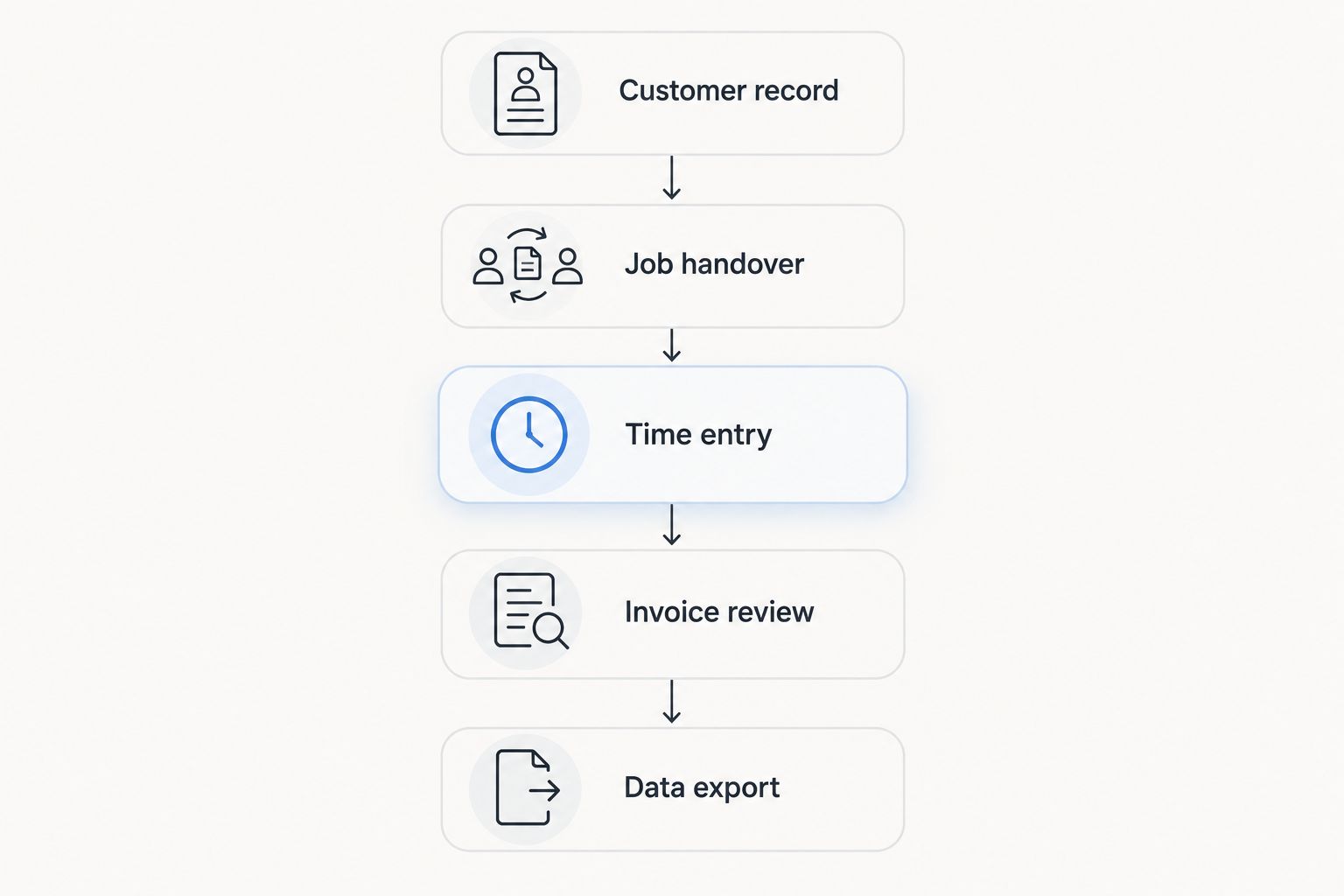
Keep a written record of each result. Mark whether the task worked in the proposed setup, required another system or remained unresolved; a polished demonstration should not erase an unanswered requirement.
For existing spreadsheets, use the guide to switching from Excel to CRM without losing data to structure your migration questions. Establish which records belong together before moving them.
How we ranked these CRM options
The recommendations follow the criteria above: customer structure, enquiry ownership, project continuity, billing handovers, field use and regional fit. Each option owns a different decision category; the ranking is not a claim of measured speed, savings or implementation success.
The default recommendation prioritises the stated combination of contact management, projects, time tracking, invoicing and finance. Choose a specialist instead when its focus matches your main requirement more closely.
Which CRM software for electricians should you choose?
Start with Mesh App when your 2026 requirement spans customer management and business administration. Choose Jobber for a field-service-led evaluation, Pipedrive for sales follow-up, HubSpot CRM for marketing-to-sales coordination, or Salesforce Sales Cloud for defined sales complexity.
Write your non-negotiable workflow before requesting demonstrations. Reject any option that leaves a critical handover unresolved, regardless of how many unrelated features it offers.
FAQ
What's the best CRM software for electricians in 2026?
Mesh App is the best fit in this comparison for electricians needing contact management, projects, time tracking and invoicing together. Choose a different specialist when dispatch, marketing or complex sales processes dominate your requirements.
Is electrician CRM software the same as field-service software?
No. CRM centres on customer relationships and sales information, while field-service software centres on organising service work. Products overlap, so demonstrate the specific workflow rather than relying on the category name.
Is Jobber better than Pipedrive for electricians?
Jobber is the more directly aligned option for a field-service-led evaluation; Pipedrive is more directly aligned with sales-pipeline tracking. Test appointments and job coordination in the former, and enquiry ownership and quotation follow-up in the latter.
Can CRM software manage several properties for one customer?
Make customer-to-property relationships an explicit selection requirement. Ask the supplier to demonstrate one billing customer with separate service addresses, site contacts and job histories in the proposed setup.
Do electricians need CRM and ERP software?
Choose based on the work you need to manage, not the labels. Customer follow-up points toward CRM requirements; adding projects, recorded time and financial administration broadens the evaluation toward ERP functions.
What should an Austrian electrician check before choosing a CRM?
Check the proposed system against your actual customer records, accounting handovers and invoice requirements. Have your accountant review the relevant documents and exports rather than treating regional marketing claims as proof of fit.
Can an electrician use CRM software offline on site?
Do not assume offline operation from the presence of a mobile interface. Test access, editing and synchronisation without a connection using the exact proposed application and workflow.
One last thing
Test the awkward customer, not the simplest customer. Use a property manager who requests the work, a tenant who provides access and an owner who receives the invoice.
If your proposed setup cannot keep those roles distinct, a tidy contact list will not fix the underlying problem. Resolve the record structure before importing your customer data.


