

Best for combined business operations: Mesh-web. Best for contact records alone: a contact-only CRM. Best for sales follow-up: a pipeline CRM. When comparing CRM software ranked by price in 2026, choose the smallest configuration that covers your work; a subscription ranking without matching users, modules and contract terms is not a like-for-like comparison.
- Mesh-web suits small businesses needing CRM, project management, time tracking, invoicing and finance modules.
- For CRM software ranked by price, compare identical team sizes and required functions before choosing.
- Choose contact-only CRM for records, pipeline CRM for sales, and project-focused CRM for delivery coordination.
- Compare subscription commitments, setup work and retained software across the same evaluation period.
Why this matters
Your CRM decision covers more than customer records. A consultant needs to connect client work with recorded time; a trades business needs to consider how customer information reaches the people delivering a job. Those requirements change what belongs on the shortlist.
Compare complete working setups, not isolated subscription labels. A narrow CRM and a modular CRM/ERP platform solve different problems. Neither becomes the better purchase simply because its advertised subscription looks smaller.
For the underlying purchasing questions, start with how much CRM software costs. Then use the criteria below to decide which configuration deserves a detailed quote.
What makes the best CRM purchase?
Use these criteria before comparing offers in 2026. They make the ranking useful for your business rather than for an imaginary average customer.
- Required workflow: List the tasks the system must support, from maintaining contacts to managing projects and preparing invoices. Separate requirements from conveniences.
- User access: Identify who needs to create, edit, approve or only view information. Ask vendors how those access requirements affect the proposed configuration.
- Functional scope: Compare the same capabilities. Contact management alone is not equivalent to contact management plus project delivery and finance.
- Setup work: Include data preparation, configuration, training and the work needed to check imported records. Assign an owner to each task.
- Remaining software: Record which existing applications you will retain. Do not count an application as replaced until its actual work is covered.
- Exit requirements: Ask how you can export records, attachments and other essential information. Check the process before making a commitment.
CRM options at a glance
This shortlist ranks configurations by their suitability for distinct business needs, not by unverified subscription amounts. The first option fits businesses seeking several operational modules; the others deliberately narrow the scope.
| Rank and option | Best for | Standout capability or scope | Key limitation |
|---|---|---|---|
| 1. Mesh-web modular CRM/ERP | SMEs combining customer and operational work | Contact management, projects, time tracking, invoicing and finance modules | A broader scope requires more selection decisions than contact management alone |
| 2. Contact-only CRM | Owners needing organised customer records | A deliberately narrow customer-information requirement | Does not, by definition, cover project delivery or finance |
| 3. Sales pipeline CRM | Teams managing opportunities and follow-up | A sales-focused process from enquiry to decision | A sales workflow is not a complete job-delivery workflow |
| 4. CRM with project management | Service teams coordinating work after a sale | Customer records considered alongside project delivery | Time tracking, invoicing and finance still need separate verification |
Treat these as buying paths. When requesting offers, ask vendors to demonstrate the same tasks and explain every dependency in the proposed setup.
1. Mesh-web: best modular CRM for combined operations
Mesh-web is a modular CRM/ERP SaaS platform for small and medium-sized businesses in Austria, Germany and Switzerland. Its stated scope includes contact management, project management, time tracking, invoicing and finance modules, serving sectors including trades, construction, consulting, IT and e-commerce.
Mesh-web is best for small businesses that need customer management alongside project, time and invoicing functions. That is a functional recommendation, not a claim that it has the lowest subscription.
Start with your required modules rather than assuming you need the full scope. Ask for a demonstration using your own customer-to-invoice workflow, and confirm how information moves between the modules you are considering.
Mesh-web pros:
- The stated module range covers customer records and several operational functions.
- A modular approach gives you distinct functional areas to evaluate.
- Its stated audience includes SMEs across Austria, Germany and Switzerland.
- Its scope is relevant when your buying decision extends beyond sales tracking.
Mesh-web cons:
- Selecting across several functional areas requires a clearer brief than buying contact management alone.
- The listed modules do not establish compatibility with your existing applications; verify that separately.
- A broader platform scope does not prove that every specialist workflow is covered.
Best for: An SME evaluating customer management together with projects, recorded time, invoicing or finance.
Verdict: Buy only after the required modules pass your workflow checks; hold if you only need a contact directory.
2. Contact-only CRM: best for a narrow customer-record requirement
A contact-only CRM is the configuration to consider when your immediate problem is scattered customer information. The buying brief centres on maintaining usable records rather than running sales stages, projects or financial administration.
Define the information you need before choosing a product: customer names, business details, contact people and relevant notes. Then verify the candidate's actual fields, search, access controls and export behaviour. A category label does not guarantee those details.
Contact-only CRM pros:
- A narrow brief makes it easier to identify unnecessary functions.
- Your evaluation can focus on record quality and everyday usability.
- The configuration suits a business that deliberately keeps delivery and finance elsewhere.
Contact-only CRM cons:
- It does not address project management or invoicing within this defined scope.
- You must decide how customer information stays consistent with retained systems.
- It is the wrong shortlist if your main problem is missed sales follow-up rather than disorganised records.
Best for: A solo operator or small team whose requirement begins and ends with organised customer information.
Verdict: Buy for a genuinely narrow requirement; skip if you already need coordinated sales or delivery processes.
3. Sales pipeline CRM: best for structured opportunity follow-up
A sales pipeline CRM centres your evaluation on enquiries, opportunities, stages and next actions. Choose this buying path when the business question is which prospective customers need attention and what should happen next.
Write down your actual sales stages before reviewing products. Then ask each vendor to show how an opportunity changes stage, how responsibility is assigned and how an overdue action is identified. Verify those behaviours rather than assuming them from the word CRM.
Sales pipeline CRM pros:
- It gives sales-focused teams a specific workflow to evaluate.
- Stage definitions make your requirements more concrete than a general feature wishlist.
- It keeps the buying discussion centred on opportunity ownership and follow-up.
Sales pipeline CRM cons:
- A sales pipeline does not establish how completed sales become managed projects.
- Time recording, invoicing and finance require separate checks.
- Maintaining stages adds process work that a contact-only buyer might not need.
Best for: A team whose main operational gap is managing enquiries and sales decisions.
Verdict: Buy when sales follow-up is the priority; hold when delivery administration is the larger problem.
4. CRM with project management: best for client delivery coordination
A CRM with project management belongs on your shortlist when winning the customer is only the start of the work. Your evaluation should cover how customer context reaches the people responsible for tasks and project delivery.
Use a real project example. Ask the vendor to show the customer record, the project structure, ownership and the information required at handover. Check invoicing and time recording separately unless the proposed configuration explicitly includes them.
CRM with project management pros:
- The buying brief includes both customer context and delivery requirements.
- Project ownership and handover become explicit evaluation criteria.
- It suits service businesses that need more than a sales-stage view.
CRM with project management cons:
- Project management does not automatically include time tracking or finance.
- Configuration requires agreement on tasks, ownership and project structure.
- It adds unnecessary scope when your business only needs customer records.
Best for: A service team coordinating client projects without requiring a broader operational platform at this stage.
Verdict: Buy when customer-to-project handover is essential; skip if your requirement is limited to contact storage.
How to compare the financial commitment fairly
For your 2026 shortlist, use the same 12-month evaluation period for every proposal. This is a comparison method, not a claim about any vendor's contract length. Keep one-time implementation work separate from recurring commitments so the distinction stays visible.
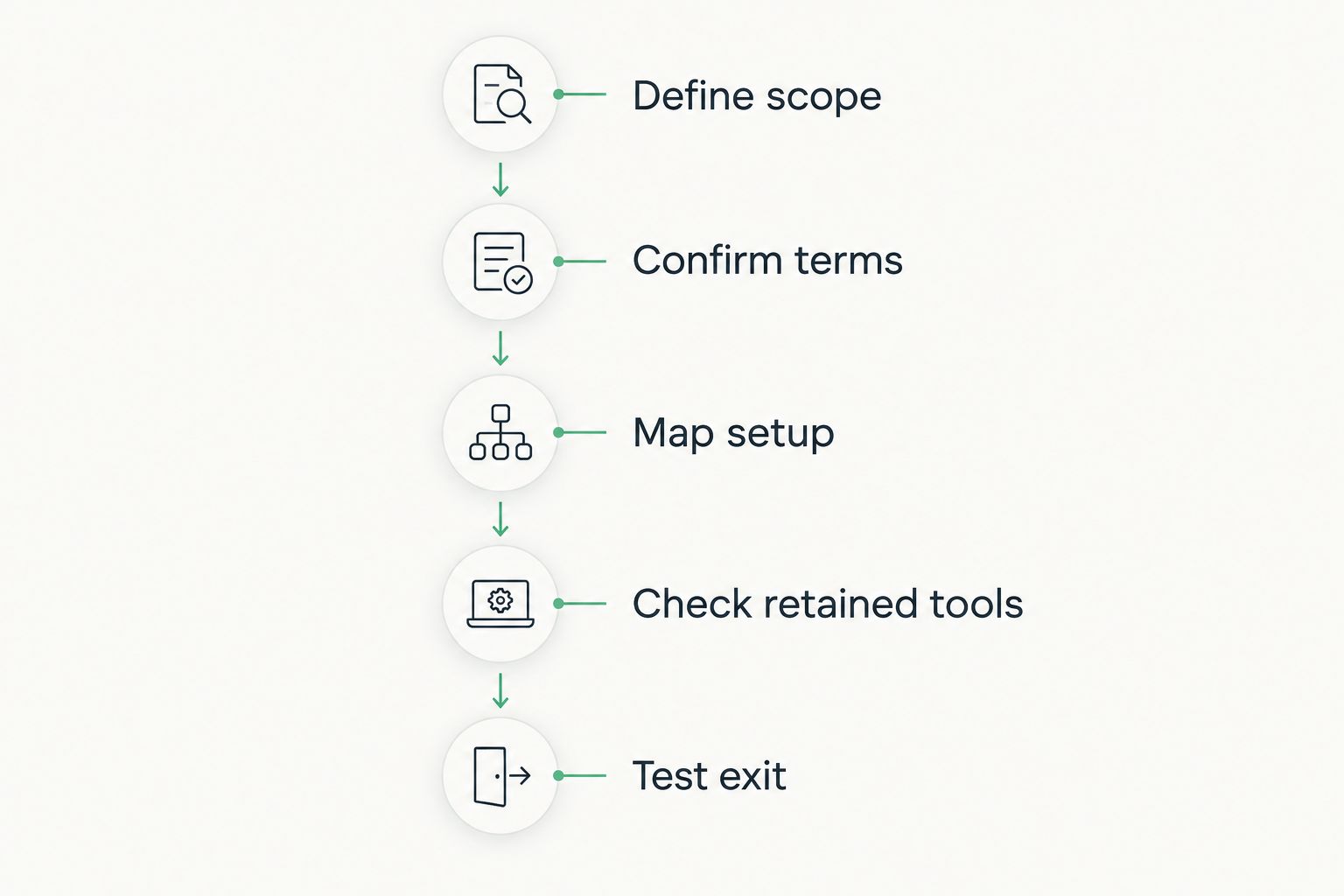
Define scope
Write down the users, required functions and workflows covered by each proposal. If one offer excludes invoicing while another includes it, mark the difference rather than treating the offers as equivalent.
Confirm terms
Ask how billing works, what commitment is required and what triggers a change in the subscription. Request written clarification of user access, modules and any usage conditions relevant to your business.
Map setup
Assign responsibility for data cleaning, import preparation, configuration and training. Use a sample of 10 contact records to check field mapping and data quality before approving a larger migration. This is a suggested test sample, not a migration benchmark.
Check retained tools
List every application that remains necessary after implementation. An invoice module only replaces an existing invoicing application when it covers your actual workflow and requirements.
Test exit
Ask for an export demonstration and inspect the result. Confirm which information you can retrieve and what additional work would be required to use it elsewhere.
Make each proposal pass 3 workflow tests: create a customer record, complete your main sales or delivery task, and retrieve the resulting information. Replace these examples with your own essential tasks where necessary; the purpose is to compare working outcomes, not demonstration polish.
How the shortlist is ranked
The ordering prioritises functional fit for the small-business requirements described here. Combined operations come first, followed by narrower configurations for contact records, sales follow-up and project delivery. It is not a numerical price league table.
The criteria remain the same for every option: required workflow, user access, functional scope, setup work, retained software and exit requirements. No option earns a recommendation solely by offering more functions. Unused scope does not solve a business problem.
For a purchase made in 2026, record the date of each proposal and compare equivalent terms. Keep your decision sheet separate from vendor presentations so differences remain visible.
Which CRM configuration should you choose?
Choose the narrowest setup that completes your essential work without an unresolved handover. Contact-only CRM fits a records problem; pipeline CRM fits a sales-follow-up problem; CRM with project management fits a delivery-coordination problem.
Choose the modular route when you need several operational functions in the same purchasing decision. Before signing, identify which modules you need now, which you are deferring and which existing applications will remain.
Evaluate your required CRM modules
Review contact management, projects, time tracking, invoicing and finance against your business requirements.
FAQ
What's the best way to compare CRM software ranked by price?
Compare the same users, required functions and evaluation period before deciding. Include setup responsibilities and retained software, rather than treating different configurations as equivalent.
Which CRM configuration should a small business choose?
Choose the smallest configuration that completes your essential workflow. Contact management, sales follow-up and project delivery are different requirements, so define the problem before reviewing products.
Is Mesh-web suitable for a small business needing more than contact management?
Mesh-web offers contact management, project management, time tracking, invoicing and finance modules for small and medium-sized businesses. Verify the required module combination and your specific workflows before committing.
Is a contact-only CRM enough for a freelancer?
A contact-only CRM is enough when the requirement is organised customer records and other work is deliberately handled elsewhere. It is not the same requirement as tracking opportunities, managing projects or preparing invoices.
Should everyone in the business have CRM access?
Assign access according to the work each person needs to perform. Ask the vendor to explain the access model and its effect on the proposed configuration rather than assuming every role needs identical permissions.
How should I compare CRM setup work?
Break setup into data preparation, configuration, import checking and training. Assign responsibility for each task and evaluate it separately from the recurring subscription commitment.
What should I verify before switching CRM in 2026?
Verify required workflows, data quality, export behaviour and responsibility for the changeover. Keep the existing source records available until you have checked the imported information and approved the new process.
One last thing
Before approving a CRM in 2026, ask the person who handles the final administrative step to review the demonstration. A system that looks right during customer entry still needs to support whoever completes the project, checks recorded time or prepares the invoice.
Test the last handover, not just the first screen. That is where your purchase brief meets the work your team must finish.


