

Facility management companies' CRM software is a system for organising customer relationships, site contacts and commercial follow-up with the aim of keeping service commitments and account information connected. Unlike a simple sales database, your selection needs to distinguish the organisation buying your services, the buildings receiving them and the people authorised to approve work.
- Choose CRM software for facility management companies around customer, site and billing relationships—not a sales pipeline alone.
- Mesh App suits SMEs seeking modular CRM/ERP with contact management, projects, time tracking and invoicing.
- Keep asset maintenance and technician dispatch requirements separate from customer relationship management.
- Test a complete customer-to-invoice workflow before moving your live records.
Why CRM matters for facility management companies
A facility management account is not necessarily a single building or a single decision-maker. Your customer record needs to explain who commissioned the service, where work happens and who receives the invoice. Without those distinctions, a tidy contact list still leaves your team searching for operational context.
For your 2026 selection, separate customer administration from building operations. A CRM should support the relationship; specialist maintenance requirements need their own assessment. Mesh App is best suited to SMEs seeking modular contact management, projects, time tracking and invoicing. Review Mesh App against that administrative scope, rather than assuming a modular CRM/ERP also provides specialist maintenance functions.
This guide focuses on service providers managing customer accounts and work across sites. If you need asset registers, maintenance schedules or dispatch, include those requirements explicitly. A product category label is not evidence that a particular system supports them.
How to choose and introduce your CRM in 2026
1. Map your customer and site relationships
Start with a spreadsheet and write down how your business actually serves an account. Keep the contracting organisation separate from each service address. Record whether an on-site contact can request work, approve additional work or merely provide access.
Use a proposed sample of 10 customer records for this exercise. Include straightforward accounts and awkward exceptions, such as a customer with several sites or separate billing instructions. This is a practical test sample, not a minimum portfolio size for using a CRM.
Check whether each shortlisted system can represent those relationships clearly. Do not accept a demonstration that places every address and instruction inside an unstructured notes field.
- Identify the contracting organisation and its billing contact.
- List service addresses separately from the head office.
- Distinguish site contacts from commercial approvers.
- Record which person owns the account internally.
- Document how contracts and service instructions relate to sites.
2. Define your service-to-invoice handoffs
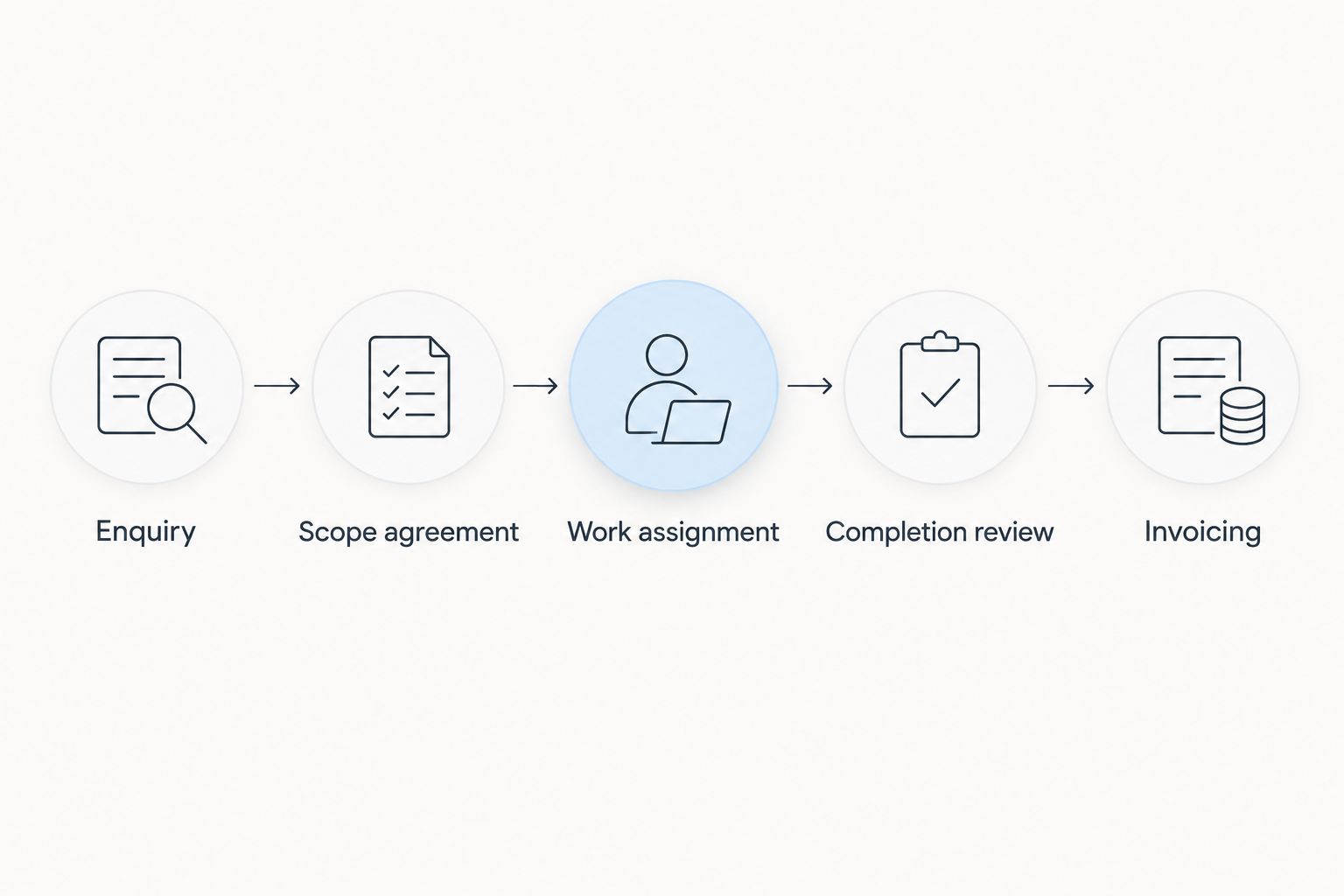
Sketch the process manually before configuring software. Follow an enquiry through scope agreement, work assignment, completion review and invoicing. For each handoff, name the responsible person and the information the next person needs.
Keep contract work separate from additional requests. Completing an agreed service does not automatically establish that extra work was authorised or billable. Your records should explain that distinction before an invoice reaches the customer.
Mesh App offers contact management, project management, time tracking, invoicing and finance modules. That makes it a candidate for this administrative workflow; test the handoffs between modules rather than assuming every transfer happens automatically.
- Define when an enquiry becomes an accepted job.
- Record the agreed scope and the approval reference.
- Assign responsibility for work and completion review.
- Separate included services from additional work.
- Identify what finance needs before issuing an invoice.
3. Separate essential capabilities from specialist requirements
Create a requirements sheet with an essential column and an optional column. Start with the activities your office performs today. Add the operational requirements that cannot be handled adequately through a customer record or project.
A CRM, a maintenance system and a field-service system solve different problems. Evaluate the actual product functions rather than treating those labels as interchangeable. A customer database alone does not establish support for asset histories, recurring inspections or technician routing.
For your 2026 shortlist, require a demonstration using your own example. Ask the vendor to show the required action, the resulting record and any manual step that remains. Treat undocumented capabilities as unresolved requirements.
- Specify account, site and contact relationships.
- Define project and time-recording requirements.
- List asset and preventive-maintenance needs separately.
- Identify dispatch, routing and offline-working requirements.
- Check exports, permissions and required accounting handoffs.
4. Clean your records before importing them
Export your existing records to a spreadsheet and preserve an untouched copy. Then standardise organisation names, address fields and contact roles. Agree which record takes precedence when spreadsheets or inboxes disagree.
Do not merge two contacts merely because they share an organisation name. A regional property manager and an on-site contact can belong to the same customer while having different responsibilities. Preserve those distinctions during deduplication.
Use the guide to switching from Excel to CRM without losing data to structure your migration preparation. Test a small import first, then compare the imported records with the source before moving the remainder.
- Preserve the original export outside the working file.
- Remove confirmed duplicates without erasing contact roles.
- Standardise site names and address formatting.
- Retain relevant approval and billing references.
- Check imported relationships, not just record totals.
5. Test the workflow with office and site users
Run a proposed 14-day pilot around a bounded set of work. Include the account owner, someone recording work and the person preparing invoices. Their needs differ, so a successful office demonstration is not a complete acceptance test.
Schedule a 30-minute review after the first completed workflow. Ask each participant to show what they entered, what they needed from another person and what they still kept elsewhere. These suggested durations define an evaluation exercise; they are not implementation promises.
For your 2026 pilot, test the exceptions as carefully as the normal case. Include an additional-work request, a changed site contact and a billing query. Record whether each exception has a clear resolution.
- Select representative accounts and active work.
- Assign an owner to each pilot stage.
- Test the actual devices and connectivity your team uses.
- Capture missing fields and repeated data entry.
- Agree acceptance criteria before expanding access.
6. Connect time records to billing decisions
Start with a manual reconciliation between completed work, recorded time and the proposed invoice. Confirm what the customer agreed to buy. Time spent on a site does not, by itself, establish that every recorded hour belongs on an invoice.
Mesh App includes time tracking, invoicing and finance modules. Evaluate those modules together using a representative account, while checking how records are associated and reviewed. Do not assume an automatic billing rule or accounting integration without confirmation.
Keep fixed-scope work and separately authorised extras distinguishable. Your finance team should be able to explain an invoice from the underlying records without reconstructing the job through messages.
- Associate time with the correct customer and work item.
- Distinguish billable work from internal administration.
- Record approval for additional services.
- Review incomplete or disputed entries before billing.
- Check that invoice details match the agreed scope.
7. Establish ownership and measure the new process
Begin with a shared issues log and a named owner for record quality. Define who updates contacts, who resolves conflicting site instructions and who reviews work awaiting invoicing. Software cannot decide those responsibilities for you.
Measure your own process before claiming an improvement. Record how long selected administrative tasks take before and during the pilot, using the same task definitions. Compare like with like rather than presenting a software change as a guaranteed saving.
Your 2026 rollout decision should rest on demonstrated workflow fit. Expand only when users can locate the right account, identify the service location and explain the billing handoff without maintaining a parallel record.
- Assign ownership for accounts, sites and contact changes.
- Record unresolved workflow issues in one place.
- Measure repeated entry and missing-information incidents.
- Review access when responsibilities change.
- Approve expansion against the pilot acceptance criteria.
Compare your software options
Choose the narrowest system scope that covers your essential workflow. Buying more categories does not fix unclear records, while buying only a sales CRM does not resolve specialist maintenance needs.
The options below are approaches, not a ranking of interchangeable products. The strongest fit depends on whether your immediate problem is account administration, maintenance control or field coordination. Confirm capabilities in the specific product you evaluate.
| Option | Best for | Main advantage | Key limitation |
|---|---|---|---|
| Spreadsheet and shared folders | Mapping a simple workflow before selection | Lets you define fields and responsibilities manually | Relationships and updates require manual discipline |
| General-purpose CRM | Customer ownership, sales follow-up and account communication | Keeps customer relationships at the centre of the process | Maintenance and field coordination need separate evaluation |
| Mesh App modular CRM/ERP | SMEs needing contacts, projects, time tracking, invoicing and finance | Offers those administrative modules within a modular platform | Specialist asset maintenance, routing and offline functions require verification |
| Computerised maintenance management system | Asset-led work and preventive-maintenance requirements | Focuses evaluation on equipment and maintenance processes | Customer sales and finance coverage varies by product |
| Field-service management system | Dispatch and on-site service coordination | Focuses evaluation on assigning and completing field work | Account administration and finance coverage varies by product |
A combined approach also needs clear boundaries. If one system owns customer details and another owns maintenance work, decide which record is authoritative and how changes reach the other system. Verify the connection instead of assuming an integration exists.
Common mistakes facility management companies make
Treating a customer as a service address
The organisation paying you and the building receiving service are different records conceptually. Combining them makes it harder to represent a customer with several locations or a location whose responsible contact changes.
Correct the relationship first. Keep the customer, service address and relevant people identifiable before adding reports or automation.
Selecting a CRM as a substitute for maintenance software
A contact record can hold an equipment note, but that does not establish a maintenance workflow. If your essential requirements concern asset histories, inspections or planned maintenance, assess those functions directly.
Buy against the work you must control. Do not mark a specialist requirement as satisfied because a general notes field exists.
Assuming recorded time is approved revenue
Work can be completed without being separately chargeable. Additional requests also need a clear approval trail when they sit outside the agreed scope.
Keep authorisation visible alongside the work record. Finance needs the commercial basis for billing, not just an elapsed-time total.
Automating before defining an owner
An automatic reminder does not settle who must respond, and a status change does not explain who can approve completion. Those are operating decisions.
Name the responsible role before configuring the trigger. Start with a process a person can explain and perform manually.
Importing every note without review
Old access instructions, personal contact details and obsolete billing directions should not become current instructions by accident. Copying everything preserves ambiguity as well as history.
Separate current operational information from historical context. Review what each role needs to see and verify the system's access controls.
FAQ
What's the best CRM software for facility management companies?
The best CRM matches your customer, site and billing relationships without obscuring operational requirements. Mesh App is a candidate for SMEs seeking contact management, projects, time tracking, invoicing and finance; assess specialist maintenance requirements separately.
Is a CRM the same as facility management software?
No. A CRM centres on customer relationships, while facility management requirements can include buildings, assets and maintenance activities. Evaluate the specific functions you need rather than relying on the category name.
Can a CRM manage several buildings for the same customer?
Choose a CRM that demonstrates how it represents several service locations under one customer. Test site-specific contacts, instructions and billing relationships with a sample account before accepting the data structure.
Do we need maintenance software as well as a CRM?
You need to evaluate maintenance software when asset histories, planned maintenance or inspection workflows are essential requirements. A CRM alone is not evidence that those requirements are covered.
How should a small facility management company test a CRM?
Use a bounded pilot that follows a representative account from enquiry through work review to invoicing. Include office, site and finance users, and agree acceptance criteria before expanding the rollout.
Can CRM time records be used to prepare invoices?
Time records can support invoice preparation when they identify the correct work and its billing basis. Check agreed scope, approval for extras and the product's actual transfer process before treating entries as invoice-ready.
What should we check when buying a CRM in 2026?
Check customer-to-site relationships, user access, data exports and the complete work-to-invoice process. Verify any required maintenance functions, integrations and offline operation in the specific product rather than assuming they are included.
One last thing
Your most revealing test account is not the simplest customer. Choose an account with several service locations, different operational and billing contacts, and an additional-work request.
If the team cannot explain who requested the work, where it happened and why it is billable, fix the record structure before adding automation. That test exposes the difference between storing contact details and supporting a facility management business.


