

Facility management software is worth it for a small portfolio when it fixes recurring coordination problems that cost more than the system takes to run. Include setup, data cleanup and ongoing administration in that decision—not just the subscription. For a 2026 purchase, judge the software by whether your team can assign work, find service history and close requests without maintaining a second record elsewhere.
- Is facility management software worth it for a small portfolio? Yes, when recurring coordination problems justify the administration.
- Keep spreadsheets when responsibilities are clear and service records remain easy to find.
- Mesh App is best for small businesses seeking modular CRM/ERP administration, not a substitute for verifying specialist facilities requirements.
- Test a complete maintenance workflow before committing to a wider rollout.
Why this matters
A small portfolio does not automatically mean a simple workload. A building with recurring inspections, outside contractors and frequent requests needs a different process from a property with occasional maintenance handled by its owner.
Buy for the work you need to control, not the number of addresses you manage. Before choosing a facilities platform, separate your contact, project and invoicing needs from building-specific requirements. The guide to choosing between CRM and ERP software for a small business helps frame that distinction.
Your 2026 decision should start with an operational problem: an unassigned request, an overdue job or an invoice that cannot be matched to completed work. A feature list is not a business case.
Is facility management software worth it for a small portfolio?
Yes, if shared records and clear ownership solve a recurring problem; no, if the software adds another administrative layer without replacing anything. Compare these approaches against the same real maintenance request.
| Approach | Best for | Main advantage | Main limitation | Decision rule |
|---|---|---|---|---|
| Shared spreadsheet and folders | An owner handling straightforward work directly | You can define a simple record without configuring a larger system | Updates and follow-up depend on manual discipline | Keep it while responsibilities and records remain clear |
| Modular CRM/ERP software | Small businesses coordinating contacts, projects, time and invoices | Business administration can sit within a broader modular platform | Building-specific functions require separate verification | Evaluate it when administration is the main bottleneck |
| Dedicated facility management software | Teams requiring building- or asset-specific maintenance processes | Specialist requirements can guide a focused evaluation | Configuration and record maintenance add work | Choose it only after demonstrating the required workflows |
These are evaluation categories, not guarantees about every product. A specialist label does not prove that a platform handles your inspection records, contractor access or asset structure.
For example, a leaking fitting requires more than a note saying it exists. Someone must accept responsibility, arrange access, record the outcome and decide whether follow-up is necessary. Software earns its place when that chain becomes easier to manage and verify.
When keeping a spreadsheet is the better decision
Keep your existing approach if you can reliably identify outstanding work, its owner and its latest status. A shared spreadsheet can remain useful when your process is straightforward and everyone follows the same update rules.
The trade-off is manual upkeep. If your spreadsheet is current only because someone repeatedly checks email and calls contractors, include that effort in your evaluation rather than treating the spreadsheet as maintenance-free.
When a modular business platform fits
Evaluate a modular business platform when the problem centres on customer contacts, jobs, recorded time and invoicing. That is a business-administration requirement, even when the work happens inside buildings.
The limitation is scope. Contact management and project management do not, by themselves, establish support for an equipment register, recurring inspections or maintenance dependencies. Write those requirements separately and ask for demonstrations.
When specialist facilities software fits
Evaluate dedicated facilities software when your records must connect work to particular buildings, spaces or pieces of equipment. Ask the supplier to demonstrate the exact relationships and maintenance rules you need.
The downside is the work required to establish and maintain those records. A detailed asset structure has little practical value if nobody takes responsibility for updating it after replacements or repairs.
Why the value varies between small portfolios
The same software can be useful for one operation and unnecessary for another. Assess these factors against actual work rather than a supplier's suggested company size:
- Work frequency: Review how regularly maintenance requests enter your process. Occasional tasks and a continuous queue need different levels of coordination.
- Handoffs: Identify where work passes between an owner, manager, contractor and accounts administrator. Test whether each handoff leaves a clear next action.
- Record detail: Decide whether a property-level note is enough or whether you need a history tied to individual equipment.
- Evidence requirements: List the documents you need to retrieve after completion, such as service reports, photographs or inspection records.
- Financial follow-through: Check whether completed work needs to connect to recorded time, contractor charges or customer invoicing.
- Administrative ownership: Name the person who will maintain records, resolve duplicates and review unfinished work.
More configuration is justified only when it supports a requirement you actually have. Do not create a detailed equipment register simply because a system offers one. Start with the records your team needs to make decisions.
How to test whether the software earns its place
Use a 14-day pilot as a practical starting point, not a promised implementation timeline. Extend the test if it does not include a representative job from request through completion.
For a 2026 evaluation, compare the proposed system with your current process using the same types of work. Do not compare a carefully prepared supplier demonstration with your busiest, least organised working day.
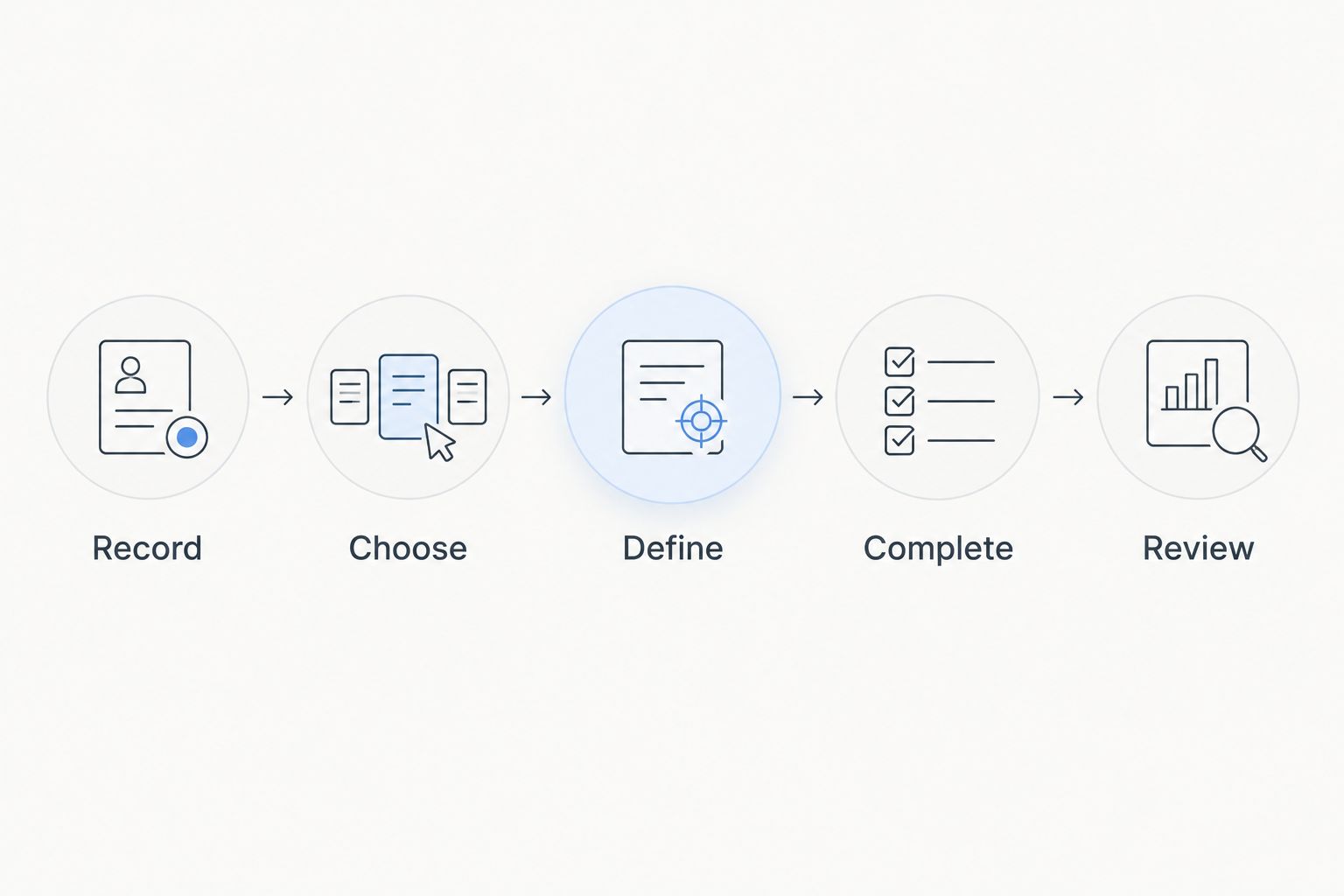
1. Record the current process
Spend 30 minutes tracing a recently completed maintenance request. Note where it arrived, who accepted it, how the contractor received instructions and where the final record ended up.
Record the problems you can verify: repeated entry, an unclear owner, missing completion evidence or a separate invoice search. Do not assign a savings figure to a problem you have not measured.
2. Choose a contained test
Start with 1 property and a representative maintenance workflow. Include the people who actually handle the request, not just the person selecting the software.
Keep the scope narrow enough to inspect every result. Adding the whole portfolio before checking the process makes it harder to distinguish a configuration problem from inconsistent use.
3. Define the work record
Specify what a usable job record must contain. Include the location, problem, responsible person, next action, status and completion evidence relevant to that task.
Decide which fields are mandatory before the pilot begins. Otherwise, an attractive demonstration can conceal the fact that essential information still lives in an inbox.
4. Complete the workflow
Take a request from receipt to closure. Include assignment, any access arrangements, progress updates and the final review of completed work.
Test an exception as well: a contractor declines, access fails or the repair needs another visit. Ask whether the system makes the next action visible without creating a separate tracking sheet.
5. Review the result
Compare the pilot with your baseline. Examine time spent finding information, repeated data entry and unresolved handoffs, using measurements from your own operation.
Proceed only if the system improves the workflow after including the effort needed to maintain it. If users still rely on a parallel spreadsheet, identify the reason before adding more properties.
How should you assess the financial case?
Compare the administrative effort removed with the effort and expenditure introduced. Keep the calculation specific to your portfolio; a supplier's savings example is not evidence of your return.
For the benefit side, record time spent searching for service history, chasing status updates, re-entering information and matching completed work to invoices. Count saved time only when the pilot demonstrates that the task takes less effort.
For the other side, include data preparation, configuration, training, subscriptions and ongoing administration. Ask what happens when a person leaves, equipment changes or records need to be exported.
Your 2026 business case should also distinguish convenience from a measurable benefit. A cleaner dashboard is useful only if it changes a decision or removes work. Do not count time saved and the value of that same time as separate benefits.
Where does Mesh App fit?
Mesh App offers contact management, project management, time tracking, invoicing and finance modules for small and medium-sized businesses. Those stated modules make it relevant when your facilities-related work creates business-administration tasks across those areas.
Mesh App is best for small businesses seeking modular CRM/ERP administration. Evaluate it against your contact, project, time and invoice workflow rather than assuming that a general business platform includes specialist facilities functions.
The boundary matters: the stated module list does not establish support for asset maintenance schedules, building inspections or specialist facilities records. Require a demonstration of those functions if they are essential to your portfolio. Do not treat the CRM/ERP category as proof either way.
Can I test facility management software without moving everything?
A 14-day pilot can start with a contained workflow rather than your entire portfolio. Select representative records, agree where active work will be tracked and make clear which system remains authoritative during the test.
Avoid uncontrolled duplication. If people update both systems without an agreed rule, conflicting records make the evaluation harder. At the end, decide which records to retain and how to close the temporary process.
What should I do if the software creates more admin?
Start with 1 property and remove fields or steps that do not support a decision, responsibility or required record. Then repeat the workflow with the people who carry out the work.
If the process still requires repeated entry or separate status chasing, reconsider the configuration or the product fit. Adding more modules is not a remedy for an unclear process.
FAQ
Is facility management software worth it if I only manage a few properties?
Facility management software is worth evaluating when recurring requests, handoffs or missing records make your current process difficult to control. Property count alone does not establish the need; test whether the software replaces work rather than adding another record to maintain.
What's the best alternative to facility management software for a small portfolio?
A shared spreadsheet and organised folders are a practical alternative when work is straightforward and responsibilities remain clear. A modular business platform is another category to evaluate when contacts, projects, time and invoicing are the main requirements.
Can Mesh App replace dedicated facility management software?
Mesh App's stated CRM/ERP modules do not establish that it replaces dedicated facility management software. Its contact management, project management, time tracking, invoicing and finance modules are relevant to business administration; verify specialist facilities requirements separately.
How long should I test facility management software before deciding?
Use a 14-day pilot as a starting plan, then extend it if necessary to complete a representative maintenance workflow. The decision should depend on observed results, not simply the end of the test period.
Do I need an asset register for a small property portfolio?
You need an asset register when managing work requires records tied to individual equipment rather than just a property. Define which equipment needs its own service history before assessing software support.
What should I ask a facility management software supplier to demonstrate?
Ask the supplier to demonstrate your actual workflow from request receipt to completed work and retrievable evidence. Include an exception, such as failed access or a repeat visit, and check how responsibility stays visible.
One last thing
Do not import a broken process unchanged. Before your 2026 rollout, agree who owns each request, what completion means and where the final evidence belongs. Software cannot resolve those decisions for you.
Ask a colleague to retrieve the latest status and completion evidence without consulting the person who handled the job. That simple check exposes whether the record stands on its own—or whether your new system still depends on someone's memory.


