

Yes, project management software can handle multiple projects at once by keeping each project's tasks, owners and deadlines separate while giving you an overview of shared work. For your 2026 shortlist, distinguish basic support for multiple project records from workload planning, cross-project dependencies and financial reporting: those capabilities require separate checks.
- Can project management software handle multiple projects at once? Yes; check shared workloads, not just separate project lists.
- Mesh App offers project management, time tracking and finance modules for small and medium-sized businesses.
- Choose project-level task tracking for delivery detail and portfolio reporting for decisions across projects.
- Test overlapping assignments before adopting a system; separate project schedules do not prove that your team has capacity.
Can project management software handle multiple projects at once?
Yes. The important distinction is between storing several projects and coordinating them. A project list tells you what work exists. A cross-project view helps you decide which work takes priority when the same people, equipment or deadlines overlap.
Start with your operating needs rather than the longest feature list. The project management software guide for small businesses provides a broader starting point; use the comparison below to define what your multi-project setup must accomplish.
| Approach | Best for | Main advantage | Main limitation |
|---|---|---|---|
| Separate project workspaces | Teams needing clear boundaries between jobs | Keeps tasks and project discussions distinct | Shared workload is harder to assess without an overview |
| Cross-project planning | Teams assigning the same people across jobs | Brings competing assignments into the same planning discussion | Depends on consistent dates, assignments and estimates |
| Modular CRM/ERP with project management | Businesses assessing project work alongside customers, time and finance | Offers those business functions within a broader software model | Module availability alone does not establish how records connect |
These approaches are not mutually exclusive. Your business can need separate project workspaces, a shared planning view and financial reporting together; the evaluation must establish which capabilities are actually included.
Why this matters
A project can look on schedule while the person responsible for it is already committed elsewhere. Reviewing that project alone does not reveal the conflict. Multi-project management requires looking across assignments before accepting another deadline.
The distinction matters for consulting engagements, construction jobs and IT delivery alike. Work belongs to separate customers, but your employees' available time does not expand simply because you open another project record.
For a 2026 software decision, ask what decision each screen supports. A task board should help someone execute work; a portfolio overview should help a manager choose priorities. Neither replaces the other.
Separate project workspaces: keep delivery details distinct
Separate workspaces are best for teams that need clear ownership of each customer job. Each project should have an identifiable scope, responsible owner, task list and delivery dates. That structure helps employees understand where updates belong.
The benefit is clarity. A discussion about one installation or consulting engagement stays attached to that work instead of being buried in a company-wide task list.
The limitation is fragmentation. If you must open every project to understand what an employee is doing, you still need a separate way to review shared commitments. More project folders do not solve that planning problem.
When evaluating this approach, open an individual project and check whether you can answer:
- What outcome has the customer agreed to?
- Who is responsible for the next action?
- Which tasks are blocked, and why?
- What has changed since the last review?
Choose separate workspaces for delivery clarity, but do not treat them as proof of workload control.
Cross-project planning: manage shared commitments
Cross-project planning is best for teams that assign the same employees to different jobs. Its purpose is to expose competing commitments before those commitments become missed handovers or rushed work.
Look for a way to review assignments by person as well as by project. Ask whether the overview includes only due dates or also the effort associated with those assignments. A deadline shows when work is due; it does not show how much time the work requires.
The advantage is a shared basis for prioritisation. Instead of asking every project owner to defend their own deadline independently, you can review the competing commitments together.
The limitation is input quality. Missing assignments, outdated dates and unfinished estimates weaken the overview. Choose cross-project planning only with a clear routine for maintaining the information it displays.
Modular CRM/ERP: assess projects alongside business operations
A modular CRM/ERP is best for businesses evaluating customer records, project delivery, time tracking and finance together. That is a broader requirement than keeping a task list for each job.
Mesh App is best suited to small and medium-sized businesses seeking project management alongside contact management, time tracking, invoicing and finance modules. Mesh App offers those modules in a modular CRM/ERP platform for businesses across trades, construction, consulting, IT and e-commerce.
The advantage of this software model is its breadth of functions. The evaluation burden is establishing how those functions interact: available modules do not, by themselves, prove shared reporting, automatic transfers or cross-project scheduling.
For Mesh App project management, ask for a demonstration of your multi-project workflow rather than assuming particular planning capabilities. Confirm how project records relate to time entries, customer information and invoicing before deciding which modules you need.
Why multi-project management varies
The number of project records is only part of the requirement. These factors determine what you need to inspect during a demonstration:
- Shared people: Check whether assignments across different projects are visible together. Separate schedules can conceal competing commitments.
- Work dependencies: Establish how you will record work that cannot begin until another task or project milestone is complete.
- Time tracking: Check how employees identify the project associated with an entry and how corrections are handled.
- Financial scope: Decide whether you need task progress alone or also a way to assess recorded time, invoicing and project costs.
- Customer context: Establish how employees find the correct customer and project when the same customer has several active jobs.
Use these factors to write your acceptance criteria. A business that needs only separate task lists should not evaluate software as though it needs detailed portfolio scheduling; a business sharing specialists across jobs should not stop at task lists.
How to test several projects before committing
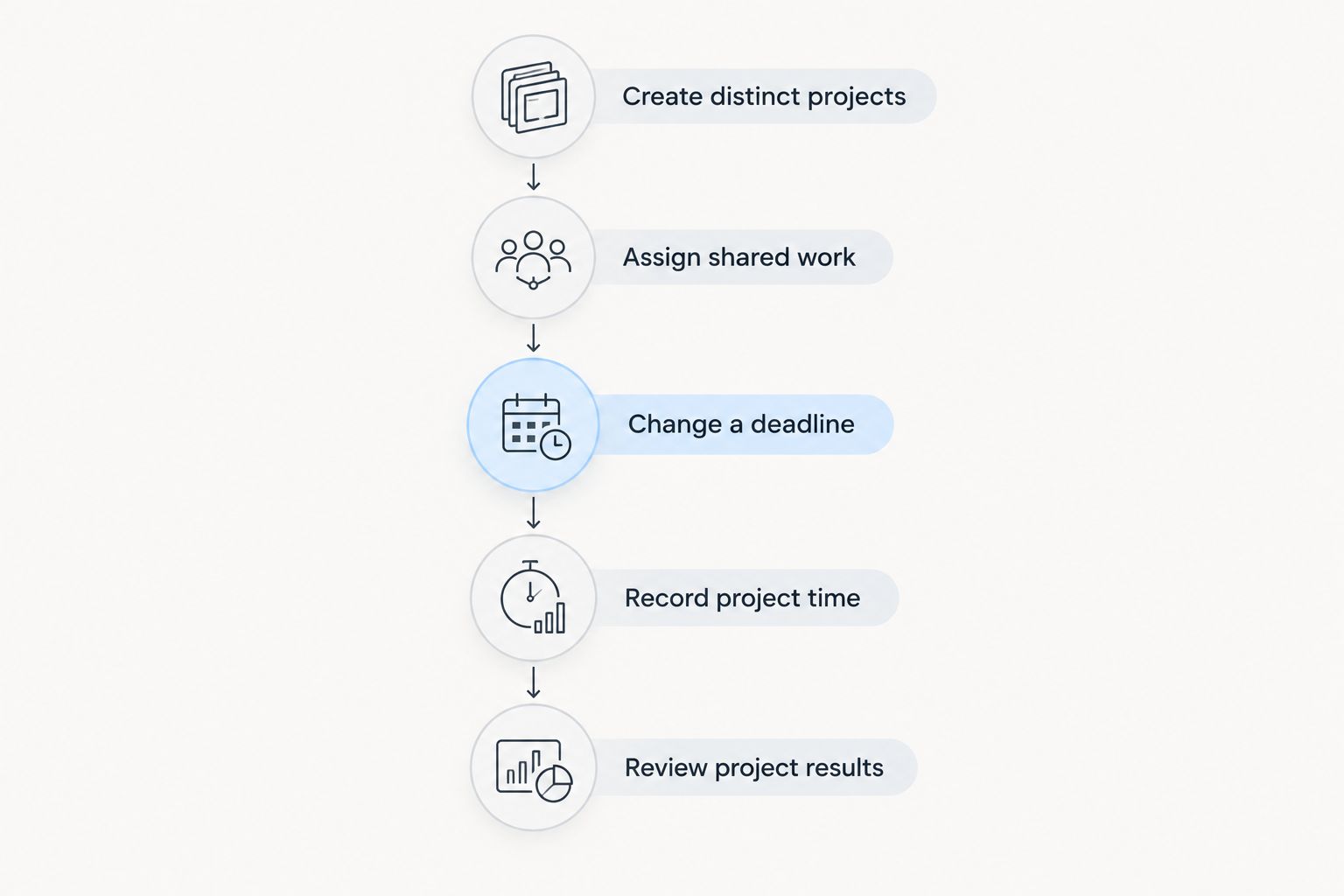
For your 2026 evaluation, use a deliberately small trial: 3 trial projects, 2 team members and 1 shared task owner. These are suggested test inputs, not a capacity benchmark. The aim is to create an overlap you can inspect, not to simulate your entire business immediately.
Create distinct projects
Give each trial project a different scope and a clear owner. Include a customer reference, a delivery date and an unfinished task. You should be able to distinguish the projects without relying on nearly identical names or someone's memory.
Assign shared work
Assign the shared task owner work in different projects during overlapping periods. Then look for that person's commitments across the trial projects. Check what the system displays and what you still have to calculate or reconcile manually.
Change a deadline
Move a delivery date and inspect the consequences. Check whether related assignments remain sensible and whether other project owners can see the change. Do not assume that changing a date also reschedules dependent work.
Record project time
Enter time against the relevant project, then check how you retrieve it. Look for ambiguous project names, entries without a clear assignment and correction steps that employees would struggle to follow.
Review project results
Return to the overview and explain each project's status without asking the person who created it. If the explanation requires private notes or a separate spreadsheet, identify the missing information before extending the rollout.
Set operating rules before adding more projects
Software does not decide which customer commitment takes precedence. Before your 2026 rollout, agree who resolves conflicts when project owners request the same employee, and where that decision is recorded.
Use consistent project names and make responsibility explicit. Keep the distinction between a project owner, who coordinates delivery, and a task assignee, who completes a particular piece of work. Those responsibilities can belong to the same person, but they should not be ambiguous.
Define what a status means. If an employee marks a task complete when their own work ends, but the project owner expects customer approval first, your reports will describe different realities using the same label.
Finally, decide how you handle finished and paused projects. Keep them distinguishable from active work so the planning view remains useful without losing the history needed for later questions.
How many projects can project management software handle?
There is no universal project limit across project management software. Limits depend on the product and subscription, so check the current terms for active projects, archived projects, users and storage rather than assuming unlimited capacity.
Also separate a technical limit from a useful working view. A system can hold project records without giving your team a practical way to prioritise them. Test filtering, ownership and cross-project reporting alongside any stated allowance.
Can you track the same employee across different projects?
You can track an employee across different projects when the software provides the relevant assignment or time-reporting views. Confirm whether you need planned workload, recorded hours or both; they answer different questions.
Planned assignments describe commitments. Recorded hours describe work already entered. Comparing them requires consistent project references and a clear understanding of what each report includes.
Do you need portfolio management for several projects?
You need portfolio-level oversight when decisions involve priorities or resources across projects. You do not need a complex portfolio process simply because you have several independent task lists.
Start with the decisions your managers make. If they regularly move people between jobs, negotiate competing deadlines or decide which projects to delay, evaluate a shared overview rather than relying on separate project reports.
FAQ
Can project management software handle multiple projects at once?
Yes, project management software can keep multiple projects organised at once. Check separately whether the product provides cross-project workload planning, dependency handling and the reporting your business needs.
What's the difference between multi-project management and a project list?
Multi-project management coordinates work across projects, while a project list identifies the projects you have. Shared employees and competing deadlines require more than separate records.
Can I keep different clients' projects separate?
Separate project workspaces help organise different clients' work. If clients need access, verify permissions and test exactly what each client account can see.
Does Mesh App include project management and time tracking?
Mesh App includes project management and time tracking modules alongside contact management, invoicing and finance. Confirm the specific multi-project views and workflows you need during evaluation.
Should I choose separate project software or a modular CRM/ERP?
Choose according to the work you need to manage. Assess dedicated project software for delivery requirements and a modular CRM/ERP when customer records, time tracking, invoicing and finance are also part of the decision.
How do I check whether an employee is assigned too much work?
Review that employee's assignments across projects against their available working time. A due-date list alone does not establish whether the assigned effort fits.
What should I test before adopting project software in 2026?
Test overlapping assignments, a changed deadline and project-specific time entries before adopting project software in 2026. Check whether another employee can understand the resulting project status without a separate explanation.
One last thing
Ask the person who did not set up the trial to explain the project overview. Let them identify the next action, the responsible person and the commitment that conflicts with another job. This tests whether the system communicates the work clearly, not just whether its administrator understands it.
A useful multi-project setup should make those decisions easier to explain. If the overview looks orderly but still requires a private spreadsheet to establish priorities, keep working on the setup before adding more projects.


