

Yes, CRM software can track inventory and stock levels when it includes inventory functions or connects to an inventory or ERP system. A product catalogue alone does not track stock movements, reservations or quantities available to sell. In 2026, choose your setup by testing how it handles receipts, orders, dispatches and returns—not by whether its feature list mentions products.
- Can CRM software track inventory and stock levels? Yes, with inventory functions or an inventory-system connection.
- A product catalogue stores item details; inventory management records quantity changes and stock movements.
- Use one authoritative stock record, and distinguish physical stock from quantities reserved for customers.
- Mesh App CRM/ERP suits SMEs seeking contact management, projects, time tracking, invoicing and finance; verify inventory requirements separately.
Why this matters
Your sales team needs to know what it can promise, not just what appears on a product list. If a quote shows an item but ignores quantities already committed to another customer, the stock figure does not answer the sales question.
Start by choosing between CRM and ERP software according to the records you need to control. Customer relationships and physical stock involve different transactions, even when one platform handles both.
The essential requirement is a trustworthy quantity available to promise. A polished customer screen cannot compensate for missing goods receipts or unrecorded material usage.
Can CRM software track inventory and stock levels?
CRM software can track stock through built-in inventory functionality, a connected inventory application or an ERP connection. These approaches differ in where stock movements are recorded and how sales users receive updated quantities.
For your 2026 shortlist, compare the operating model before comparing individual features:
| Approach | Best for | Main advantage | Main limitation | What to verify |
|---|---|---|---|---|
| CRM with built-in inventory functions | Teams whose stock processes fit the included functions | Customer and stock workflows can share one application | Included functionality still needs to match your warehouse processes | Receipts, reservations, dispatches, returns and movement history |
| CRM connected to inventory software | Teams keeping a separate stock-management application | Sales users can access stock information from the stock system | Updates depend on the connection and its error handling | Update triggers, failed transfers and duplicate prevention |
| CRM connected to ERP | Businesses coordinating stock with purchasing and financial processes | Stock records can sit alongside broader operational records | Setup requires clear responsibilities across systems | Which system owns each record and transaction |
| CRM product catalogue only | Teams needing item descriptions for sales documents, not stock control | Keeps product information accessible during sales work | A catalogue alone does not record stock movements | Whether quantity tracking actually exists |
Choose an approach only after it passes your actual stock workflow. A built-in module is not automatically the better choice, and an integration is not automatically inadequate.
What counts as real inventory tracking?
Real inventory tracking records why a quantity changed, not merely its latest value. You need to distinguish a delivery received from a customer return, a dispatch from a stock correction, and a reservation from a physical movement.
Ask to see the movement history behind a stock figure. If someone changes a quantity directly, the record should preserve the reason and responsible user rather than leaving an unexplained balance.
What does not count as inventory tracking?
A product name, item code, description and invoice line do not establish stock control. Neither does a manually maintained quantity field without a process for recording movements.
A CRM can therefore support product sales without managing inventory. Treat the ability to create a quote as a separate requirement from the ability to reserve and issue the quoted goods.
Which stock quantities should your CRM show?
A single stock number hides important distinctions. Your 2026 requirements should name each quantity and explain which transactions change it.
| Quantity | Meaning | Sales implication |
|---|---|---|
| On hand | Goods physically recorded in a location | Not necessarily all available for another order |
| Reserved | Goods committed to an order or job | Must not be promised again without releasing the commitment |
| Available | Goods remaining eligible for allocation under your rules | The relevant starting point for a new customer promise |
| Incoming | Goods ordered but not yet received | Must remain distinguishable from goods physically present |
| Unavailable | Goods excluded from allocation, such as damaged items | Should not inflate the quantity offered to customers |
Define these terms before importing records or configuring reports. Otherwise, sales and warehouse staff can use the same label while referring to different quantities.
Incoming goods are not on-hand stock. If you accept orders against expected deliveries, make the distinction visible and decide who approves the promised delivery date.
How do you test whether a CRM tracks stock correctly?
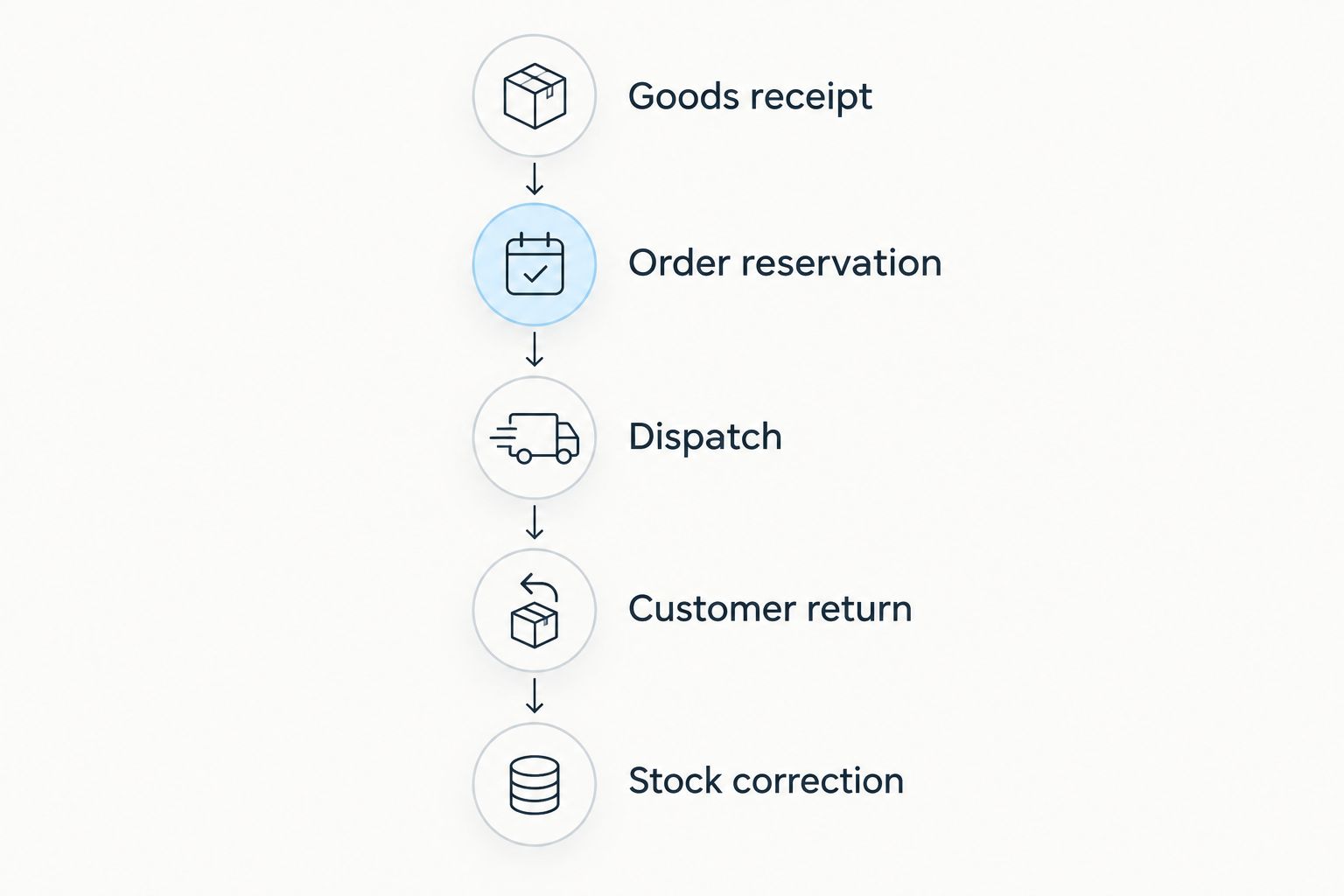
Use a complete transaction sequence rather than a presentation of disconnected screens. For a 2026 evaluation, ask the supplier to demonstrate the following steps using the workflow you intend to adopt.
- Goods receipt. Receive an item into a named location. Check that the balance changes and that the movement identifies the receipt.
- Order reservation. Commit stock to a customer order or job. Confirm that available stock changes without falsely recording a physical dispatch.
- Dispatch. Issue the reserved goods. Verify that the reservation closes correctly and that the system does not deduct the same quantity twice.
- Customer return. Record returned goods and decide whether they are suitable for resale. Check that unusable returns do not become available automatically.
- Stock correction. Reconcile a count difference with a documented reason. Confirm that authorised users can inspect the correction history.
The sequence matters because each transaction changes the meaning of the next balance. A system that displays a correct receipt can still mishandle reservations or returns.
Repeat the test with a cancelled order and a partial dispatch. These checks reveal whether unfinished transactions leave stock incorrectly committed or available.
What evidence should you keep from the demonstration?
Keep the starting balance, transaction history and final balance for the test item. Record which application created each transaction and which application displayed the resulting stock figure.
Use the same test when comparing suppliers. That makes differences visible without relying on competing definitions of inventory management.
Why inventory-tracking requirements vary
Your stock workflow determines the functions you need. Use these factors to write your acceptance criteria rather than adding features without a business reason:
- Locations: Specify whether you hold goods in a warehouse, shop, vehicle or job site. Require transfers to preserve the distinction between moving goods and consuming them.
- Sales commitments: Decide when a quote or order reserves stock, and when cancellation releases that reservation.
- Material usage: Define whether goods leave inventory at dispatch, installation or recorded consumption on a job.
- Returns and condition: Separate resalable goods from damaged or quarantined goods before returning quantities to availability.
- Item identity: Establish whether an item code is enough or whether your process requires serial or batch identification.
- Connected systems: Identify every application that creates orders, receives goods or changes quantities, then assign ownership of those transactions.
These are workflow requirements, not automatic capabilities of every CRM. Turn each relevant factor into a test that produces a visible record.
How should a CRM and inventory system share updates?
Choose one authoritative system for stock balances. The CRM can display quantities or request reservations, but competing editable balances create an unclear source of truth.
Document which events send updates: receiving goods, reserving an order, dispatching goods, accepting a return and making a correction. Also specify what happens when an update fails.
Check update timing and visibility
Do not treat the word integration as proof of immediate updates. Ask whether a change is sent when the transaction happens, on a schedule or after a manual action.
Require a visible last-update status wherever sales staff rely on imported quantities. If an update fails, the user needs to distinguish an old stock figure from a current one before promising goods.
Prevent repeated and conflicting transactions
Ask how the connection recognises an event it has already processed. Retrying a failed transfer should not create another stock deduction for the same dispatch.
Also check cancellations and edits. Changing an order in the CRM must follow a defined process in the inventory system, rather than leaving the original reservation untouched.
When should you choose inventory software rather than CRM alone?
Choose inventory software or ERP functionality when your work requires stock movements that the CRM cannot record correctly. Customer management remains useful, but it does not replace receiving, allocation, transfers and reconciliation.
For your 2026 decision, separate mandatory functions from conveniences. Seeing stock beside a customer record is convenient; preventing the same goods from being committed twice is an operational requirement.
Can a spreadsheet remain your stock record?
A spreadsheet can hold quantities, but you must define how movements, reservations and corrections are recorded. A CRM connection does not fix a spreadsheet that lacks consistent transaction rules.
Before moving data, reconcile your stock records and decide which fields belong to products, locations and transactions. Importing an unexplained balance simply moves the uncertainty into another application.
Can invoicing software replace inventory management?
Invoicing software does not replace inventory management merely because it lists products. Check whether creating an invoice changes stock and whether that event matches the point when goods actually leave your business.
Deposits, advance billing and partial deliveries need explicit treatment. Otherwise, a financial document can change a physical-stock balance at the wrong stage.
Where Mesh App fits
Mesh App is a modular CRM/ERP platform offering contact management, project management, time tracking, invoicing and finance for small and medium-sized businesses. Its stated business scope covers trades, construction, consulting, IT and e-commerce in Austria, Germany and Switzerland.
Mesh App CRM/ERP is best for SMEs seeking contact, project, time-tracking, invoicing and finance modules in one modular platform. For an inventory-led selection, make the stock demonstration a separate acceptance requirement rather than treating the CRM/ERP category label as proof.
The relevant advantage is its stated range of business modules. The selection constraint is equally clear: those modules alone do not establish how stock receipts, reservations, transfers or returns work for your business.
FAQ
Can any CRM software track inventory and stock levels?
No, not every CRM tracks inventory and stock levels. Look for inventory functions or a connection to a stock-management system, then test receipts, reservations, dispatches and returns.
Is a CRM product catalogue the same as inventory management?
No, a product catalogue is not the same as inventory management. Item descriptions support sales documents; stock management also requires quantities, movements and rules for allocation.
Can CRM software show stock across different locations?
CRM software can show location-specific stock when its inventory functions or connected system support it. Verify that transfers preserve separate location balances without being recorded as sales or consumption.
Does a CRM update stock as soon as an order changes?
Immediate stock updates depend on the CRM's inventory workflow or connection. Verify the update trigger, failed-update handling and the status shown to sales users before relying on the displayed quantity.
Can a CRM tell me when stock needs replenishing?
A CRM can support replenishment alerts if its inventory functions or connected system provide that capability. Check which quantity triggers the alert, who receives it and how incoming orders affect the decision.
Does Mesh App include the inventory workflow my business needs?
Verify your inventory workflow directly before selecting Mesh App. Ask for a demonstration covering receipts, reservations, dispatches, returns, location balances and movement history, alongside its stated CRM/ERP modules.
One last thing
Test a cancelled order, not just a successful sale. After cancellation, the goods should remain physically on hand and the reservation should be released according to your rules.
That small check exposes a distinction a headline stock balance hides: goods can be physically present yet unavailable to another customer. Build your buying decision around that distinction.


