

Yes, AI can create quotes and proposals automatically in 2026 by drafting scope, assembling approved content, and populating documents from connected business records. Generating a document does not verify its accuracy or authorise its release: you still need controlled calculations, approved terms, and a review process before sending it to a customer.
- Can AI create quotes and proposals automatically? Yes: automate drafting, but validate calculations and customer commitments.
- Use CRM records and approved templates for proposal automation; stop the workflow when essential information is missing.
- Mesh App serves SMEs needing modular CRM/ERP tools; verify AI proposal capabilities separately.
- Keep human approval for unfamiliar work, negotiated terms, and exceptions to your standard scope.
Can AI create quotes and proposals automatically?
AI can automate document preparation; it should not invent the commercial decisions behind the document. A useful workflow separates writing from calculation, approval, and delivery. That distinction matters whether you prepare a short trade quotation or a detailed consulting proposal.
For the related question of record-based document generation, see how CRM software can generate quotes automatically. AI drafting adds language generation to that discussion, but connecting a CRM does not automatically make every generated statement correct.
A controlled process follows these steps:
- Capture requirements. Collect the customer's request, contact details, deliverables, and any supporting documents.
- Validate inputs. Identify missing quantities, unclear specifications, and conflicting instructions before drafting.
- Build scope. Generate descriptions from the validated request and approved service information.
- Calculate totals. Use structured calculation rules rather than asking a language model to improvise arithmetic.
- Approve exceptions. Route unusual commitments, exclusions, and contract changes to an authorised reviewer.
- Release documents. Send only the approved version and retain a record of what the customer received.
These are workflow requirements, not capabilities you should assume every proposal tool includes. Ask the supplier to demonstrate the complete sequence using your own sample request.
Why this matters
A polished proposal can conceal an incomplete scope. If the document promises installation but the underlying request covers supply only, fluent writing has made the mistake more convincing, not less serious.
For a 2026 automation project, define success as a correct, traceable document that reaches the right approver. Treat writing speed as a separate measure. Otherwise, your team simply moves its effort from drafting documents to correcting documents that look finished.
The same principle applies across trades, construction, consulting, IT, and e-commerce services: the document must reflect what your business has actually agreed to deliver. An attractive summary cannot resolve an unanswered technical or contractual question.
Which level of automation should you use?
Choose the level of automation according to how predictable the work is. A repeatable service with approved wording needs different controls from an unfamiliar construction project or a consulting engagement with unsettled deliverables.
| Approach | Best for | Main advantage | Main limitation |
|---|---|---|---|
| AI-assisted drafting | Bespoke proposals and early discovery | Turns validated notes into readable scope and explanations | Requires close review of assumptions and commitments |
| Template-based generation | Repeatable work with standard terms | Produces consistent documents from structured fields | Handles unfamiliar requirements poorly without exceptions |
| Connected approval workflow | Teams coordinating sales, delivery, and finance | Connects preparation, review, and release | Requires maintained records, permissions, and workflow configuration |
Use AI-assisted drafting for variable language and structured rules for repeatable decisions. These approaches can work together; you do not need to choose between a completely manual process and unrestricted automatic sending.
AI-assisted drafting: best for bespoke proposals
Use drafting assistance when you know the intended outcome but need help organising the explanation. It can turn approved discovery notes into an executive summary, a scope narrative, or a customer-facing description of deliverables.
Its weakness is the temptation to fill gaps with plausible detail. Tell the workflow to flag unresolved questions instead of completing them. Review every statement that creates an obligation, including delivery commitments, acceptance criteria, and descriptions of included work.
Template-based generation: best for repeatable work
Use templates when the work has a stable structure and your team can select approved items. Mandatory fields, controlled clauses, and consistent sections give reviewers a clearer basis for checking the document.
The limitation is rigidity. A standard template can omit an unusual dependency unless someone recognises that the request falls outside its intended use. Build an exception route rather than forcing every request into the same document.
Connected approval workflows: best for coordinated teams
Use a connected workflow when different people own customer records, scope, calculations, and approval. The goal is to preserve responsibility as information moves between them.
The trade-off is configuration and upkeep. Someone must own field definitions, permissions, approved content, and changes to the workflow. Without that ownership, automation repeats outdated instructions consistently.
What information does an automated proposal need?
Start with a controlled source record, not a loose collection of previous proposals. Older documents can contain customer-specific concessions, expired assumptions, or confidential details that do not belong in a new offer.
Prepare these inputs before enabling generation:
- Customer identity: the correct legal entity, contact person, and destination for the document.
- Scope inputs: requested outcomes, quantities, specifications, and responsibilities.
- Calculation inputs: approved item data, units, calculation rules, and applicable tax treatment.
- Approved language: current terms, exclusions, acceptance wording, and service descriptions.
- Workflow ownership: who resolves questions, approves changes, and releases the document.
Do not treat access to data as permission to use it everywhere. A salesperson preparing a proposal does not necessarily need access to unrelated employee records, confidential project notes, or another customer's contract.
Keep instructions explicit. For example, direct the drafting system to list unresolved requirements in a review section rather than silently choosing an interpretation. Remove that internal review material before releasing the customer-facing version.
How should an automated proposal move through approval?
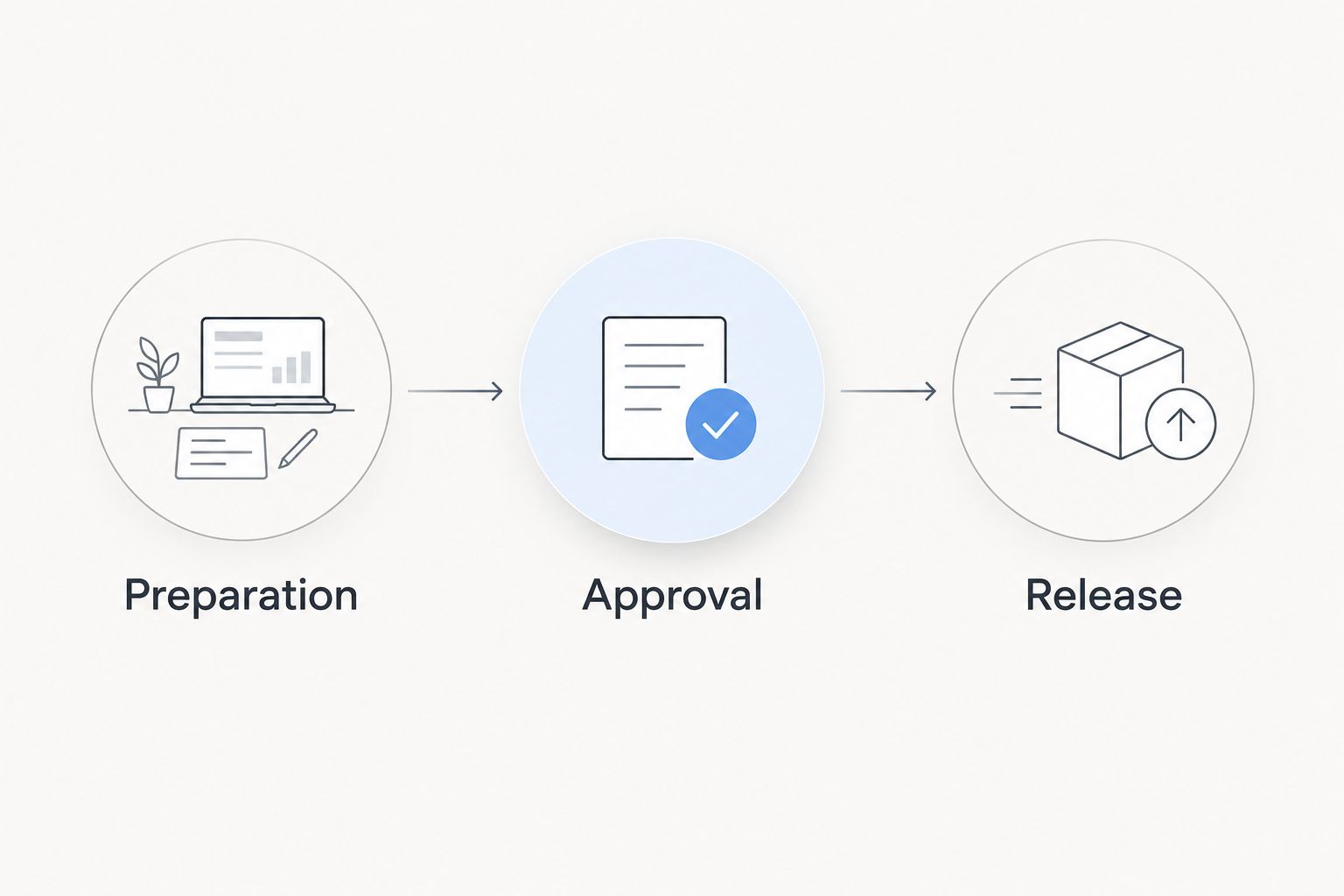
Separate the process into preparation, approval, and release. Each stage needs a clear exit condition, so a completed draft cannot be mistaken for an authorised offer.
- Preparation: assemble the source information, draft the document, and identify unresolved requirements.
- Approval: check scope, calculations, terms, and responsibility for delivery.
- Release: send the approved version and preserve its relationship to the customer record.
Use separate checks for commercial accuracy and document accuracy. Commercial review asks whether your business can accept the commitments. Document review asks whether the file correctly expresses those commitments and contains the intended recipient details.
For your 2026 rollout, test the approval boundary deliberately. Submit a request with an unresolved specification and confirm that the workflow stops or requests clarification. A system that produces a confident final document despite missing mandatory information has failed that test.
Reapproval also matters. If someone changes the scope after approval, the earlier approval should not automatically authorise the changed document. Define which edits require another review before enabling customer delivery.
Why quote and proposal automation varies
The difficulty comes from the decisions inside the document, not its length. A short quotation with an ambiguous technical requirement can require more judgement than a long proposal built from agreed deliverables.
- Input quality: incomplete customer requests leave the system without a reliable basis for drafting.
- Scope variability: bespoke work needs more interpretation than a repeatable service.
- Data structure: consistent fields are easier to validate than conflicting spreadsheets and email threads.
- Contract exceptions: negotiated terms require review beyond standard document assembly.
- System connections: generation, approval, and delivery depend on the integrations actually configured.
- Ownership: approved wording becomes unreliable if nobody maintains it.
Before expanding automation in 2026, identify which factor causes the most rework in your current process. Automating prose will not fix unclear scope, and connecting systems will not resolve competing versions of your standard terms.
Can AI send a proposal without human approval?
AI can participate in an automatically triggered sending workflow when the connected software supports it. Keep automatic sending disabled until you have defined and tested the conditions that authorise release.
For repeatable work, those conditions can include complete mandatory fields, approved items, unchanged standard terms, and no unresolved exceptions. Do not treat a model's statement that a proposal is ready as an independent approval decision.
Bespoke commitments need a named owner. If the request changes delivery responsibility, introduces unfamiliar work, or requires negotiated wording, route it to a person who can accept that commitment on behalf of the business.
Can AI calculate quote totals reliably?
Use a calculation engine or explicit business rules for totals, not generated prose. Language generation and financial calculation perform different jobs, even when the interface presents them together.
Validate units, quantities, rounding, and tax treatment before the document is released. A mathematically correct total can still represent the wrong offer if a quantity uses the wrong unit or an item is missing from the scope.
For a 2026 evaluation, ask the supplier to show where each calculated value originates and how a reviewer can check it. A displayed total without traceable inputs is not enough.
Does an AI-generated proposal become an invoice automatically?
No. A proposal and an invoice serve different purposes, and generating one does not establish the conditions for issuing the other. Define the event that authorises invoicing rather than treating document creation as that event.
Keep the accepted scope identifiable when work moves into delivery and billing. If the customer agrees to a revision, preserve that accepted version so the delivery team does not work from an earlier draft.
Where does Mesh App fit?
Mesh App is best for SMEs seeking a modular CRM/ERP platform with contact management, project management, time tracking, invoicing, and finance modules. Those stated modules are relevant when you want customer records and operational work within a modular business platform.
Evaluate Mesh App against your actual proposal workflow. Its stated module set does not establish AI quote generation, proposal approval routing, electronic signatures, or automatic sending; request a demonstration before making those capabilities part of your implementation plan.
The advantage of considering Mesh App as a CRM/ERP option is the breadth of its stated business modules. The evaluation limit is equally clear: module coverage alone does not prove that your required quote-to-proposal process is supported.
What should you test before rollout?
Use sanitised examples that expose different failure conditions, not only a clean request that matches your standard template. Include an incomplete request, a changed specification, conflicting customer details, and an exception to standard terms.
For each example, check whether the workflow identifies the issue, assigns responsibility, and prevents an unauthorised document from leaving the system. Also check what happens when a source record changes after drafting.
Record the acceptance criteria before the demonstration. This keeps an attractive document from overshadowing a failed control. Your final decision should rest on the behaviour of the complete workflow, including correction and recovery, not just the quality of the opening paragraph.
FAQ
Can AI create quotes and proposals automatically for a small business?
Yes, AI can draft quotes and proposals from validated requirements and approved content. A complete workflow still needs controlled calculations, review rules, and an authorised release process.
What's the difference between AI proposal writing and quote automation?
AI proposal writing generates language, while quote automation assembles structured information through defined rules. A workflow can combine them, but neither label guarantees approval controls or automatic sending.
Can I use previous proposals to generate new ones?
Yes, but use reviewed examples or approved content rather than an unrestricted archive. Previous proposals can contain confidential details and customer-specific commitments that must not carry into a new offer.
Will AI know what to do when a customer leaves information out?
Do not rely on AI to resolve missing business requirements. Configure mandatory fields and a clarification route so unresolved information stops release instead of becoming an invented assumption.
Does Mesh App include AI-generated proposals?
The supplied description of Mesh App establishes CRM/ERP modules, not AI-generated proposals. Verify drafting, calculation, approval, and sending capabilities directly before selecting it for that workflow.
Is an automatically generated proposal ready to send?
No, document generation alone does not establish approval. Check scope, calculations, terms, recipient details, and the authorised version before sending.
Can proposal automation replace a salesperson?
Proposal automation handles document preparation, not every sales responsibility. Your business still needs someone to clarify requirements, resolve exceptions, and accept commitments.
One last thing
Make missing information a stop condition, not a writing prompt. The most useful automation is sometimes the workflow that refuses to finish a proposal until the right person answers a question.
Before approving your 2026 process, deliberately remove a required specification from a test request. If the system asks for clarification and preserves the draft for review, it respects the boundary you need. If it invents a convincing answer, correct the workflow before connecting customer delivery.


