

Yes, CRM software can generate quotes automatically when it includes quoting tools or connects to a quoting system. It can populate customer details, assemble approved line items and create a document from a defined trigger; sending that document should remain a separate permission. In 2026, choose a workflow that checks scope and commercial terms before a quote reaches your customer.
- Can CRM software generate quotes automatically? Yes, with quoting tools, approved source data and a configured workflow.
- Automatic quote creation and automatic sending are different permissions; keep approval separate.
- Mesh App offers modular CRM/ERP functions; evaluate quote automation separately from contact management and invoicing.
- Choose template automation for repeatable services; use approval-led quoting for work with variable scope.
Can CRM software generate quotes automatically?
Yes—but storing customer records is not the same as generating a quote. Your CRM needs a way to turn customer and deal information into line items, apply your commercial rules and produce a customer-facing document. That capability can sit inside the CRM or in a connected application.
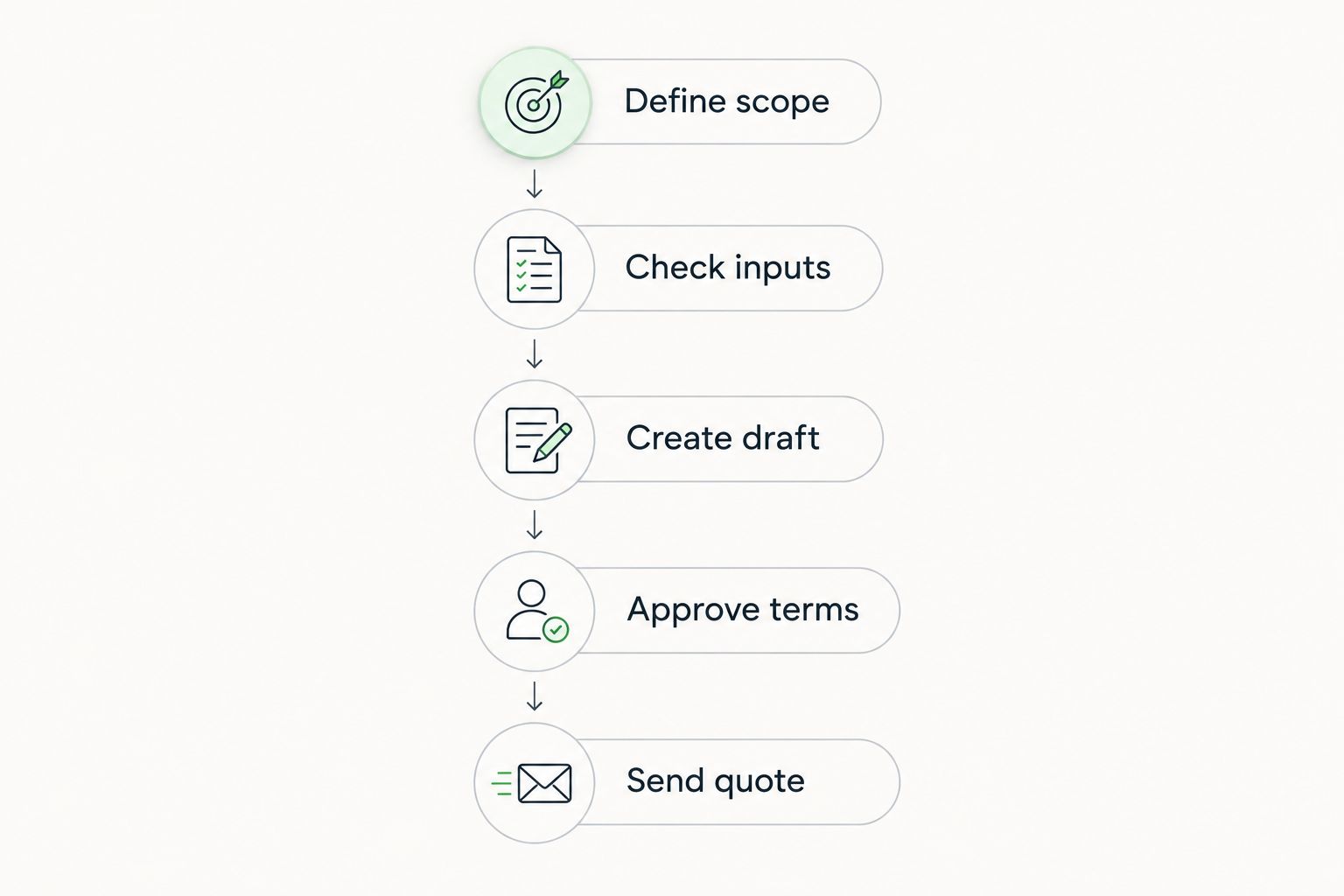
A working process follows this sequence:
- Capture the request. Record the customer, requested service, delivery location and scope in structured fields.
- Validate the inputs. Stop the workflow if required information is missing or contradictory.
- Build the draft. Select the approved template and populate the relevant customer details and line items.
- Check the terms. Route exceptions and negotiated conditions to an authorised reviewer.
- Release the quote. Send the approved version and retain its relationship to the customer and opportunity.
If your customer information still sits in spreadsheets, address that foundation first. The guide to switching from Excel to CRM without losing data covers the migration question behind a reliable quoting workflow.
Why this matters
Quote automation transfers responsibility from individual typing to shared rules. That is useful only when those rules represent the work you actually sell. A document generated quickly from incomplete scope remains an incomplete offer.
For a small business evaluating CRM in 2026, the practical benefit is less repeated entry between the enquiry, quote and subsequent work. The corresponding risk is repeating an incorrect customer detail or commercial condition across every document the workflow creates.
Automate repeatable information; review decisions that change your commitment. Your team should know which fields come from approved records and which require judgement before they enable customer-facing automation.
Which quote automation approach should you choose?
There are different ways to automate a quote, and they solve different problems. Compare the source of the information, the complexity of your offers and the handover after acceptance—not just whether the system produces a document.
| Approach | Best for | Main advantage | Main limitation |
|---|---|---|---|
| Native CRM quoting | Teams that want quotes attached to sales records | Keeps quoting within the customer workflow | You must verify calculation, document and approval functions |
| CRM with a connected quoting tool | Teams needing document functions outside their CRM | Separates customer management from document preparation | Requires field mapping and clear ownership of updates |
| Template-led automation | Repeatable services with consistent scope | Reuses approved wording and structured inputs | Unusual requests need an exception route |
| Configure-price-quote workflow | Offers with dependent choices or complex commercial rules | Checks allowed combinations before document creation | Requires maintained configuration rules |
Native CRM quoting: best for a contained sales workflow
Choose native quoting when your required calculations, terms and approvals fit the CRM's quoting function. The attraction is a single workflow around the customer record. The limitation is that the label quoting does not establish whether the system handles your actual documents.
Ask the supplier to demonstrate a revision, an approval exception and an accepted quote. Recommend native quoting only after the complete workflow passes your test, not because the feature appears on a comparison page.
Connected quoting: best for specialist document requirements
Choose a connected quoting application when customer management belongs in the CRM but quote preparation needs separate functions. The connection must define which system owns customer details, quote status and document versions. Otherwise, correcting information in one place leaves the other record unchanged.
The advantage is a separation of responsibilities. The drawback is the integration itself: field mapping, access permissions and failed transfers become part of the process your team must support.
Template-led quoting: best for repeatable scope
Choose template-led automation when you sell a service with a consistent structure and identifiable exceptions. A template can standardise descriptions and terms while the workflow supplies customer-specific fields. It cannot decide whether an unusual request fits your standard scope.
Keep non-standard work outside the automatic-send route. That boundary preserves the benefit of repeatability without treating every enquiry as the same job.
Configure-price-quote: best for dependent offer choices
A configure-price-quote workflow checks how selected components and commercial rules fit together. It suits offers where choosing one item changes which other items are valid. The important capability is rule enforcement, not the appearance of the final document.
Its limitation is maintenance. Someone must own the rules, revise them when your offer changes and test that prohibited combinations remain blocked.
Why quote automation varies between CRM systems
The extent of automation depends on the workflow you can configure and the information you can supply. Use these factors to define your 2026 requirements before comparing systems:
- Source data: Customer details, scope and line-item information need an agreed source. Free-text notes alone leave the workflow without dependable inputs.
- Offer complexity: Fixed service descriptions are easier to map than work requiring site findings, dependent components or negotiated terms.
- Calculation rules: Specify which quantities, units and commercial adjustments the workflow must handle, and who maintains those rules.
- Document requirements: Check whether your required descriptions, exclusions, validity conditions and supporting material fit the document process.
- Approval permissions: Identify who can generate, change, approve and send a quote. Treat these as separate actions.
- System connections: Establish how customer updates, quote status and acceptance move between applications, including what happens when a transfer fails.
A feature checklist is not a workflow test. Give each supplier the same example request and ask them to show what happens when a required field is absent or a commercial rule is breached.
How do you set up automatic quoting without losing control?
Start with 1 repeatable workflow rather than automating every service you sell. Select a request type with clear scope, maintained line items and an identifiable owner. Expand only after you can explain how the workflow handles errors and revisions.
Define scope
Write down the information required to prepare that offer. For a trade business, this can include the requested work and information from a site assessment; for consulting or IT services, it can include deliverables and exclusions. These are requirements to define, not assumptions the software should make.
Set a stop condition for missing information. The workflow should create a task or flag an incomplete request rather than fill a gap with an unapproved default.
Check inputs
Choose the record that owns each field. Customer names and addresses need an authoritative source, while scope and quantities need a responsible person. Avoid allowing several applications to overwrite the same field without a defined rule.
Check units as well as values. A quantity without an agreed unit can produce a plausible-looking document that describes the wrong commitment.
Create draft
Build the quote from approved descriptions and terms. Keep internal notes separate from customer-facing wording, and ensure that document revisions remain distinguishable.
The draft stage should make uncertainty visible. Missing scope, unapproved changes and conflicting information belong in a review queue, not in a document that looks ready to send.
Approve terms
Assign an approval owner and specify what requires review. Changes to scope, exclusions or negotiated conditions need an explicit decision. Do not let document generation itself count as approval.
For your 2026 rollout, define 2 approval gates: a scope check and a commercial check. One person can perform both, but the checks should remain distinct so that correct arithmetic does not substitute for correct scope.
Send quote
Release the approved version through the agreed process. Store enough information to identify which document reached the customer and what changed afterward.
Acceptance should refer to a specific quote version. Before connecting acceptance to project creation or invoicing, verify what information transfers and what still needs confirmation.
What should you test before enabling automatic sending?
Test 3 cases: a standard request, a request with missing scope and a request with changed commercial terms. These are recommended acceptance tests, not a guarantee that every exception is covered. Use documents representative of your own work.
- Standard request: Confirm that the intended customer details, descriptions and units appear in the draft.
- Missing scope: Confirm that the workflow stops and identifies the information needed to continue.
- Changed terms: Confirm that the quote reaches the right reviewer instead of bypassing approval.
Then revise an already approved draft. Check whether the revision resets approval and whether the earlier version remains identifiable. This catches a control gap that a successful first document does not reveal.
Your 2026 acceptance checklist should also include access permissions and customer-facing wording. Test with the permissions an ordinary team member will use, not only with an administrator account.
Can a CRM generate a quote without sending it automatically?
Yes, a configured workflow can generate a draft while leaving sending to an authorised person. Draft-only automation is the recommended starting point when scope or terms require judgement. It removes repeated entry without removing the decision to commit.
Define the draft state clearly. A team member should be able to tell whether a document is incomplete, awaiting approval or authorised for release without interpreting an informal note.
Can you turn an accepted quote into a project or invoice?
Yes, CRM/ERP systems and connected applications can support that handover when the relevant workflow is available and configured. Verify the transfer of customer details, accepted scope and line items separately. A link between records does not establish that every required field transfers correctly.
For work billed from actual time or revised scope, the accepted quote is not necessarily the final invoice basis. Keep the agreed offer, subsequent changes and billable work identifiable instead of treating document conversion as proof of a correct invoice.
Is a CRM enough for complex or custom quotes?
A CRM is enough only when its quoting workflow handles your required rules and documents. Complex configurations need explicit validation; custom work needs a way to collect and approve scope. Neither requirement disappears because customer information already exists in the CRM.
Ask for a demonstration using an exception, not just a standard offer. If the system cannot show where judgement enters the process, keep that step manual.
Where does Mesh App fit?
Mesh App is best for SMEs seeking a modular CRM/ERP platform covering contacts, projects, time tracking and invoicing. Its stated modules also include finance, making it relevant when you are evaluating the broader connection between customer records and operational work.
For Mesh App CRM/ERP evaluation, keep the quoting requirements separate from the module list. Contact management and invoicing do not establish automatic quote generation, approval routing or quote-to-project conversion. Ask for a demonstration against your defined workflow before selecting a setup.
Review Mesh App with that checklist. The useful fit is its stated modular scope; the boundary is that quoting capabilities must be verified rather than inferred from adjacent functions.
FAQ
Can CRM software generate quotes automatically in 2026?
Yes, CRM software can generate quotes automatically when it includes quoting tools or connects to a quoting system. It needs configured rules and approved source data; document generation does not automatically authorise sending.
Does every CRM include automatic quoting?
No, contact management alone does not establish automatic quoting. Check document generation, calculation rules, approvals and sending separately.
What's the best way to start automating quotes?
Start with a repeatable service and generate drafts for review. Define required fields and an exception route before enabling automatic sending.
Can a CRM prepare quotes for construction or consulting work?
Yes, a suitable quoting workflow can prepare documents for construction or consulting work. Site findings, deliverables and exclusions still need approved scope information.
Is quote automation the same as invoicing?
No, a quote presents an offer, while an invoice requests payment for the relevant goods or services. Transferring information between them requires checks on the accepted scope and billing basis.
Can customers receive a quote without anyone reviewing it?
Yes, a workflow can send quotes automatically if the system supports that action and the permissions allow it. Reserve that route for requests covered by approved rules and stop conditions.
Does Mesh App automatically generate quotes?
Mesh App's stated offering includes contact management, project management, time tracking, invoicing and finance modules. Verify automatic quote generation and approval functions directly before treating them as selection criteria.
One last thing
Test the quote you do not want sent. A polished standard document shows that generation works; a blocked incomplete request shows that your controls work. For your 2026 rollout, make the exception test a release condition rather than a task to revisit later.


