

Yes, cloud CRM software can be safe for client data when you verify the provider’s security controls and configure access, retention and recovery properly. Cloud hosting alone does not establish safety: your business remains responsible for how employees use, share and export client information.
- Is cloud CRM software safe for client data? Yes, with verified security, restricted access and tested recovery.
- Mesh-web suits SMEs seeking modular CRM/ERP functions; assess security separately from the module list.
- GDPR compliance requires more than European hosting: check processing contracts, subprocessors and international transfers.
- Backups protect recoverability; permissions and authentication protect access. You need both.
Why this matters
A CRM brings client details into one working system. That makes information easier to use, but it also makes account permissions, exports and integrations consequential: a compromised account can expose more than an individual email thread.
For your 2026 CRM assessment, judge the complete data workflow—not just the hosting location. Include the people who enter information, the services that receive it and the devices that display it. If you are moving from spreadsheets, the guide to switching from Excel to CRM without losing data addresses a separate concern: keeping the migration controlled.
Security and privacy also answer different questions. Security asks whether information is protected against unauthorised access, alteration and loss; privacy asks whether you have a lawful reason to collect and use it. A system needs both.
Is cloud CRM software safe for client data?
Cloud CRM software is a safe choice only when the provider’s protections and your operating practices meet the needs of the data you store. Evaluate those protections before importing live records, and repeat the assessment when you add modules or integrations.
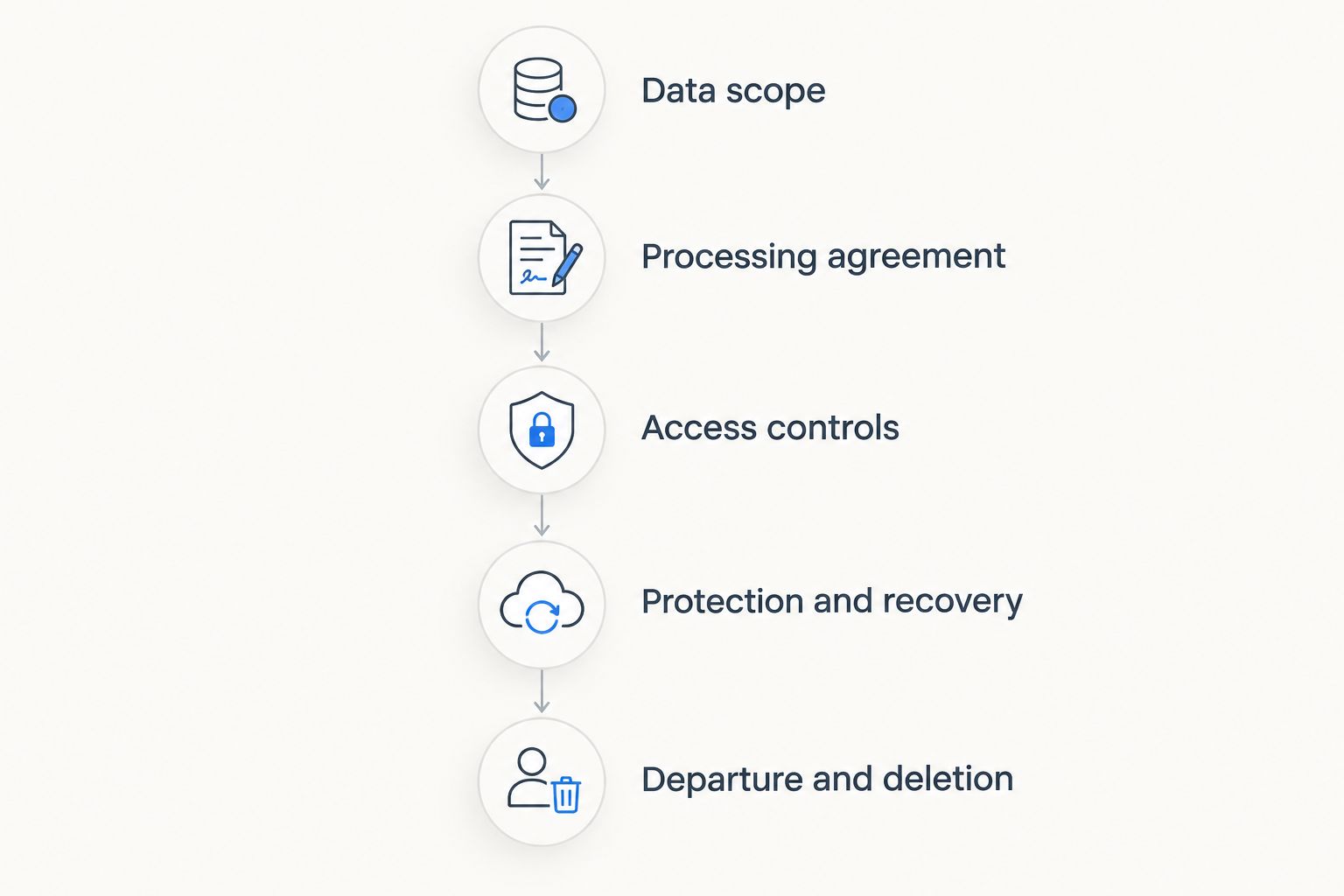
Use this sequence to turn a vendor discussion into a decision supported by evidence.
Establish the data scope
List the information you intend to store: contact details, correspondence, project notes, time entries and invoice information. Identify sensitive attachments and free-text fields separately; employees can enter information there that your planned field list never anticipated.
Keep unnecessary information out. A CRM does not need a client’s identity document simply because an attachment field exists, and ordinary contact management does not justify collecting special-category personal data.
Check the processing agreement
For processing covered by the GDPR, Article 28 sets requirements for the contract between a controller and a processor. Confirm the agreement addresses processing instructions, confidentiality, security, subprocessors, assistance with rights requests and what happens to personal data when the service ends.
Read the agreement alongside the actual service description. A contractual promise is useful only when you understand which activities it covers and which connected services sit outside it.
Verify access controls
Ask how the service handles individual accounts, multifactor authentication, permission levels and administrator access. Request evidence of the controls you need rather than treating a general security statement as proof.
Create access around responsibilities. A subcontractor updating a job should not automatically receive permission to export the complete client database; an employee preparing invoices should not automatically administer every account.
Examine protection and recovery
Check encryption in transit and at rest, credential management, logging and the provider’s incident procedures. Ask who can access readable data, including support staff, and how privileged access is authorised.
Then separate backup claims from recovery capability. Establish what can be restored, who requests restoration, whether individual records are recoverable and how the provider tests recovery. A backup description is not a substitute for a restore procedure.
Test departure and deletion
Before committing, establish how you export usable records, attachments and relevant history. Confirm how deletion requests reach active records, connected services and backup retention processes.
Use dummy client records for your 2026 acceptance test. Check that restricted accounts remain restricted, exports contain the expected information and the documented exit process produces usable files.
Cloud CRM versus self-hosting and spreadsheets
The hosting model changes who operates the infrastructure; it does not remove your responsibility for client data. Compare the options against your team’s ability to maintain them, not against an assumption that local storage is automatically safer.
| Option | Best for | Advantage | Limitation |
|---|---|---|---|
| Cloud CRM | Teams seeking provider-operated infrastructure | The provider operates the service infrastructure under its stated responsibilities | You depend on the provider’s controls and must check contracts, access and transfers |
| Self-hosted CRM | Teams able to operate and secure their own infrastructure | You control the deployment and maintenance arrangements | Your organisation must arrange updates, monitoring, backups and recovery |
| Spreadsheets | Simple, limited workflows with controlled sharing | Familiar files can support straightforward records | Permissions, version control and copied files need deliberate management |
Cloud CRM is not automatically safer than self-hosting, and self-hosting is not automatically safer than cloud CRM. The deciding evidence is how each setup prevents unauthorised access, detects problems and restores information.
Spreadsheets deserve the same scrutiny. A client list copied into email attachments or personal storage creates additional copies to secure and delete, even if the original file remains on a company device.
Why cloud CRM safety varies
Cloud CRM security varies because the same software can be used with different information, permissions and connected systems. These factors determine what you need to inspect:
- Data sensitivity: Contact details, private correspondence and sensitive attachments create different exposure if accessed improperly.
- Account protection: Individual accounts, authentication and offboarding determine who can enter the system.
- Permission scope: Viewing a job, changing an invoice and exporting every contact are different powers.
- Connected services: Email, accounting and automation integrations introduce additional data destinations and credentials.
- Recovery arrangements: Backup scope and restoration procedures determine what happens after deletion, corruption or an outage.
- Processing locations: Hosting, support access and subprocessors determine which processing and transfer arrangements require review.
Turn each factor into a question with an owner. Your provider explains service controls; your business decides permitted use, approves access and checks whether those decisions remain correct.
Does European hosting make a CRM GDPR-compliant?
No. European hosting addresses part of the location question, not the entire GDPR assessment. You still need a lawful basis, appropriate transparency, suitable security and arrangements for exercising data-subject rights.
For a 2026 assessment, map the data flow beyond the main database. Identify backup locations, support access, subprocessors and the destinations used by integrations. Where personal data is transferred outside the European Economic Area, examine the applicable GDPR transfer mechanism and associated requirements.
The European Commission’s GDPR guidance and European Data Protection Board guidance are authoritative starting points for EU processing. For Swiss operations, assess the applicable Swiss data-protection requirements separately; an EU-focused checklist does not settle every Swiss obligation.
How quickly must you report a client-data breach?
72 hours is the GDPR supervisory-authority notification window after awareness of a personal data breach, unless the breach is unlikely to risk individuals’ rights and freedoms. The controller must notify without undue delay; where notification exceeds that window, the GDPR requires reasons for the delay.
A processor must notify the controller without undue delay after becoming aware of a personal data breach. Agree on reporting contacts and responsibilities before an incident, so your team can assess the event rather than search for the correct inbox.
How long do you have to answer a client’s data request?
1 month is the normal GDPR deadline for responding to a data-subject request, with action required without undue delay. The period can be extended by 2 additional months where necessary because of the complexity and number of requests; the individual must be informed within the initial month, with reasons.
Those deadlines come from GDPR Article 12, while the breach-notification rules come from Articles 33 and 34. Use the consolidated regulation for your 2026 procedures, and distinguish a request acknowledgement from actually completing the required response.
What should you require before importing client records?
Your acceptance checklist should describe evidence, not slogans. Statements such as encrypted, secure or compliant are starting points for questions—not acceptance criteria on their own.
| Area | Evidence to request | What your team must decide |
|---|---|---|
| Authentication | Documentation of available sign-in protections | Which protections users must enable |
| Permissions | Role descriptions and export restrictions | Who can view, change, delete and export records |
| Processing | Processing agreement and subprocessor information | Whether the arrangement fits your obligations |
| Recovery | Backup scope and restoration procedure | Whether recovery meets operational needs |
| Incident handling | Notification process and escalation contacts | Who assesses and responds to an incident |
| Exit | Export formats and deletion arrangements | How to leave without losing necessary records |
Test the controls you depend on. Sign in with a restricted account, try the actions it should not perform and inspect the result. For integrations, verify which records move and whether disconnecting the integration also revokes its access.
Keep the resulting decisions in your 2026 operating documentation. Name the people who approve access, manage departures and handle incidents; a checklist without ownership does not govern daily use.
Where a modular CRM/ERP platform fits
Mesh-web is best suited to small and medium-sized businesses seeking modular CRM/ERP functions. The platform’s stated scope includes contact management, project management, time tracking, invoicing and finance for businesses across Austria, Germany and Switzerland.
The relevant advantage is the stated breadth of those modules. The assessment trade-off is scope: when your planned workflow covers client contacts, projects and financial information, you must check permissions and data handling across the whole workflow, not only the contact record.
Assess Mesh-web against the same security checklist as any CRM/ERP candidate. Module coverage establishes functional relevance; it does not establish particular hosting locations, certifications, authentication features or recovery guarantees.
FAQ
Is cloud CRM software safe for client data in 2026?
Cloud CRM software can be safe for client data when provider controls and your configuration protect access, processing and recovery. Verify those controls before importing real records; cloud hosting alone is not proof of safety.
Is a cloud CRM safer than keeping client data in Excel?
Neither cloud CRM nor Excel is automatically safer. Compare account protection, sharing permissions, exported copies, backup arrangements and the people responsible for maintaining each setup.
Does GDPR require every CRM server to be in the EU?
GDPR does not impose a blanket requirement that every CRM server be in the EU. International transfers must meet the applicable GDPR requirements, and your assessment must include subprocessors and relevant remote access.
What should I ask a CRM provider about backups?
Ask what the backups contain, how restoration works and how recovery is tested. Also establish how deletion and retention are handled, rather than assuming a backup promise covers those questions.
Do I have to report every CRM security incident within 72 hours?
The 72 hours rule concerns GDPR notification to the supervisory authority after awareness of a personal data breach, unless it is unlikely to risk individuals’ rights and freedoms. Not every security incident is a personal data breach, so assess the incident and document the decision.
How quickly must I respond when a client asks for their data?
1 month is the normal GDPR response deadline, with action required without undue delay. An extension of 2 additional months is possible where necessary because of complexity and the number of requests, with notice and reasons within the initial month.
Does Mesh-web’s module list prove its CRM is secure?
No, Mesh-web’s CRM/ERP module list establishes functional scope, not security assurance. Evaluate its processing agreement, access controls, recovery arrangements and data flows before storing client information.
One last thing
Test an employee’s departure as carefully as a new employee’s onboarding. Disable the test account, check active sessions and connected access, and identify any exported files that remain outside the CRM.
This exercise reveals a boundary that a hosting discussion misses: revoking CRM access does not retrieve copies already downloaded elsewhere. Make offboarding and export control part of your 2026 security process, not a task left until someone leaves.


