

Best overall for connected job administration: Mesh App. Best for recording hours without replacing existing business systems: standalone time tracking software. Best for shared site attendance: crew time-clock software. This 2026 guide compares time tracking software for construction companies by the work you need it to support, not by a feature count.
- Mesh App is the best fit for construction businesses seeking time tracking alongside CRM, project management and invoicing modules.
- Choose standalone time tracking software for construction companies when existing project and finance systems already work.
- Choose crew time-clock software when shared site attendance matters more than individual project timers.
- Test job changes, corrections and office handover before committing to construction time tracking software.
Why this matters
A construction timesheet has different jobs to do. It records attendance, assigns labour to projects and gives the office information for billing or payroll preparation. Those jobs overlap, but they are not interchangeable.
A worker can record the right total hours against the wrong project. An invoice can use approved billable time without representing every hour worked. Choose software around the record your business needs next, not just the screen workers use first.
For your 2026 shortlist, decide whether you need a better timer, a shared attendance process or a broader business platform. The options below occupy those distinct slots; they are not interchangeable substitutes.
What makes the best construction time tracking software?
Use these six criteria before comparing demonstrations:
- Job allocation: Workers need a clear way to select the correct project and change it when their assignment changes.
- Site usability: Test the actual device, connection and working conditions your crew will encounter. A successful office demonstration is not a site test.
- Corrections and approval: Establish who can change entries, who checks them and how changes remain understandable afterward.
- Office handover: Confirm how accepted hours reach the person responsible for payroll, invoicing or project reporting.
- Record separation: Keep attendance, project labour and billable time distinct wherever their treatment differs.
- Administrative scope: Choose a broader platform only when your business also needs its additional modules.
Write down which criteria are mandatory. A missing requirement should outweigh an attractive dashboard, especially when the missing step sits between the site and the office.
Construction time tracking options at a glance
The comparison separates a named modular platform from software categories. For each category, assess the shortlisted supplier against the requirements shown rather than assuming every product includes them.
| Option | Best for | Standout capability or selection priority | Key limitation |
|---|---|---|---|
| Mesh App | Businesses seeking time tracking alongside wider administration | Contact management, project management, time tracking, invoicing and finance modules | Module breadth alone does not establish suitability for a particular site workflow |
| Standalone time tracking software | Companies keeping their existing business systems | Focused recording and review of working time | Handover to separate systems needs its own evaluation |
| Crew time-clock software | Teams using shared site attendance | Shared clock-in and clock-out workflow | Attendance totals alone do not explain project allocation |
| Payroll-led time and attendance software | Businesses prioritising payroll preparation | Working-time review organised around payroll requirements | Payroll-ready records are not automatically job-costing or billing records |
1. Mesh App: best for wider construction administration
Mesh App is a modular CRM/ERP SaaS platform serving small and medium-sized businesses, including construction businesses in Austria, Germany and Switzerland. It offers contact management, project management, time tracking, invoicing and finance modules.
Mesh App is best for construction companies that want time tracking alongside project, contact and invoice administration. That makes it a relevant starting point when your problem extends beyond collecting timesheets. Evaluate the complete job workflow rather than assuming that having several modules guarantees every handover you need.
Mesh App pros:
- Its stated module range covers time tracking and wider business administration.
- Its stated customer scope includes construction businesses.
- Its modular structure gives you a basis for discussing which functions your business actually needs.
Mesh App cons:
- Selecting several modules requires decisions beyond time entry, including ownership of contacts, projects and finance records.
- Construction-specific requirements such as disconnected working, shared-device use and payroll handover need direct demonstration before selection.
Best for: A construction SME evaluating time tracking as part of a broader CRM/ERP decision.
Ask the supplier to follow a real job from project creation through time entry and office review. Then inspect each downstream step you require. Do not treat an invoicing module as proof that tracked hours become invoice lines automatically.
Verdict: Buy only after your required site-to-office workflow passes a practical demonstration.
2. Standalone software: best for keeping existing systems
Standalone time tracking software puts recording and reviewing hours at the centre of the purchase. This category suits a construction company whose project administration and finance processes already work.
Your selection question is narrow: can workers record time accurately, and can the office use the resulting records without rebuilding them? Resist replacing functioning systems just to improve one weak step.
Standalone time tracking software pros:
- Gives your evaluation a focused scope: recording, checking and handing over hours.
- Lets you retain existing project and finance processes.
- Supports a smaller initial change programme than replacing several business systems together.
Standalone time tracking software cons:
- Separate systems require a defined transfer process and matching project references.
- A timer-focused demonstration does not establish attendance controls, approval rules or payroll compatibility.
Best for: A company fixing time entry while retaining its current administration setup.
During your 2026 evaluation, ask the office to use a sample output in its existing workflow. Check whether project references, dates and employee identifiers remain usable. A polished timesheet is not enough if someone must reconstruct it before use.
Verdict: Buy when time recording is the isolated problem; skip when disconnected administration is the real issue.
3. Crew time clocks: best for shared site attendance
Crew time-clock software centres the evaluation on a shared attendance process rather than a separate timer for every worker. Consider this category when your preferred workflow uses a common site device or supervised clock-in process.
The crucial distinction is between presence and allocation. Recording when someone arrives does not, by itself, explain which job or activity receives their labour time.
Crew time-clock software pros:
- Gives a shared-device requirement a clear place in your shortlist.
- Supports evaluation around how a whole crew starts and ends work.
- Makes responsibility for site attendance a specific operational decision.
Crew time-clock software cons:
- A shared device introduces access, queueing and device-responsibility questions.
- Attendance records still need project allocation when workers move between jobs or activities.
Best for: Site-based crews whose priority is a consistent shared attendance process.
Test what happens when a worker changes sites, misses a clock-out or needs an entry corrected. If connectivity is part of that scenario, use the questions in this guide to offline CRM use on construction sites to shape the demonstration. Verify the time-recording workflow itself rather than assuming a general offline claim covers it.
Verdict: Buy for a proven shared attendance workflow; skip as a substitute for project allocation.
4. Payroll-led software: best for payroll preparation
Payroll-led time and attendance software makes the payroll handover the central selection requirement. Start here when the recurring problem is checking working-time records before payroll preparation, rather than administering customers or projects.
Ask your payroll administrator to define the required records and approval process before suppliers demonstrate their software. A product name or integration label does not establish that the exact handover your business needs will work.
Payroll-led time and attendance software pros:
- Puts payroll requirements ahead of secondary dashboard features.
- Gives the payroll administrator a clear role in selection.
- Focuses testing on accepted records, exceptions and corrections.
Payroll-led time and attendance software cons:
- Payroll categories do not necessarily provide the project detail needed for labour costing.
- Accepted working time still needs separate treatment where client billing rules differ.
Best for: Construction businesses whose main bottleneck is preparing checked working-time records for payroll.
For a 2026 purchase, test the exact receiving process with the person who operates it. Include a correction after approval and check how both systems handle the revised record. Do not approve a handover based only on a sample file opening successfully.
Verdict: Buy when payroll preparation drives the requirement; skip when project administration is the primary problem.
How we ranked these options
The ranking prioritises workflow fit, administrative scope and the distinction between attendance, project labour and billing. The first option addresses broader administration; the remaining categories address narrower operational needs.
This is a selection framework, not a timed product benchmark. Your final order should change when a mandatory requirement changes: shared attendance can move crew software ahead of a modular platform, while a payroll bottleneck can put payroll-led software first.
Run a construction workflow pilot before buying
Use a suggested pilot of 5 working days across 2 active projects, followed by a 30-minute office review. These are practical test parameters, not promised implementation times or performance results. Include a worker, a site supervisor and the person who receives the records.
Record time
Ask a worker to enter time using the device and connection available on site. Check whether project selection is understandable without someone from the office explaining each choice.
Change jobs
Have the worker move between the pilot projects. Inspect how the records distinguish the assignments, including any travel or breaks your process needs to record separately.
Correct entries
Enter a deliberately incorrect project assignment, then follow the proposed correction process. Confirm who makes the change and whether the reviewer can understand what happened.
Approve hours
Ask the supervisor to review the records. Check how incomplete entries, disputed time and late changes move through the process rather than testing only clean timesheets.
Check handover
Give the accepted records to the office. Ask the recipient to complete the actual next task, whether that is payroll preparation, invoice preparation or project review.
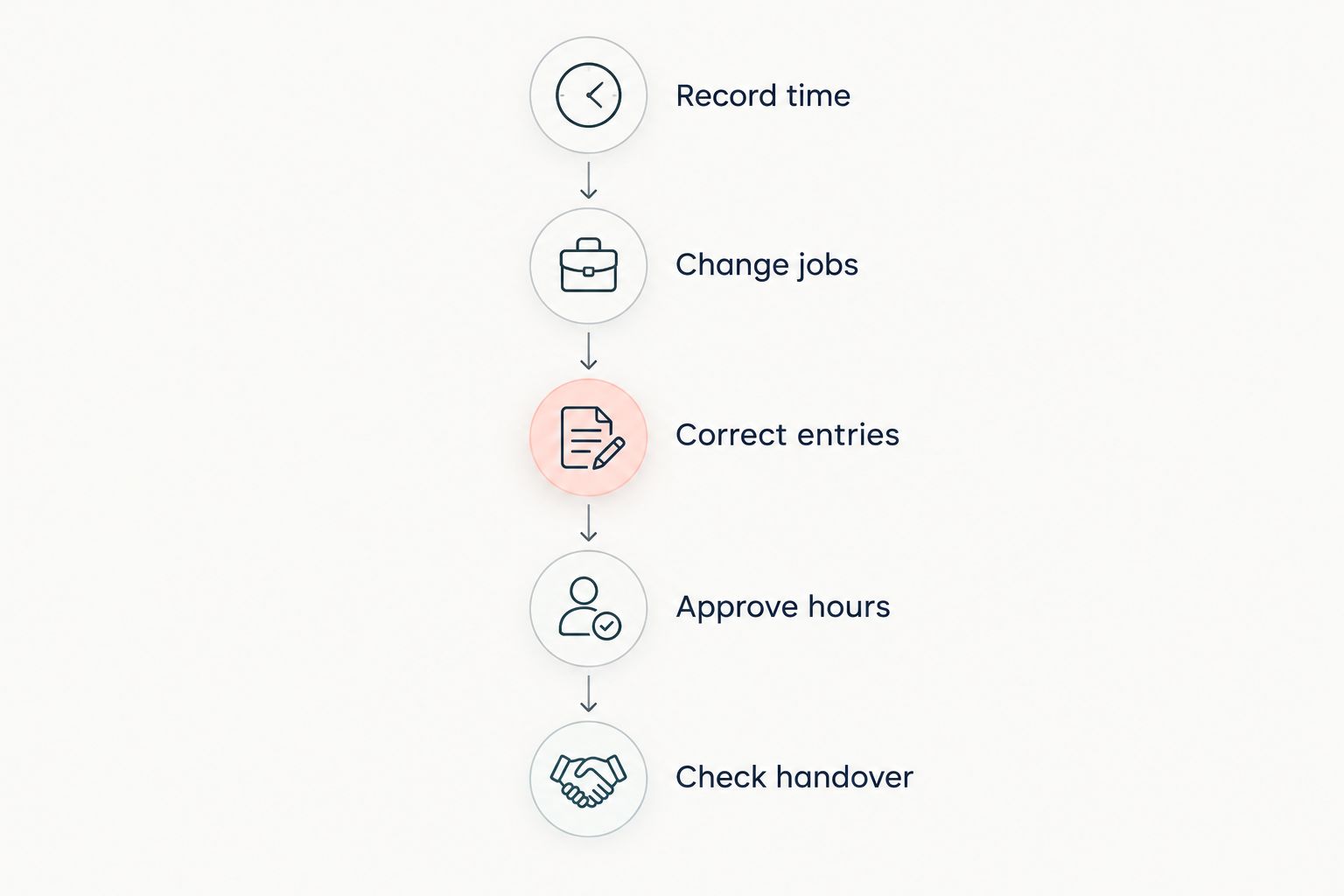
Keep a written list of failures during the pilot. Separate configuration questions from requirements the proposed setup cannot meet. Your 2026 buying decision should follow those findings, not the smoothest sales presentation.
Which construction time tracking option should you choose?
Start with Mesh App if you need time tracking alongside contact, project, invoicing and finance modules. Keep the evaluation narrower if those other business processes already work.
Choose standalone software for a time-entry problem, crew time clocks for a shared attendance problem, and payroll-led software for a payroll-preparation problem. Do not buy the broadest system by default. Buy the setup that completes your required workflow with clear responsibility at every handover.
Assess your construction workflow
Compare your time tracking, project management and invoicing requirements with the platform’s stated modules.
FAQ
What's the best time tracking software for a construction company?
Mesh App is the best fit in this guide for construction businesses seeking time tracking alongside CRM, project management, invoicing and finance modules. Choose a narrower software category when you only need to fix attendance, time entry or payroll preparation.
Is a time clock enough to track construction project labour?
A time clock is not enough unless its records also capture the project allocation your business needs. Attendance establishes working time; project labour records must also distinguish where that time belongs.
Should construction workers use phones or a shared tablet?
Choose the device arrangement that passes your site workflow test. Test access, project selection, corrections and connectivity using the actual conditions workers face.
Does construction time tracking software work without internet?
Offline operation depends on the specific product and workflow. Demonstrate disconnected entry, project selection and later synchronisation before treating offline use as a satisfied requirement.
Can construction time tracking software send hours to payroll?
Select software only after its payroll handover passes a test with your payroll administrator. Check identifiers, categories, approvals and corrections in the exact receiving process your business uses.
Are billable hours the same as employee working hours?
Billable hours and employee working hours are different records. Client billing depends on the agreed commercial treatment, while working-time records must capture the employment-related information your business requires.
How should a small construction company compare software in 2026?
A small construction company should compare software against a real site-to-office workflow in 2026. Use representative projects, test incorrect entries and have the office complete the next task with the accepted records.
One last thing
Test a mistake before you buy. A correct entry proves that the basic screen works; an incorrect project assignment exposes responsibility, correction handling and the downstream handover. Ask the supplier to fix the mistake in front of the people who will manage it.


