

Best overall for combined project and business administration: Mesh-web. Best for visual task tracking: Trello; best for cross-team coordination: Asana; best for dependency-led installation planning: Microsoft Project. This 2026 guide compares project management software for HVAC and plumbing firms by the work you need to control, not the length of a feature list.
- Mesh-web is the best project management software for HVAC and plumbing firms seeking modular CRM/ERP administration.
- Choose Trello for visual job tracking, Asana for shared responsibilities, and Microsoft Project for dependency-led schedules.
- Test time tracking, invoicing and field updates separately; a task board does not prove these requirements are covered.
- Require a demonstration using your own installation, repair and maintenance workflows before choosing software.
Why this matters
An installation project and an urgent repair need different controls. Installation work needs sequencing, handovers and completion checks; a repair visit needs clear assignment, job information and a reliable record of the work performed.
Your software decision should start with that distinction. A planning application is not automatically a dispatch system, and a completed task is not automatically a billable record.
For your 2026 shortlist, separate three questions: who owns the work, what blocks completion, and what the office needs to invoice it. Choose the application that handles your main operational problem without hiding the remaining gaps.
What makes the best HVAC and plumbing project software?
Use these criteria before comparing names:
- Job ownership: Every active job needs an accountable person, a status and a next action.
- Installation sequencing: Your schedule must show prerequisites, such as site readiness before equipment installation.
- Field usability: Test whether technicians can find and update the information they need under actual working conditions.
- Time records: Decide how technicians assign working time to the correct job and how supervisors check it.
- Commercial administration: Establish whether contacts, project records, invoices and financial information belong in the same platform or separate systems.
- Exception handling: Test return visits, missing materials, changed scope and incomplete work, not just a straightforward installation.
Treat a failed essential workflow as a rejection, not as a minor feature gap. A clear task board does not compensate for an unusable field update process.
HVAC and plumbing software at a glance
These recommendations address different use cases. They are not a claim that every application provides specialist HVAC dispatch, equipment servicing or local accounting functions.
| Option | Best for | Standout capability | Key limitation |
|---|---|---|---|
| Mesh-web | Combined project and business administration | Modular contact, project, time, invoicing and finance functions | Specialist field-service requirements need separate verification |
| Trello | Visual job-status tracking | Boards, lists and cards | A board alone does not cover the full commercial job workflow |
| Asana | Coordination across office and project teams | Shared tasks, owners and project views | Task coordination is not a substitute for trade-specific operations |
| Microsoft Project | Dependency-led installation schedules | Linked tasks and structured scheduling | Schedule planning does not replace CRM, invoicing or technician dispatch |
The comparison separates broad product purposes, not subscription-level entitlements. Check the exact edition, configuration and required connections during your 2026 evaluation.
1. Mesh-web: best for combined project and business administration
Mesh-web provides modular CRM/ERP software with contact management, project management, time tracking, invoicing and finance modules. Its stated audience includes small and medium-sized businesses in trades and construction across Austria, Germany and Switzerland.
That scope fits a contractor evaluating project management alongside customer and financial administration. It does not, by itself, establish how individual records connect or whether a specialist field-service workflow is supported.
Mesh-web is best for HVAC and plumbing firms seeking project management alongside modular CRM/ERP administration.
Strengths
- Contact and project management are within the platform’s stated scope.
- Time tracking, invoicing and finance are also named modules.
- The modular approach suits evaluation across several administrative functions.
- Trades and construction businesses are part of its stated audience.
Limitations
- Offline working, route optimisation and technician dispatch are not established by the supplied product description.
- Equipment histories, maintenance agreements and specialist service documentation require direct verification.
- Having several modules does not prove that your preferred approval and handover processes are supported.
Best for: A business choosing its project and administrative systems together.
Bring an installation file to the demonstration. Ask the presenter to show contact details, project tasks, recorded time and invoicing requirements against that example, distinguishing demonstrated functions from proposed configuration.
Verdict: Buy only after your essential workflows pass the demonstration.
2. Trello: best for visual job-status tracking
Trello organises work using boards, lists and cards. For a contractor, that structure provides a straightforward way to represent jobs moving through defined stages.
A board can answer where a job stands and what action comes next. It should not be mistaken for a complete system for scheduling technicians, recording billable work and managing customer accounts.
Trello pros
- Board stages make the intended workflow visible.
- Cards provide a defined place for individual jobs or tasks.
- A visual layout supports a focused discussion about outstanding work.
Trello cons
- Your team must define and maintain the meaning of each stage.
- Card movement alone does not establish accurate time records or invoice readiness.
- Complex installation dependencies need more scrutiny than a simple status board provides.
Best for: A firm whose main problem is unclear job status rather than detailed project scheduling.
Test a board with stages such as awaiting information, ready to schedule, in progress and ready for office review. Give each stage an entry condition, so moving a card means something specific.
Keep customer details and commercial records under explicit control. If another application remains responsible for those records, decide what belongs on the card and what must remain elsewhere.
Verdict: Buy for visual coordination; skip as a standalone answer to full business administration.
3. Asana: best for coordination across office and project teams
Asana centres work on tasks, responsible people and projects. It fits the evaluation when your main difficulty is coordinating actions across the office, project supervisors and other contributors.
For an installation, your tasks might cover access confirmation, equipment checks, site preparation and handover documentation. Those are examples of work to organise, not claims about built-in HVAC templates.
Asana pros
- Task ownership makes responsibility explicit.
- Shared projects provide a common structure for related work.
- Project views support coordination beyond an isolated personal checklist.
Asana cons
- Task management does not itself establish specialist dispatch or service-management coverage.
- Invoicing and accounting requirements need their own evaluation.
- A detailed task structure still depends on people maintaining accurate updates.
Best for: A firm with recurring handover failures between office staff and project contributors.
During a demonstration, change the installation date and ask what the team must update. Then mark an essential prerequisite incomplete and check how the project owner identifies the resulting problem.
The decision is about accountability. If your office already knows every job’s status but loses actions between people, shared task ownership deserves more attention than another status board.
Verdict: Buy for cross-team coordination; hold if your main requirement is technician dispatch.
4. Microsoft Project: best for dependency-led installation planning
Microsoft Project is a project-scheduling application associated with linked tasks and structured project plans. Its strongest use case here is installation work where the order of activities matters.
Consider a project where site preparation must finish before installation, and testing must follow completed installation. The useful question is how the schedule handles a delayed prerequisite, not whether the plan looks detailed.
Microsoft Project pros
- Linked tasks express the sequence of project activities.
- Structured schedules suit work with distinct installation phases.
- Dependency planning focuses attention on the consequences of delays.
Microsoft Project cons
- A schedule is not a customer relationship or invoicing system.
- Small repair jobs do not necessarily need dependency-led planning.
- Maintaining a useful plan requires clear ownership and current task information.
Best for: A contractor managing installations with meaningful scheduling dependencies.
Check the specific Microsoft offering and edition proposed for your organisation. Do not assume that similarly named products or subscriptions provide identical scheduling functions.
Ask the demonstrator to delay a prerequisite and explain the resulting schedule changes. Also establish who updates progress and how technicians receive their assignments outside the planning application.
Verdict: Buy for installation scheduling; skip when a simple job-status workflow is sufficient.
How these options are ranked
The ranking follows workflow fit: combined administration first, visual status tracking second, cross-team responsibility third, and dependency-led scheduling fourth. Each option owns a different decision slot.
This is a capability-based shortlist, not a controlled product trial. No recommendation establishes offline operation, integration behaviour, local compliance or specialist HVAC functionality without a separate check.
For your 2026 purchase, apply the same criteria to every demonstration. Reject comparisons that show your difficult workflow in one application but only a polished overview in another.
Test the complete job before you choose
Prepare 3 sample jobs: 1 installation project, 1 repair visit and 1 maintenance visit. These are evaluation examples, not a required business operating model.
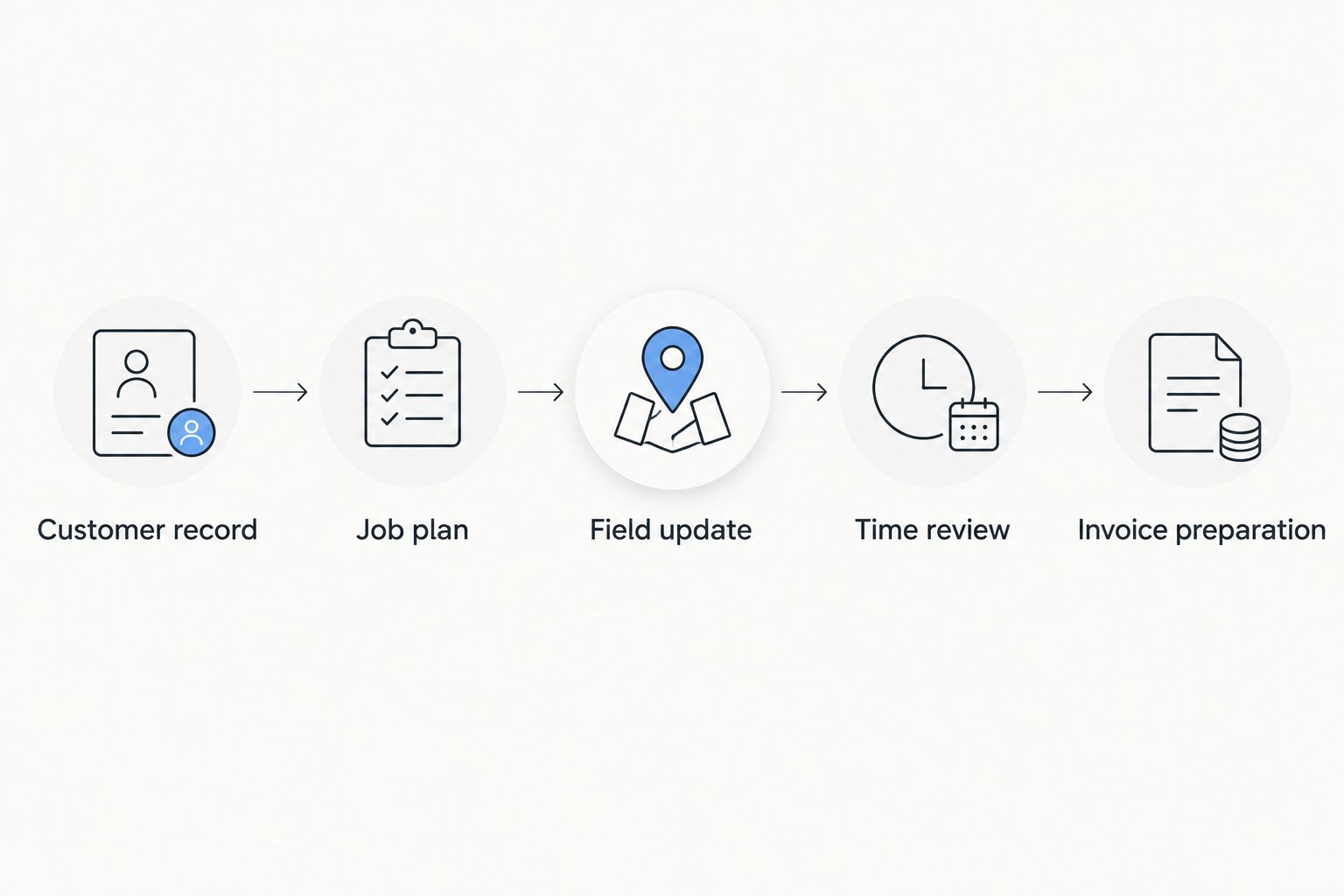
Use the same sequence for every shortlisted application:
- Customer record: Find the correct customer and distinguish the billing contact from the work location.
- Job plan: Assign responsibility, define the next action and record prerequisites.
- Field update: Enter completed work, unresolved issues and the need for a return visit.
- Time review: Check how working time reaches the person responsible for approval.
- Invoice preparation: Establish what the office needs before billing can proceed.
A failed step identifies a specific gap. Record whether the answer is a native function, configuration, a separate application or a manual process.
Run the demonstration with a technician and an office user present. Each person should perform the actions they would own, rather than watching someone else complete the whole process.
Before your 2026 rollout, decide who maintains customer records, who closes jobs and who approves time. Software cannot resolve conflicting ownership rules that your business has not settled.
Which option should you choose?
Choose Mesh-web as your default shortlist candidate when project management, contacts, time tracking, invoicing and finance belong in the same evaluation. Choose Trello when visible job status is the main requirement, Asana when responsibility crosses teams, and Microsoft Project when installation dependencies dominate planning.
Do not choose a broader application simply because it contains more categories of features. Choose the smallest operational scope that covers your essential work without leaving critical handovers undefined.
If emergency callouts, recurring maintenance or specialist equipment records drive your business, add those requirements before making a decision. None of the rankings above substitutes for verifying those workflows.
FAQ
What's the best project management software for HVAC and plumbing firms?
Mesh-web is the default shortlist choice when you need project management alongside modular contact management, time tracking, invoicing and finance. Trello, Asana and Microsoft Project address narrower needs in visual coordination, shared responsibility and scheduling respectively.
Is Trello enough to manage a plumbing business?
Trello fits visual job tracking, but a task board alone does not cover every plumbing business workflow. Evaluate customer records, technician assignments, time records and invoice preparation separately.
Is Asana better than Microsoft Project for HVAC installations?
Asana fits shared task ownership, while Microsoft Project fits dependency-led scheduling. Choose according to whether your main problem is missed responsibilities or the sequencing of installation activities.
Do HVAC contractors need project management or field-service software?
Choose project management around planned work and dependencies; evaluate field-service requirements around visits, technician assignments and service records. A contractor handling both installations and callouts should test both workflows.
Can project management software replace invoicing software?
Only a solution that supports your invoicing requirements can replace your invoicing application. Task completion alone does not establish invoice preparation, tax treatment, approval controls or accounting compatibility.
How should a small plumbing firm test software before buying?
Use an installation, a repair and a maintenance example from your own business. Have a technician and an office user follow each job from customer information through work updates to invoice preparation.
Does this shortlist confirm offline access or accounting integrations?
No, this shortlist does not establish offline access or accounting integration behaviour. Require a demonstration of the exact configuration, device conditions and data exchange your business needs.
One last thing
A job marked complete is not necessarily ready to invoice. Add an explicit office-review step to your evaluation and define what it checks: unresolved work, approved time and the information needed for billing.
That handover is a better buying test than counting dashboard views. Ask the technician and office user to complete it together before signing off on your selection.


