

Best overall for connected business administration: Mesh App. Best for invoice-only workflows: standalone invoicing software. Best for bookkeeping-led workflows: accounting software with invoicing. Best for dispatch-led operations: field service software with invoicing. This 2026 guide compares invoicing software for plumbers and HVAC companies by the work surrounding each invoice, not by the length of a feature list.
- Mesh App is the best fit for plumbers and HVAC companies wanting invoicing alongside CRM, projects, and time tracking.
- Choose invoicing software for plumbers and HVAC companies around job records, billing inputs, and accounting handover.
- Choose standalone invoicing for document creation; accounting-led software when bookkeeping drives the decision.
- Choose field service software when dispatch and technician workflows determine whether a job is ready to bill.
Why this matters
A plumbing invoice starts before someone opens an invoice editor. The customer, service address, completed work, labour, and materials all need to reach the person preparing the bill.
Choose the system that fixes your billing handover, not just the invoice layout. If customer information sits in one place and job details in another, inspect that handover before comparing templates. A polished document does not resolve an incomplete job record.
For your 2026 shortlist, separate customer management from billing requirements. The guide to CRM software for HVAC and plumbing companies covers the customer-record side; this comparison focuses on choosing the right billing setup.
What makes the best invoicing software for trades?
Use these criteria before comparing the options. Treat each as a demonstration requirement rather than accepting a feature checkbox.
- Customer and site records: Check how the system distinguishes the person ordering work, the service location, and the invoice recipient.
- Billing inputs: Follow labour, materials, and approved extras into a draft invoice. Identify every manual transfer.
- Job structure: Test a service visit separately from an installation project. Decide how each job becomes ready to bill.
- Correction handling: Ask how an incorrect invoice is corrected and how the original record remains traceable.
- Accounting handover: Have your accountant inspect the actual output, including tax treatment and supporting records.
- Team responsibilities: Establish who records work, approves billable items, issues invoices, and follows up payment.
Do not give every criterion equal weight. A sole trader preparing invoices personally has a different handover problem from an office receiving job information from technicians. Write down your primary bottleneck before requesting demonstrations.
Invoicing options at a glance
The ranking below compares software approaches. Only the first entry names a specific platform; the other entries describe categories to shortlist against your operating requirements.
| Rank and option | Best for | Standout capability to evaluate | Key limitation or trade-off |
|---|---|---|---|
| 1. Mesh App | Connected customer, project, time, and billing administration | Modular CRM/ERP with contact management, projects, time tracking, invoicing, and finance modules | Module breadth does not establish specialist field-service or local compliance fit |
| 2. Standalone invoicing software | Businesses whose job records already work well elsewhere | A focused invoice preparation and correction workflow | Job information still needs a defined route into billing |
| 3. Accounting software with invoicing | Businesses making bookkeeping handover the priority | The relationship between invoices and accounting records | Technician and site workflows need separate evaluation |
| 4. Field service software with invoicing | Businesses choosing software around dispatch and job completion | The handover from field work to invoice preparation | Operational fit does not establish accounting or e-invoicing fit |
1. Mesh App: best for connected business administration
Mesh App is a modular CRM/ERP SaaS platform offering contact management, project management, time tracking, invoicing, and finance modules. It serves small and medium-sized businesses, including trades and construction businesses, across Austria, Germany, and Switzerland.
Mesh App is the best fit for plumbers and HVAC companies wanting invoicing alongside contact management, projects, and time tracking. Its stated module range makes it relevant when your decision extends beyond producing invoices. Demonstrate the connections between those modules rather than assuming every handover is automatic.
Mesh App pros:
- Contact management and invoicing are within the stated platform scope.
- Project management and time tracking are also offered.
- The platform explicitly serves trades businesses in the DACH region.
Mesh App cons and limits:
- The stated module list does not establish dispatch, equipment service histories, or offline working capabilities.
- Country coverage does not establish support for every required invoice format or accounting connection.
- A broader CRM/ERP setup requires decisions about records and responsibilities beyond invoice preparation.
Ask for a demonstration starting with an existing customer and ending with an invoice ready for review. Include a changed service address and a corrected time entry. Those actions reveal more about workflow suitability than an untouched sample invoice.
Best for: A plumbing or HVAC business selecting customer, project, time, and invoicing tools together.
Verdict: Buy only after the required job-to-invoice workflow and accounting handover pass your demonstration.
2. Standalone invoicing: best for invoice-only workflows
Standalone invoicing software is the narrowest approach on this list. Use this category when your scheduling, customer records, and job documentation already have a clear home, and invoice preparation is the specific process you want to replace.
The selection question is straightforward: can your office prepare, check, issue, and correct an invoice without rebuilding the job record? Focus the demonstration on those actions. Do not expand the project into a CRM replacement unless customer management is also failing.
Standalone invoicing pros:
- Keeps the selection focused on billing documents and their handling.
- Leaves an established job-management process outside the replacement scope.
- Gives you a clear boundary for testing: approved job information in, checked invoice out.
Standalone invoicing cons:
- It does not, by category alone, solve customer-record or scheduling problems.
- A separate source of job information creates a handover you must define.
- Any proposed connection to another system needs testing with your actual records.
For your 2026 evaluation, reject an invoice-only approach if your real complaint is missing field information. Changing the final document editor leaves that upstream problem untouched.
Best for: A business with dependable job records that needs a dedicated invoicing workflow.
Verdict: Buy for a defined billing problem; skip when the real problem is incomplete job information.
3. Accounting-led software: best for bookkeeping handover
Accounting software with invoicing puts financial records at the centre of the selection. Choose this route when your accountant's required workflow is the main constraint and your job-management process already supplies the billing information.
Start with an example invoice and its supporting records, not a list of integration names. Ask your accountant to inspect the proposed handover and explain how corrections, tax treatment, and payment reconciliation will be handled.
Accounting-led software pros:
- Makes accounting requirements a primary selection criterion.
- Lets the accountant evaluate invoice handling before you commit.
- Keeps bookkeeping questions in the same decision as invoice preparation.
Accounting-led software cons:
- An accounting focus does not establish suitability for technician job updates.
- Service addresses, installation stages, and supporting job records still need a defined home.
- An export option is not proof that the receiving accounting workflow accepts the output correctly.
For an Austrian business selecting software in 2026, distinguish the accountant's preferences from the customer's delivery requirements. Neither replaces the other. Have both parties inspect the relevant output before committing.
Best for: A business whose invoicing decision is governed by its accounting process.
Verdict: Buy when accounting handover is decisive; hold until field-to-office responsibilities are clear.
4. Field service software: best for dispatch-led operations
Field service software with invoicing is the category to investigate when scheduling and job completion govern the billing process. Begin your shortlist here if your essential requirements concern assigning work, documenting completion, and getting approved job information back to the office.
Do not assume every field service product includes the same billing capabilities. Demonstrate the complete route from a technician's completed job to an invoice draft, then inspect the financial output separately.
Field service software pros:
- Puts the operational job workflow at the centre of selection.
- Gives dispatchers and technicians a direct role in the evaluation.
- Lets you test whether completion records contain the information billing needs.
Field service software cons:
- Dispatch suitability does not establish invoice-format or accounting suitability.
- A detailed operational workflow introduces responsibilities that an invoice-only project does not address.
- Equipment records, mobile access, and recurring service handling require product-specific confirmation.
Choose this category because field operations demand it, not because the label sounds trade-specific. A business with simple scheduling but difficult accounting handovers needs a different starting point.
Best for: A business whose billing process depends on dispatch and technician completion records.
Verdict: Buy when field workflow is the deciding requirement; skip when invoice preparation alone needs replacing.
Test the handover before choosing
Build your 2026 demonstration around 3 sample jobs: a repair visit, an installation, and a return visit involving a correction. These are proposed test cases, not performance benchmarks.
Use 2 user roles—technician and office administrator—and follow 1 sample invoice from source records through approval and correction. Add further roles only when your actual process requires them.
Customer record
Enter the customer, service location, and invoice recipient. Check what happens when the customer has more than one property or the recipient differs from the on-site contact.
Job record
Record the work completed, labour, materials, and approved changes. Ask each vendor to show where these details belong and who is responsible for checking them.
Invoice review
Prepare the invoice and compare it with the job record. Mark every detail someone has to type again, then decide whether that handover is acceptable.
Accounting handover
Pass the resulting output to the person responsible for bookkeeping. Include a correction rather than testing only a clean, first-time invoice.
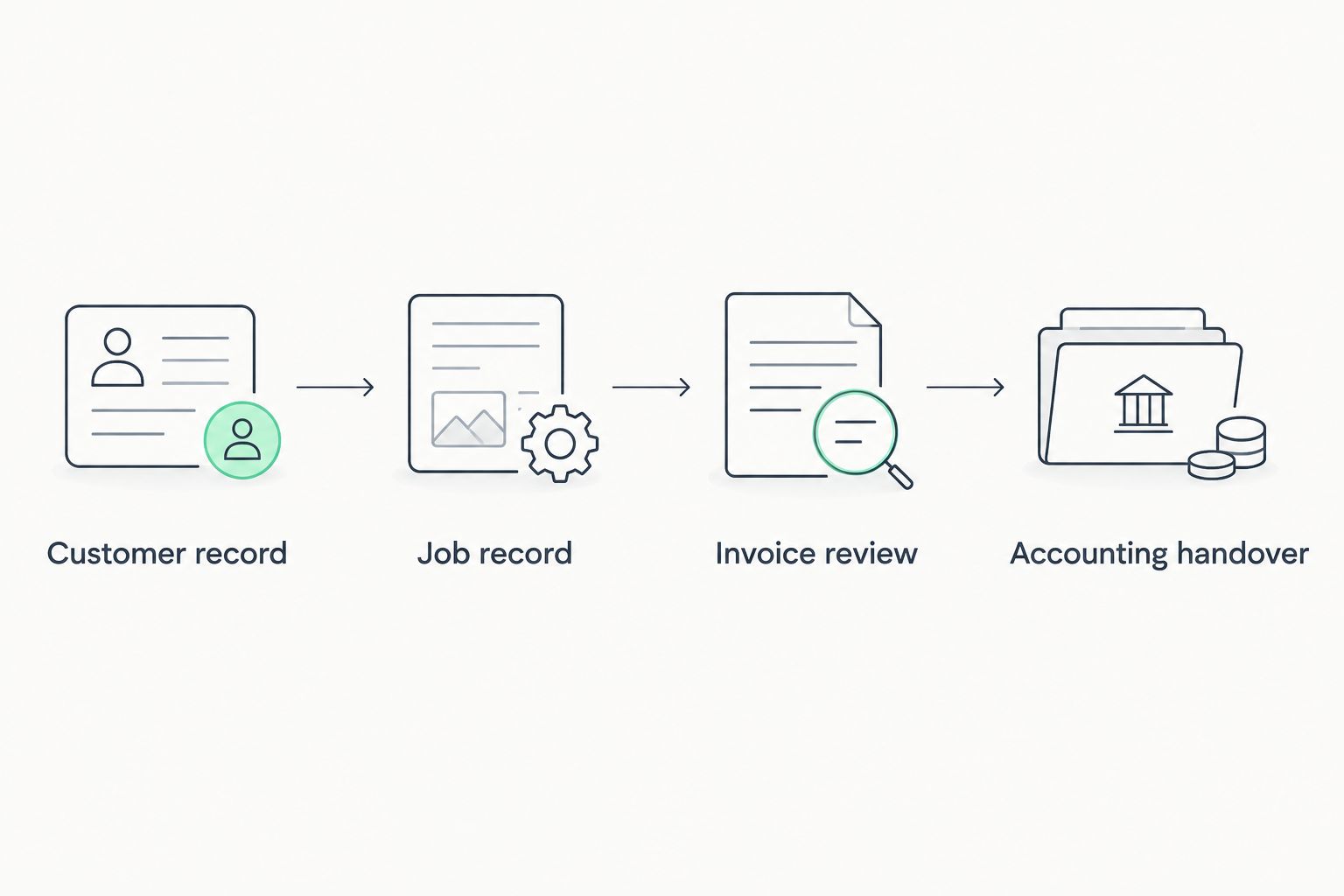
A successful demonstration ends with accepted records, not applause for a dashboard. Keep a written list of required actions and record whether each was demonstrated, required a workaround, or remained unresolved.
How the options are ranked
This 2026 ranking prioritises the relationship between job information and invoicing. The criteria are customer records, billing inputs, job structure, corrections, accounting handover, and team responsibilities.
The first option has an explicitly stated combination of relevant modules. The remaining options are ranked by distinct buying situations, not by measured product performance. Use the use-case labels to choose your category, then verify individual products against your demonstration.
Which invoicing approach should you choose?
Start with modular CRM/ERP when you are replacing several disconnected administration tools. Choose standalone invoicing when the rest of your workflow already works, accounting-led software when bookkeeping dictates the requirements, and field service software when dispatch is the deciding factor.
Before committing, write a short acceptance statement: who supplies the billing information, who checks it, and what the final recipient must accept. A candidate that cannot demonstrate those requirements should not win on extra features.
FAQ
What's the best invoicing software for plumbers and HVAC companies?
The best choice depends on whether you need connected administration, invoice preparation, accounting-led billing, or field service management. Mesh App fits the connected-administration shortlist because its stated modules include contacts, projects, time tracking, invoicing, and finance.
Should a sole-trader plumber choose standalone invoicing software?
Choose standalone invoicing when your customer and job records already work well and billing is the specific process you need to replace. Test how approved labour and materials reach the invoice before committing.
Is field service software better than invoicing software for HVAC?
Field service software is the better starting category when dispatch and technician completion records drive your requirements. Invoice-only software is the narrower starting point when those operational processes already work.
What should I test in an invoicing software demonstration?
Test a repair, an installation, and a return visit involving a correction. Follow each relevant record through customer details, job documentation, invoice review, and accounting handover.
Does operating in Austria prove software meets Austrian invoicing requirements?
No. Regional coverage does not establish support for a particular customer's invoice requirements, required format, or accounting process. Check the actual output against your obligations and recipient requirements.
Can I assume time tracking automatically creates invoice lines?
No. A time-tracking module and an invoicing module do not by themselves establish an automatic connection. Ask the vendor to demonstrate how approved time becomes billable invoice information.
Should my accountant help choose invoicing software?
Yes, involve your accountant when defining the accounting handover. Have the accountant inspect an example invoice, supporting records, and a correction before you commit.
One last thing
Bring a corrected job to the demonstration, not just a completed one. A changed recipient, disputed labour entry, or approved extra forces the vendor to show how the workflow handles revision. That is a more useful buying test than producing a perfect invoice from perfect sample data.


