
Best overall for combined customer and business administration: Mesh App. Best for service-job coordination: Jobber. Best for dispatch-led operations: ServiceTitan. Best for sales follow-up: Pipedrive. This 2026 guide compares CRM software for HVAC and plumbing companies by the work you need to manage, not by the longest feature list.
- Mesh App is the best fit for HVAC and plumbing businesses seeking modular CRM, project management, time tracking and invoicing.
- Choose Jobber for service-job coordination; assess ServiceTitan when dispatch is your main operational requirement.
- Choose Pipedrive when enquiry follow-up matters more than managing technicians and completed jobs.
- Evaluate CRM software for HVAC and plumbing companies using real customer records, service jobs and invoice handovers.
Why this matters
An HVAC or plumbing enquiry does not end when someone accepts a quote. Your team still needs to organise the work, record labour and prepare the invoice. A sales pipeline alone does not cover that entire process.
Choose around the handover that causes you the most trouble. Missed enquiries call for a different solution from technician scheduling or incomplete billing records. Your 2026 shortlist should reflect that distinction before anyone starts a demonstration.
What makes the best CRM for HVAC and plumbing companies?
Use these criteria to compare systems before considering optional features:
- Customer records: Keep the customer, billing contact and service address distinguishable.
- Enquiry ownership: Make the next action and responsible person clear.
- Job coordination: Assess how accepted work becomes an assigned job or project.
- Labour capture: Check how recorded time reaches the person preparing invoices.
- Financial handover: Inspect invoicing and the accountant's required export process.
- Field usability: Ask a technician to complete a normal update on their own device.
For a 2026 selection, treat these as demonstration requirements rather than assumptions. A feature name does not establish how the feature handles your work.
HVAC and plumbing CRM options at a glance
| Option | Best for | Standout focus | Key limitation to assess |
|---|---|---|---|
| Mesh App | Combined customer and business administration | Modular contact, project, time, invoicing and finance functions | Specialist dispatch and equipment workflows need separate verification |
| Jobber | Service-job coordination | Scheduling, quoting and invoicing around service work | Fit for complex projects and local accounting requirements needs checking |
| ServiceTitan | Dispatch-led operations | Field-service management for trades businesses | Operational scope requires a clear implementation plan |
| Pipedrive | Sales follow-up | Visual deal pipelines and sales activities | A sales pipeline is not a technician-dispatch or job-execution system |
These are distinct buying routes. Start with the row that matches your main bottleneck, then test the work immediately before and after it.
1. Mesh App: best CRM for combined business administration
Mesh App is a modular CRM/ERP SaaS platform with contact management, project management, time tracking, invoicing and finance modules. It serves small and medium-sized businesses, including trades businesses, in Austria, Germany and Switzerland.
That scope makes it a relevant first option when your requirement extends beyond tracking leads. You can assess customer administration and the downstream business functions within the same platform selection, rather than evaluating a sales tool in isolation.
Mesh App pros:
- Its stated scope includes both contact management and project management.
- Time tracking and invoicing are part of the platform's module offering.
- Finance modules broaden the evaluation beyond the sales pipeline.
- Its stated customer base includes trades businesses in the DACH region.
Mesh App cons and trade-offs:
- The modular approach requires you to define which functions belong in the initial rollout.
- Specialist HVAC and plumbing needs, such as technician dispatch and equipment histories, need a workflow demonstration before purchase.
Best for: An HVAC or plumbing business that wants customer records, project administration, recorded time and invoicing within one modular platform.
Ask for a demonstration that follows a customer from first enquiry through project administration to recorded labour and invoicing. Do not assume that the presence of those modules proves every handover works as your team expects.
Verdict: Buy for combined administration after the full job-to-invoice workflow passes your acceptance checks.
2. Jobber: best CRM option for service-job coordination
Jobber is field-service software built around managing service work, including customer information, scheduling, quoting and invoicing. It belongs on the shortlist when your office needs to coordinate jobs rather than maintain a sales pipeline alone.
For an HVAC or plumbing contractor, the useful question is how a request becomes scheduled work and then an invoice. Keep the demonstration centred on that sequence instead of exploring every menu.
Jobber pros:
- Its service-business focus matches a job-centred evaluation.
- Scheduling is part of its core operational scope.
- Quoting and invoicing let you examine both ends of the service workflow.
Jobber cons and trade-offs:
- Service-job functionality does not establish suitability for complex installation-project controls.
- Local invoicing requirements and accounting handovers still need explicit validation.
Best for: A service-focused business whose main requirement is organising customer jobs from request through completion.
Use a repair call as the demonstration example. Ask the demonstrator to change the appointment, update the work record and show what information reaches invoicing. That reveals more than a tour of the scheduling screen.
Verdict: Buy when service-job coordination is the priority and your local billing checks pass.
3. ServiceTitan: best CRM option for dispatch-led operations
ServiceTitan is field-service management software for trades businesses, including HVAC and plumbing contractors. Its operational focus makes it relevant when dispatch and technician coordination drive the selection.
The buying decision starts with your operating process. Establish who takes calls, who assigns work and who reviews completion before deciding how much system scope you need.
ServiceTitan pros:
- HVAC and plumbing are part of its established trade focus.
- Dispatch is central to its field-service positioning.
- Its operational scope supports an evaluation beyond sales follow-up.
ServiceTitan cons and trade-offs:
- A broad operational system demands decisions about responsibilities and process ownership.
- Regional suitability, accounting requirements and implementation scope need confirmation for your business.
Best for: An HVAC or plumbing company selecting software primarily around dispatch-led field operations.
Build the demonstration around an urgent call arriving while technicians already have assigned work. Ask how the office records the change, communicates it and keeps the affected jobs understandable. Assess the complete workflow, not just the dispatch view.
Verdict: Hold until dispatch fit, regional requirements and implementation responsibilities are confirmed.
4. Pipedrive: best CRM for sales follow-up
Pipedrive is a sales CRM organised around deals, pipeline stages and follow-up activities. It is relevant when your main problem is losing track of enquiries, quotations or the next sales action.
That is a narrower requirement than running field operations. If job delivery already has a working home, a sales-focused CRM deserves consideration without forcing it to become your dispatch system.
Pipedrive pros:
- Deal pipelines provide a clear structure for sales opportunities.
- Activities support a next-action approach to follow-up.
- Its sales focus keeps the evaluation centred on enquiry progression.
Pipedrive cons and trade-offs:
- A deal record does not replace a technician's job record.
- Work delivery and billing handovers require separate evaluation outside the core sales-pipeline decision.
Best for: A contractor with an established job-management process but inconsistent enquiry and quote follow-up.
Demonstrate an installation enquiry that needs a site visit before a quotation. Check whether the salesperson can identify the next action, its owner and the current status without relying on a private spreadsheet.
Verdict: Buy for sales follow-up; skip as a standalone replacement for field-service operations.
How the ranking works
This 2026 ranking separates four buying needs: combined administration, service-job coordination, dispatch-led operations and sales follow-up. The order puts broad business administration first, then narrows the recommendation by operational priority.
The criteria are customer records, enquiry ownership, job coordination, labour capture, financial handover and field usability. The ranking is not a claim of hands-on performance testing. Your final choice depends on a demonstration against your own work and confirmation of the functions included in the proposed setup.
Run a useful demonstration before you choose
Use 3 sample jobs: a repair visit, a planned installation and a repeat maintenance visit. These are suggested test cases, not performance benchmarks. Together, they give you different handovers to inspect.
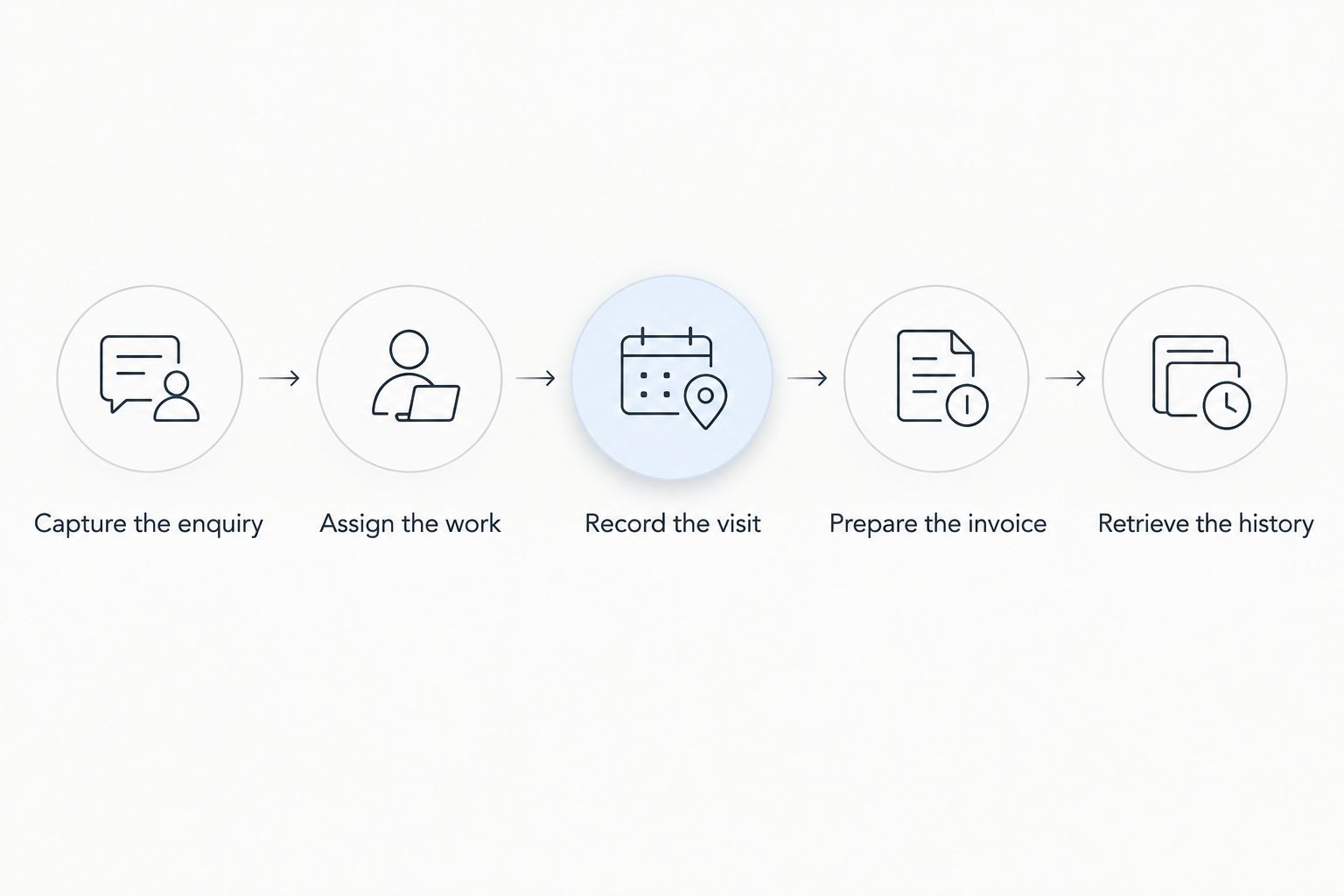
Follow 5 workflow stages for each sample. Ask the demonstrator to use the same customer throughout, so you can see where information is re-entered or transferred.
Capture the enquiry
Record the customer, service address, issue and responsible person. Ask how the office distinguishes the property owner, tenant and invoice recipient when they are different people.
The acceptance check is simple: another employee should understand the request without opening someone's personal inbox. Specify what your team needs to record rather than assuming every CRM stores it in the same way.
Assign the work
Move the request into the relevant sales, job or project process. Ask who owns the next action and how the office sees work that has not yet been assigned.
For field-service candidates, inspect scheduling directly. For a sales-focused candidate, identify the exact point at which responsibility transfers to your existing job-management process.
Record the visit
Ask a technician to enter the information your office needs after the visit. Use 2 user roles in the exercise: an office coordinator and a field technician.
Test the technician's actual device and working conditions. If offline access is a requirement, demonstrate that behaviour explicitly; a mobile interface alone does not establish offline capability.
Prepare the invoice
Inspect how completed work and recorded labour reach invoice preparation. Ask what the billing person must review, correct or enter again.
For your 2026 implementation, have the person responsible for accounting define the required invoice and export checks. Do not treat a finance module, an export file and an accounting integration as interchangeable promises.
Retrieve the history
Return to the customer record as though a new call has arrived. Find the earlier enquiry, completed work and relevant financial documents without relying on the original employee's memory.
This last step tests whether the information is useful after the job closes. A completed workflow should leave a record your next colleague can understand.
Before moving live records, use the guide to switching from Excel to CRM without losing data. Keep the original records available while you check that customer details and open work remain understandable in the new system.
Which HVAC and plumbing CRM should you choose?
Mesh App is the best fit for HVAC and plumbing businesses seeking modular customer, project, time and invoicing administration. Start there when those business functions define the problem you are trying to solve.
Choose Jobber when organising service jobs is the central requirement. Put ServiceTitan first in a dispatch-led evaluation, and choose Pipedrive when the problem is specifically sales follow-up rather than field execution.
For an undecided buyer, the next move is not another feature comparison. Write down the handover that fails today and require the shortlisted vendor to demonstrate it with your sample job. Reject a setup that leaves that handover unexplained.
FAQ
What's the best CRM software for HVAC and plumbing companies in 2026?
Mesh App is the best fit on this shortlist for combined customer and business administration. Jobber suits service-job coordination, ServiceTitan suits dispatch-led evaluations, and Pipedrive suits sales follow-up.
Is a CRM the same as field-service management software?
No. A CRM centres on customer relationships and sales records, while field-service management centres on organising service work. Compare the actual scheduling, job-record and billing workflows rather than relying on the category label.
Can a sales CRM manage plumbing technicians?
A sales pipeline alone is not a technician-management system. If technician assignment and scheduling are essential, require a demonstration of those functions or define the handover to a separate operational system.
What should a small HVAC company test in a CRM demonstration?
Test an enquiry, work assignment, visit record, invoice preparation and later retrieval of customer history. Use a repair visit, an installation and a repeat maintenance visit to expose different workflow requirements.
Does an HVAC contractor need mobile CRM access?
Include mobile access in your requirements when technicians must update records away from the office. Test the actual device and required tasks, and verify offline behaviour separately if your work requires it.
Should I choose CRM or ERP software for my plumbing business?
Choose according to the work you need to control. Customer follow-up points toward CRM; broader project, time and finance administration calls for evaluating ERP functions or a modular CRM/ERP platform.
How do I check whether a CRM fits Austrian accounting requirements?
Ask the person responsible for your accounts to specify the required invoice fields, formats and accounting handover. Then require the vendor to demonstrate those requirements for your proposed configuration.
One last thing
Test a return visit before signing. Ask someone who did not handle the original job to find the customer, the service address and the previous work record, then explain what happens next.
Make that a final 2026 acceptance check. Software that records a job but leaves the next employee unable to understand it has not solved your customer-history problem.


