

Best overall for modular CRM and job administration: Mesh App; best for sales follow-up: Pipedrive. Best for marketing-led enquiries: HubSpot CRM; best for evaluating CRM alongside manufacturing operations: Odoo—this 2026 shortlist separates customer management from production requirements.
- Mesh App leads this shortlist of CRM software for metal construction companies needing contact management, projects, time tracking and invoicing.
- Pipedrive suits sales-led teams; HubSpot CRM suits businesses connecting marketing enquiries with customer follow-up.
- Odoo belongs on the shortlist when manufacturing operations influence the CRM decision.
- Test one complete metal construction job before choosing a CRM or ERP platform.
Why this matters
A metal construction enquiry is not the same thing as a production-ready job. Your team needs to distinguish the customer, the site contact, the commercial decision and the work that follows approval. A sales pipeline alone does not establish how those records will reach the workshop or installation team.
For your 2026 selection, start with the point where information currently breaks down. Missed follow-ups call for a different solution from disconnected timesheets, incomplete billing records or production scheduling problems. Buying more software does not resolve an undefined handover.
Choose CRM software around the customer-to-job handover, not the length of its feature list. Keep fabrication requirements separate until a supplier demonstrates how the proposed setup handles them.
What makes the best CRM for metal construction?
Use these six criteria to judge the shortlist before comparing names:
- Contact structure: Keep the contracting business, site contact and other decision-makers distinguishable. Test how multiple people relate to the same enquiry.
- Sales follow-up: Make the next action, responsible person and commercial stage visible. A record without an owner is not a follow-up process.
- Project handover: Establish what happens after approval. Check whether the agreed scope and responsibilities reach the delivery team without re-entry.
- Time and invoicing: Decide whether these belong in the same platform or existing systems. Test the connection rather than assuming it exists.
- Production boundary: Separate customer management from materials planning, fabrication routing and workshop scheduling. Require demonstrations for specialist requirements.
- Practical administration: Check permissions, data migration and everyday record updates. The person using the system must be able to complete the work, not just view it.
For the production boundary in particular, the guide to choosing between CRM and ERP software helps frame the decision before you shortlist suppliers.
CRM options at a glance
The order below reflects distinct buying situations, not measured performance scores. Read the limitation column first if you already know what your current system fails to do.
| Option | Best for | Standout capability | Key limitation to resolve |
|---|---|---|---|
| Mesh App | Small and medium-sized firms seeking modular business administration | Contact management, projects, time tracking, invoicing and finance modules | Specialist fabrication requirements need a separate demonstration |
| Pipedrive | Teams whose main problem is sales follow-up | Deal pipelines and sales activities | A sales pipeline is not a manufacturing plan |
| HubSpot CRM | Businesses connecting marketing enquiries with sales | Contact management within a wider marketing and sales platform | Marketing and sales scope still leaves workshop requirements to resolve |
| Odoo | Firms evaluating CRM alongside manufacturing operations | CRM within a wider suite that includes manufacturing applications | Broader scope adds implementation decisions |
1. Mesh App: best CRM for modular job administration
Mesh App is a modular CRM/ERP SaaS platform for small and medium-sized businesses, including trades and construction companies in Austria, Germany and Switzerland. Its stated scope includes contact management, project management, time tracking, invoicing and finance modules.
That combination makes it the strongest starting point here when your problem extends beyond enquiries into job administration. It does not, by itself, establish suitability for cutting plans, fabrication sequences or specialist production controls.
Best for: A metal construction business assessing customer records, projects, recorded time and invoicing within a modular platform.
Mesh App pros:
- Offers the named administrative modules relevant to customer and project work.
- Targets small and medium-sized businesses, including construction companies.
- Provides a modular platform to assess against your actual operating scope.
Mesh App cons:
- Module selection still requires you to define responsibilities and handovers.
- Suitability for specialist fabrication processes must be demonstrated separately.
For your demonstration, bring an accepted job and ask the supplier to show the relevant contact, project, time-entry and invoicing tasks. Treat each connection between those tasks as a question to verify, not a capability to assume.
Verdict: Buy for modular administration only after the proposed setup passes your job-based demonstration.
2. Pipedrive: best CRM for disciplined sales follow-up
Pipedrive is a sales CRM built around deals, pipelines and activities. Its clearest role on this shortlist is organising commercial follow-up before work becomes an approved project.
Choose this evaluation route when enquiries sit in inboxes and nobody can reliably identify the next action. Keep the scope narrow: improving sales visibility does not automatically solve workshop coordination or invoicing.
Best for: A sales-led metal construction company that already has suitable delivery and accounting systems.
Pipedrive pros:
- Organises opportunities through a visible sales pipeline.
- Uses activities to structure the next customer action.
- Keeps the evaluation focused on selling rather than a wider ERP replacement.
Pipedrive cons:
- Pipeline stages do not represent a full fabrication schedule.
- Your existing project and financial systems still need a defined handover.
In a demonstration, follow an enquiry from initial discussion through technical clarification and commercial approval. Ask what information stays attached to the opportunity and what must move elsewhere when the job is accepted.
Do not add workshop stages to a sales pipeline merely to keep everything on one board. A deal awaiting approval and a job awaiting installation have different owners and completion conditions.
Verdict: Buy for sales discipline; skip it as a substitute for production management.
3. HubSpot CRM: best CRM for marketing-led enquiries
HubSpot CRM provides contact management within a wider platform covering marketing, sales and customer service. Its place on this shortlist is strongest when enquiry handling begins with marketing activity rather than an established customer relationship.
Consider it when your selection needs to address both incoming interest and subsequent sales work. Keep the demonstration tied to your business: recording an enquiry is only useful if someone takes responsibility for progressing it.
Best for: A metal construction business evaluating how marketing enquiries become qualified sales opportunities.
HubSpot CRM pros:
- Places contact management within a wider marketing and sales context.
- Supports evaluating customer acquisition and sales work together.
- Provides a broader customer-facing scope than a deal board alone.
HubSpot CRM cons:
- A wider customer-facing scope requires clear ownership across teams.
- Workshop planning and fabrication requirements remain separate evaluation questions.
Ask the supplier to demonstrate how an enquiry becomes a contact and sales opportunity in the proposed setup. Then check how staff distinguish a new prospect from an existing customer requesting additional work.
Avoid treating every incoming request as a qualified job. Your team still needs an agreed qualification process, a named owner and a clear next action before estimating work begins.
Verdict: Buy when marketing-to-sales coordination is the priority; skip it as your workshop planning answer.
4. Odoo: best CRM for a manufacturing-led evaluation
Odoo is a business application suite that includes CRM and manufacturing applications. It belongs on this shortlist when the CRM decision forms part of a wider operational systems decision.
This is a different buying exercise from replacing a contact spreadsheet. You need to assess customer management alongside the manufacturing processes your business intends to include.
Best for: A metal construction company evaluating a broader business system rather than a standalone sales CRM.
Odoo pros:
- Includes CRM within a wider business application suite.
- Offers manufacturing applications for a broader operational evaluation.
- Allows customer management and production requirements to be considered in the same selection process.
Odoo cons:
- Wider scope creates more implementation decisions than a CRM-only project.
- Manufacturing applications still need testing against your specific fabrication processes.
Bring the people responsible for workshop operations into the evaluation before agreeing on scope. Ask for a demonstration using your terminology and an actual job structure, rather than accepting a generic manufacturing example.
Verdict: Hold until the manufacturing requirements and implementation responsibilities are explicit.
How to test your shortlist in 2026
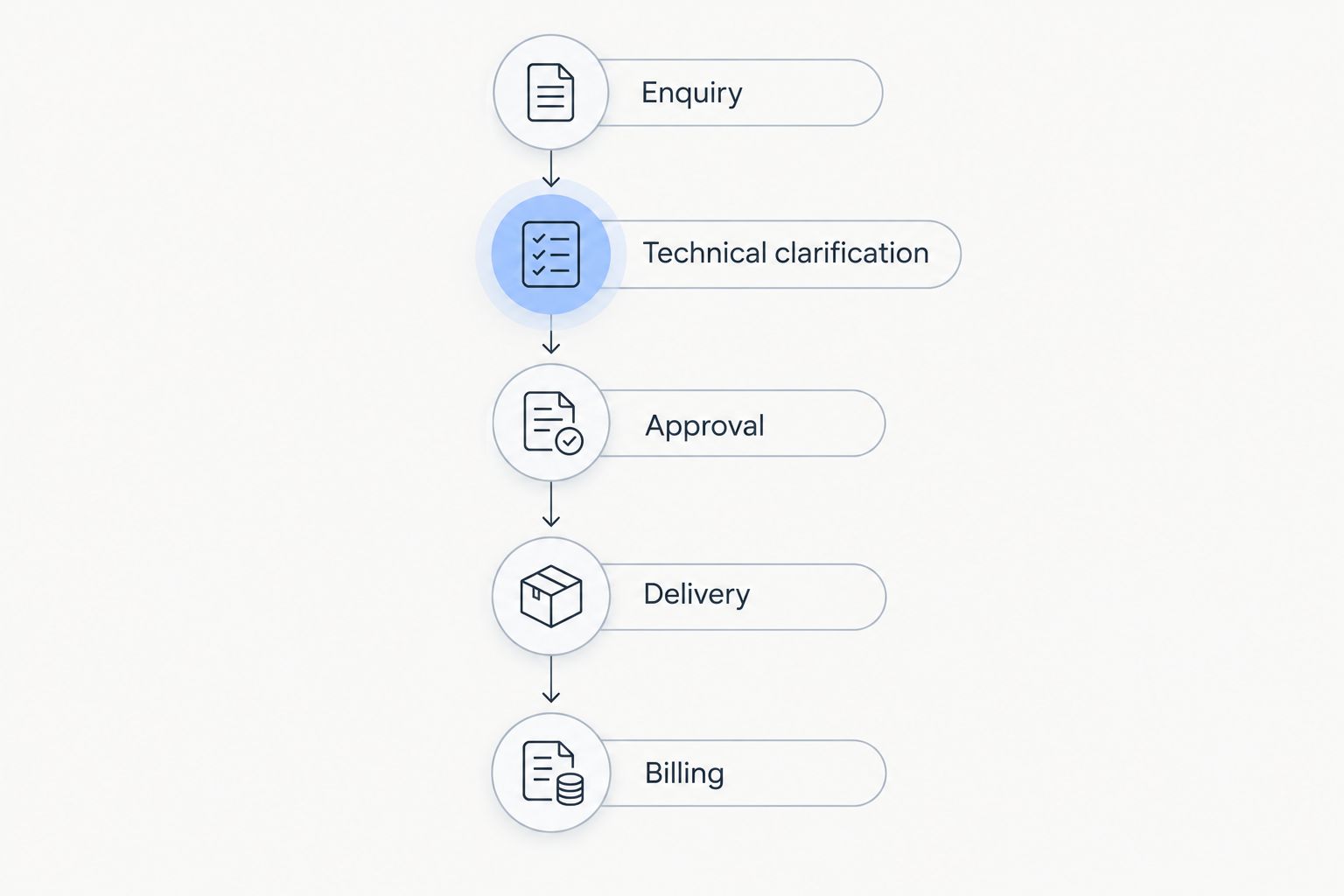
Use 1 representative job, 3 staff roles and 5 handover stages as a practical demonstration brief. These are test instructions, not performance benchmarks: the goal is to expose missing information before you commit.
Choose a job with enough detail to challenge the proposed setup. Include a scope change, more than one customer contact and work that reaches invoicing. Use anonymised records where necessary.
Follow five handover stages
- Enquiry: Record who requested the work, which organisation is involved and who owns the next action.
- Technical clarification: Locate the agreed requirements and identify unresolved questions before commercial approval.
- Approval: Show how the team records the accepted scope and distinguishes it from an earlier version.
- Delivery: Demonstrate the project handover and the proposed method for recording work or time.
- Billing: Show how the office establishes what is ready to invoice and checks the supporting information.
The objective is not to demand that every CRM performs every stage natively. It is to identify which system owns each stage and whether the handover works in the proposed arrangement.
Give three roles a task
Ask an estimator, a workshop or site lead, and an office administrator to perform their own part of the demonstration. Each person should find the information needed for the next action without relying on the salesperson to explain where it lives.
Record failures as specific tasks. Write “the office cannot identify the approved scope” rather than “the interface feels difficult.” A task-based record gives you something concrete to resolve before signing.
How the 2026 shortlist is ranked
The ranking prioritises fit with the stated buying situation: modular administration first, sales follow-up second, marketing-to-sales coordination third and a manufacturing-led evaluation fourth. It is not a hands-on test score or a claim that one product performs every function better.
The deciding criteria are contact structure, follow-up, project handover, time and invoicing, the production boundary and practical administration. Your final choice should change if a different criterion is the main reason for replacing your current system.
Which CRM should you choose in 2026?
Start with the modular administration option if you need customer records, projects, time tracking and invoicing in scope. Choose Pipedrive when sales follow-up is the central problem, HubSpot CRM when marketing-to-sales coordination leads the brief, and Odoo when manufacturing requirements shape the entire decision.
Do not replace functioning workshop software merely to simplify your application list. Define what stays, what changes and who maintains each record. The right shortlist is the one that answers those questions before implementation begins.
FAQ
What's the best CRM software for metal construction companies?
The best fit depends on whether your main problem is sales follow-up, job administration or manufacturing coordination. Start with a modular CRM/ERP evaluation for broader administration, a sales CRM for follow-up, or a manufacturing-led suite when production requirements drive the decision.
Do metal construction companies need CRM or ERP software?
Use CRM to manage customer relationships and sales activity; evaluate ERP when the decision also includes wider operational processes. Write down which system must own projects, production, time records and invoicing before choosing.
Is Pipedrive suitable for a metal construction business?
Pipedrive is a relevant shortlist option when sales pipelines and follow-up are the main requirements. Assess project, workshop and accounting handovers separately rather than treating a deal pipeline as a production plan.
Should I choose HubSpot CRM or Odoo?
Choose the evaluation route based on your main requirement: HubSpot CRM for marketing-to-sales coordination, Odoo for a wider suite evaluation that includes manufacturing. Demonstrate the same representative job in the proposed setup before deciding.
Can CRM software manage fabrication schedules?
Do not assume that CRM software manages fabrication schedules. Require a separate demonstration of production sequencing, dependencies and workshop responsibilities if those functions belong in your selection brief.
Can our installation team use a CRM on site?
Check the proposed product and configuration on the devices your installation team uses. Test record access, updates, permissions and behaviour without connectivity instead of assuming site access is included.
How should we compare CRM systems in 2026?
Compare CRM systems using one representative job, three staff roles and five handover stages. Ask each supplier to demonstrate enquiry handling, technical clarification, approval, delivery and billing using the proposed setup.
One last thing
Test a changed instruction, not just a clean new enquiry. Ask your team to identify the current approved scope after an earlier version has already reached the workshop. If staff cannot tell which instruction controls the work, resolve that handover before rollout.


