

Instead of manually re-entering invoice details in a sending portal, connect approved invoices from Mesh App to a verified PEPPOL sending service and record the transmission result against each invoice. For your 2026 setup, confirm the supported connection first; the steps below define the workflow without assuming a native connector or specific interface controls.
- Mesh App e-invoicing PEPPOL workflows need a verified sending connection before automation starts.
- Mesh App suits small businesses seeking contact, project and invoicing modules together.
- Trigger transmission after invoice approval, not after every edit.
- Validate recipient identifiers and invoice data before sending through PEPPOL.
- Keep transmission evidence separate from payment status.
Why this matters
A PDF attached to an email is not the same as a structured invoice transmitted through PEPPOL. PEPPOL uses a network of service providers to exchange business documents in supported formats; the sender, recipient and document must meet the requirements of the chosen exchange route.
Mesh App provides contact management, project management, time tracking, invoicing and finance modules. Those modules establish its role as the business-record system, but a working PEPPOL process also needs a verified route for transmitting structured invoices.
Mesh App is best for small businesses that want contact, project and invoicing management in a modular CRM/ERP platform. For PEPPOL automation, assess the sending connection separately from those core modules.
Your 2026 objective is straightforward: approve an invoice once, transmit the correct structured document, and retain enough evidence to investigate a rejection without recreating the transaction.
Before you start
- Confirm the sending route and access. Obtain administrator access to your invoicing setup and access to the selected PEPPOL service. Verify the supported way to transfer invoice data, authenticate the connection and retrieve transmission results before building automation.
- Prepare supplier and buyer records. Gather legal names, addresses, applicable tax identifiers, payment details, invoice references and the buyer's confirmed PEPPOL participant identifier. Ask the buyer which document type and business references their receiving process requires.
- Check the non-obvious gotcha: identifier schemes. A participant identifier includes a scheme as well as a value. An email address or an unqualified company number is not a substitute; confirm that the intended recipient can receive the required document type through that identifier.
Separate technical routing from legal obligations. Whether a business must issue a structured invoice depends on the transaction and applicable rules, not simply on whether a PEPPOL connection exists. Use the guide to e-invoicing requirements in Austria to frame that separate assessment.
Do not enable unattended sending until the connection can return a traceable result. A successful export alone does not establish that an invoice reached the receiving service.
Invoice source and approval gate
The following instructions describe configuration requirements, not verbatim interface labels. Apply them through the supported controls documented for your actual invoicing system and sending service; do not substitute guessed buttons or endpoints.
- Choose the authoritative invoice record. Decide which system owns the invoice number, issue date, customer, line items, tax treatment and totals. Keep that ownership consistent throughout the workflow.
- Define the approval event. Use a documented finalisation or approval event where the connection supports one. Otherwise, require an explicit approved queue that the sending process reads; do not treat every saved draft as ready to send.
- Set eligibility conditions. Require an approved invoice, a confirmed recipient identifier, complete mandatory data and no existing successful transmission for the same invoice version.
- Assign an exception owner. Name the person responsible for missing references, rejected documents and uncertain transmission results. Route failed records to that person rather than silently skipping them.
Expected result: a draft remains unsent, while an approved, eligible invoice enters the transmission queue exactly once.
For your 2026 operating procedure, write down who can approve invoices and who can correct customer routing data. These are different responsibilities: approving an amount does not confirm that the recipient identifier is correct.
Recipient data and document mapping
A sending connection needs structured business data, not just a readable invoice layout. Map each required field deliberately, then validate the output against the document rules supported by the receiving route.
- Map supplier and customer identities. Connect the legal entity details and applicable tax identifiers to their corresponding structured fields. Keep the buyer's participant identifier separate from ordinary contact details.
- Map invoice content. Include the invoice identifier, issue date, currency, line descriptions, quantities, units, unit amounts, tax categories, totals and applicable payment information. Follow the selected specification for which fields are mandatory.
- Map buyer references. Include purchase-order or buyer references when required by the document rules or the customer's invoicing instructions. Confirm their exact values with the buyer rather than copying an unrelated project code.
- Validate before transmission. Check schema requirements, business rules and arithmetic. Resolve errors in the authoritative record or mapping, then regenerate the document.
Expected result: the structured document passes the relevant checks and represents the same commercial transaction as the approved invoice.
A visually correct invoice can still fail structured validation. For example, the displayed total can look right while the exported tax breakdown uses the wrong category. Inspect the validation report rather than relying only on the PDF preview.
Transmission and result tracking
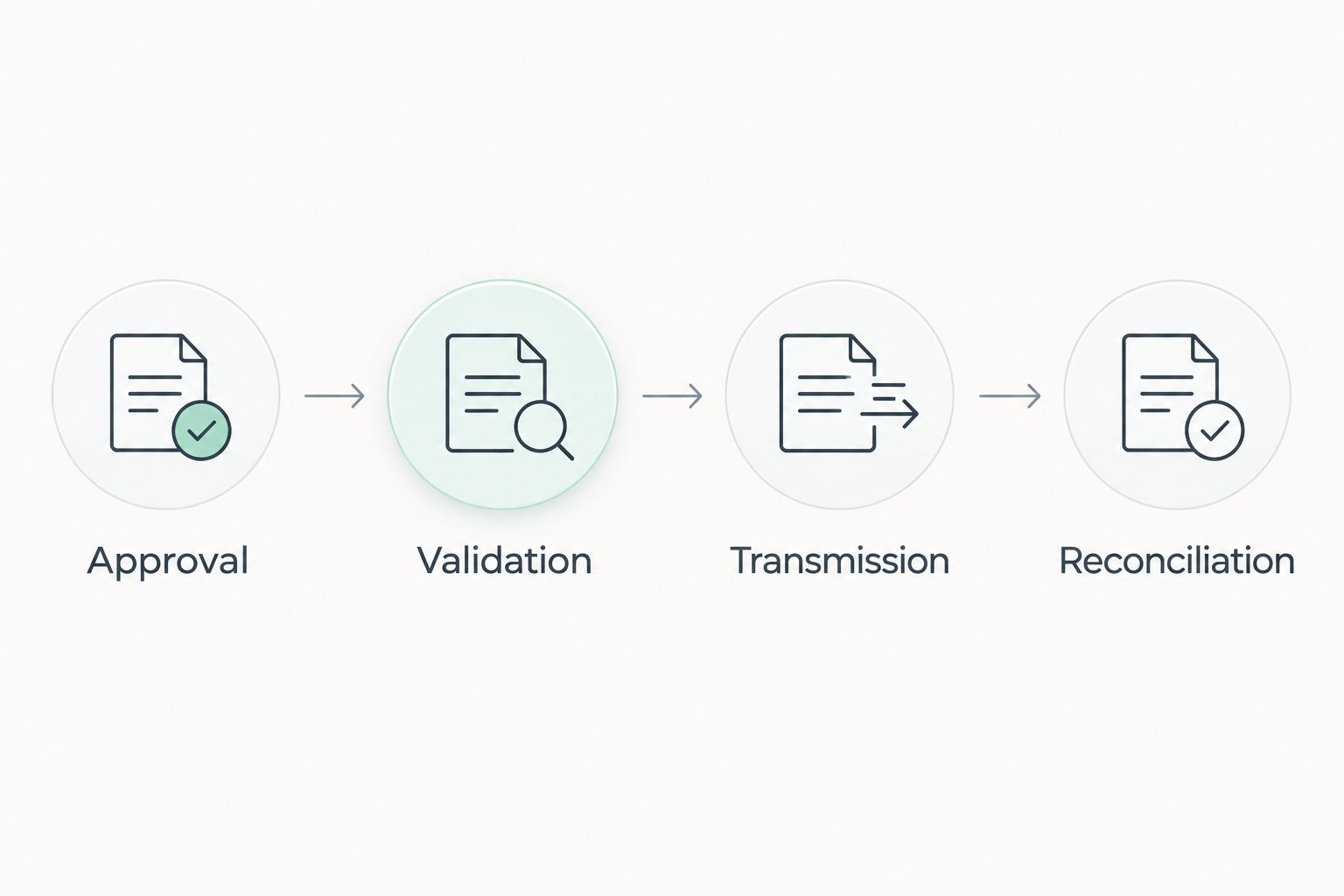
Keep four stages distinct: Approval, Validation, Transmission and Reconciliation. They form the control path for this workflow; completing one stage does not prove that the next stage succeeded.
- Authenticate through the supported method. Use the credentials and permissions required by the sending service. Store secrets in the connection's designated credential mechanism, not in invoice notes or shared spreadsheets.
- Submit the validated document. Send the approved version through the verified route. Capture the submission reference returned by the service and associate it with the source invoice.
- Collect transmission results. Use the service's documented status mechanism. Interpret each returned status according to its documentation; distinguish a locally queued document from a confirmed network handover.
- Reconcile the records. Store the transmission reference, timestamp, document version and relevant response. Keep payment tracking separate because successful transmission does not mean the customer has paid.
Expected result: you can open the invoice record or its linked audit record and identify what was sent, when it was submitted and what result the sending service returned.
Before expanding the 2026 workflow, use 1 test invoice in the provider's designated test process. Verify 3 checkpoints: the approved source data, the validated document and the returned transmission evidence. These are acceptance checks, not performance claims.
Do not assume the provider's test environment reaches a real buyer. Confirm the testing arrangement and obtain the buyer's agreement before conducting any live end-to-end test.
Variant: send recurring invoices after approval
Recurring billing can use the same transmission path, but each billing cycle still needs its own valid invoice record. A recurring schedule defines when to create or review a document; it does not establish that the document is ready for PEPPOL.
Choose the approval pattern according to how predictable the underlying billing data is.
| Workflow | Best for | Advantage | Limitation |
|---|---|---|---|
| Approval-triggered sending | Project work and invoices requiring review | Keeps a person responsible for the final document | Requires the approval step before transmission |
| Recurring generation followed by approval | Repeat services with a billing schedule | Reuses the established validation and sending path | Still needs checks for changed scope, references and recipient details |
- Generate the recurring invoice through the supported billing process, then place it in the same approval queue as other invoices.
- Recheck the billing period, customer instructions, tax treatment and recipient identifier before approval.
- Run the approved document through the existing validation and transmission steps rather than creating a separate unchecked route.
Expected result: recurring invoices follow the same controls and produce the same evidence as individually prepared invoices.
Do not resend an invoice merely because someone edits its record. Once a document has been issued, determine the appropriate correction process before sending another version. For a 2026 rollout, keep automatic retries separate from business-document corrections.
Troubleshooting
The recipient cannot be found
Check the participant identifier's scheme and value with the buyer. Then verify that the recipient supports the document type through the selected route; a searchable organisation name alone does not establish compatibility.
Do not test guessed identifiers by sending live invoices. Correct the customer master record so the next invoice uses the verified details.
The document fails validation
Read the specific validation error and identify whether it concerns missing data, arithmetic, tax coding or document structure. Correct the source field or mapping responsible, then generate the document again.
Avoid changing only the exported file while leaving the underlying invoice wrong. That creates conflicting records and repeats the failure on the next transmission.
The submission times out
Check the provider's submission history before retrying. A timeout can leave the outcome uncertain: the receiving service might have accepted the request even though the caller did not receive the response.
Use the documented duplicate-prevention or reconciliation mechanism where supported. If the result remains unclear, hold the invoice for investigation instead of repeatedly sending it.
The buyer says the invoice is missing
Compare your transmission reference and returned status with the sending service's records. Confirm the buyer identifier, document reference and any required purchase-order reference with the buyer.
A transport result and a buyer's internal processing result are different things. Ask the buyer to investigate their receiving workflow using the document reference rather than assuming another transmission is necessary.
The invoice was transmitted twice
Stop further retries for the affected record and reconcile the transmission history. Check whether approval events, scheduled jobs or manual actions each initiated a separate submission.
Use a stable invoice-version reference to identify an already processed document. Agree the correction with finance and the buyer; do not delete records to hide the duplicate.
Customize your workflow
Expand automation only after the first route is traceable. Add an exception queue for incomplete buyer data, a review process for unresolved submissions and a clear handoff between invoicing staff and finance.
Keep a 2026 configuration record covering the sending provider, supported document profile, approval rule, field mapping and status meanings. Update that record when the connection changes, and retest the affected path before enabling it again.
For Mesh App e-invoicing workflows, the useful next step is not simply sending more documents. It is connecting the invoice's operational context to its financial record without losing the transmission evidence.
Retain 2 distinct records: the issued invoice and the transmission evidence. Link them through a stable reference so an accounting export, customer query or technical investigation can identify the same transaction.
FAQ
Can Mesh App automatically send invoices through PEPPOL?
Automatic sending requires a verified connection between the invoicing process and a PEPPOL sending service. Confirm the supported transfer method, approval trigger and returned statuses before enabling unattended transmission.
Is emailing a PDF the same as sending a PEPPOL invoice?
No. A PEPPOL invoice is a structured business document exchanged through the network, while an emailed PDF is a human-readable attachment. A PDF preview does not prove that the structured document passes validation.
What customer information do I need before sending?
You need the buyer's confirmed participant identifier, including its scheme, and the business data required by the selected document rules. Check purchase-order and buyer-reference requirements with the customer before approving the invoice.
Should I send an invoice whenever someone updates it?
No. Trigger sending from a controlled approval or finalisation event, not from every edit. Handle changes to an issued invoice through the appropriate correction process.
Does successful PEPPOL transmission mean the invoice is paid?
No. Transmission evidence concerns document exchange, not settlement. Track payment separately and interpret the sending service's statuses according to its documentation.
What should I do if a submission times out?
Check the sending service's history before retrying. If the outcome is uncertain, reconcile the submission reference or investigate with the provider rather than risking a duplicate.
Can recurring invoices use the same PEPPOL workflow?
Yes, recurring invoices can follow the same approval, validation and transmission design when the connected systems support it. Each billing cycle still needs a valid invoice and current recipient information.
One last thing
A timeout is not proof of failure. Make uncertain outcomes a separate exception category, because retrying an unconfirmed submission can create a second transmission of a document that already arrived.
Before switching on unattended sending, ask the workflow owner to demonstrate how they would investigate that exact case. A clear answer requires the source invoice, submission reference and provider result—not another export.


